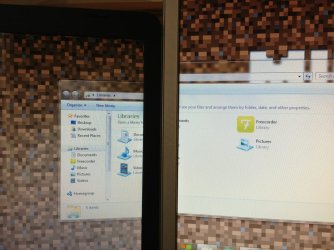
dual monitor alignment problem

nlgregg

New member
Local time
7:25 AM
Messages
4
Im having a strange problem with dual screens with my laptop and a second monitor where the bottom of a window aligns perfectly but the top on one monitor is much higher

how can i fix this?

please help, nlgregg
 

Attachments

  • Photo 1 (1).jpg
    Photo 1 (1).jpg
    76.8 KB · Views: 4

My Computer My Computer

OS
windows 7 ultimate x64
What resolution are the two displays?
 

My Computer My Computer

Computer type
PC/Desktop
OS
Windows 10
CPU
Intel Core i5 3570K
Motherboard
Asus P8Z77V-PRO
Memory
16GB 1600Mhz G.Skill
Graphics Card(s)
Gigabyte GTX 970 G1-Gaming
PSU
Seasonic 1000W Platinum
Case
Fractal Design Define R4
Cooling
Noctua NH-D14
the laptop is 1366 x 768 and the monitor is 1440 x 900
 

My Computer My Computer

OS
windows 7 ultimate x64
I use (2) 1920 x 1080 displays with a 1280 x 1024 between. I use Display Fusion to scale and align the screens for a continuous look with triple monitor wall paper. I purchased the "Pro" version, but there is a free version that works well too.
 

My Computer My Computer

Computer type
PC/Desktop
Computer Manufacturer/Model Number
Gateway DX4860
OS
Windows 7 Professional x64
CPU
Intel I5 2320 @ 3.0 HHz
Motherboard
Gateway / Acer
Memory
32 GB DDR3
Graphics Card(s)
Asus Nvidia 440 GT & Zotac Nvidia 610 GT
Sound Card
Realtek HDA
Monitor(s) Displays
(2) Asus VW246H 24" (16:9) & (1) Asus VB198 19" (4:3)
Screen Resolution
5120 Total x 1080
Hard Drives
WD 1.5 TB WD15EARX-22P
PSU
Basiq 650
Case
Gateway Tower
Cooling
(3) Case Fans
Keyboard
1. Saitek Eclipse 2. Focus FK8200
Mouse
Logitech M510
Internet Speed
90 mbps DL / 10 mbps UL (usually 110.5/11.5)
Antivirus
SuperAntiSpyware Pro, MalwareBytes Pro, MSE
Browser
1. Palemoon x64 2. IE 11
Other Info
USB 3.0 Card
yes i have display fusion but the wallpaper isn't the problem its windows one sides bigger than the other
 

My Computer My Computer

OS
windows 7 ultimate x64
As far as I know you will never have perfect alignment with different sized displays.

The images are different in physical size and inherently to that in resolution, there is no getting around
that while the displays are set to their native resolution.

 

My Computer My Computer

Computer type
PC/Desktop
OS
Windows 10
CPU
Intel Core i5 3570K
Motherboard
Asus P8Z77V-PRO
Memory
16GB 1600Mhz G.Skill
Graphics Card(s)
Gigabyte GTX 970 G1-Gaming
PSU
Seasonic 1000W Platinum
Case
Fractal Design Define R4
Cooling
Noctua NH-D14
ahh ok thank you i get it now
 

My Computer My Computer

OS
windows 7 ultimate x64
Back
Top