Dual monitors aren't showing the same colors/display

waveon

New member
Local time
3:31 AM
Messages
19
So I recently got a second monitor so I can work with two screens at once. As I kind of expected, I had to calibrate the monitors so their colors, brightness and all everything else match each other. But how much I may try, I can't manage to calibrate them properly. Worse, both monitors seem to be calibrated from tests, yet they still don't match.

It's hard to explain what the differences are, so I included pictures of them in the attachments. Take in mind that they're photo's from my phone, since screenshots obviously wouldn't work.

The first one, monitorDifference_blackgrayOnSteam.jpg, is made by placing the steam client over the two screens. The left side is from the new monitor, which seems to be more dark green, and the right side is the old monitor, which seems to be more light grey.

The second one are monitorDifference_foxOld.jpg (old screen) and monitorDifference_foxNew.jpg (new screen), which are from with a wallpaper. The old one seems to be more dull and brighter while the new one seems to be more colorful/warmer (?) and darker.

Just for the sake of having enough information, the old monitor is an Asus VH222H which I have for almost two years, and the new one is a LG Flatron IPS224, which is just a few days old.

These differences aren't everywhere or not as noticeable, but there are plenty things like the above two examples where the differences are big and annoying. So the question is, how can I fix this difference problem and make the monitors match properly?
 

Attachments
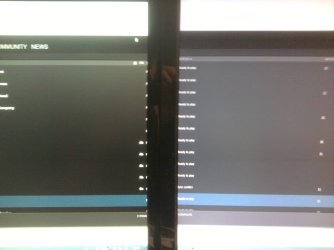
  • monitorDifference_blackgrayOnSteam.jpg
    monitorDifference_blackgrayOnSteam.jpg
    73.5 KB · Views: 4
  • monitorDifference_foxOld.jpg
    monitorDifference_foxOld.jpg
    57.3 KB · Views: 4
  • monitorDifference_foxNew.jpg
    monitorDifference_foxNew.jpg
    56.5 KB · Views: 4

My Computer My Computer

At a glance

Windows 7 Home Premium 64bitintel i7 2600k2x Kingston 4GBMSI GTX780 Twin Frozr Gaming
Computer type
PC/Desktop
OS
Windows 7 Home Premium 64bit
CPU
intel i7 2600k
Motherboard
Asus P8Z68-V Pro
Memory
2x Kingston 4GB
Graphics Card(s)
MSI GTX780 Twin Frozr Gaming
Monitor(s) Displays
Asus VH222H, LG Flatron IPS224
Screen Resolution
1920x1080
Hard Drives
1x Samsung SSD 840 EVO 250GB
2x 1TB HDD
PSU
Corsair 650 Watt
Keyboard
Logitech G110
Mouse
Razer Naga left-handed edition
Antivirus
Avira Antivir, Malwarebytes
Browser
Firefox, Google Chrome
Are you using the sRGB colour profiles on both monitors?

It could be simply down to the age of the monitors - you probably didn't notice the changes with your old one until you hooked up your new one along side it. You might need to set the colour/brightness/contrast/temperature settings individually on one or both monitors to compensate for this.
 

My Computer My Computer

At a glance

Windows 8.1 Pro RTM x64Intel Core-i5-3570K 4-core @ 3.4GHz (Ivy Brid...4 x 4GB DDR3-1600 Corsair Vengeance CMZ8GX3M2...MSI GeForce GTX770 Gaming OC 2GB
Computer type
PC/Desktop
Computer Manufacturer/Model Number
Dwarf Dwf/11/2012 r09/2013
OS
Windows 8.1 Pro RTM x64
CPU
Intel Core-i5-3570K 4-core @ 3.4GHz (Ivy Bridge) (OC 4.4GHz)
Motherboard
ASRock Z77 Extreme4-M
Memory
4 x 4GB DDR3-1600 Corsair Vengeance CMZ8GX3M2A1600C9B (16GB)
Graphics Card(s)
MSI GeForce GTX770 Gaming OC 2GB
Sound Card
Realtek High Definition on board solution (ALC 898)
Monitor(s) Displays
ViewSonic VA1912w Widescreen (VGA)
Screen Resolution
1440x900
Hard Drives
OCZ Agility 3 SSD 120GB SATA III x2 (RAID 0)
Samsung HD501LJ 500GB SATA II x2
Hitachi HDS721010CLA332 1TB SATA II
Iomega 1.5TB Ext USB 2.0
WD 2.0TB Ext USB 3.0
PSU
XFX Pro Series 850W Semi-Modular
Case
Gigabyte IF233
Cooling
1 x 120mm Front Inlet 1 x 120mm Rear Exhaust
Keyboard
Microsoft Comfort Curve Keyboard 3000 (USB)
Mouse
Microsoft Comfort Mouse 3000 for Business (USB)
Internet Speed
NetGear DG834Gv3 ADSL Modem/Router (Ethernet) ~4.0 Mb/s (O2)
Antivirus
Avast! 8.0.1497
Browser
IE 11
Other Info
Optical Drive: HL-DT-ST BD-RE BH10LS30 SATA Bluray
Lexmark S305 Printer/Scanner/Copier (USB)
WEI Score: 8.1/8.1/8.5/8.5/8.25
Asus Eee PC 1011PX Netbook (Windows 7 x86 Starter)
Some monitors have an option to adjust the black intensity. To me it seems that may be the key.
 

My Computer My Computer

At a glance

Windows 7 professional X64AMD A10-5800K OC@ 4.4Ghz.8GB Kingston HyperX Blu 1333mhzXFX HD7870 2GB Core Edition
Computer type
PC/Desktop
OS
Windows 7 professional X64
CPU
AMD A10-5800K OC@ 4.4Ghz.
Motherboard
Gigabyte F2A85X-UP4
Memory
8GB Kingston HyperX Blu 1333mhz
Graphics Card(s)
XFX HD7870 2GB Core Edition
Monitor(s) Displays
Acer AL2216W
Screen Resolution
1680x1050
Hard Drives
Seagate Barracuda 500gb 7200rpm
Seagate Barracuda 1.5TB 7200rpm
PSU
Cooler Master Silent Pro M 850W
Case
Thermaltake Commander MS-I
Cooling
Cooler Master N520
Mouse
Logitech M504
Internet Speed
10Mbps
Are you using the sRGB colour profiles on both monitors?

It could be simply down to the age of the monitors - you probably didn't notice the changes with your old one until you hooked up your new one along side it. You might need to set the colour/brightness/contrast/temperature settings individually on one or both monitors to compensate for this.
What exactly are the sRGB color profiles and how do I check them (probably the settings of the monitors themselves)?

I'm aware it could be the age of the monitors, but I don't believe it should be as bad as this at this stage. I've been messing with the color/brightness/contrast settings with no result, though I couldn't find one for the temperature.

Edit: Actually, I just found the temperature, which I saw as the color settings. Sadly those didn't help either.

Edit 2: I found the sRGB color profile on the old monitor, and understand what you mean now. Using it makes no difference, and the new one doesn't seem to have it. Both are on the default manufacturer mode, and switching and matching the modes doesn't seem to improve it.

Some monitors have an option to adjust the black intensity. To me it seems that may be the key.
I suspected it's something in that direction, but sadly I couldn't find anything in the settings for that.
 

My Computer My Computer

At a glance

Windows 7 Home Premium 64bitintel i7 2600k2x Kingston 4GBMSI GTX780 Twin Frozr Gaming
Computer type
PC/Desktop
OS
Windows 7 Home Premium 64bit
CPU
intel i7 2600k
Motherboard
Asus P8Z68-V Pro
Memory
2x Kingston 4GB
Graphics Card(s)
MSI GTX780 Twin Frozr Gaming
Monitor(s) Displays
Asus VH222H, LG Flatron IPS224
Screen Resolution
1920x1080
Hard Drives
1x Samsung SSD 840 EVO 250GB
2x 1TB HDD
PSU
Corsair 650 Watt
Keyboard
Logitech G110
Mouse
Razer Naga left-handed edition
Antivirus
Avira Antivir, Malwarebytes
Browser
Firefox, Google Chrome
You could try modifying the monitor settings with your GPU drivers as well.
I know ATI has that, but I don't know about nvidia to be honest with you.
 

My Computer My Computer

At a glance

Windows 7 professional X64AMD A10-5800K OC@ 4.4Ghz.8GB Kingston HyperX Blu 1333mhzXFX HD7870 2GB Core Edition
Computer type
PC/Desktop
OS
Windows 7 professional X64
CPU
AMD A10-5800K OC@ 4.4Ghz.
Motherboard
Gigabyte F2A85X-UP4
Memory
8GB Kingston HyperX Blu 1333mhz
Graphics Card(s)
XFX HD7870 2GB Core Edition
Monitor(s) Displays
Acer AL2216W
Screen Resolution
1680x1050
Hard Drives
Seagate Barracuda 500gb 7200rpm
Seagate Barracuda 1.5TB 7200rpm
PSU
Cooler Master Silent Pro M 850W
Case
Thermaltake Commander MS-I
Cooling
Cooler Master N520
Mouse
Logitech M504
Internet Speed
10Mbps
I checked my nVidia settings, and it seems I can change my monitor settings with it. However, either it's not user friendly, or I'm too stupid for it. Either way, I'm not getting further with it than by using the monitor settings themselves.
 

My Computer My Computer

At a glance

Windows 7 Home Premium 64bitintel i7 2600k2x Kingston 4GBMSI GTX780 Twin Frozr Gaming
Computer type
PC/Desktop
OS
Windows 7 Home Premium 64bit
CPU
intel i7 2600k
Motherboard
Asus P8Z68-V Pro
Memory
2x Kingston 4GB
Graphics Card(s)
MSI GTX780 Twin Frozr Gaming
Monitor(s) Displays
Asus VH222H, LG Flatron IPS224
Screen Resolution
1920x1080
Hard Drives
1x Samsung SSD 840 EVO 250GB
2x 1TB HDD
PSU
Corsair 650 Watt
Keyboard
Logitech G110
Mouse
Razer Naga left-handed edition
Antivirus
Avira Antivir, Malwarebytes
Browser
Firefox, Google Chrome
Back
Top