Solved HDD's aren't showing up after a re-install of Win7

Zoeff

New member
Local time
6:45 PM
Messages
3
Hello! First post here for me. Seems like a good forum/community. :)

After replacing the motherboard/CPU and reinstalling Windows 7, my disks aren't showing up. See screenshots for more details:
XnhV7Mn.png

wwWWOzs.png


The two dark green partitions on the two 2TB disks are a software raid setup in my previous installation of Windows 7, using the same Disk Management window you see in the screenshot. For whatever reason this new install of windows is having problems with my hard drives. It does however see the main partition on the first 2TB disk but none on the second 2TB disk. I can right click on the partitions on the disks or the disks themselves and 'Reactivate' it but that has no effect.

Something else - Disk 0 had the same problem which I tried to solve by deleting a smaller (unused) partition of the two partitions that were on there. To my annoyance both partitions got deleted. :rolleyes:
Is there a simple way to recover the lost partition on this drive?

I don't dare delete either of the two software raid partitions fearing that it might delete a much bigger partition. This will be the last time I'll be using the partition management software that's build into windows...

Any help would be greatly appreciated. :)
 

My Computer My Computer

At a glance

Windows 7 Ultimate x64Intel i7 4770KCorsair CMT16GX3M4X2133C9 (4x 4GB)Nvidia GTX580 (MSI)
Computer type
PC/Desktop
OS
Windows 7 Ultimate x64
CPU
Intel i7 4770K
Motherboard
Gigabyte GA-Z87X-UD5H (rev. 1.0)
Memory
Corsair CMT16GX3M4X2133C9 (4x 4GB)
Graphics Card(s)
Nvidia GTX580 (MSI)
Hard Drives
A whole bunch...
Antivirus
Avira Antivir
Browser
Chrome
Welcome to Sevenforums! Sorry help for your problem has been slow. Hopefully someone with raid experience will come along.

Not knowing anything about your raid setup, should the missing drives have a drive letter?

My advice is to download Best Free Partition Manager Freeware and free partition magic for Windows 7, Windows 8, Windows Vista and Windows XP 32 bit & 64 bit. MiniTool Free Partition Manager Software Home Edition. Look on the left side of the page for Bootable CD and burn a CD to boot your PC. Partition Wizard is close to 100% reliable. It has tools to explore your partitions and can do things Disk Management can't.

You might have problems in the future having the System Reserved partition on Disk 3.
 

My Computer My Computer

At a glance

Windows 7 Home Premium 64biti3-5308 Gbonboard
Computer Manufacturer/Model Number
HP p6370t
OS
Windows 7 Home Premium 64bit
CPU
i3-530
Motherboard
MSI - IONA
Memory
8 Gb
Graphics Card(s)
onboard
Sound Card
onboard
Monitor(s) Displays
Dell ST2400
Screen Resolution
1920x1080
Hard Drives
Intell 520 SSD 120Gb, WD6400AAKS, 640Gb & WD USB MyBook 1Tb
Internet Speed
1.5 Mmbps, Hughes Satellite
Thanks for the reply Bumpkin!

After browsing trough the countless tutorials on this website I ended up downloading a similar 3rd party partition tool which fixed my problems (EaseUS or something?). For future reference, I converted the 'dynamic' disks back to 'basic' disks. This deleted the 2 raid volumes that were striped but that wasn't a problem for me as there wasn't any data on there.

After they were basic disks the large failed volume in the screenshot was restored again and all I had to do is mount it.

The same software was able to recover the lost partition on disk 0.

About the 'system reserved' partition - It being on disk 3 bothered me as well so I resorted to re-installing Win7 (again...) without any extra SATA cables plugged in. Now there's a second 'system reserved' partition on my SSD which is fine by me.
 

My Computer My Computer

At a glance

Windows 7 Ultimate x64Intel i7 4770KCorsair CMT16GX3M4X2133C9 (4x 4GB)Nvidia GTX580 (MSI)
Computer type
PC/Desktop
OS
Windows 7 Ultimate x64
CPU
Intel i7 4770K
Motherboard
Gigabyte GA-Z87X-UD5H (rev. 1.0)
Memory
Corsair CMT16GX3M4X2133C9 (4x 4GB)
Graphics Card(s)
Nvidia GTX580 (MSI)
Hard Drives
A whole bunch...
Antivirus
Avira Antivir
Browser
Chrome
Glad to hear you got things sorted out!

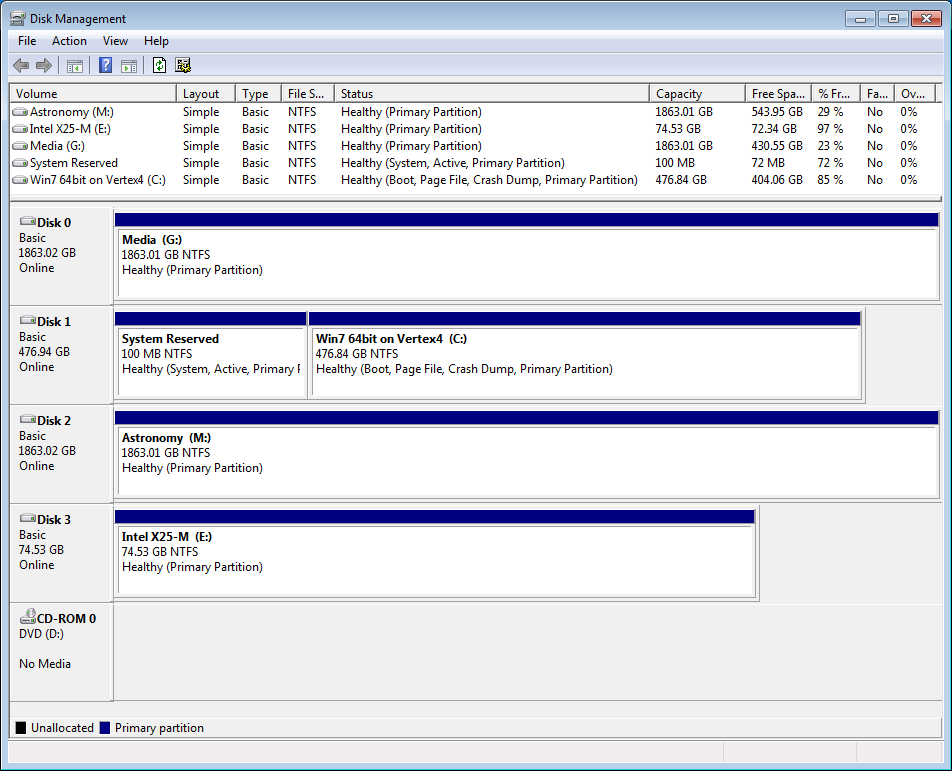
You might consider removing the Active flag that is on the System Reserved partition on Disk 3. If you have boot problems with your C drive, the computer will try to boot using Disk 3.
 

My Computer My Computer

At a glance

Windows 7 Home Premium 64biti3-5308 Gbonboard
Computer Manufacturer/Model Number
HP p6370t
OS
Windows 7 Home Premium 64bit
CPU
i3-530
Motherboard
MSI - IONA
Memory
8 Gb
Graphics Card(s)
onboard
Sound Card
onboard
Monitor(s) Displays
Dell ST2400
Screen Resolution
1920x1080
Hard Drives
Intell 520 SSD 120Gb, WD6400AAKS, 640Gb & WD USB MyBook 1Tb
Internet Speed
1.5 Mmbps, Hughes Satellite
I had actually already formatted that disk, but somehow several other drives ended up having the active flag. I've removed those flags using the tool you provided. :)

Screenshot for completeness:
E4NvCFW.png
 

My Computer My Computer

At a glance

Windows 7 Ultimate x64Intel i7 4770KCorsair CMT16GX3M4X2133C9 (4x 4GB)Nvidia GTX580 (MSI)
Computer type
PC/Desktop
OS
Windows 7 Ultimate x64
CPU
Intel i7 4770K
Motherboard
Gigabyte GA-Z87X-UD5H (rev. 1.0)
Memory
Corsair CMT16GX3M4X2133C9 (4x 4GB)
Graphics Card(s)
Nvidia GTX580 (MSI)
Hard Drives
A whole bunch...
Antivirus
Avira Antivir
Browser
Chrome
Looks good!

The only thing I would be temped to do is swap the SATA connections on the motherboard so your C drive would be Disk 0.

But then again... "if it ain't broke, don't fix it".
 

My Computer My Computer

At a glance

Windows 7 Home Premium 64biti3-5308 Gbonboard
Computer Manufacturer/Model Number
HP p6370t
OS
Windows 7 Home Premium 64bit
CPU
i3-530
Motherboard
MSI - IONA
Memory
8 Gb
Graphics Card(s)
onboard
Sound Card
onboard
Monitor(s) Displays
Dell ST2400
Screen Resolution
1920x1080
Hard Drives
Intell 520 SSD 120Gb, WD6400AAKS, 640Gb & WD USB MyBook 1Tb
Internet Speed
1.5 Mmbps, Hughes Satellite
Back
Top