
madmanaenewman
New member
- Local time
- 8:03 AM
- Messages
- 2
I installed the Chinese version of XP on drive F. I then installed the English version of Windows 7 on drive C:. My problem is that I cannot get the Chinese XP system to boot.
At first I thought it simply gave me no time to choose which system so I managed to assign a 10 second timeout. I also renamed "old version of windows" to "XP Chinese version" and I changed the device of ntldr to F: as it said C: before. I tried to have it default to xp and list it first as an option (which never shows on bootup). Nothing works. When I turn on the computer it simply goes to Windows 7 without giving me any say in the matter.
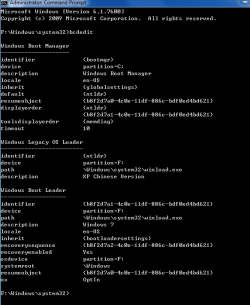
I have attached a copy of BCDEdit. I have made some changes that seemed right from what I have read. It feels like everything should work, but clearly I have done something wrong. Is it because of the different languages? Any help would be most appreciated. I am in China and I need an old chinese system to do on-line banking but otherwise I want everyone using the english version of 7.
Cheers and thanks in advance.
At first I thought it simply gave me no time to choose which system so I managed to assign a 10 second timeout. I also renamed "old version of windows" to "XP Chinese version" and I changed the device of ntldr to F: as it said C: before. I tried to have it default to xp and list it first as an option (which never shows on bootup). Nothing works. When I turn on the computer it simply goes to Windows 7 without giving me any say in the matter.
I have attached a copy of BCDEdit. I have made some changes that seemed right from what I have read. It feels like everything should work, but clearly I have done something wrong. Is it because of the different languages? Any help would be most appreciated. I am in China and I need an old chinese system to do on-line banking but otherwise I want everyone using the english version of 7.
Cheers and thanks in advance.
Attachments
My Computer
- OS
- Windows 7 (English) and XP (Chinese)


