Dual OS -- XP W7

escape

New member
Local time
1:41 PM
Messages
10
Hi guys can you help me out a little? i got dual OS same as this -- completely same as this --
but when i reinstalled Windows 7 , earlier version of XP on the choose list wheir gone.. and sometimes when startup runs it'd go directly starting Windows 7 without dual OS choose list- i mean straight up loading like 1 OS installed. I tried my senses going to BIOS, (delete) setup, Disk manager and even System config ( msconfig) boot tab Only
Windows 7 (C:\Windows) Current OS: Default OS-- please help me load my XP os again normal choose list like this -!
>>>

same like this again :(
.http://www.sevenforums.com/attachments/tutorials/9098d1240933934-dual-boot-installation-windows-7-xp-example.jpg?ltr=D
9098d1240933934-dual-boot-installation-windows-7-xp-example.jpg
 

My Computer

Computer Manufacturer/Model Number
X15-60567-01
OS
Duals> \Xp sp2 . W7 64-bit ultimate/-> extra W7 32-bit ult (not instald)
CPU
Intel(R) Core(TM) i7 CPU 920 2.67Ghz
Motherboard
X58 Asus P6T SE
Memory
DDR3 800. 1000 compt . 2046 mb (2gbs ram)
Graphics Card(s)
NVIDIA Geforce GTX 260
Sound Card
Realtech HD audio
Monitor(s) Displays
19" inch view sonic
Hard Drives
Samsung HD161GJ ATA device 160Gbs
PSU
Acbel 600 W
Case
Black Pallette 2 cooling fans
Cooling
PSU fan PCI VGA fan

My Computer

Computer Manufacturer/Model Number
Too many to describe...
OS
Windows 7 x64 pro/ Windows 7 x86 Pro/ XP SP3 x86
Try running a startup repair om 7. It should detect the XP and add it to the BCD.

It didn't work :confused::confused:
Really ? It is a process thet generally never fails in this situation.
Hope you got it already fixed as per Jonathan's advise .
There is another way (just an alternative) to fix that issue. Download EasyBCD 2.0 Beta and install it in win 7. then add a windows xp boot entry using it. After restarting, you will get a dual boot between win 7 and xp.

what is windows xp boot entry, and where to add it?
I don't want to restart the computer.

Thanks my friend, hope it works.... :huh:

In first pic, click on the red bordered button : the 2nd pic will appear. click on the red bordered button, select win xp/nt/2k/2k3, and then in the third pic, click the red bordered button, thats all.

But my dear friend, whatever method of fixing the issue you may follow, restart/reboot is the must at the end to take the process effect. It is unavoidable.

Edit : you may try softpedia.com/EasyBCD insted of the beta if you want.


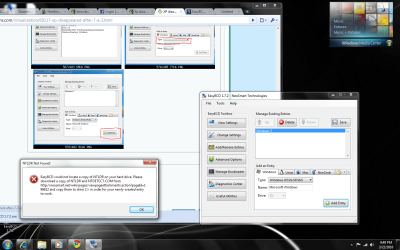
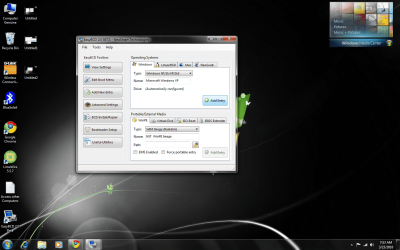
Hey i tried your method. This is what i get :(
 

Attachments

  • Untitled.png
    Untitled.png
    189.7 KB · Views: 58

My Computer

Computer Manufacturer/Model Number
X15-60567-01
OS
Duals> \Xp sp2 . W7 64-bit ultimate/-> extra W7 32-bit ult (not instald)
CPU
Intel(R) Core(TM) i7 CPU 920 2.67Ghz
Motherboard
X58 Asus P6T SE
Memory
DDR3 800. 1000 compt . 2046 mb (2gbs ram)
Graphics Card(s)
NVIDIA Geforce GTX 260
Sound Card
Realtech HD audio
Monitor(s) Displays
19" inch view sonic
Hard Drives
Samsung HD161GJ ATA device 160Gbs
PSU
Acbel 600 W
Case
Black Pallette 2 cooling fans
Cooling
PSU fan PCI VGA fan
What happens when you select the 'Earlier Version of Windows' ?

If it goes nowhere, then you may have to change XP's boot.ini because it could be pointing to the wrong partition.

EDIT:

From memory, you may have to copy the C:\Windows\Boot folder into XP's C:\Windows directory.
 

My Computer

Computer type
PC/Desktop
Computer Manufacturer/Model Number
Systems by SmartEyeball
OS
8 Pro x64
CPU
i7 3770K 4.6GHz
Motherboard
ASUS P8Z77 WS
Memory
16GB G.Skill Trident X 2666mhz
Graphics Card(s)
x2 EVGA 780 Ti Superclocked SLI
Sound Card
SB X-FI Surround 5.1 PRO USB / ATH-AD900 Headphones
Monitor(s) Displays
x3 Dell U2410 / 58" Samsung
Screen Resolution
5760*1200/ 1920*1200
Hard Drives
2x Intel 520 240GB (RAID 0) * 2x WD Caviar Blacks 2TB (RAID 0) * 2TB WD Caviar Black * Sony Optirac DVD
PSU
Silverstone Strider Evolution 1200W
Case
Thermaltake Level 10 GT Snow Edition
Cooling
Noctua NH-D14
Keyboard
Topre Realforce // Ducky Shine MX Black // Filco Ninja TKL
Mouse
Thermaltake Theron (Highly Recommended) + Razer Imperator
Antivirus
MSE
Browser
IE, FF, WaterFox
Other Info
GT Extreme V2 Sim Racing Cockpit + 40" LCD and K/B Mouse stand ▼
Fanatec CSR Elite Wheel + Clubsport V1 Pedals + CSR shifter/7G-H ▼Saitek X52 Pro ▼ TrackIR 5 Pro
Buttkicker v2 Seat Rumbler with Dedicated 5.1 and Sub Woofer attached to frame ▼
=
Bloody Big Grin
What happens when you select the 'Earlier Version of Windows' ?

If it goes nowhere, then you may have to change XP's boot.ini because it could be pointing to the wrong partition.

EDIT:

From memory, you may have to copy the C:\Windows\Boot folder into XP's C:\Windows directory.

Hey , I tried what you said and when I finished copying, I reboot
copy and paste ( do this with the same 79 files ) C:\Windows directory.


i can't prnstscreen on booting so i capture it on my mobile
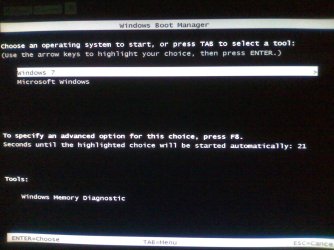
this what shows -- guess this image happened because of my BCD method - NTLDR file is the problem - missing
 

Attachments

  • ABCD0001.JPG
    ABCD0001.JPG
    217.8 KB · Views: 18
  • ABCD0002.JPG
    ABCD0002.JPG
    208.3 KB · Views: 12

My Computer

Computer Manufacturer/Model Number
X15-60567-01
OS
Duals> \Xp sp2 . W7 64-bit ultimate/-> extra W7 32-bit ult (not instald)
CPU
Intel(R) Core(TM) i7 CPU 920 2.67Ghz
Motherboard
X58 Asus P6T SE
Memory
DDR3 800. 1000 compt . 2046 mb (2gbs ram)
Graphics Card(s)
NVIDIA Geforce GTX 260
Sound Card
Realtech HD audio
Monitor(s) Displays
19" inch view sonic
Hard Drives
Samsung HD161GJ ATA device 160Gbs
PSU
Acbel 600 W
Case
Black Pallette 2 cooling fans
Cooling
PSU fan PCI VGA fan
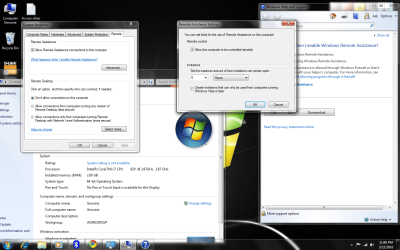
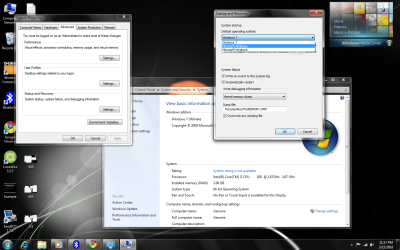
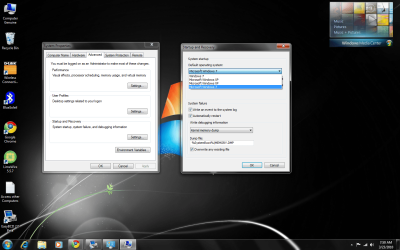
I'm curious. Can you post a screenshot of this location? Right click on "My Computer"...then choose "Properties"...then click on "Remote Settings" link at top left....then click on the "Advanced" tab.....then click on the "Settings" button in the Startup & Recovery section. Does it list XP in the drop-down menu for default operating system?
 

My Computer

Computer Manufacturer/Model Number
NVIDIA
OS
Windows 7 Enterprise x64
CPU
AMD Athlon 64X2 Dual Core 3800+
Motherboard
GeForce 6100-M9
Memory
OCZ Platinum Dual Channel - 4x1Gb
Graphics Card(s)
NVIDIA GeForce 8800 GT PCI Express x16
Sound Card
Creative Audigy Sound Blaster Extreme PCI
Monitor(s) Displays
Compaq 7500
Screen Resolution
1024x768
Hard Drives
C: Seagate ST3250318AS SataII - 250Gb

D: Seagate ST3500418AS SataII - 500Gb
PSU
OCZ 600w Dual 12v Rails
Case
Thermaltake
Cooling
OCZ Heatsinks, Fans, and Thermal Paste on CPU & Chipsets
Keyboard
Logitech
Mouse
Radio Shack PS2
Internet Speed
Cable
Other Info
Dual Pioneer DVD/RW optical drives. LG CD/RW optical drive.
What is your partition layout? and does it match XP's boot.ini ?

[boot loader]
timeout=30
default=multi(0)disk(0)rdisk(0)partition(1)\WINDOWS
[operating systems]
multi(0)disk(0)rdisk(0)partition(1)\WINDOWS="Microsoft Windows XP Professional" /fastdetect /NoExecute=OptIn

The partition mentioned in the boot.ini has to match the physical location. Depending on the layout, the partition(1) may be pointing to the wrong location hence the \NTLDR error (basically it can't find the partition XP is installed on)


Another method:
Problem fixed with EasyBCD 2.0
EasyBCD create new boot.ini, ntlrd amd ntdetect at drive C (Windows 7)
I was just copied this files on drive F (winXp) and booting working.

F would be whatever your XP drive is.

From here:
http://www.sevenforums.com/installation-setup/40522-dual-boot-windwos-7-xp-ntdlr-error.html#post395262
 

My Computer

Computer type
PC/Desktop
Computer Manufacturer/Model Number
Systems by SmartEyeball
OS
8 Pro x64
CPU
i7 3770K 4.6GHz
Motherboard
ASUS P8Z77 WS
Memory
16GB G.Skill Trident X 2666mhz
Graphics Card(s)
x2 EVGA 780 Ti Superclocked SLI
Sound Card
SB X-FI Surround 5.1 PRO USB / ATH-AD900 Headphones
Monitor(s) Displays
x3 Dell U2410 / 58" Samsung
Screen Resolution
5760*1200/ 1920*1200
Hard Drives
2x Intel 520 240GB (RAID 0) * 2x WD Caviar Blacks 2TB (RAID 0) * 2TB WD Caviar Black * Sony Optirac DVD
PSU
Silverstone Strider Evolution 1200W
Case
Thermaltake Level 10 GT Snow Edition
Cooling
Noctua NH-D14
Keyboard
Topre Realforce // Ducky Shine MX Black // Filco Ninja TKL
Mouse
Thermaltake Theron (Highly Recommended) + Razer Imperator
Antivirus
MSE
Browser
IE, FF, WaterFox
Other Info
GT Extreme V2 Sim Racing Cockpit + 40" LCD and K/B Mouse stand ▼
Fanatec CSR Elite Wheel + Clubsport V1 Pedals + CSR shifter/7G-H ▼Saitek X52 Pro ▼ TrackIR 5 Pro
Buttkicker v2 Seat Rumbler with Dedicated 5.1 and Sub Woofer attached to frame ▼
=
Bloody Big Grin
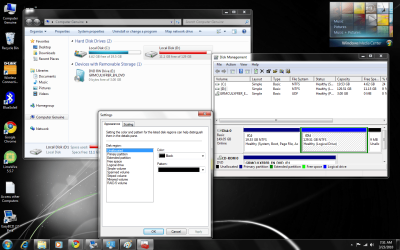
Well , when I was before starting reinstalling W7 p1 named C: and XP wheir named p2 F:


now W7 is still same as C: but XPs name changed to D:


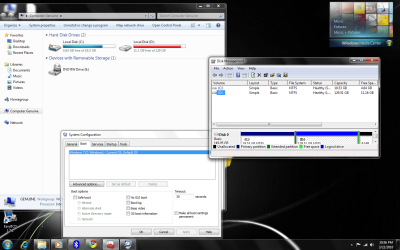
this is how it looks
the red almost full capacity is D:/ and the one who is highlighted with blue is D:/ in disk management -- D: is the XP OS
 

Attachments

  • 666.png
    666.png
    161.3 KB · Views: 23

My Computer

Computer Manufacturer/Model Number
X15-60567-01
OS
Duals> \Xp sp2 . W7 64-bit ultimate/-> extra W7 32-bit ult (not instald)
CPU
Intel(R) Core(TM) i7 CPU 920 2.67Ghz
Motherboard
X58 Asus P6T SE
Memory
DDR3 800. 1000 compt . 2046 mb (2gbs ram)
Graphics Card(s)
NVIDIA Geforce GTX 260
Sound Card
Realtech HD audio
Monitor(s) Displays
19" inch view sonic
Hard Drives
Samsung HD161GJ ATA device 160Gbs
PSU
Acbel 600 W
Case
Black Pallette 2 cooling fans
Cooling
PSU fan PCI VGA fan
I'm curious. Can you post a screenshot of this location? Right click on "My Computer"...then choose "Properties"...then click on "Remote Settings" link at top left....then click on the "Advanced" tab.....then click on the "Settings" button in the Startup & Recovery section. Does it list XP in the drop-down menu for default operating system?


@MadMaxData
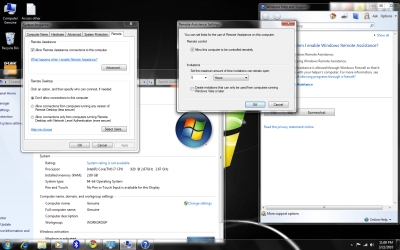
here is it cant coupe with the drop down XP anyway I tried am I right?
---> oh sorry i got new upload at bottom--> am sorry 3rd image the one i think u mention?
 

Attachments

  • 888.png
    888.png
    143.4 KB · Views: 17
  • 111.png
    111.png
    143.4 KB · Views: 12
  • 67676.png
    67676.png
    204.7 KB · Views: 15

My Computer

Computer Manufacturer/Model Number
X15-60567-01
OS
Duals> \Xp sp2 . W7 64-bit ultimate/-> extra W7 32-bit ult (not instald)
CPU
Intel(R) Core(TM) i7 CPU 920 2.67Ghz
Motherboard
X58 Asus P6T SE
Memory
DDR3 800. 1000 compt . 2046 mb (2gbs ram)
Graphics Card(s)
NVIDIA Geforce GTX 260
Sound Card
Realtech HD audio
Monitor(s) Displays
19" inch view sonic
Hard Drives
Samsung HD161GJ ATA device 160Gbs
PSU
Acbel 600 W
Case
Black Pallette 2 cooling fans
Cooling
PSU fan PCI VGA fan
copy NTLDR.sys, NTDETECT.COM and Boot.ini from the XP installation to C:\ (the Seven installation)

Edit the boot.ini and change the partition(1) to partition (2) to reflect the physical partition location of XP on the extended volume.

The boot data has to be on a primary system partition, which is currently the partition Seven is installed on.
 

My Computer

Computer type
PC/Desktop
Computer Manufacturer/Model Number
Systems by SmartEyeball
OS
8 Pro x64
CPU
i7 3770K 4.6GHz
Motherboard
ASUS P8Z77 WS
Memory
16GB G.Skill Trident X 2666mhz
Graphics Card(s)
x2 EVGA 780 Ti Superclocked SLI
Sound Card
SB X-FI Surround 5.1 PRO USB / ATH-AD900 Headphones
Monitor(s) Displays
x3 Dell U2410 / 58" Samsung
Screen Resolution
5760*1200/ 1920*1200
Hard Drives
2x Intel 520 240GB (RAID 0) * 2x WD Caviar Blacks 2TB (RAID 0) * 2TB WD Caviar Black * Sony Optirac DVD
PSU
Silverstone Strider Evolution 1200W
Case
Thermaltake Level 10 GT Snow Edition
Cooling
Noctua NH-D14
Keyboard
Topre Realforce // Ducky Shine MX Black // Filco Ninja TKL
Mouse
Thermaltake Theron (Highly Recommended) + Razer Imperator
Antivirus
MSE
Browser
IE, FF, WaterFox
Other Info
GT Extreme V2 Sim Racing Cockpit + 40" LCD and K/B Mouse stand ▼
Fanatec CSR Elite Wheel + Clubsport V1 Pedals + CSR shifter/7G-H ▼Saitek X52 Pro ▼ TrackIR 5 Pro
Buttkicker v2 Seat Rumbler with Dedicated 5.1 and Sub Woofer attached to frame ▼
=
Bloody Big Grin
copy NTLDR.sys, NTDETECT.COM and Boot.ini from the XP installation to C:\ (the Seven installation)

Edit the boot.ini and change the partition(1) to partition (2) to reflect the physical partition location of XP on the extended volume.

The boot data has to be on a primary system partition, which is currently the partition Seven is installed on.


where can i find those files in XP? ( NTLDR.sys, NTDETECT.COM and Boot.ini)
how to edit boot.ini and change the partition(1) to partition (2) to reflect the physical partition location of XP on the extended volume?
 

My Computer

Computer Manufacturer/Model Number
X15-60567-01
OS
Duals> \Xp sp2 . W7 64-bit ultimate/-> extra W7 32-bit ult (not instald)
CPU
Intel(R) Core(TM) i7 CPU 920 2.67Ghz
Motherboard
X58 Asus P6T SE
Memory
DDR3 800. 1000 compt . 2046 mb (2gbs ram)
Graphics Card(s)
NVIDIA Geforce GTX 260
Sound Card
Realtech HD audio
Monitor(s) Displays
19" inch view sonic
Hard Drives
Samsung HD161GJ ATA device 160Gbs
PSU
Acbel 600 W
Case
Black Pallette 2 cooling fans
Cooling
PSU fan PCI VGA fan

Attachments

  • Untitled.png
    Untitled.png
    206.7 KB · Views: 6
  • Untitled1.png
    Untitled1.png
    194.6 KB · Views: 9
  • Untitled2.png
    Untitled2.png
    248.5 KB · Views: 6
  • Untitled3.png
    Untitled3.png
    233.7 KB · Views: 7
  • ABCD0001.JPG
    ABCD0001.JPG
    217.8 KB · Views: 4
Last edited by a moderator:

My Computer

Computer Manufacturer/Model Number
X15-60567-01
OS
Duals> \Xp sp2 . W7 64-bit ultimate/-> extra W7 32-bit ult (not instald)
CPU
Intel(R) Core(TM) i7 CPU 920 2.67Ghz
Motherboard
X58 Asus P6T SE
Memory
DDR3 800. 1000 compt . 2046 mb (2gbs ram)
Graphics Card(s)
NVIDIA Geforce GTX 260
Sound Card
Realtech HD audio
Monitor(s) Displays
19" inch view sonic
Hard Drives
Samsung HD161GJ ATA device 160Gbs
PSU
Acbel 600 W
Case
Black Pallette 2 cooling fans
Cooling
PSU fan PCI VGA fan
Hello again, escape!

Would you help me understand something here? I noticed your D partition is 129GB in size, correct? Is that where you have installed XP? Partition D has only 11GB of free space left, that means there is 118GB of data stores there? A new XP install only takes up 5 or 6GB, so which OS, XP or 7 was installed first? What happened to break the boot menu?

Thanks!
Robert
 

My Computer

OS
...
Hello again, escape!

Would you help me understand something here? I noticed your D partition is 129GB in size, correct? Is that where you have installed XP? Partition D has only 11GB of free space left, that means there is 118GB of data stores there? A new XP install only takes up 5 or 6GB, so which OS, XP or 7 was installed first? What happened to break the boot menu?

Thanks!
Robert

Hello again Robert!

just woke up. Yes its 129, the HDD was like 150+ GBs in total though not showing 160Gb exactly. Yes partition D: is XP-- at first I installed XP then i created 2 partitions
C: and F: i putted XP on F: which is D: now its in 140 Gbs something then later I installed windows 7 on C: 20 GBs making it default OS of my CPU
its working
Choose a version of windows:
Earlier version of windows
Windows 7

It was like this lately

but when I reinstalled my W7 on C:
my XP was missing on boot OS choose list
i tried the repair thing
but not the cmd-
repair does not show up today? when i F8 W7? the disc is in
yet i never tried cmd editing while repairing
etc and BCD's
Windows 7--
 

My Computer

Computer Manufacturer/Model Number
X15-60567-01
OS
Duals> \Xp sp2 . W7 64-bit ultimate/-> extra W7 32-bit ult (not instald)
CPU
Intel(R) Core(TM) i7 CPU 920 2.67Ghz
Motherboard
X58 Asus P6T SE
Memory
DDR3 800. 1000 compt . 2046 mb (2gbs ram)
Graphics Card(s)
NVIDIA Geforce GTX 260
Sound Card
Realtech HD audio
Monitor(s) Displays
19" inch view sonic
Hard Drives
Samsung HD161GJ ATA device 160Gbs
PSU
Acbel 600 W
Case
Black Pallette 2 cooling fans
Cooling
PSU fan PCI VGA fan
Hello again, escape!

Would you help me understand something here? I noticed your D partition is 129GB in size, correct? Is that where you have installed XP? Partition D has only 11GB of free space left, that means there is 118GB of data stores there? A new XP install only takes up 5 or 6GB, so which OS, XP or 7 was installed first? What happened to break the boot menu?

Thanks!
Robert

Hello again Robert!

just woke up. Yes its 129, the HDD was like 150+ GBs in total though not showing 160Gb exactly. Yes partition D: is XP-- at first I installed XP then i created 2 partitions
C: and F: i putted XP on F: which is D: now its in 140 Gbs something then later I installed windows 7 on C: 20 GBs making it default OS of my CPU
its working
Choose a version of windows:
Earlier version of windows
Windows 7

It was like this lately

but when I reinstalled my W7 on C:
my XP was missing on boot OS choose list
i tried the repair thing
but not the cmd-
repair does not show up today? when i F8 W7? the disc is in
yet i never tried cmd editing while repairing
etc and BCD's
Windows 7--
OK, thanks, that clears up a lot for me. I think what has happened is the XP boot code was in the Windows 7 partition and when you reinstalled 7, you erased the boot code.

This link explains exactly how to find the three files (boot.ini, NTLDR, and NTDETECT.COM) and put them in your Windows 7 partition. One difference is you do not have the 100MB "System Reserved" partition. This is OK. Just ignore those parts and find the three files, put them in your Windows 7 partition as shown, and use the command prompt to manually create the XP entry in you current menu.

http://www.sevenforums.com/installation-setup/58680-solve-dual-boot-problem-windows-7-a.html

Cheers!
Robert
 

My Computer

OS
...
Those files are found in XP's root directory. (D:\)

They are hidden system files but should already be visible. If not, Tools> Folder Options > View , Tick Show hidden files and folders and untick Hide protected operating system files


To edit, just use notepad.
 

My Computer

Computer type
PC/Desktop
Computer Manufacturer/Model Number
Systems by SmartEyeball
OS
8 Pro x64
CPU
i7 3770K 4.6GHz
Motherboard
ASUS P8Z77 WS
Memory
16GB G.Skill Trident X 2666mhz
Graphics Card(s)
x2 EVGA 780 Ti Superclocked SLI
Sound Card
SB X-FI Surround 5.1 PRO USB / ATH-AD900 Headphones
Monitor(s) Displays
x3 Dell U2410 / 58" Samsung
Screen Resolution
5760*1200/ 1920*1200
Hard Drives
2x Intel 520 240GB (RAID 0) * 2x WD Caviar Blacks 2TB (RAID 0) * 2TB WD Caviar Black * Sony Optirac DVD
PSU
Silverstone Strider Evolution 1200W
Case
Thermaltake Level 10 GT Snow Edition
Cooling
Noctua NH-D14
Keyboard
Topre Realforce // Ducky Shine MX Black // Filco Ninja TKL
Mouse
Thermaltake Theron (Highly Recommended) + Razer Imperator
Antivirus
MSE
Browser
IE, FF, WaterFox
Other Info
GT Extreme V2 Sim Racing Cockpit + 40" LCD and K/B Mouse stand ▼
Fanatec CSR Elite Wheel + Clubsport V1 Pedals + CSR shifter/7G-H ▼Saitek X52 Pro ▼ TrackIR 5 Pro
Buttkicker v2 Seat Rumbler with Dedicated 5.1 and Sub Woofer attached to frame ▼
=
Bloody Big Grin
If there is any way you can do it, reinstall and always install the older OS 1st, on the C: Partition. You should have no problems that way. Then install Easy BCD on Windows 7 and rename Earlier Versions of windows to Windows XP Professional/Home and make the boot time about 10 seconds. I`ve done this about a dozen times with no complaints yet.
 
Last edited:

My Computer

Computer Manufacturer/Model Number
Myself
OS
Windows 7 Ultimate 64Bit
CPU
C2D E8200
Motherboard
XFX 750i
Memory
8GB PNY PC2-6400
Graphics Card(s)
BFG 9600GT x 2
Sound Card
Stock XFX Optical
Monitor(s) Displays
Gateway 22" HD Display
Hard Drives
C: 1 TB G: 500 GB H: 500 GB
PSU
Ultra LSP 550 Pro Lifetime Series
Case
Xion2
Cooling
ThermalTake
The tool to use is EasyBCD 2.0. Add XP on Add/Remove tab, accept boot files offered, Save, Reboot.

Can you post back a screenshot of your full Disk Mgmt drive map, using Snipping Tool in Start menu, attaching file using paper clip in Reply Box?
 
Hello again, escape!

Would you help me understand something here? I noticed your D partition is 129GB in size, correct? Is that where you have installed XP? Partition D has only 11GB of free space left, that means there is 118GB of data stores there? A new XP install only takes up 5 or 6GB, so which OS, XP or 7 was installed first? What happened to break the boot menu?

Thanks!
Robert

Hello again Robert!

just woke up. Yes its 129, the HDD was like 150+ GBs in total though not showing 160Gb exactly. Yes partition D: is XP-- at first I installed XP then i created 2 partitions
C: and F: i putted XP on F: which is D: now its in 140 Gbs something then later I installed windows 7 on C: 20 GBs making it default OS of my CPU
its working
Choose a version of windows:
Earlier version of windows
Windows 7

It was like this lately

but when I reinstalled my W7 on C:
my XP was missing on boot OS choose list
i tried the repair thing
but not the cmd-
repair does not show up today? when i F8 W7? the disc is in
yet i never tried cmd editing while repairing
etc and BCD's
Windows 7--
OK, thanks, that clears up a lot for me. I think what has happened is the XP boot code was in the Windows 7 partition and when you reinstalled 7, you erased the boot code.

This link explains exactly how to find the three files (boot.ini, NTLDR, and NTDETECT.COM) and put them in your Windows 7 partition. One difference is you do not have the 100MB "System Reserved" partition. This is OK. Just ignore those parts and find the three files, put them in your Windows 7 partition as shown, and use the command prompt to manually create the XP entry in you current menu.

http://www.sevenforums.com/installation-setup/58680-solve-dual-boot-problem-windows-7-a.html

Cheers!
Robert


hey there's a problem my D: (XP) in Disk Management says its a logical drive
when i right click , it says change driver letter paths , format .
there's no / mark as active / btw i finished creating system reserved partition S:
 

My Computer

Computer Manufacturer/Model Number
X15-60567-01
OS
Duals> \Xp sp2 . W7 64-bit ultimate/-> extra W7 32-bit ult (not instald)
CPU
Intel(R) Core(TM) i7 CPU 920 2.67Ghz
Motherboard
X58 Asus P6T SE
Memory
DDR3 800. 1000 compt . 2046 mb (2gbs ram)
Graphics Card(s)
NVIDIA Geforce GTX 260
Sound Card
Realtech HD audio
Monitor(s) Displays
19" inch view sonic
Hard Drives
Samsung HD161GJ ATA device 160Gbs
PSU
Acbel 600 W
Case
Black Pallette 2 cooling fans
Cooling
PSU fan PCI VGA fan
Back
Top