Duplicate Channels in Media Center Channel list

petermatt

New member
Local time
2:45 PM
Messages
2
I have tried to re setup my Media Center at least 3 or 4 times in the past week and no matter what I have tried I keep getting a number of channels duplicated in the Channel list e.g. Channel 1, 2,2, 3,3,7,9,10 etc. This affects the recording of tv shows where the channel is duplicated. I have 2 tuners if that is any help
Does any one have a KISS guide I can follow that might help me resolve this issue.
Thanks
Peter
Australia
 

My Computer My Computer

At a glance

Windows7 Professional x64
Computer type
PC/Desktop
Computer Manufacturer/Model Number
Custom Build
OS
Windows7 Professional x64
Antivirus
ESET Nod32
Browser
Firefox
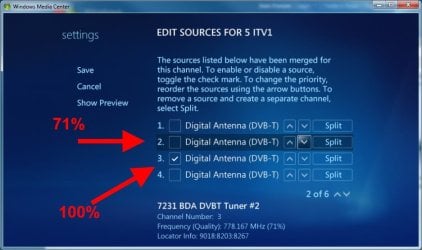
Duplicate channels are sometimes caused by the tuner picking the station from an adjacent region, as well as from your region. To fix this, in epg R click a duplicate channel, edit, edit sources. There's probably several entries, but the correct channel will have (for 2 tuners) 2 ticks against the highest signal strength (the selected tuners are used top down). The incorrect channel will probably have a lower signal strength selected and this channel can be disabled. See snip

wmc.jpg

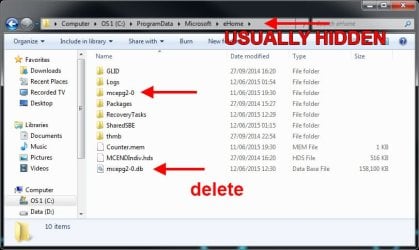
To completely reset WMC and start afresh, the eHome services need to be stopped before the (hidden) relevant data files can be deleted (they are in use). The easiest way to do this is to restart the pc in safe mode using F8. When in safe mode, you need to go Control Panel, Folder Options, View and check Show hidden files and folders. Then navigate to

C:\ProgramData\Microsoft\eHome

and delete the folder mcepg2-0 and file mcepg2-0.db see snip

reset_wmc.jpg

make folder views normal and restart the pc. Goto WMC and setup from scratch.

When everything is working, it's a good idea to go through each channel (as per step 1) and double check the tuners are pointing at the highest (usually 100%) signal strength transmitter.
 

My Computer My Computer

At a glance

W10 Pro x64, W7 Pro x64 in VMwarei7 2600K @ 4.4GHz8GB Mushkin @ 1600MHzNvidia GTX 750 Ti
Computer type
PC/Desktop
Computer Manufacturer/Model Number
self build
OS
W10 Pro x64, W7 Pro x64 in VMware
CPU
i7 2600K @ 4.4GHz
Motherboard
MSI Z68A-GD80
Memory
8GB Mushkin @ 1600MHz
Graphics Card(s)
Nvidia GTX 750 Ti
Monitor(s) Displays
27" Benq + 27" LG
Screen Resolution
1080p
Hard Drives
500GB 850 Evo SSD + 3 * 2TB Seagate
PSU
EVGA 650 GS modular
Case
Antec 300
Cooling
Seidon 120V v2
Internet Speed
62/18 Mbps
Antivirus
Defender (W10) + MSE (W7)
Browser
Firefox
Hi wasnotwas,
Thank you for your reply. I managed to work it out in the end but your advice was excellent confirmation.

Thank you again & regards
Peter
 

My Computer My Computer

At a glance

Windows7 Professional x64
Computer type
PC/Desktop
Computer Manufacturer/Model Number
Custom Build
OS
Windows7 Professional x64
Antivirus
ESET Nod32
Browser
Firefox
Back
Top