Solved Duplicates in updates

mckaryn

New member
Local time
7:27 AM
Messages
3
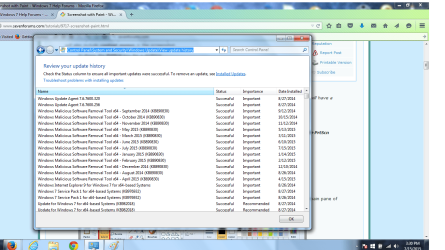
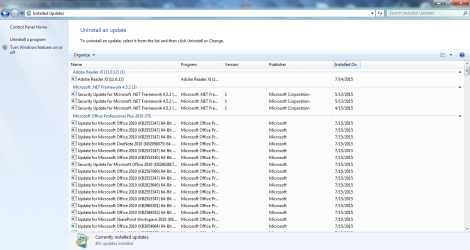
Windows Update seems to list the exact same updates multiple times and I'm wondering a) if this is usual, normal, and acceptable b) if it is truly necessary and c) if I should be alarmed. The screenshots below show, I think, only a portion of the updates made today--to display the entire list would have taken several more screenshots (a skill I can accomplish only laboriously, and then only because of the helpful sevenforums tutorial).
For instance, update KB2553347 for Microsoft Office 2010 appears in the list 14 times. This can't be functionally necessary (or could it?)!
I just registered as a member of sevenforums, although I have visited the website many times over the last couple of years to help get me through all kinds of computer glitchiness from BSODs to SATA malfunctions, file corruptions to connectivity issues. This site rocks!
Thank you for any information-
mckaryn
 

Attachments
  • ScreenshotUpdates_07132015_Part1.png
    ScreenshotUpdates_07132015_Part1.png
    51.5 KB · Views: 4
  • Screenshot_1stAttempt.png
    Screenshot_1stAttempt.png
    104.5 KB · Views: 2

My Computer

Computer type
Laptop
Computer Manufacturer/Model Number
Dell
OS
Microsoft Windows 7 Home Premium 64-bit 7601 Multiprocessor Free Service Pack 1
CPU
Pentium(R) Dual-Core CPU T4500 @ 2.30GHz
Motherboard
Dell Inc. 0N7J7M
Memory
4.00 GB
Graphics Card(s)
(1) Mobile Intel(R) 4 Series Express Chipset Family (2) Mo
Sound Card
Realtek High Definition Audio
Screen Resolution
1366 x 768 x 32 bits (4294967296 colors) @ 60 Hz
Hard Drives
TOSHIBA MQ01ABD050 ATA Device
The MSRT is released EVERY month, with updated definitions - so that's normal.

Why the KB2553347 has multiple entries in the history log, I have no idea - but it does for me, as well.
 

My Computer

Computer type
Laptop
Computer Manufacturer/Model Number
Asus K52F or Lenovo B51-80
OS
Win 7 x64 Home Premium (and x86 VirtualBox VM)/Win10
CPU
i3 370M/i7 6500U
Motherboard
Asus/Lenovo
Memory
8GB - finally :)/8GB
Graphics Card(s)
it's an i3, dude!/dual Intel&nVidia
Sound Card
onboard
Monitor(s) Displays
15.6" built-in
Screen Resolution
1366x768/1920x1080
Hard Drives
750GB Seagate internal
Sundry external drives attached to other computers on the local network
1TB SSD on the Lenovo
PSU
n/a
Internet Speed
as much as I can get - usually on a dongle/phone, so <1MB/s
Antivirus
MSE/Defender
Browser
IE11/12/Edge/Chrome/FF(if I must)
Thank you, NoelDP; I've been a little skittish about unknown variables affecting my machine's performance as I had several hard crashes last year that wiped out critical documents, files and programs--and which ultimately led me to have a new hard drive installed last August. Needless to say, I have become quite rabid about backing up my work externally (USBs). Thanks for your help and I will try not to obsess =)
mckaryn
 

My Computer

Computer type
Laptop
Computer Manufacturer/Model Number
Dell
OS
Microsoft Windows 7 Home Premium 64-bit 7601 Multiprocessor Free Service Pack 1
CPU
Pentium(R) Dual-Core CPU T4500 @ 2.30GHz
Motherboard
Dell Inc. 0N7J7M
Memory
4.00 GB
Graphics Card(s)
(1) Mobile Intel(R) 4 Series Express Chipset Family (2) Mo
Sound Card
Realtek High Definition Audio
Screen Resolution
1366 x 768 x 32 bits (4294967296 colors) @ 60 Hz
Hard Drives
TOSHIBA MQ01ABD050 ATA Device
Thank you, NoelDP; I've been a little skittish about unknown variables affecting my machine's performance as I had several hard crashes last year that wiped out critical documents, files and programs--and which ultimately led me to have a new hard drive installed last August. Needless to say, I have become quite rabid about backing up my work externally (USBs). Thanks for your help and I will try not to obsess =)
mckaryn

Do not worry about obsessing; we don't mind. Also, you are to be commended for backing up your data!
 

My Computer

Computer type
PC/Desktop
Computer Manufacturer/Model Number
Custom Build
OS
Win 7 Ultimate 64 bit
CPU
Intel i7-3930K
Motherboard
ASUS P9X79 WS
Memory
Kingston HyperX Genesis 32GB Kit (8x4GB Modules) 1600MHz DDR
Graphics Card(s)
MSI R7850 Twin Frozr 2GD5/OC Radeon HD 7850 2GB 256-bit GDDR
Sound Card
Asus Xonar Essence STX
Monitor(s) Displays
3x Asus VG248QE 24", Vizio 32" TV
Screen Resolution
1920 x 1080, ?
Hard Drives
Samsung 128GB 840 Pro SSD (1),
Samsung 4TB 850 EVO SSDs (4)
Samsung 4TB 850 EVO SSDs (16) external backup drives used in 2.5" hot swap bays in the computer.
PSU
Corsair HX750w
Case
Antec Two Hundred v2 (modified)
Cooling
Cooler Master GeminII S524 120mm (fan replaced with a 140mm)
Keyboard
Logitech G510s
Mouse
Logitech M525 (two in use)
Internet Speed
=< 32Mbps down, 8Mbps up
Antivirus
AVAST!, MBAM, SAS, Spybot S&D (all but MBAM free) Glary Util
Browser
IE11
Other Info
LSI 9211-8i HBA card (8 SATA III ports), 2.5" & 3.5" Hot Swap Bays, HooToo HT-CR001 PCI-E to USB 3.0 Internal Hub + 6 Slot Card Reader, and LG Model CH12LS28 BD-ROM Optical Drive. Also, ScanSnap S1500 ADF duplexing scanner, Canon 9000F flat bed scanner, Corsair SP2500 2.1 speakers, Samsung CLP 415nw laser color printer, Cyberpower PP2200SW UPS
Thanks, Lady Fitzgerald; learning the hard way is what I do best =)
 

My Computer

Computer type
Laptop
Computer Manufacturer/Model Number
Dell
OS
Microsoft Windows 7 Home Premium 64-bit 7601 Multiprocessor Free Service Pack 1
CPU
Pentium(R) Dual-Core CPU T4500 @ 2.30GHz
Motherboard
Dell Inc. 0N7J7M
Memory
4.00 GB
Graphics Card(s)
(1) Mobile Intel(R) 4 Series Express Chipset Family (2) Mo
Sound Card
Realtek High Definition Audio
Screen Resolution
1366 x 768 x 32 bits (4294967296 colors) @ 60 Hz
Hard Drives
TOSHIBA MQ01ABD050 ATA Device
Back
Top