Duplicating my PC to my TV

Hi just wondering if you Right click your Desktop do you see Graphic's options ?
If so verify some of these settings,
resolution-maintain-aspect-r.jpg

Some times switching the Clone displays option can help,
resolution-rightclick.jpg
 

My Computer My Computer

At a glance

Win-7-Pro64bit 7-H-Prem-64biti7-5930K 2nd i9-9940x both water blocked VRM'...Trident-z 3200C14 2nd Trident-z 3600C16EVGA 1080ti ftw3 2nd Titan Xp both water blocked
Computer type
PC/Desktop
Computer Manufacturer/Model Number
Custom assembled by me :}
OS
Win-7-Pro64bit 7-H-Prem-64bit
CPU
i7-5930K 2nd i9-9940x both water blocked VRM's too
Motherboard
ASUS SABERTOOTH X99 2nd ASUS x299 Apex
Memory
Trident-z 3200C14 2nd Trident-z 3600C16
Graphics Card(s)
EVGA 1080ti ftw3 2nd Titan Xp both water blocked
Sound Card
Built-in Realtek
Monitor(s) Displays
1-AOC G2460PG 24"G-Sync 144Hz/ 2nd 1-ASUS VG248QE 24" 144Hz
Screen Resolution
1920 x 1080 144Hz
Hard Drives
2-Samsung M.2 Evo & Evo Plus
2-Samsung 850 EVO 500GB SSD's/ 3-2.5 W.D. Black 1tb-&3-1tb/3-3.5 WD Black 1tb hdd's
PSU
EVGA SuperNOVA 1000-P2 2nd 1200-P2
Case
2-Corsair Obsidian Series 450D Black ATX Mid Tower
Cooling
Custom water loops
Keyboard
Logitech G710+/ 2nd Logitech G910
Mouse
2-RedDragon M901 Perdition 16400 dpi Gaming mouse = wired
Internet Speed
Comcast Ping 19ms 89.31mbps download speed 6.12mbps upload
Antivirus
Malwarebytes Pro/ Superantispyware Pro
Browser
FireFox & Pale moon
Other Info
2nd ASUS X299 Apex/Intel i9-9940x with Custom water loop/7H-Prem-x64/Corsair 450D case/Ram Trident-z 3600C16 4x8gb / Samsung970Evo plus 500gb SSD/Dual ssd EZ swap evo/PSU EVGA SuperNova 1200w-P2 80+Platinum/GPU Titan Xp /8-ML-140 on push-pull on 2-280GTX rads
Hi yoyo155, mine displays the same but instead of the computer monitor, it's the Panasonic TVTV
 

My Computer My Computer

At a glance

Windows 7 Home
Computer type
PC/Desktop
Computer Manufacturer/Model Number
Dell
OS
Windows 7 Home
lennon, try not to disregard the help others are taking the time to post for you.
Answer anyone's question that may come to this thread regardless of their forums rank or reputation
as they all just want to pitch in and help.

Also try to give as much information surrounding the issue and your PC as it will only help us help you.
Now with that out of the way, what option do you get in that window?
post a screenshot that will help.


My Computer My Computer

At a glance

Windows 10Intel Core i5 3570K16GB 1600Mhz G.SkillGigabyte GTX 970 G1-Gaming
Computer type
PC/Desktop
OS
Windows 10
CPU
Intel Core i5 3570K
Motherboard
Asus P8Z77V-PRO
Memory
16GB 1600Mhz G.Skill
Graphics Card(s)
Gigabyte GTX 970 G1-Gaming
PSU
Seasonic 1000W Platinum
Case
Fractal Design Define R4
Cooling
Noctua NH-D14
photo-11.jpg

photo-16.jpg

photo-13.jpg

photo-14.jpg

photo-15.jpg

photo-9.jpg

photo-10.jpg

photo-8.jpg

photo-12.jpg
 

My Computer My Computer

At a glance

Windows 7 Home
Computer type
PC/Desktop
Computer Manufacturer/Model Number
Dell
OS
Windows 7 Home
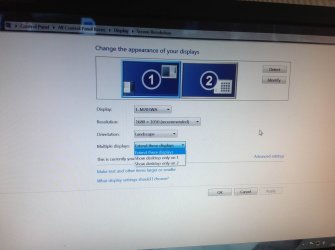
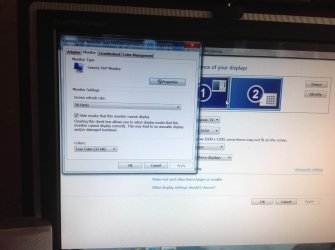
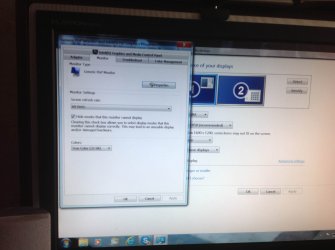
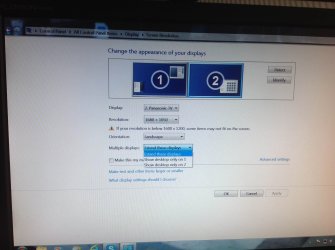
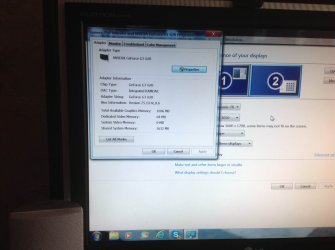
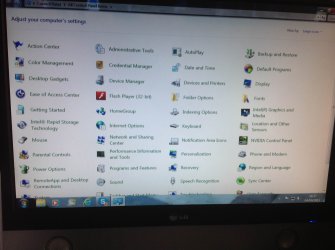
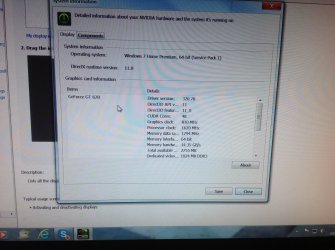
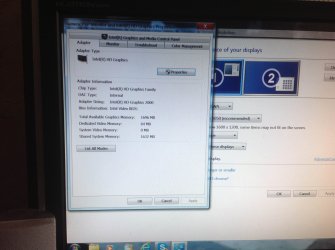
I hope I've taken the right photos to get this problem solved...
Thanks
 

My Computer My Computer

At a glance

Windows 7 Home
Computer type
PC/Desktop
Computer Manufacturer/Model Number
Dell
OS
Windows 7 Home
ThrashZone, when i right click i don't get the same options as you..
 

My Computer My Computer

At a glance

Windows 7 Home
Computer type
PC/Desktop
Computer Manufacturer/Model Number
Dell
OS
Windows 7 Home
I've followed everyone's advise but still no 'Duplicate"
 

My Computer My Computer

At a glance

Windows 7 Home
Computer type
PC/Desktop
Computer Manufacturer/Model Number
Dell
OS
Windows 7 Home
I think I've seen this before, dual display works but only on extended mode, the reason this is happening is because the clone mode will only work on one of the inbuilt cards, however, the registry has gotten corrupted during a restart with both monitors connected in clone mode and cannot re-enable itself, I believe to fix this you have to remove your external display and do a system restore to the point it worked again and reconnect the external monitor after the restart, and make sure you don't leave the display connected during restarts.

Give this a go and see if it fixes the issue.
 

My Computer My Computer

At a glance

Windows 7 Ultimate x64 SP1Intel Q6600 @ 2.6Ghz4Gb DDR2 Corsair Dominator @ 800Mhz 5-5-5-15EVGA 560 GTX SC FTW 1GB
Computer type
PC/Desktop
Computer Manufacturer/Model Number
Custom Build
OS
Windows 7 Ultimate x64 SP1
CPU
Intel Q6600 @ 2.6Ghz
Motherboard
Evga NF78-CK-132-A 3-Way SLI
Memory
4Gb DDR2 Corsair Dominator @ 800Mhz 5-5-5-15
Graphics Card(s)
EVGA 560 GTX SC FTW 1GB
Sound Card
Realtek HD 7.1 Audio, Plantronics GameCom780 7.1 Headset
Monitor(s) Displays
Dell S2409W
Screen Resolution
1920 x 1080
Hard Drives
SanDisk SDSSDHII-120G-G25 120GB SSD
Samsung 7200RPM 750Gb SATA
Samsung 850 EVO 120GB SSD
Western Digital Green 1TB 7200RPM
PSU
Xigmatek 750W Quad sli quad core 80% eff
Case
Antec 900 Gaming Case
Cooling
Zalman CNPS9700-NT NVIDIA Tritium
Keyboard
Logitech generic keyboard, MS wireless keyboard
Mouse
Razor Lachesis Banshee V2 Blue, 4000DPI, MS wireless mouse
Internet Speed
152Mb Virgin Media Fibre Optic
Antivirus
Microsoft Security Essentials
Browser
Google Chrome
Other Info
Wireless Gaming Receiver for Windows, Wireless Xbox 360 Pad
Thanks MrNeeds..will try and keep you posted
 

My Computer My Computer

At a glance

Windows 7 Home
Computer type
PC/Desktop
Computer Manufacturer/Model Number
Dell
OS
Windows 7 Home
I've tried it all and even re formatted the computer to factory settings but still can't duplicate.. What is wrong???
 

My Computer My Computer

At a glance

Windows 7 Home
Computer type
PC/Desktop
Computer Manufacturer/Model Number
Dell
OS
Windows 7 Home
sounds like a driver install needed, what's the model number of the TV?
 

My Computer My Computer

At a glance

Windows 7 Ultimate x64 SP1Intel Q6600 @ 2.6Ghz4Gb DDR2 Corsair Dominator @ 800Mhz 5-5-5-15EVGA 560 GTX SC FTW 1GB
Computer type
PC/Desktop
Computer Manufacturer/Model Number
Custom Build
OS
Windows 7 Ultimate x64 SP1
CPU
Intel Q6600 @ 2.6Ghz
Motherboard
Evga NF78-CK-132-A 3-Way SLI
Memory
4Gb DDR2 Corsair Dominator @ 800Mhz 5-5-5-15
Graphics Card(s)
EVGA 560 GTX SC FTW 1GB
Sound Card
Realtek HD 7.1 Audio, Plantronics GameCom780 7.1 Headset
Monitor(s) Displays
Dell S2409W
Screen Resolution
1920 x 1080
Hard Drives
SanDisk SDSSDHII-120G-G25 120GB SSD
Samsung 7200RPM 750Gb SATA
Samsung 850 EVO 120GB SSD
Western Digital Green 1TB 7200RPM
PSU
Xigmatek 750W Quad sli quad core 80% eff
Case
Antec 900 Gaming Case
Cooling
Zalman CNPS9700-NT NVIDIA Tritium
Keyboard
Logitech generic keyboard, MS wireless keyboard
Mouse
Razor Lachesis Banshee V2 Blue, 4000DPI, MS wireless mouse
Internet Speed
152Mb Virgin Media Fibre Optic
Antivirus
Microsoft Security Essentials
Browser
Google Chrome
Other Info
Wireless Gaming Receiver for Windows, Wireless Xbox 360 Pad
Back
Top