DVD/Blu-Ray drive won't load disk after being burned.

tkmops

New member
Member
Local time
2:33 AM
Messages
63
DVD/Blu-Ray drive won't load disk after being burned.
An internal DVD/Blu-Ray drive, that I've used for years, now won't load a DVD disk that I've just burned.
When I load a blank DVD or Blu-Ray disk, it 'spins up' like normal, and am successfully able to burn to it. But after closing the burner drawer, the DVD disk won't 'spin up', and when I click on the drive in Windows Explorer, a box pops up with 'Insert a disc Please insert a disc into Drive D: Help me choose a disc'.
I am able to load a prior Blu-Ray disc that I've burned, but not any of my burned DVD disks.
It seems that, somehow, the DVD functionality has been 'turned off'.
Anyone know what's causing this, and how to fix it?
Thanks!
 

My Computer My Computer

At a glance

Win 7 64 bitI56GBNvidia
Computer type
PC/Desktop
Computer Manufacturer/Model Number
Custom
OS
Win 7 64 bit
CPU
I5
Memory
6GB
Graphics Card(s)
Nvidia

My Computers My Computers

  • At a glance

    Windows 7 HP 64i5 6600K - 800MHz to 4200MHz4+4G GSkill DDR4 3000IG - Intel 530
    Computer type
    PC/Desktop
    Computer Manufacturer/Model Number
    custom build
    OS
    Windows 7 HP 64
    CPU
    i5 6600K - 800MHz to 4200MHz
    Motherboard
    GA-Z170-HD3P
    Memory
    4+4G GSkill DDR4 3000
    Graphics Card(s)
    IG - Intel 530
    Monitor(s) Displays
    Samsung 226BW
    Screen Resolution
    1680x1050
    Hard Drives
    (1) -1 SM951 – 128GB M.2 AHCI PCIe SSD drive for Windows 7 and Lubuntu
    (2) -1 WD SATA 3 - 1T for Data
    (3) -1 WD SATA 3 - 1T for backup
    PSU
    Thermaltake 450W TR2 gold
    Keyboard
    Old and good Chicony mechanical keyboard
    Mouse
    Logitech mX performance - 9 buttons (had to disable some)
    Internet Speed
    500Mb/s
    Browser
    Firefox 64
    Other Info
    TinyWall firewall
  • At a glance

    Windows 7 Proi7-4500U 800MHz to 3.0GHz(4+4)G DDR3 1600IG intel 4400 + NVIDIA GeForce GT 745M
    Computer type
    Laptop
    System Manufacturer/Model Number
    Asus Q550LF
    OS
    Windows 7 Pro
    CPU
    i7-4500U 800MHz to 3.0GHz
    Motherboard
    Asus Q550LF
    Memory
    (4+4)G DDR3 1600
    Graphics Card(s)
    IG intel 4400 + NVIDIA GeForce GT 745M
    Sound Card
    Realtek
    Monitor(s) Displays
    LG Display LP156WF4-SPH1
    Screen Resolution
    1920 x 1080
    Hard Drives
    BX500 120G SSD for Windows and programs +
    1T HDD for data
    Internet Speed
    500 Mb/s
    Browser
    Firefox
    Other Info
    TinyWall firewall
Thanks for the fast reply. I should have mentioned that in my original post...yes, I have a 'lens-cleaner' disk, and have used it multiple times.
To be clearer in what's going on:
Blank CD's and Blu-Ray disks will load fine, and be able to be burned and played.
Previously burned and commercial CD's and Blu-Rays disks are able to be played
Blank DVD's won't 'spin up', and previously burned and commercial DVD's won't play.
So, while my drive recognizes CD's and Blu-Ray disks, it no longer will recognize DVD disks.
It seems like a software 'switch' has been 'turned off' somehow.

- - - Updated - - -

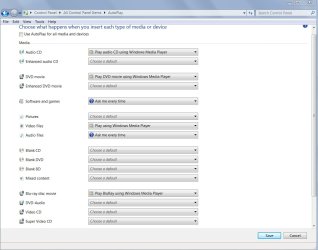
I recently read in another tech forum to check the 'Use AutoPlay for all media and devices' checkbox(at the top of the attached screen print).I tried that, blank DVD's will still 'spin up', and burn. But those, and all prior burned and commercial DVD's won't load. Looks like the only difference was that whenever a disc was loaded, a box came up asking what software I wanted to use to play the files(which did not happen before). So, I unchecked it and went back to the way it was before.Attached is a screen print of Control Panel-Autoplay...is it possible that one(or more) of these selections has somehow got changed from what they used to be?Oh, forgot to mention that I use(and have been for many years) my 'Nero StartSmart Essentials'(there's no 'Help' button, so I can't see what version it is).
 

Attachments

  • Control Panel-Autoplay.jpg
    Control Panel-Autoplay.jpg
    92.9 KB · Views: 0

My Computer My Computer

At a glance

Win 7 64 bitI56GBNvidia
Computer type
PC/Desktop
Computer Manufacturer/Model Number
Custom
OS
Win 7 64 bit
CPU
I5
Memory
6GB
Graphics Card(s)
Nvidia
If you inset a data DVD can you see the files on explorer?
If you can see the files can you execute or ply them by double click?
Did you load any extra codecs?
 

My Computers My Computers

  • At a glance

    Windows 7 HP 64i5 6600K - 800MHz to 4200MHz4+4G GSkill DDR4 3000IG - Intel 530
    Computer type
    PC/Desktop
    Computer Manufacturer/Model Number
    custom build
    OS
    Windows 7 HP 64
    CPU
    i5 6600K - 800MHz to 4200MHz
    Motherboard
    GA-Z170-HD3P
    Memory
    4+4G GSkill DDR4 3000
    Graphics Card(s)
    IG - Intel 530
    Monitor(s) Displays
    Samsung 226BW
    Screen Resolution
    1680x1050
    Hard Drives
    (1) -1 SM951 – 128GB M.2 AHCI PCIe SSD drive for Windows 7 and Lubuntu
    (2) -1 WD SATA 3 - 1T for Data
    (3) -1 WD SATA 3 - 1T for backup
    PSU
    Thermaltake 450W TR2 gold
    Keyboard
    Old and good Chicony mechanical keyboard
    Mouse
    Logitech mX performance - 9 buttons (had to disable some)
    Internet Speed
    500Mb/s
    Browser
    Firefox 64
    Other Info
    TinyWall firewall
  • At a glance

    Windows 7 Proi7-4500U 800MHz to 3.0GHz(4+4)G DDR3 1600IG intel 4400 + NVIDIA GeForce GT 745M
    Computer type
    Laptop
    System Manufacturer/Model Number
    Asus Q550LF
    OS
    Windows 7 Pro
    CPU
    i7-4500U 800MHz to 3.0GHz
    Motherboard
    Asus Q550LF
    Memory
    (4+4)G DDR3 1600
    Graphics Card(s)
    IG intel 4400 + NVIDIA GeForce GT 745M
    Sound Card
    Realtek
    Monitor(s) Displays
    LG Display LP156WF4-SPH1
    Screen Resolution
    1920 x 1080
    Hard Drives
    BX500 120G SSD for Windows and programs +
    1T HDD for data
    Internet Speed
    500 Mb/s
    Browser
    Firefox
    Other Info
    TinyWall firewall
For DVD's(burned and commercial), nothing appears in Explorer, and a box pops up with 'Insert a disc Please insert a disc into Drive D: Help me choose a disc'. The problem is only with DVD's...CD's and Blu-Ray discs load, burn, and are able to be played like before.
 

My Computer My Computer

At a glance

Win 7 64 bitI56GBNvidia
Computer type
PC/Desktop
Computer Manufacturer/Model Number
Custom
OS
Win 7 64 bit
CPU
I5
Memory
6GB
Graphics Card(s)
Nvidia
If you insert a Win 7 installation DVD (or any other OS installation DVD) can you boot from it?
If you can't it isn't a Windows issue but a DVD hardware issue.
 

My Computers My Computers

  • At a glance

    Windows 7 HP 64i5 6600K - 800MHz to 4200MHz4+4G GSkill DDR4 3000IG - Intel 530
    Computer type
    PC/Desktop
    Computer Manufacturer/Model Number
    custom build
    OS
    Windows 7 HP 64
    CPU
    i5 6600K - 800MHz to 4200MHz
    Motherboard
    GA-Z170-HD3P
    Memory
    4+4G GSkill DDR4 3000
    Graphics Card(s)
    IG - Intel 530
    Monitor(s) Displays
    Samsung 226BW
    Screen Resolution
    1680x1050
    Hard Drives
    (1) -1 SM951 – 128GB M.2 AHCI PCIe SSD drive for Windows 7 and Lubuntu
    (2) -1 WD SATA 3 - 1T for Data
    (3) -1 WD SATA 3 - 1T for backup
    PSU
    Thermaltake 450W TR2 gold
    Keyboard
    Old and good Chicony mechanical keyboard
    Mouse
    Logitech mX performance - 9 buttons (had to disable some)
    Internet Speed
    500Mb/s
    Browser
    Firefox 64
    Other Info
    TinyWall firewall
  • At a glance

    Windows 7 Proi7-4500U 800MHz to 3.0GHz(4+4)G DDR3 1600IG intel 4400 + NVIDIA GeForce GT 745M
    Computer type
    Laptop
    System Manufacturer/Model Number
    Asus Q550LF
    OS
    Windows 7 Pro
    CPU
    i7-4500U 800MHz to 3.0GHz
    Motherboard
    Asus Q550LF
    Memory
    (4+4)G DDR3 1600
    Graphics Card(s)
    IG intel 4400 + NVIDIA GeForce GT 745M
    Sound Card
    Realtek
    Monitor(s) Displays
    LG Display LP156WF4-SPH1
    Screen Resolution
    1920 x 1080
    Hard Drives
    BX500 120G SSD for Windows and programs +
    1T HDD for data
    Internet Speed
    500 Mb/s
    Browser
    Firefox
    Other Info
    TinyWall firewall
Questions:

Did you recently update the firmware for your optical drive?

Did some optical media software like Nero change the region setting? (Not sure if that's even possible software side).

To rule out Nero or some other optical media software, boot in safe mode and then try exploring a DVD. You might also want to temp remove Nero and any other optical media software using RevoUninstaller. Or, boot a live environment with Hiren's Boot CD or Linux (be very careful not to install) using USB and launch a DVD. That'll rule out he hardware and bring software to the forefront as the likely corrupt.
 

My Computer My Computer

At a glance

Windows 7 Ultimate x64
Computer type
PC/Desktop
OS
Windows 7 Ultimate x64
Latest news:
I did a hard reboot...
I am still able to burn and view CD's and Blu-Ray discs, either my own data or commercial discs.
Blank DVD's still 'spin up', and are able to be burned 'successfully', but will not load after burning.
All my prior burned DVD's which used to load, are now not loading.
Commercial DVD's will load and play OK.
I was able to burn and then load/play DVD's when using the 'multidisc' option(which I normally don't use).
I've been using blank DVD+R discs for many years without issues... could it be that my burner's settings have been changed to not accept the DVD+R disc using the non-multidisc option(but then why do DVD's burn successfully)?
Any suggestions as to what to try?
 

My Computer My Computer

At a glance

Win 7 64 bitI56GBNvidia
Computer type
PC/Desktop
Computer Manufacturer/Model Number
Custom
OS
Win 7 64 bit
CPU
I5
Memory
6GB
Graphics Card(s)
Nvidia
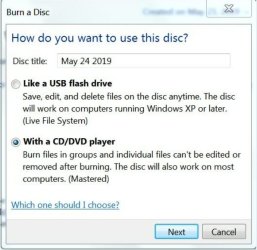
How do I stop this 'how do you want to use this disk' msg box from popping up everytime I burn a DVD? In the past, this box did NOT pop up, it just started recently, and ONLY for DVD's(there is no pop up msg box for CD's and Blu-Ray blank discs.
 

Attachments

  • how do you want to use this disk .jpg
    how do you want to use this disk .jpg
    40.1 KB · Views: 3

My Computer My Computer

At a glance

Win 7 64 bitI56GBNvidia
Computer type
PC/Desktop
Computer Manufacturer/Model Number
Custom
OS
Win 7 64 bit
CPU
I5
Memory
6GB
Graphics Card(s)
Nvidia
Run regedit.exe and go here-

HKEY_LOCAL_MACHINE\SYSTEM\CurrentControlSet\Control\Class\{4D36E965-E325-11CE-BFC1-08002BE10318}

Is there any reference in the Names to upper or lower filters? Maybe you could provide a screenshot?[/COLOR]
 

My Computer My Computer

At a glance

Windows 7 Pro SP1 64 bit8 GB
Computer type
Laptop
Computer Manufacturer/Model Number
Dell M6500 Precision Work Station
OS
Windows 7 Pro SP1 64 bit
Memory
8 GB
Screen Resolution
1920x
Internet Speed
30 Mbps
Antivirus
Norton Security
Browser
IE 11
Removed the drive, cleaned the lens, wiped off some dust...drive reads discs now...although slower than before...probably drive is dying...it is almost 10 years old! I guess time to buy a new one?
 

My Computer My Computer

At a glance

Win 7 64 bitI56GBNvidia
Computer type
PC/Desktop
Computer Manufacturer/Model Number
Custom
OS
Win 7 64 bit
CPU
I5
Memory
6GB
Graphics Card(s)
Nvidia
Back
Top