

DVD/CD drive is not listed on "Computer" nor on "Disk Management"
Windows "Trouble shooting" reports "TSSTcorp CDDVDW TS-L633J" is missing (or corrupted ?)
With a DVD movie in the drive, the drive spins up but does not auto play. It just spins down and stops. The drive is not listed in VLC.
Four days ago I uninstalled (using RevoUninstaller) some ancient apps I never use with a restore point before each uninstall. 4-Feb, 5-Feb
1. CloneDVD2.exe
2. AnyDVD.exe ... this one was a ring in (unsolicited)
- both by SlySoft.com ... there is an obvious omen in there ...
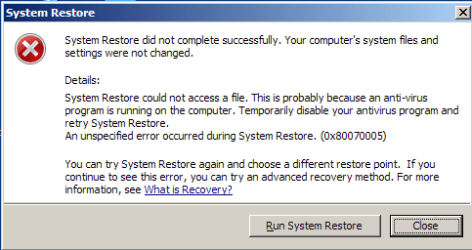
I have tried 3 system restores, one each before the unstalls and one a daily (1-Feb) system restore. Each System Restore failed.
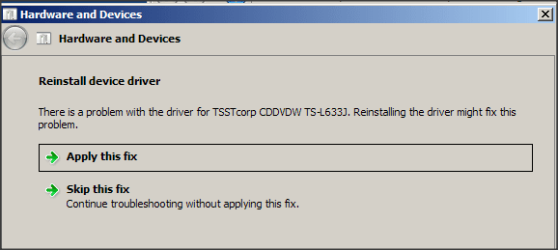
On the third "fail" (1-Feb) I decided to try Windows Troubleshooter, targeting devices and hardware
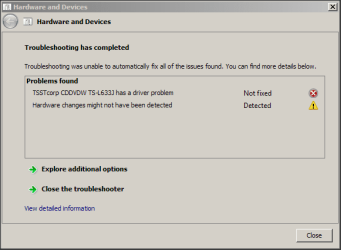
After the attempted fix ...
I am way in over my head, this is the first system Restore I have done in 25 years.
CONFESSION TIME:
For the past 12 months I have been reading up on virual drives, imaging, OEM backup, recue discs etc ... all a bit late for todays dilema.
I have never made a media disc of the OEM -- could I do that onto a USB stick (or USB pocket drive) or must it be a CD/DVD ?
recently I made a "Rescue Disc" for my new unused Lenovo ... so I am learning
How would I know if it is a hardware or a driver problem ?
Would appreciate some help, thank you
--------------
SPECS:
Toshiba Satellite C665
OS:= Windows 7 Home Premium (32-bit), sp1 (Build 7601) OEM
UI:=Classic Shell Start + Classic Explorer
Windows Indexing = disabled
Windows "Trouble shooting" reports "TSSTcorp CDDVDW TS-L633J" is missing (or corrupted ?)
With a DVD movie in the drive, the drive spins up but does not auto play. It just spins down and stops. The drive is not listed in VLC.
Four days ago I uninstalled (using RevoUninstaller) some ancient apps I never use with a restore point before each uninstall. 4-Feb, 5-Feb
1. CloneDVD2.exe
2. AnyDVD.exe ... this one was a ring in (unsolicited)
- both by SlySoft.com ... there is an obvious omen in there ...
I have tried 3 system restores, one each before the unstalls and one a daily (1-Feb) system restore. Each System Restore failed.
On the third "fail" (1-Feb) I decided to try Windows Troubleshooter, targeting devices and hardware
After the attempted fix ...
I am way in over my head, this is the first system Restore I have done in 25 years.
CONFESSION TIME:
For the past 12 months I have been reading up on virual drives, imaging, OEM backup, recue discs etc ... all a bit late for todays dilema.
I have never made a media disc of the OEM -- could I do that onto a USB stick (or USB pocket drive) or must it be a CD/DVD ?
recently I made a "Rescue Disc" for my new unused Lenovo ...
so I am learning How would I know if it is a hardware or a driver problem ?
Would appreciate some help, thank you
--------------
SPECS:
Toshiba Satellite C665
OS:= Windows 7 Home Premium (32-bit), sp1 (Build 7601) OEM
UI:=Classic Shell Start + Classic Explorer
Windows Indexing = disabled
My Computer
At a glance
XP Pro (x86) | 7 HP (x86) & (x64) | 7 Pro (x64)
- Computer type
- PC/Desktop
- Computer Manufacturer/Model Number
- Toshiba, Lenovo (laptops) + 4 rigs
- OS
- XP Pro (x86) | 7 HP (x86) & (x64) | 7 Pro (x64)


