DVD playback locks up explorer

lopploio

New member
Member
Local time
7:48 PM
Messages
70
Hi, I have an Dell Inspiron 1525 running windows 7 32-bit and has a PBDS DVD+-RW DS8W1P ATA Device drive. Whenever I play DVDs back in any player my system locks up and my DVD drive will not eject or read the disk while Explorer is at a standstill and task manager can't even kill the process. I have tried flashing the firmware on the drive which completed successfully and had some improvement but the symptoms still occur. My DVD drive is region one and this occurs in multiple DVDs so my discs aren't scratched. Also I am able to run and install software from DVDs as well as read files and burn discs.

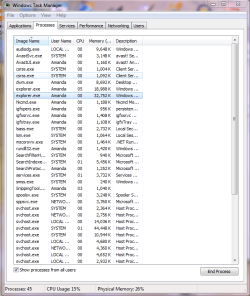
Also attached is my task manager screenshot as the problem is occurring right now

also here is the crash information for the failures
Description:
A problem caused this program to stop interacting with Windows.

Problem signature:
Problem Event Name: AppHangB1
Application Name: explorer.exe
Application Version: 6.1.7600.16450
Application Timestamp: 4aeba271
Hang Signature: 4972
Hang Type: 0
OS Version: 6.1.7600.2.0.0.256.4
Locale ID: 1033
Additional Hang Signature 1: 497227662588a1f40785eb4877026607
Additional Hang Signature 2: 3c9b
Additional Hang Signature 3: 3c9b709b391f974f526f30cdb4411fec
Additional Hang Signature 4: 4972
Additional Hang Signature 5: 497227662588a1f40785eb4877026607
Additional Hang Signature 6: 3c9b
Additional Hang Signature 7: 3c9b709b391f974f526f30cdb4411fec


Any help would be appreciated
 

Attachments
  • taskmgr.PNG
    taskmgr.PNG
    26.4 KB · Views: 1
Last edited:

My Computer

OS
Windows 7 Home Premium 64 bit
Hi, I have an Dell Inspiron 1525 running windows 7 32-bit and has a PBDS DVD+-RW DS8W1P ATA Device drive. Whenever I play DVDs back in any player my system locks up and my DVD drive will not eject or read the disk while Explorer is at a standstill and task manager can't even kill the process. I have tried flashing the firmware on the drive which completed successfully and had some improvement but the symptoms still occur. My DVD drive is region one and this occurs in multiple DVDs so my discs aren't scratched. Also I am able to run and install software from DVDs as well as read files and burn discs.

Also attached is my task manager screenshot as the problem is occurring right now

also here is the crash information for the failures
Description:
A problem caused this program to stop interacting with Windows.

Problem signature:
Problem Event Name: AppHangB1
Application Name: explorer.exe
Application Version: 6.1.7600.16450
Application Timestamp: 4aeba271
Hang Signature: 4972
Hang Type: 0
OS Version: 6.1.7600.2.0.0.256.4
Locale ID: 1033
Additional Hang Signature 1: 497227662588a1f40785eb4877026607
Additional Hang Signature 2: 3c9b
Additional Hang Signature 3: 3c9b709b391f974f526f30cdb4411fec
Additional Hang Signature 4: 4972
Additional Hang Signature 5: 497227662588a1f40785eb4877026607
Additional Hang Signature 6: 3c9b
Additional Hang Signature 7: 3c9b709b391f974f526f30cdb4411fec


Any help would be appreciated

If your computer just hangs we need the event viewer information

There are several ways to find what the problem is. The best is to go into event viewer (type eventvwr in search). Go to the windows log>application tab.

You want to look for critical errors (they have red in the left column ).

When you find them you want to look for critical errors that say app hang, app crash, or anything that relates to the problem.

When you find them please note the event ID, and the source codes and tell us what they are.

If your computer BSOD's we need the DMP file.

If you wish to have others assist you with your computer's BSOD symptoms, upload the contents of your "\Windows\Minidump" folder. The procedure:

* Copy the contents of \Windows\Minidump to another (temporary) location somewhere on your machine.
* Zip up the copy.
* Attach the ZIP archive to your post using the "paperclip" (file attachments) button.
* Briefly describe the problem history and circumstances in the same post. Somebody will attend to your query as soon as possible.


Also if you take a snapshot of the task manager make sure you have the show all task from all users ticked on the bottom.

Thanks


Ken J
 

My Computer

Computer Manufacturer/Model Number
HP Pavillion dv-7 1005 Tx
OS
Win 8 Release candidate 8400
CPU
[email protected]
Memory
4 gigs
Graphics Card(s)
Nvidia 9600M
Sound Card
HD built-in
Monitor(s) Displays
17" Wxga
Screen Resolution
1440x900
Cooling
none
Internet Speed
45Mb down 5Mb up
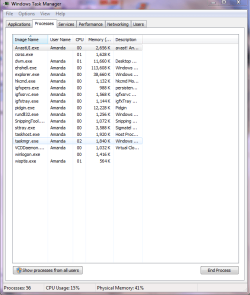
hi, thanks for replying the event id for the explorer crash is 1002 and the source code is application hang and attached is an updated task manager with all users shown also BSODs do not occur at all

Below is the Binary Data

- System

- Provider


[ Name] Application Hang


- EventID 1002


[ Qualifiers] 0


Level 2


Task 101


Keywords 0x80000000000000

- TimeCreated


[ SystemTime] 2010-11-21T22:00:48.000000000Z


EventRecordID 630


Channel Application


Computer Amanda-1525


Security
- EventData


Explorer.EXE


6.1.7600.16450


900


01cb89c71f7deeed


60000


C:\Windows\Explorer.EXE


9c22aab3-f5ba-11df-929a-00219be44ba7


55006E006B006E006F0077006E0000000000
Binary data:

In Words
0000: 006E0055 006E006B 0077006F 0000006E
0008: 0000

In Bytes
0000: 55 00 6E 00 6B 00 6E 00 U.n.k.n.
0008: 6F 00 77 00 6E 00 00 00 o.w.n...
0010: 00 00 ..
 

Attachments

  • Taskmgr.PNG
    Taskmgr.PNG
    33.9 KB · Views: 1

My Computer

OS
Windows 7 Home Premium 64 bit
Process Explorer and Process Monitor

Hi, I have gotten some more information on the problem above and any help would be appreciated.

Below is the process explorer stack for explorer.exe

ntdll.dll!KiFastSystemCallRet
kernel32.dll!WaitForMultipleObjectsEx+0x8e
USER32.dll!GetMessageW+0x127
USER32.dll!MsgWaitForMultipleObjects+0x1f
EXPLORERFRAME.dll!Ordinal134+0x87f
EXPLORERFRAME.dll!Ordinal110+0x85ae3
explorer.exe+0x52454
explorer.exe+0x2aa50
kernel32.dll!BaseThreadInitThunk+0x12
ntdll.dll!RtlInitializeExceptionChain+0x63
ntdll.dll!RtlInitializeExceptionChain+0x36

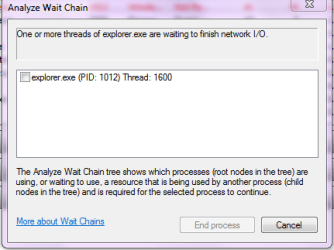
Attached is the error resource monitor gives out while doing a wait chain on explorer.exe
 

Attachments

  • Explorer Wait Chain.png
    Explorer Wait Chain.png
    11.5 KB · Views: 3

My Computer

OS
Windows 7 Home Premium 64 bit
Back
Top