DVD playback stops in Media Center and Media Player

vicbeer660

New member
Local time
8:55 AM
Messages
3
Hi,
I have checked two seperate DVD movies and they stop after the splash screens, FBI warning and Corporate logos, and never make it to the DVD menu.
This DVD player is an external player and I have no problem with playback on my Dual boot with Vista Home Premium.

Any suggestions?:p

Victor
 

My Computer My Computer

At a glance

Windows 7 Beta
OS
Windows 7 Beta
Dear Victor,

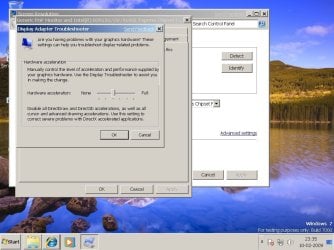
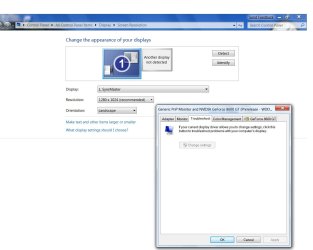
May the hardware acceleration is set to full. You can change it to `none'. It may be find in the graphic properties menu, have to check, cause it differ from OS to OS. In windows 7, it is in the graphic properties, troubleshoot menu. I too had the problem, I was not able to play any kind of video be it dvd or .avi or .dat files through wmp 12, then I found the hardware acceleration menu and set it to none. Now everything plays fine with wmp 12 and cyberlink pdvd etc., Try and give a chance to set it.
 

My Computer My Computer

At a glance

windows 7INTEL P4 2.80Ghz (HYPER-THREADING)3 GB (KINGSTON)ONBORAD - Intel(R)82915G/GV/910 GL Express Ch...
Computer Manufacturer/Model Number
WIPRO-Supergenius
OS
windows 7
CPU
INTEL P4 2.80Ghz (HYPER-THREADING)
Motherboard
INTEL - 915 GAG
Memory
3 GB (KINGSTON)
Graphics Card(s)
ONBORAD - Intel(R)82915G/GV/910 GL Express Chipset
Sound Card
ONBOARD - Microsoft HD Audio 6.1.7000.0
Monitor(s) Displays
Samsung - 15 inch CRT Monitor .28 dot pitch
Screen Resolution
1024 x 768 60 Hz refresh rate
Hard Drives
Maxtor - 6E040L0 ATA - 80 GB and WDC WD5000KS-00MNBO - ATA - 500 GB
PSU
Normal S.M.P.S.
Case
ATX Cabinet
Cooling
Three Fans - 1. SMPS Fan, Processor Fan and Cabinet FAN
Keyboard
104 Kesy Membrane Keyboard
Mouse
Wipro Scroll Mouse (Ball Mouse)
Internet Speed
Upto 2 MB - B.S.N.L. DATAONE
Other Info
Moser Baer DH-20A4P ATA DVD-Writer. One Internal 56 kbps Modem.
Hello,
I have tried to turn off hardware acceleration in my Nvidia GPU control panel but this did not help with the problem. I found the troubleshoot menu but I could not find the acceleration menu that you mention. I also looked at the troubleshooting report and it states the following: Configuration settings might be set incorrectly. "Unexpected WMP behavior might be due to configuration errors."

I typed hardware acceleration in the Start Menu and it lists the VLC media player set to no hardware acceleration. This is the only media player that I have been able to view DVD's and play audio CD's. How do I change these settings for WMP?

Thanks,

Victor:confused:
 

My Computer My Computer

At a glance

Windows 7 Beta
OS
Windows 7 Beta
Dear Victor,

I am uploading the jpeg image file, the procedure that I did for onboard 915 GAG motherboard graphic properties. Hope it will hellp you.


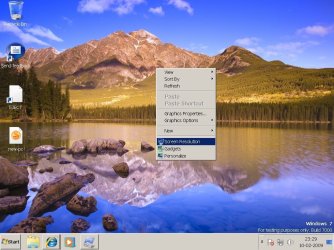
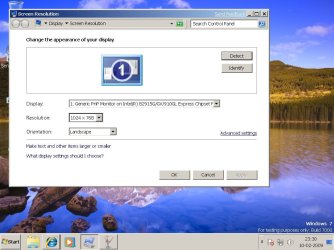
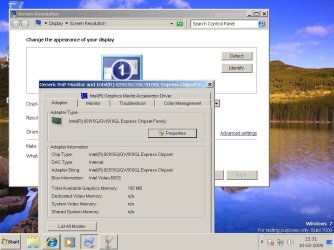
1. Right click on desktop - screen resolution - advanced setting - troubleshoot - change setting - hardware acceleration - choose none
 

Attachments

  • p1.jpg
    p1.jpg
    118.5 KB · Views: 269
  • p2.jpg
    p2.jpg
    88.5 KB · Views: 303
  • p3.jpg
    p3.jpg
    96.9 KB · Views: 347
  • p4.jpg
    p4.jpg
    84.7 KB · Views: 375
  • p5.jpg
    p5.jpg
    99.9 KB · Views: 408

My Computer My Computer

At a glance

windows 7INTEL P4 2.80Ghz (HYPER-THREADING)3 GB (KINGSTON)ONBORAD - Intel(R)82915G/GV/910 GL Express Ch...
Computer Manufacturer/Model Number
WIPRO-Supergenius
OS
windows 7
CPU
INTEL P4 2.80Ghz (HYPER-THREADING)
Motherboard
INTEL - 915 GAG
Memory
3 GB (KINGSTON)
Graphics Card(s)
ONBORAD - Intel(R)82915G/GV/910 GL Express Chipset
Sound Card
ONBOARD - Microsoft HD Audio 6.1.7000.0
Monitor(s) Displays
Samsung - 15 inch CRT Monitor .28 dot pitch
Screen Resolution
1024 x 768 60 Hz refresh rate
Hard Drives
Maxtor - 6E040L0 ATA - 80 GB and WDC WD5000KS-00MNBO - ATA - 500 GB
PSU
Normal S.M.P.S.
Case
ATX Cabinet
Cooling
Three Fans - 1. SMPS Fan, Processor Fan and Cabinet FAN
Keyboard
104 Kesy Membrane Keyboard
Mouse
Wipro Scroll Mouse (Ball Mouse)
Internet Speed
Upto 2 MB - B.S.N.L. DATAONE
Other Info
Moser Baer DH-20A4P ATA DVD-Writer. One Internal 56 kbps Modem.
Hi,

Thank you for the time you have spent in trying to help with this problem. I do not think this will work for me because the "change settings" is grayed out for me.

Victor
 

Attachments

  • greyed out trouble.jpg
    greyed out trouble.jpg
    74.5 KB · Views: 101

My Computer My Computer

At a glance

Windows 7 Beta
OS
Windows 7 Beta
Bad luck buddy !!:huh:

Then there is still one more option, go for windows live update. It's in the start menu, at first or second number. Run the live update, possibly it will update the windows. I got the 915 GAG graphics driver only after I ran windows live update, until then it was showing generic and refreshed rate at a fixed 60.

participating in your grief.
 

My Computer My Computer

At a glance

windows 7INTEL P4 2.80Ghz (HYPER-THREADING)3 GB (KINGSTON)ONBORAD - Intel(R)82915G/GV/910 GL Express Ch...
Computer Manufacturer/Model Number
WIPRO-Supergenius
OS
windows 7
CPU
INTEL P4 2.80Ghz (HYPER-THREADING)
Motherboard
INTEL - 915 GAG
Memory
3 GB (KINGSTON)
Graphics Card(s)
ONBORAD - Intel(R)82915G/GV/910 GL Express Chipset
Sound Card
ONBOARD - Microsoft HD Audio 6.1.7000.0
Monitor(s) Displays
Samsung - 15 inch CRT Monitor .28 dot pitch
Screen Resolution
1024 x 768 60 Hz refresh rate
Hard Drives
Maxtor - 6E040L0 ATA - 80 GB and WDC WD5000KS-00MNBO - ATA - 500 GB
PSU
Normal S.M.P.S.
Case
ATX Cabinet
Cooling
Three Fans - 1. SMPS Fan, Processor Fan and Cabinet FAN
Keyboard
104 Kesy Membrane Keyboard
Mouse
Wipro Scroll Mouse (Ball Mouse)
Internet Speed
Upto 2 MB - B.S.N.L. DATAONE
Other Info
Moser Baer DH-20A4P ATA DVD-Writer. One Internal 56 kbps Modem.
same problem with windows media center and player

i just got a new dell studio 1555 laptop, it will play some movies but just last night it got through all the credits of a the dark night and the fbi screen and froze and wouldnt play it, seems since the last update on windows auto update this problem has arrised, also could be microsofts wonderful new deal with the movie industry and security on stolen movies, seems i dont own anything stolen or priated but seems like vista does it cant play something it thinks we stole, please fix this microsoft. this is your software issue not mine. anybody know a good movie player that works on a 64 bit computer other than windows media?


BTW not trying to be a smart alec but i cant even get windows 7 for dummies video to even run on this

Frustrated to no end with all these bugs
 
Last edited:

My Computer My Computer

At a glance

windows 7 home premium 64 bitintel duel core t6600 2.20/2.204 gigsintel
Computer Manufacturer/Model Number
dell studio 1555
OS
windows 7 home premium 64 bit
CPU
intel duel core t6600 2.20/2.20
Motherboard
studio 1555
Memory
4 gigs
Graphics Card(s)
intel
Sound Card
srs premium
Monitor(s) Displays
dell high resolution
Hard Drives
ST9500325AS ATA device 500 gigs
Seeing as you just bought the PC, have you contacted Dell Customer support? Can you add more detailed info about your Graphics Card? Are you plugged into AC when this occurs?

Is the movie in question encoded in HD?

According to Dell all of the 15 series include standard:

15.6” High Definition (720p) LED Display with TrueLife™ and Camera

but a 1080p screen can be added on models that can be customized (which include ATI Mobility Radeon 4570 Graphics.)
 
i have the intel mobile 4 graffics card its a stock 1555 studio with the camera, dell customer support said its a software problem and wanted to send me somehwere to talk to someone from their software customer support at which i refused because of the charge, i got VCL media player to work on it just fine, but i was able to watch movies on this before the last 2 windows updates this weekend, i watched blackhawk down and a few others. i also have had to run system restore to a previous saved usable windows for some reason cause the lojack caused major issues with adobe flash player of all things i will leave my specs below.

dell studio 1555
os windows 7 home premium
version: 6.1.7700 Build 7600
bios version dell inc AO8 11/7/2009
SMBIOS Version 2.5
intel core 2 duo cpu t6600 @ 2.20/2.20
memory 4 gig, i am assuming this is standard dell ram
System type 64 bit operating system
no pen or touch input for this display
windows is activated

Name Mobile Intel(R) 4 Series Express Chipset Family
PNP Device ID PCI\VEN_8086&DEV_2A42&SUBSYS_02BE1028&REV_07\3&11583659&0&10
Adapter Type Mobile Intel(R) 4 Series Express Chipset Family, Intel Corporation compatible
Adapter Description Mobile Intel(R) 4 Series Express Chipset Family
Adapter RAM 1.75 GB (1,877,399,552 bytes)
Installed Drivers igdumd64.dll,igd10umd64.dll,igdumdx32,igd10umd32
Driver Version 8.15.10.1872
INF File oem22.inf (iCNT0 section)
Color Planes Not Available
Color Table Entries 4294967296
Resolution 1366 x 768 x 59 hertz
Bits/Pixel 32
Memory Address 0xFC000000-0xFC3FFFFF
Memory Address 0xD0000000-0xDFFFFFFF
I/O Port 0x00001800-0x00001807
IRQ Channel IRQ 16
I/O Port 0x000003B0-0x000003BB
I/O Port 0x000003C0-0x000003DF
Memory Address 0xA0000-0xBFFFF
Driver c:\windows\system32\drivers\igdkmd64.sys (8.15.10.1872, 7.03 MB (7,370,176 bytes), 8/13/2009 10:53 PM)

Name Mobile Intel(R) 4 Series Express Chipset Family
PNP Device ID PCI\VEN_8086&DEV_2A43&SUBSYS_02BE1028&REV_07\3&11583659&0&11
Adapter Type Not Available, Intel Corporation compatible
Adapter Description Mobile Intel(R) 4 Series Express Chipset Family
Adapter RAM Not Available
Installed Drivers igdumd64.dll,igd10umd64.dll,igdumdx32,igd10umd32
Driver Version 8.15.10.1872
INF File oem22.inf (iCNT1 section)
Color Planes Not Available
Color Table Entries Not Available
Resolution Not Available
Bits/Pixel Not Available
Memory Address 0xFC400000-0xFC4FFFFF
Driver c:\windows\system32\drivers\igdkmd64.sys (8.15.10.1872, 7.03 MB (7,370,176 bytes), 8/13/2009 10:53 PM)


if you need more i can copy and paste everything that is the computer

Thank you for your time

 

My Computer My Computer

At a glance

windows 7 home premium 64 bitintel duel core t6600 2.20/2.204 gigsintel
Computer Manufacturer/Model Number
dell studio 1555
OS
windows 7 home premium 64 bit
CPU
intel duel core t6600 2.20/2.20
Motherboard
studio 1555
Memory
4 gigs
Graphics Card(s)
intel
Sound Card
srs premium
Monitor(s) Displays
dell high resolution
Hard Drives
ST9500325AS ATA device 500 gigs
i have played a hd movie on it it before worked fine, and yes it is plugged in, i can get all my movies to work on other dvd playing software, such as VCL media player and i tried a couple of others to be sure. the other dvd players work plugged in or not. i have the dark night widescreen edition, it works on my old sony vaio with xp.
 

My Computer My Computer

At a glance

windows 7 home premium 64 bitintel duel core t6600 2.20/2.204 gigsintel
Computer Manufacturer/Model Number
dell studio 1555
OS
windows 7 home premium 64 bit
CPU
intel duel core t6600 2.20/2.20
Motherboard
studio 1555
Memory
4 gigs
Graphics Card(s)
intel
Sound Card
srs premium
Monitor(s) Displays
dell high resolution
Hard Drives
ST9500325AS ATA device 500 gigs
Back
Top