DVD ROM not working , but it should work.

cyb3roo

New member
Local time
7:17 PM
Messages
9
Hi ,
I have an Asus N53SV laptop, My DVD rom doesn't read any type of DVD in windows , but I just installed windows 7 from a bootable DVD , I think this problem occurred after I tried to change my partitioning with paragon partition magic , I was trying to shrink , join and so , after that my windows showed an error that windows cannot find [weird address] on hard disk every time on starts.

windows itself says the DVD drive works correctly and driver is working properly, but no DVD or CD can be read , note that the DVD I'm trying to read is the same DVD which I used to install windows some minutes ago.

I don't know what's the problem :(
 

My Computer My Computer

OS
windows 7 ultimate x64
if youve just installed windows, maybe there is a driver needed. its a longshot, but try looking for the drivers for your laptop on the ASUS website.
 

My Computer My Computer

Computer type
PC/Desktop
Computer Manufacturer/Model Number
Built by badgers!!!
OS
Windows 7 Ultimate x64, & Mac OS X 10.9.2
CPU
Intel Core i5 2500k
Motherboard
Asus P8z68 LE
Memory
Corsair Vengence 8gb 1866mhz
Graphics Card(s)
Nvidia GTX 770 OC
Monitor(s) Displays
2x ASUS LED 22" IPS
Screen Resolution
3840x1080
Hard Drives
240GB Crucial M500 SSD
120gb Corsair Force 3 SSD
1TB Western Digital
PSU
Corsair HX650w Modular
Case
Corsair Air 540
Cooling
Corsair H60 Push/Pull
Keyboard
Corsair K70/ Logitech G27 wheel
Mouse
Saitek R.A.T 9
Internet Speed
Too slow!
Other Info
AMD fusion E350N Home server-Windows Home Server 2011 (also made by badgers!)
2011 Macbook 2.4ghz Core2Duo, 4gb ddr3, 120gb Ocz Vertex SSD
the driver is installed , and windows says the device is working properly , I think the problem is about the Partitioning I've mentioned in my previous post. is there any tools to find the partitioning errors?
 

My Computer My Computer

OS
windows 7 ultimate x64

My Computer My Computer

Computer Manufacturer/Model Number
HP Pavilion Elite 495UK
OS
Windows 7 Ultimate SP1 64-Bit
CPU
Intel Core i7 870 @ 2.93GHz
Motherboard
MSI 2A9C (CPU1)
Memory
8Gb Dual-Channel DDR3 @ 664MHz
Graphics Card(s)
nVidia GeForce GTX 460 1024MB dedicated RAM
Sound Card
Realtek HD Audio
Monitor(s) Displays
HP2310i
Screen Resolution
1920 x 1080
Hard Drives
1x1954GB Hitachi HDS22020ALA 330 (RAID), 1x1954GB Hitachi External for backup and storage
PSU
460W
Case
HP Elite
Cooling
Air cooled
Keyboard
Logitech K750 solar-powered keyboard
Mouse
Logitech Wireless M180 mouse
Internet Speed
2Mb
Other Info
Pure Avanti Flow Internet Radio with iPod Dock, 64Gb iPod, HP USB Speakers, Sony MDR-V500 Headphones, Sony Vaio F-Series Laptop
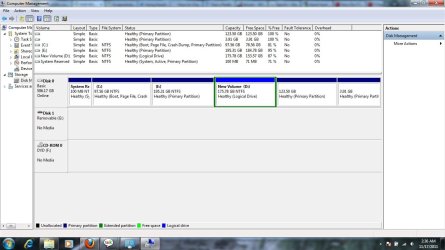
screenshot attached to the post
 

Attachments

  • Untitled.jpg
    Untitled.jpg
    99.6 KB · Views: 266

My Computer My Computer

OS
windows 7 ultimate x64
Are you trying to access the DVD drive as drive F:? According to the screenshot, the DVD drive letter is F: and there is no disc in the drive. If there is actually a disc in the drive then it's possible that the drive failed. When you put a disc in the drive can you here it spinning up? Can you here it attempting to read the disk?
 

My Computer My Computer

Computer type
PC/Desktop
Computer Manufacturer/Model Number
Home Built desktop, Dell G15 5511 Gaming laptop,MS Surface Pro 7 tablet
OS
W10 Pro desktop, W11 laptop, W11 Pro tablet (all 64-bit)
CPU
3.7Ghz 8700K i7, i7-11800H, i7-1065G7
Motherboard
ASUS TUF Z370-Pro Gaming in desktop
Memory
16G desktop, 16G laptop, 4G tablet
Graphics Card(s)
AMD Radeon RX580, RTX 3060, Intel Iris Plus
Sound Card
High Definition Audio (Built-in to mobo)
Monitor(s) Displays
Samsung U32J59 32" (2x), 15.6", 12"
Screen Resolution
3840x2160, 3840x2160, 1920x1080, 2160x1440
Hard Drives
500G SSD for OS; 2T, 10T & 15T HDDs for Data on Desktop, 1TB SSD laptop, 128G SSD tablet.
PSU
Corsair CX 750M
Case
Antec 100
Cooling
CM 212+
Keyboard
IBM Model M - used continuously since 1986
Mouse
Microsoft Pro IntelliMouse
Internet Speed
400M down 8M up
Antivirus
Windows Defender
Browser
FireFox
Other Info
Built my first computer (8Mhz 8088cpu, 640K RAM, 20MB HDD, 2 360K floppy drives) in 1985 and have been building them for myself, relatives and friends ever since.
I'm a bit concerned with the message you're getting when Windows starts.

I'm assuming you installed Windows to the C drive.

What do you have on the D drive (the logical partition)?

At present, you've got four primary partitions, one of which is too small to be of any use, and a logical partition that appears to have data on it because its free space is less than the partition size.

When you go into Windows Explorer does it indicate whether there is a DVD in your DVD drive?

I think at this stage I'd be inclined to wipe the drive and reinstall Windows. Once you've got Windows up and running we can sort out your partitioning afterwards, but of course we can't do that until we get your DVD drive working.
 

My Computer My Computer

Computer Manufacturer/Model Number
HP Pavilion Elite 495UK
OS
Windows 7 Ultimate SP1 64-Bit
CPU
Intel Core i7 870 @ 2.93GHz
Motherboard
MSI 2A9C (CPU1)
Memory
8Gb Dual-Channel DDR3 @ 664MHz
Graphics Card(s)
nVidia GeForce GTX 460 1024MB dedicated RAM
Sound Card
Realtek HD Audio
Monitor(s) Displays
HP2310i
Screen Resolution
1920 x 1080
Hard Drives
1x1954GB Hitachi HDS22020ALA 330 (RAID), 1x1954GB Hitachi External for backup and storage
PSU
460W
Case
HP Elite
Cooling
Air cooled
Keyboard
Logitech K750 solar-powered keyboard
Mouse
Logitech Wireless M180 mouse
Internet Speed
2Mb
Other Info
Pure Avanti Flow Internet Radio with iPod Dock, 64Gb iPod, HP USB Speakers, Sony MDR-V500 Headphones, Sony Vaio F-Series Laptop
windows is installed on C: , D contains typical stuffs , music - docs.... .
I don't know what's that 100 MB system reserved for?
in the start of booting , computer reads the DVD and boots into it, but in windows it seems that there is nothing in DVD rom , and another thing , my Drive (D) is the Drive (E) of the time before new windows installation and vice versa.
 

My Computer My Computer

OS
windows 7 ultimate x64
Ah, we're getting somewhere.

The 100mb reserved partition is the active partition that holds the Windows master boot record files and it appears that it has been corrupted.

You need to carry out a Startup Repair three times with a reboot between each one, as this tutorial explains.

http://www.sevenforums.com/tutorials/681-startup-repair.html

Once we've got you up and running, we can sort out your hard drive partitions.

As it's getting late here in the UK, I'm shutting down for the night, but there'll be others about from a different time zone who can help you.
 

My Computer My Computer

Computer Manufacturer/Model Number
HP Pavilion Elite 495UK
OS
Windows 7 Ultimate SP1 64-Bit
CPU
Intel Core i7 870 @ 2.93GHz
Motherboard
MSI 2A9C (CPU1)
Memory
8Gb Dual-Channel DDR3 @ 664MHz
Graphics Card(s)
nVidia GeForce GTX 460 1024MB dedicated RAM
Sound Card
Realtek HD Audio
Monitor(s) Displays
HP2310i
Screen Resolution
1920 x 1080
Hard Drives
1x1954GB Hitachi HDS22020ALA 330 (RAID), 1x1954GB Hitachi External for backup and storage
PSU
460W
Case
HP Elite
Cooling
Air cooled
Keyboard
Logitech K750 solar-powered keyboard
Mouse
Logitech Wireless M180 mouse
Internet Speed
2Mb
Other Info
Pure Avanti Flow Internet Radio with iPod Dock, 64Gb iPod, HP USB Speakers, Sony MDR-V500 Headphones, Sony Vaio F-Series Laptop
ok , lets try
 

My Computer My Computer

OS
windows 7 ultimate x64
what the hell's these ! :))
1 - it started to read the DVD in the windows randomly , now it reads , previous time it didn't read , and maybe next time will not read!
2 - windows recovery : the windows recovery tools version is not compatible with the windows which is installed

P.S : in this installation I only formatted C: , not reserved partition
 

My Computer My Computer

OS
windows 7 ultimate x64
Right, this really is my last post of the night.

If you are now saying you formatted your C drive and you don't have Windows on another drive then you may as well reinstall Windows.

If you go for a clean install you can do it withoout touching the logical partition that has your data on it.

http://www.sevenforums.com/tutorials/1649-clean-install-windows-7-a.html

Good night.
 

My Computer My Computer

Computer Manufacturer/Model Number
HP Pavilion Elite 495UK
OS
Windows 7 Ultimate SP1 64-Bit
CPU
Intel Core i7 870 @ 2.93GHz
Motherboard
MSI 2A9C (CPU1)
Memory
8Gb Dual-Channel DDR3 @ 664MHz
Graphics Card(s)
nVidia GeForce GTX 460 1024MB dedicated RAM
Sound Card
Realtek HD Audio
Monitor(s) Displays
HP2310i
Screen Resolution
1920 x 1080
Hard Drives
1x1954GB Hitachi HDS22020ALA 330 (RAID), 1x1954GB Hitachi External for backup and storage
PSU
460W
Case
HP Elite
Cooling
Air cooled
Keyboard
Logitech K750 solar-powered keyboard
Mouse
Logitech Wireless M180 mouse
Internet Speed
2Mb
Other Info
Pure Avanti Flow Internet Radio with iPod Dock, 64Gb iPod, HP USB Speakers, Sony MDR-V500 Headphones, Sony Vaio F-Series Laptop
thank you , good night . here is 4:39 am :D
 

My Computer My Computer

OS
windows 7 ultimate x64
What were you trying to do with Partition Wizard? From your Disk Management screenshot, it seems you have five(!) primary partitions plus a logical volume in an extended partition stuck between them - both of which should be impossible.

But I have a feeling the two rightmost primary partitions are actually inside the extended partitions as well but somehow ended up being misidentified by Windows.

I don't know how this would affect your ability to read DVDs, but I wouldn't be surprised if that was exactly why.
 

My Computer My Computer

Computer type
PC/Desktop
Computer Manufacturer/Model Number
Custom-built
OS
Windows 7 Professional SP1 32-bit
CPU
Intel Core 2 Duo E6600 2.4GHz
Motherboard
Asus PL5D2
Memory
4GB DDR2-667 (4x1GB in dual-channel config)
Graphics Card(s)
nVidia GeForce 9800 GT
Sound Card
Creative X-Fi XtremeMusic
Monitor(s) Displays
Acer P236H
Screen Resolution
1920x1200 (DVI)
Hard Drives
OCZ SSD Vertex Plus 60GB SATA (Firmware 3.55), 64MB cache
Hitachi HD321KJ SATA, 320GB, 7200rpm, 16MB cache
PSU
Antec TruePower 2.0
Case
Cooler Master Centurion
Cooling
Too many fans
Keyboard
Standard
Mouse
Microsoft wireless optical mouse
Internet Speed
AT&T U-verse (18mbit/sec)
Antivirus
Microsoft Security Essentials
Browser
Firefox
Other Info
Other devices:
Compaq CQ-60 laptop
Google Nexus 7 (2012) tablet
Nvidia SHIELD tablet (US/LTE)
Hardkernel ODROID-XU single-board computer (Samsung Exynos 5420)
I feel I need to sent it to guarantee service and after that I become friends with fdisk again
 

My Computer My Computer

OS
windows 7 ultimate x64
If you want to reinstall fresh, no need to send the harddisk in. :) Follow the link seavixen32 gave you for a clean install, and use diskpart from the command prompt (while booted to your Windows setup DVD) to wipe out the (suspected) corrupt partition table.
 

My Computer My Computer

Computer type
PC/Desktop
Computer Manufacturer/Model Number
Custom-built
OS
Windows 7 Professional SP1 32-bit
CPU
Intel Core 2 Duo E6600 2.4GHz
Motherboard
Asus PL5D2
Memory
4GB DDR2-667 (4x1GB in dual-channel config)
Graphics Card(s)
nVidia GeForce 9800 GT
Sound Card
Creative X-Fi XtremeMusic
Monitor(s) Displays
Acer P236H
Screen Resolution
1920x1200 (DVI)
Hard Drives
OCZ SSD Vertex Plus 60GB SATA (Firmware 3.55), 64MB cache
Hitachi HD321KJ SATA, 320GB, 7200rpm, 16MB cache
PSU
Antec TruePower 2.0
Case
Cooler Master Centurion
Cooling
Too many fans
Keyboard
Standard
Mouse
Microsoft wireless optical mouse
Internet Speed
AT&T U-verse (18mbit/sec)
Antivirus
Microsoft Security Essentials
Browser
Firefox
Other Info
Other devices:
Compaq CQ-60 laptop
Google Nexus 7 (2012) tablet
Nvidia SHIELD tablet (US/LTE)
Hardkernel ODROID-XU single-board computer (Samsung Exynos 5420)
I dont know why recovery process says its not compatible with windows version installed . its the same DVD
 

My Computer My Computer

OS
windows 7 ultimate x64
Back
Top