DVD RW problem

Jimbo2208

New member
Local time
4:18 PM
Messages
2
Hi,

I have a problem with my Samsung SN S082H DVD writer. I have installed a new hard drive in my laptop and installed Win 7. I now find that the only disc that i can read is my Win 7 installation disc. I have tried CDs, Films on DVD and other DVDs but none can be read.

Device manager says the device is working properly.

I have tried to install new driver and firmware but this hasn't helped.

This really has me stumped, has anyone else had this problem?
 

My Computer

Computer Manufacturer/Model Number
Hi-Grade M760S
OS
Windows 7 Ultimate 32bit
CPU
Pentium T2330 1.6GHz
Motherboard
HIGRADED M7xOS
Memory
1Gb
Graphics Card(s)
Generic Standard VGA
Hard Drives
80Gb Hitachi SATA
First of all fill out "My System Specs". That will help us all know what system we are looking at. What version of windows 7 did you install?
 

My Computer

Computer type
PC/Desktop
Computer Manufacturer/Model Number
custom build
OS
WinXP / Win 7 / Win 8.1 64bit Dual Boot
CPU
i7-4770K
Motherboard
Asus Z87-A
Memory
16 gb G.Skill Ripjaws
Graphics Card(s)
on board 4600
Sound Card
On Board Soundmax HD
Monitor(s) Displays
Dell 19" Flat Panel
Screen Resolution
1280x1024
Hard Drives
Samsung 840 Pro 512gb SSD
WD1001 Caviar Win 7 Boot
WD500 Caviar Win XP Boot
2xWD500 Caviar (Raid 0)
WD750 Caviar (Backup)
PSU
Aerocool StrikeX 800w x2
Case
Aerocool Strike X
Cooling
Air
Keyboard
Microsoft Wireless
Mouse
Microsoft Wireless
Internet Speed
Cable
Other Info
Asus 12x Blu-ray writer
Welcome to the form Jimbo2208. As hoganth suggested, always helpful to know your system specs. A Guy
 

My Computer

Computer type
PC/Desktop
OS
Windows 10 Home x64
CPU
INTEL Core i5-750 Quad-Core 3.37GHz
Motherboard
ASUS P7P55D
Memory
HyperX Fury Black Series 8GB (2 x 4GB) 1866Mhz
Graphics Card(s)
EVGA GeForce GTX 750 Superclocked 1GB 128-Bit GDDR5
Monitor(s) Displays
LG 32MA68HY 32" IPS
Screen Resolution
1920 x 1080
Hard Drives
Samsung 840 Evo 120GB, SEAGATE 500GB Barracuda® 7200.12, SATA 3 Gb/s, 7200 RPM, 16MB cache
PSU
ANTEC TruePower New TP-550, 80 PLUS, 550W
Case
ANTEC Three Hundred Illusion
Cooling
COOLER MASTER Hyper 212 Plus, 4 x 120mm 1 x 140mm Noctua's
Internet Speed
85 + Mbps
Antivirus
Avast
Browser
Vivaldi
Welcome

Thanks, I think I've posted everything about my system.
 

My Computer

Computer Manufacturer/Model Number
Dell Inspiron E1705
OS
Windows 7
CPU
Intel(R) Core(TM)Duo CPU T2350 @1.86GHz 1.87GHz
Motherboard
DELL Inc, OFF049, i90145GM, 82801GHM (ICH7-M/U)
Memory
DDR2, 2048 MBytes, 266MHz
Graphics Card(s)
Mobile Intel(R) 945 Express Chipset Family
Mouse
Microsoft Wireless
Other Info
Intel(R) Core(TM) Duo CPU T2350 @ 1.86GHz
More Info please

Welcome to Windows 7 Support Forums,
Waltaf could you provide more info please on the issue you describe: DVD does not load.
Since you installed the new hard drive is this a replacement drive?
If this is true then all your drivers etc. have to be re-installed.
As always please report back and let us know so that we can mark the issue resolved, or continue troubleshooting.
 

My Computer

Computer Manufacturer/Model Number
Custom Build
OS
Windows 7 7600 1 X64
CPU
AMD PHENOM II X 550 PROCESSOR 3.1 ghz
Motherboard
ASUS M4A78-TE
Memory
Corsair 4 gig ddr 3
Graphics Card(s)
ati radeon 3300
Sound Card
ati hd
Monitor(s) Displays
syncmaster 2033sw
Screen Resolution
1600X900 60 hz refresh
Hard Drives
twin_seagates SATA's 1 TB & 500 Gig, hitachi_slimline 160 gig
PSU
antec_550 watt
Case
cooler master GLite
Cooling
stock_heat sink
Internet Speed
20mbs up/ 1.5mbs down
Other Info
favorite child "stewie"
favorite dog "brian"
Do you have any virtual drives installed?
 

My Computer

Computer Manufacturer/Model Number
Toshiba P300
OS
Windows 8 Pro
CPU
Intel Centrino Dual Core P7450 2.13GHz
Memory
4gb
Graphics Card(s)
ATI Mobility Raedon HD3650
Hard Drives
Toshiba MK3252GSX ATA
Internet Speed
Wish it were faster
My DVD is not new. It's the same one that came with the new computer. (TSSTcorp CDRW/DVD TSL462D ATA
DVD/CD-ROM drive
This is what happens. When I insert a disk (Sony DVD-RW 120min/4.7GB) it tells me "No disk inserted or drive not ready, please try again." I can play music, load software with no problems. I have tried different suggestions from the forum with no help. I have uninstalled and reinstalled with the same results.
 

My Computer

Computer Manufacturer/Model Number
Dell Inspiron E1705
OS
Windows 7
CPU
Intel(R) Core(TM)Duo CPU T2350 @1.86GHz 1.87GHz
Motherboard
DELL Inc, OFF049, i90145GM, 82801GHM (ICH7-M/U)
Memory
DDR2, 2048 MBytes, 266MHz
Graphics Card(s)
Mobile Intel(R) 945 Express Chipset Family
Mouse
Microsoft Wireless
Other Info
Intel(R) Core(TM) Duo CPU T2350 @ 1.86GHz
My DVD is not new. It's the same one that came with the new computer. (TSSTcorp CDRW/DVD TSL462D ATA
DVD/CD-ROM drive
This is what happens. When I insert a disk (Sony DVD-RW 120min/4.7GB) it tells me "No disk inserted or drive not ready, please try again." I can play music, load software with no problems. I have tried different suggestions from the forum with no help. I have uninstalled and reinstalled with the same results.
Mwaltaf, thankyou for responding back. I suggest the following troubleshooting procedures:
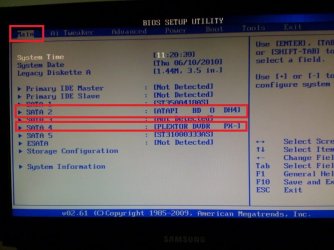
  1. Access your bios and review the Optical Drive connection, make sure its IDE or SATA connected
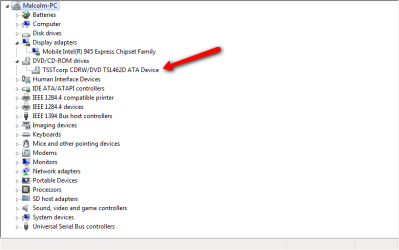
  2. Reboot your system and let Windows 7 load, then go to your device manaher and review youur optical drive settings in Device Manager and see if you have any Yellow Exclamation sympols
Report back when convenient.
 

My Computer

Computer Manufacturer/Model Number
Custom Build
OS
Windows 7 7600 1 X64
CPU
AMD PHENOM II X 550 PROCESSOR 3.1 ghz
Motherboard
ASUS M4A78-TE
Memory
Corsair 4 gig ddr 3
Graphics Card(s)
ati radeon 3300
Sound Card
ati hd
Monitor(s) Displays
syncmaster 2033sw
Screen Resolution
1600X900 60 hz refresh
Hard Drives
twin_seagates SATA's 1 TB & 500 Gig, hitachi_slimline 160 gig
PSU
antec_550 watt
Case
cooler master GLite
Cooling
stock_heat sink
Internet Speed
20mbs up/ 1.5mbs down
Other Info
favorite child "stewie"
favorite dog "brian"
I had a nearly identical problem with an (expensive!!) Plextor DVD/CD drive. It worked fine in XP, but with Vista, it would not read or write DVD+RWs, but it would read commercial DVDs and write virtually everything else.

Nothing I tried worked, including drivers.

Ended up spending a (whopping) $20 and replaced with with a Samsung DVD/CD drive -- and haven't had any problems since.

And now, since I've migrated to Win7, it continues to work with no problems.
 

My Computer

Computer type
PC/Desktop
Computer Manufacturer/Model Number
Custom
OS
Win7 Pro 32-bit, Win8 Pro 32-bit
CPU
AMD Phenom II X6 1090T
Motherboard
Gigabyte
Memory
4GB ddr3 1300
Graphics Card(s)
AMD HD 4290 onboard
Sound Card
Builtin Realtek HD Audio
Monitor(s) Displays
Samsung 24" widescreen, LG 23" widescreen
Screen Resolution
1920x1200/1920x1080
Hard Drives
Kingston 256GB SSD
Keyboard
Logitech Illuminated Keyboard
Mouse
Logitech M705 wireless mouse
Antivirus
Norton Av 2013
Browser
IE v10
Adrian I thought I new a little about computers, but I'm stumped. I went into bios but could not see anything saying "Optical Drive Connection." Would you please elaborate?
 

My Computer

Computer Manufacturer/Model Number
Dell Inspiron E1705
OS
Windows 7
CPU
Intel(R) Core(TM)Duo CPU T2350 @1.86GHz 1.87GHz
Motherboard
DELL Inc, OFF049, i90145GM, 82801GHM (ICH7-M/U)
Memory
DDR2, 2048 MBytes, 266MHz
Graphics Card(s)
Mobile Intel(R) 945 Express Chipset Family
Mouse
Microsoft Wireless
Other Info
Intel(R) Core(TM) Duo CPU T2350 @ 1.86GHz
Adrian I thought I new a little about computers, but I'm stumped. I went into bios but could not see anything saying "Optical Drive Connection." Would you please elaborate?
Hello Mawaltaf, thanks for responding back.
I'm attaching some screenshots of my bios set up and also of my device manager to further assist you in the resolution of this issue. What I hope it will show are any errors, how the drive is connected to your motherboard. If you are capable provide us with images to review. I will bestanding by.
 

Attachments

  • My_bios.jpg
    My_bios.jpg
    52 KB · Views: 24
  • dvices.png
    dvices.png
    49.4 KB · Views: 19

My Computer

Computer Manufacturer/Model Number
Custom Build
OS
Windows 7 7600 1 X64
CPU
AMD PHENOM II X 550 PROCESSOR 3.1 ghz
Motherboard
ASUS M4A78-TE
Memory
Corsair 4 gig ddr 3
Graphics Card(s)
ati radeon 3300
Sound Card
ati hd
Monitor(s) Displays
syncmaster 2033sw
Screen Resolution
1600X900 60 hz refresh
Hard Drives
twin_seagates SATA's 1 TB & 500 Gig, hitachi_slimline 160 gig
PSU
antec_550 watt
Case
cooler master GLite
Cooling
stock_heat sink
Internet Speed
20mbs up/ 1.5mbs down
Other Info
favorite child "stewie"
favorite dog "brian"
This is my Device Manager
 

Attachments

  • Device_Mgr.png
    Device_Mgr.png
    13.2 KB · Views: 19

My Computer

Computer Manufacturer/Model Number
Dell Inspiron E1705
OS
Windows 7
CPU
Intel(R) Core(TM)Duo CPU T2350 @1.86GHz 1.87GHz
Motherboard
DELL Inc, OFF049, i90145GM, 82801GHM (ICH7-M/U)
Memory
DDR2, 2048 MBytes, 266MHz
Graphics Card(s)
Mobile Intel(R) 945 Express Chipset Family
Mouse
Microsoft Wireless
Other Info
Intel(R) Core(TM) Duo CPU T2350 @ 1.86GHz
Confusion

There are 2 different posters here, Jimbo and Malwalt?
Malwalt, describe your issue again please.
 

My Computer

Computer Manufacturer/Model Number
Custom Build
OS
Windows 7 7600 1 X64
CPU
AMD PHENOM II X 550 PROCESSOR 3.1 ghz
Motherboard
ASUS M4A78-TE
Memory
Corsair 4 gig ddr 3
Graphics Card(s)
ati radeon 3300
Sound Card
ati hd
Monitor(s) Displays
syncmaster 2033sw
Screen Resolution
1600X900 60 hz refresh
Hard Drives
twin_seagates SATA's 1 TB & 500 Gig, hitachi_slimline 160 gig
PSU
antec_550 watt
Case
cooler master GLite
Cooling
stock_heat sink
Internet Speed
20mbs up/ 1.5mbs down
Other Info
favorite child "stewie"
favorite dog "brian"
I cannot write anything to my DVD drive. It tells me the disk is write protected, or "the disk in drive D is not supported, the disk is not recognized by the drive, the disk might be damaged or installed. The disks that I have is "Sony DVD-RW. My device is TSST corp CDRW/DVD TSL462D ATA device
 

My Computer

Computer Manufacturer/Model Number
Dell Inspiron E1705
OS
Windows 7
CPU
Intel(R) Core(TM)Duo CPU T2350 @1.86GHz 1.87GHz
Motherboard
DELL Inc, OFF049, i90145GM, 82801GHM (ICH7-M/U)
Memory
DDR2, 2048 MBytes, 266MHz
Graphics Card(s)
Mobile Intel(R) 945 Express Chipset Family
Mouse
Microsoft Wireless
Other Info
Intel(R) Core(TM) Duo CPU T2350 @ 1.86GHz
Carification

I cannot write anything to my DVD drive. It tells me the disk is write protected, or "the disk in drive D is not supported, the disk is not recognized by the drive, the disk might be damaged or installed. The disks that I have is "Sony DVD-RW. My device is TSST corp CDRW/DVD TSL462D ATA device
Ok, as I understand your issue you are attempting to read/write data to a CD/DVD
After reviewing you optical drive within your device manager I'm going to research your drive.
When you attempt to write onto a blank media disk are you using a 3rd party writer such as Nero? Or are you attempting to write to the media through Windows 7?
 

My Computer

Computer Manufacturer/Model Number
Custom Build
OS
Windows 7 7600 1 X64
CPU
AMD PHENOM II X 550 PROCESSOR 3.1 ghz
Motherboard
ASUS M4A78-TE
Memory
Corsair 4 gig ddr 3
Graphics Card(s)
ati radeon 3300
Sound Card
ati hd
Monitor(s) Displays
syncmaster 2033sw
Screen Resolution
1600X900 60 hz refresh
Hard Drives
twin_seagates SATA's 1 TB & 500 Gig, hitachi_slimline 160 gig
PSU
antec_550 watt
Case
cooler master GLite
Cooling
stock_heat sink
Internet Speed
20mbs up/ 1.5mbs down
Other Info
favorite child "stewie"
favorite dog "brian"
Nero
 

My Computer

Computer Manufacturer/Model Number
Dell Inspiron E1705
OS
Windows 7
CPU
Intel(R) Core(TM)Duo CPU T2350 @1.86GHz 1.87GHz
Motherboard
DELL Inc, OFF049, i90145GM, 82801GHM (ICH7-M/U)
Memory
DDR2, 2048 MBytes, 266MHz
Graphics Card(s)
Mobile Intel(R) 945 Express Chipset Family
Mouse
Microsoft Wireless
Other Info
Intel(R) Core(TM) Duo CPU T2350 @ 1.86GHz

My Computer

Computer Manufacturer/Model Number
Custom Build
OS
Windows 7 7600 1 X64
CPU
AMD PHENOM II X 550 PROCESSOR 3.1 ghz
Motherboard
ASUS M4A78-TE
Memory
Corsair 4 gig ddr 3
Graphics Card(s)
ati radeon 3300
Sound Card
ati hd
Monitor(s) Displays
syncmaster 2033sw
Screen Resolution
1600X900 60 hz refresh
Hard Drives
twin_seagates SATA's 1 TB & 500 Gig, hitachi_slimline 160 gig
PSU
antec_550 watt
Case
cooler master GLite
Cooling
stock_heat sink
Internet Speed
20mbs up/ 1.5mbs down
Other Info
favorite child "stewie"
favorite dog "brian"
Yes sir
 

My Computer

Computer Manufacturer/Model Number
Dell Inspiron E1705
OS
Windows 7
CPU
Intel(R) Core(TM)Duo CPU T2350 @1.86GHz 1.87GHz
Motherboard
DELL Inc, OFF049, i90145GM, 82801GHM (ICH7-M/U)
Memory
DDR2, 2048 MBytes, 266MHz
Graphics Card(s)
Mobile Intel(R) 945 Express Chipset Family
Mouse
Microsoft Wireless
Other Info
Intel(R) Core(TM) Duo CPU T2350 @ 1.86GHz
Ok, we are starting to narrow down the issue. Are you able to copy/burn data to your optical drive/media using the feature in Windows 7?
 

My Computer

Computer Manufacturer/Model Number
Custom Build
OS
Windows 7 7600 1 X64
CPU
AMD PHENOM II X 550 PROCESSOR 3.1 ghz
Motherboard
ASUS M4A78-TE
Memory
Corsair 4 gig ddr 3
Graphics Card(s)
ati radeon 3300
Sound Card
ati hd
Monitor(s) Displays
syncmaster 2033sw
Screen Resolution
1600X900 60 hz refresh
Hard Drives
twin_seagates SATA's 1 TB & 500 Gig, hitachi_slimline 160 gig
PSU
antec_550 watt
Case
cooler master GLite
Cooling
stock_heat sink
Internet Speed
20mbs up/ 1.5mbs down
Other Info
favorite child "stewie"
favorite dog "brian"
Adrian I'm going to ask a stupid question, "how would I do this".
 

My Computer

Computer Manufacturer/Model Number
Dell Inspiron E1705
OS
Windows 7
CPU
Intel(R) Core(TM)Duo CPU T2350 @1.86GHz 1.87GHz
Motherboard
DELL Inc, OFF049, i90145GM, 82801GHM (ICH7-M/U)
Memory
DDR2, 2048 MBytes, 266MHz
Graphics Card(s)
Mobile Intel(R) 945 Express Chipset Family
Mouse
Microsoft Wireless
Other Info
Intel(R) Core(TM) Duo CPU T2350 @ 1.86GHz
Back
Top