Solved Earbud mic not recording?

azhe

New member
Local time
6:48 AM
Messages
14
I've bought the following earbuds:
SHE7005A/28 Philips In-Ear Headset SHE7005A - Philips Support

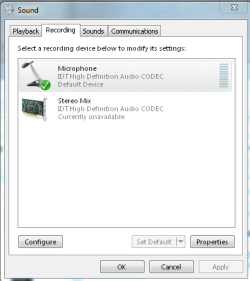
I've plugged them into the front headphone jack of my tower, and the Sound manager recognizes them (when I test them under "playback" I can hear the chime that plays), but it does not seem to pick up the mic. Attached to this post are screenshots of the settings in the Sound manager.

Anyone know how I might get these to work?

EDIT: Would a mobile headset to PC converter be necessary for this?
 

Attachments
  • ScreenClip.png
    ScreenClip.png
    12.6 KB · Views: 3
  • ScreenClip [2].png
    ScreenClip [2].png
    11.9 KB · Views: 3
  • ScreenClip [4].png
    ScreenClip [4].png
    11.5 KB · Views: 3
  • ScreenClip [3].png
    ScreenClip [3].png
    7.6 KB · Views: 3

My Computer

Computer Manufacturer/Model Number
HP Pavilion HPE h8m
OS
Windows 7 Home Premium x64 SP1
CPU
AMD FX-6100 Six-Core 3.30GHz
Memory
6GB DDR3-1333MHz SDRAM
Graphics Card(s)
2GB DDR3 nVidia GeForce GT 530
Screen Resolution
1440x900
Other Info
Brand new PC
What Mic are you using? Is this a laptop with a built in mic? or are you using some other mic?

Along with the test tones, do you hear audio when you play some other music?

Can you hear the mic with your speakers?

Usually the System Mixer (could be called Stereo Mix) is set as the default audio recording device. Then any input such as a mic or line will be heard. You also need the System Mixer if you want to record streaming audio from the internet.
 

My Computer

Computer type
PC/Desktop
Computer Manufacturer/Model Number
My Own Build
OS
Windows 10 64 bit
CPU
Intel i7 6700K
Motherboard
ASUS ROG Maximus VIII Hero
Memory
16GB Corsair Dominator
Graphics Card(s)
Intel CPU Graphics
Sound Card
RealTek
Monitor(s) Displays
27" Dell S2719dgf
Screen Resolution
2560X1440
Hard Drives
1 TB Samsung 850 EVO SSD for Win 10 Pro
500GB Samsung 850 EVO SSD for Win 10 Insider
2 TB drive for backup
PSU
EVGA Supernova 750G2
Case
BeQuiet Silent Base 600
Cooling
Deepcool Captain 120EX
Keyboard
Microsoft Wireless 2000
Mouse
Microsoft wireless
Internet Speed
100 MB/sec (Cable)
Antivirus
Microsoft Defender and Malwarebytes
Browser
Edge/Firefox
Other Info
Cakewalk (Sonar) by BandLab and Studio One 4.1 Pro recording studio software. MOTU 896Mk3 Hybrid recording interface, Frontier Tranzport wireless control unit, Behringer X-Touch Control Surface.
Five USB connected optical drives for CD Audio production using Nero BurningROM
What Mic are you using? Is this a laptop with a built in mic? or are you using some other mic?
The mic is on the earbuds. I have posted a link to the model in my post. My computer is a desktop, and I am plugging them into the tower, into the front panel.

Along with the test tones, do you hear audio when you play some other music?
Yes, that is what I normally use them for.

Can you hear the mic with your speakers?
No, there is no sound, no noticeable "response" when I speak into the mic.

Usually the System Mixer (could be called Stereo Mix) is set as the default audio recording device. Then any input such as a mic or line will be heard. You also need the System Mixer if you want to record streaming audio from the internet.
I want to record my voice, from my mic. Are you saying the Stereo Mix needs to be default, and not my headset?

I would try it, but actually now when I plug them in they aren't showing up under the Recording tab. I don't know why this is, seeing as they were showing up earlier.
 

My Computer

Computer Manufacturer/Model Number
HP Pavilion HPE h8m
OS
Windows 7 Home Premium x64 SP1
CPU
AMD FX-6100 Six-Core 3.30GHz
Memory
6GB DDR3-1333MHz SDRAM
Graphics Card(s)
2GB DDR3 nVidia GeForce GT 530
Screen Resolution
1440x900
Other Info
Brand new PC
The link you have is only for earbuds, no mic?
 

My Computer

Computer type
PC/Desktop
Computer Manufacturer/Model Number
My Own Build
OS
Windows 10 64 bit
CPU
Intel i7 6700K
Motherboard
ASUS ROG Maximus VIII Hero
Memory
16GB Corsair Dominator
Graphics Card(s)
Intel CPU Graphics
Sound Card
RealTek
Monitor(s) Displays
27" Dell S2719dgf
Screen Resolution
2560X1440
Hard Drives
1 TB Samsung 850 EVO SSD for Win 10 Pro
500GB Samsung 850 EVO SSD for Win 10 Insider
2 TB drive for backup
PSU
EVGA Supernova 750G2
Case
BeQuiet Silent Base 600
Cooling
Deepcool Captain 120EX
Keyboard
Microsoft Wireless 2000
Mouse
Microsoft wireless
Internet Speed
100 MB/sec (Cable)
Antivirus
Microsoft Defender and Malwarebytes
Browser
Edge/Firefox
Other Info
Cakewalk (Sonar) by BandLab and Studio One 4.1 Pro recording studio software. MOTU 896Mk3 Hybrid recording interface, Frontier Tranzport wireless control unit, Behringer X-Touch Control Surface.
Five USB connected optical drives for CD Audio production using Nero BurningROM
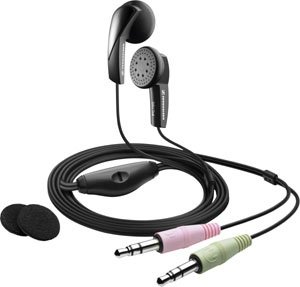
It is a earphones/mic combo compatible for Android phones only, if you want to use a microphone on the PC you would need a headset with a separate 3.5mm jack for the mic to connect to the pink microphone hole

Sample:
Sennheiser-PC-100-PC-Headset-for-VoIP.jpg
 

My Computer

Computer type
PC/Desktop
Computer Manufacturer/Model Number
UNDER CONSTRUCTION
OS
Windows 7 Ultimate SP1 (32-bit)
CPU
Intel Core i3-2120 @ 3.30GHz (Stock)
Motherboard
ASUS P8H61-M LX (Rev 3.0)
Memory
1x Kingston DDR3 SDRAM @ 1333MHz 4GB (Stock)
Graphics Card(s)
PALIT NVIDIA GeForce 210 @ 1GB DDR3 (Stock)
Sound Card
Realtek ALC887 (On-Board)
Monitor(s) Displays
LG Flatron L227WTG-PF 22" LCD Monitor
Screen Resolution
1680x1050 (Monitor) & 1176x664 (TV)
Hard Drives
Western Digital Caviar Blue @ 500GB (Internal) & Western Digital Elements @ 500GB (External)
PSU
Seasonic M12II Bronze Evo Edition @ 520W
Case
Cooler Master HAF X
Cooling
DEEPCOOL Gamma Archer CPU Cooler & 1x 120mm Side Intake Fan
Keyboard
Compaq KB-0133 PS/2 Keyboard
Mouse
Elephant Blade Runner GR WEM-1019 USB Laser Gaming Mouse
Internet Speed
PLDT Home DSL @ 3 Mbps ↓ & 0.75 Mbps ↑
Antivirus
Microsoft SE & Malwarebytes Anti-Malware (Premium)
Browser
Google Chrome
Other Info
Edifier 2.1 Speaker System + Bose SoundLink Mini | Samsung LN540520X/XAA LCD TV via HDMI | Epson L120
'splains that. Different headset/mic will be required.
 

My Computer

Computer type
PC/Desktop
Computer Manufacturer/Model Number
My Own Build
OS
Windows 10 64 bit
CPU
Intel i7 6700K
Motherboard
ASUS ROG Maximus VIII Hero
Memory
16GB Corsair Dominator
Graphics Card(s)
Intel CPU Graphics
Sound Card
RealTek
Monitor(s) Displays
27" Dell S2719dgf
Screen Resolution
2560X1440
Hard Drives
1 TB Samsung 850 EVO SSD for Win 10 Pro
500GB Samsung 850 EVO SSD for Win 10 Insider
2 TB drive for backup
PSU
EVGA Supernova 750G2
Case
BeQuiet Silent Base 600
Cooling
Deepcool Captain 120EX
Keyboard
Microsoft Wireless 2000
Mouse
Microsoft wireless
Internet Speed
100 MB/sec (Cable)
Antivirus
Microsoft Defender and Malwarebytes
Browser
Edge/Firefox
Other Info
Cakewalk (Sonar) by BandLab and Studio One 4.1 Pro recording studio software. MOTU 896Mk3 Hybrid recording interface, Frontier Tranzport wireless control unit, Behringer X-Touch Control Surface.
Five USB connected optical drives for CD Audio production using Nero BurningROM
Yeah, after some more reading, that's what I figured. I went and bought a proper mic. Thank you for the help nonetheless.
 

My Computer

Computer Manufacturer/Model Number
HP Pavilion HPE h8m
OS
Windows 7 Home Premium x64 SP1
CPU
AMD FX-6100 Six-Core 3.30GHz
Memory
6GB DDR3-1333MHz SDRAM
Graphics Card(s)
2GB DDR3 nVidia GeForce GT 530
Screen Resolution
1440x900
Other Info
Brand new PC
Back
Top