Solved Easeus todo for images?

Yep, a 39 year old who will never grow up, lol! I do appreciate all the help but as you can guess I am doing my best to avoid re install and having to start over. I'm trying reflect again and have ticked the option to ignore bad sectors. A pondering out of left field but I have network drives mapped. If one of those is dodgy could that be unsettle the system - I suspect this is highly unlikely.
 

My Computer My Computer

Computer type
Laptop
Computer Manufacturer/Model Number
Alienware M17RX3
OS
Windows 7 Ultimate 64 bit
CPU
Sandybridge 2820 QM 2.3 ghz
Memory
8 gb
Graphics Card(s)
AMD Radeon 6970m
Sound Card
Integrated
Monitor(s) Displays
Laptop 17"
Screen Resolution
1980x1080
Hard Drives
750 gb mechanical (7,200RPM) Seagate Momentous paired with OCZ Synapse 128 gb SSD cache drive
Internet Speed
55 mbits download, 12 mbits download
Antivirus
Microsoft Security Essentials
Browser
IE11, Mozilla
Do you have a pagefile on the drive ? To create a dump file a pagefile is needed on [C].
 

My Computer My Computer

Computer type
PC/Desktop
Computer Manufacturer/Model Number
home built
OS
Multi-Boot W7_Pro_x64 W8.1_Pro_x64 W10_Pro_x64 +Linux_VMs +Chromium_VM
CPU
AMD Athlon II x4 620
Motherboard
Gigabyte GA-MA785G-UD3H
Memory
6GB GSkill DDR2 800
Graphics Card(s)
AMD 4670 GPU + AMD 4200 IGP
Sound Card
on board Realtek ALC889A
Monitor(s) Displays
RCA 40" LCD TV, Insignia 32" LCD TV, HP 15" LCD monitor
Screen Resolution
1680 x 1050
Hard Drives
OCZ Vertex 3 120GB,
Samsung F3 1TB (3),
Several others - WD, Seagate, Hitachi, ...
PSU
Corsair 500 W
Case
Rosewill mid tower
Cooling
CM 90mm rifle
Keyboard
Gyration wireless, Logitech wireless, Dell USB wired
Mouse
Gyration wireless, Logitech wireless, V7 USB wired
Internet Speed
Spectrum - 100Mbps D / 10Mbps U
Antivirus
Avast, MBAM3, EMET, WinPatrol
Browser
Pale Moon, Firefox, IE
Other Info
2 multi-boot PC's
Mainly HTPC/Office/Gen purpose (no gaming).
Trendnet USB KVM.
LG DVD burner/Blue Ray Player.
Tray system for removable SATA backup drives.

Not currently OCd, under-volted.
I use Hybrid sleep, rarely re-boot or shutdown.

Hauppauge HD-PVR, Avermedia PCIe TV Tuner, Hauppauge PCI TV Tuner.
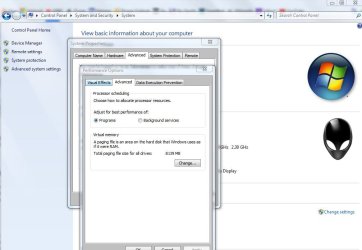
Yeah I think it's enabled, this is what I see setup. I've never touched anything like this.

I'm just trying your suggestion in macrium to ignore bad sectors in the advanced options. Will see how that gets on!
 

Attachments

  • pagefile.JPG
    pagefile.JPG
    65.5 KB · Views: 1

My Computer My Computer

Computer type
Laptop
Computer Manufacturer/Model Number
Alienware M17RX3
OS
Windows 7 Ultimate 64 bit
CPU
Sandybridge 2820 QM 2.3 ghz
Memory
8 gb
Graphics Card(s)
AMD Radeon 6970m
Sound Card
Integrated
Monitor(s) Displays
Laptop 17"
Screen Resolution
1980x1080
Hard Drives
750 gb mechanical (7,200RPM) Seagate Momentous paired with OCZ Synapse 128 gb SSD cache drive
Internet Speed
55 mbits download, 12 mbits download
Antivirus
Microsoft Security Essentials
Browser
IE11, Mozilla
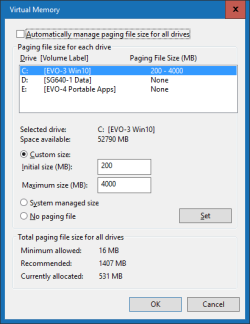
Click on the Change... button in your screen print and it will show info for each partition (drive).

Pagefile_01.png
 

My Computer My Computer

Computer type
PC/Desktop
Computer Manufacturer/Model Number
home built
OS
Multi-Boot W7_Pro_x64 W8.1_Pro_x64 W10_Pro_x64 +Linux_VMs +Chromium_VM
CPU
AMD Athlon II x4 620
Motherboard
Gigabyte GA-MA785G-UD3H
Memory
6GB GSkill DDR2 800
Graphics Card(s)
AMD 4670 GPU + AMD 4200 IGP
Sound Card
on board Realtek ALC889A
Monitor(s) Displays
RCA 40" LCD TV, Insignia 32" LCD TV, HP 15" LCD monitor
Screen Resolution
1680 x 1050
Hard Drives
OCZ Vertex 3 120GB,
Samsung F3 1TB (3),
Several others - WD, Seagate, Hitachi, ...
PSU
Corsair 500 W
Case
Rosewill mid tower
Cooling
CM 90mm rifle
Keyboard
Gyration wireless, Logitech wireless, Dell USB wired
Mouse
Gyration wireless, Logitech wireless, V7 USB wired
Internet Speed
Spectrum - 100Mbps D / 10Mbps U
Antivirus
Avast, MBAM3, EMET, WinPatrol
Browser
Pale Moon, Firefox, IE
Other Info
2 multi-boot PC's
Mainly HTPC/Office/Gen purpose (no gaming).
Trendnet USB KVM.
LG DVD burner/Blue Ray Player.
Tray system for removable SATA backup drives.

Not currently OCd, under-volted.
I use Hybrid sleep, rarely re-boot or shutdown.

Hauppauge HD-PVR, Avermedia PCIe TV Tuner, Hauppauge PCI TV Tuner.
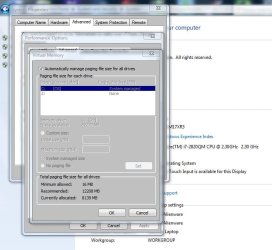
Oaky, I've attached. It's on auto at the moment. Strange Z is listed, that's a mapped network drive.

Macrium failed again. System froze up at same 95% point despite tweaking those options and ensuring it ignores bad sectors.
 

Attachments

  • pagefile 2.JPG
    pagefile 2.JPG
    60 KB · Views: 1

My Computer My Computer

Computer type
Laptop
Computer Manufacturer/Model Number
Alienware M17RX3
OS
Windows 7 Ultimate 64 bit
CPU
Sandybridge 2820 QM 2.3 ghz
Memory
8 gb
Graphics Card(s)
AMD Radeon 6970m
Sound Card
Integrated
Monitor(s) Displays
Laptop 17"
Screen Resolution
1980x1080
Hard Drives
750 gb mechanical (7,200RPM) Seagate Momentous paired with OCZ Synapse 128 gb SSD cache drive
Internet Speed
55 mbits download, 12 mbits download
Antivirus
Microsoft Security Essentials
Browser
IE11, Mozilla
The only thing I've added of any note since last successful image and restore from is Hauppauge capture and the drivers for the capture device. I'll try uninstalling it and having another go. But I doubt it's the reason. I think i'll have to try the image again tomorrow night. My wife's getting cross with the amount of time I spending with the laptop. She must think I've got another woman on the go, lol!

This is extremely unlikely, but is your Windows fully updated and have you made successful images of your entire drive of late? Mine is fully updated but maybe there is a remote possibility some Windows update is to blame as occasionally MS drop the ball. Of course if you've imaged just fine in relatively recent memory then that ends that theory

Computers, I love them and loathe them all at the same time!!!

Cheers,
Wayne
 

My Computer My Computer

Computer type
Laptop
Computer Manufacturer/Model Number
Alienware M17RX3
OS
Windows 7 Ultimate 64 bit
CPU
Sandybridge 2820 QM 2.3 ghz
Memory
8 gb
Graphics Card(s)
AMD Radeon 6970m
Sound Card
Integrated
Monitor(s) Displays
Laptop 17"
Screen Resolution
1980x1080
Hard Drives
750 gb mechanical (7,200RPM) Seagate Momentous paired with OCZ Synapse 128 gb SSD cache drive
Internet Speed
55 mbits download, 12 mbits download
Antivirus
Microsoft Security Essentials
Browser
IE11, Mozilla
System Managed is fine, and the preferred/recommended setting.

Right now I suggest NOT making any system/driver changes unless the experts in your BSOD thread suggest doing it.
It seems you are getting somewhere in that thread with the HD Tune issue.
Making changes they don't know about could cause confusion for what they see.

Post any new info there you find, but let them know before making changes.

I have no idea what having the Z mapped Network drive means, or if it even matters for the BSOD issue.
 

My Computer My Computer

Computer type
PC/Desktop
Computer Manufacturer/Model Number
home built
OS
Multi-Boot W7_Pro_x64 W8.1_Pro_x64 W10_Pro_x64 +Linux_VMs +Chromium_VM
CPU
AMD Athlon II x4 620
Motherboard
Gigabyte GA-MA785G-UD3H
Memory
6GB GSkill DDR2 800
Graphics Card(s)
AMD 4670 GPU + AMD 4200 IGP
Sound Card
on board Realtek ALC889A
Monitor(s) Displays
RCA 40" LCD TV, Insignia 32" LCD TV, HP 15" LCD monitor
Screen Resolution
1680 x 1050
Hard Drives
OCZ Vertex 3 120GB,
Samsung F3 1TB (3),
Several others - WD, Seagate, Hitachi, ...
PSU
Corsair 500 W
Case
Rosewill mid tower
Cooling
CM 90mm rifle
Keyboard
Gyration wireless, Logitech wireless, Dell USB wired
Mouse
Gyration wireless, Logitech wireless, V7 USB wired
Internet Speed
Spectrum - 100Mbps D / 10Mbps U
Antivirus
Avast, MBAM3, EMET, WinPatrol
Browser
Pale Moon, Firefox, IE
Other Info
2 multi-boot PC's
Mainly HTPC/Office/Gen purpose (no gaming).
Trendnet USB KVM.
LG DVD burner/Blue Ray Player.
Tray system for removable SATA backup drives.

Not currently OCd, under-volted.
I use Hybrid sleep, rarely re-boot or shutdown.

Hauppauge HD-PVR, Avermedia PCIe TV Tuner, Hauppauge PCI TV Tuner.
Ok understood. I will focus on that thread now. It has been speculated the HD is damaged/bad as certain parameters are unreadable in HD tune such as temperature and health check. Of course I will update this particular thread with a final outcome whether it be successful or not.

Thanks, Wayne
 

My Computer My Computer

Computer type
Laptop
Computer Manufacturer/Model Number
Alienware M17RX3
OS
Windows 7 Ultimate 64 bit
CPU
Sandybridge 2820 QM 2.3 ghz
Memory
8 gb
Graphics Card(s)
AMD Radeon 6970m
Sound Card
Integrated
Monitor(s) Displays
Laptop 17"
Screen Resolution
1980x1080
Hard Drives
750 gb mechanical (7,200RPM) Seagate Momentous paired with OCZ Synapse 128 gb SSD cache drive
Internet Speed
55 mbits download, 12 mbits download
Antivirus
Microsoft Security Essentials
Browser
IE11, Mozilla
This is extremely unlikely, but is your Windows fully updated and have you made successful images of your entire drive of late? Mine is fully updated but maybe there is a remote possibility some Windows update is to blame as occasionally MS drop the ball. Of course if you've imaged just fine in relatively recent memory then that ends that theory

Yes, i keep my systems fully updated, and haven't had any problems creating backup images with Macrium.
I do NOT install some updates (and hide them) that are for the Win 10 upgrade if i don't want that OS to upgrade.
 

My Computer My Computer

Computer type
PC/Desktop
Computer Manufacturer/Model Number
home built
OS
Multi-Boot W7_Pro_x64 W8.1_Pro_x64 W10_Pro_x64 +Linux_VMs +Chromium_VM
CPU
AMD Athlon II x4 620
Motherboard
Gigabyte GA-MA785G-UD3H
Memory
6GB GSkill DDR2 800
Graphics Card(s)
AMD 4670 GPU + AMD 4200 IGP
Sound Card
on board Realtek ALC889A
Monitor(s) Displays
RCA 40" LCD TV, Insignia 32" LCD TV, HP 15" LCD monitor
Screen Resolution
1680 x 1050
Hard Drives
OCZ Vertex 3 120GB,
Samsung F3 1TB (3),
Several others - WD, Seagate, Hitachi, ...
PSU
Corsair 500 W
Case
Rosewill mid tower
Cooling
CM 90mm rifle
Keyboard
Gyration wireless, Logitech wireless, Dell USB wired
Mouse
Gyration wireless, Logitech wireless, V7 USB wired
Internet Speed
Spectrum - 100Mbps D / 10Mbps U
Antivirus
Avast, MBAM3, EMET, WinPatrol
Browser
Pale Moon, Firefox, IE
Other Info
2 multi-boot PC's
Mainly HTPC/Office/Gen purpose (no gaming).
Trendnet USB KVM.
LG DVD burner/Blue Ray Player.
Tray system for removable SATA backup drives.

Not currently OCd, under-volted.
I use Hybrid sleep, rarely re-boot or shutdown.

Hauppauge HD-PVR, Avermedia PCIe TV Tuner, Hauppauge PCI TV Tuner.
Have you tried to create an image ignoring bad sectors like I advised?
Have you actually carried out a full disk scan yet using "Scan for and attempt recovery of bad sectors".
If you have non recoverable bad sectors then your HDD needs replacing and this will give you the opportunity to include an important 4th partition for data.
 

My Computer My Computer

Computer type
PC/Desktop
Computer Manufacturer/Model Number
Own build
OS
Windows 7x64 Home Premium SP1
CPU
Intel i7 2600k
Motherboard
ASUS P8Z68 Deluxe
Memory
G.Skill Ripjaws (DDR3-1600) 2x4GB
Graphics Card(s)
Nvidia GeForce GTS 450; Intel HD Graphics 3000(GT2+)
Monitor(s) Displays
Dell Ultrasharp IPS panel U2311H, Samsung SyncMaster P2350
Screen Resolution
1920x1080
Hard Drives
Samsung 850 Pro SSD 256GB, Samsung SSD 840 120GB, Seagates 1TB Barracuda ST31000528AS x2
PSU
Seasonic M12II 520W
Case
Lian Li Lancool PC-K60
Cooling
Case: 1x120mm, 3x140mm CPU: Hyper 212+
Keyboard
Logitech MK520 (wireless)
Mouse
Logitech MK520
Internet Speed
6-7 Mbps
Antivirus
Norton Security Premium, Malwarebytes on 2 (MSE on 3rd PC)
Browser
FireFox
Other Info
Audio: Logitech Z523 2.1
Yes I tried an image with ignore bad sectors as advised and it still did the same at exactly same point. I haven't done the other scan yet. It has been speculated on the BSOD forum my problem might be because my disk is too full with only 10% left and to free up space. So from 70gb free approx out of 679 I have cleared off lots of media to get another 60 gb back. That took me a while so I'll try the image again tomorrow evening. It's funny as in normal use its perfect and I don't think I've ever had a BSOD in five years. Anyway time will tell. I also uninstalled the Hauppauge capture device software and drivers for the capture device which is the only notable addition since my last image.

Cheers, Wayne
 

My Computer My Computer

Computer type
Laptop
Computer Manufacturer/Model Number
Alienware M17RX3
OS
Windows 7 Ultimate 64 bit
CPU
Sandybridge 2820 QM 2.3 ghz
Memory
8 gb
Graphics Card(s)
AMD Radeon 6970m
Sound Card
Integrated
Monitor(s) Displays
Laptop 17"
Screen Resolution
1980x1080
Hard Drives
750 gb mechanical (7,200RPM) Seagate Momentous paired with OCZ Synapse 128 gb SSD cache drive
Internet Speed
55 mbits download, 12 mbits download
Antivirus
Microsoft Security Essentials
Browser
IE11, Mozilla
Wayne, You could try to run chkdsk and Macrium both from disc. Chkdsk will be more thorough without the locked files of a running system. Not sure if you have tried making an image of the system from the Macrium disc itself with the operating system off, it can make images as well as restore them. The Macrium imaging function really should finish with the system shut down.
Here is Shawn's guide on how to make a Windows 7 repair disc:
http://www.sevenforums.com/tutorials/2083-system-repair-disc-create.html
Here is a visual walk through of chkdsk from the University of Wisconsin Knowledge Base:
https://kb.wisc.edu/page.php?id=6565
When you are at X:\Sources> you can type DISKPART then press enter,
then type list volume and press enter to see exactly what drive letter the OS is on,
it won't necessarily be C: drive while you are running from the disk.
Make sure you type exit and press enter to leave DISKPART.
While you're there might as well run the System File checker as well.
Again at X:\Sources> type:
sfc /scannow /offbootdir=?:\ /offwindir=?:\windows

Then press enter and wait until finished. The actual drive letter the OS is on replaces the red question marks. Notice the space between: \ & /
Crystal Disk Info is another HD checker, this is the portable version from Major Geeks with no adware:
Download CrystalDiskInfo - MajorGeeks
Hope this helps.
 

My Computer My Computer

Computer type
PC/Desktop
Computer Manufacturer/Model Number
PowerSpec B718
OS
7 Ultimate x64 / Linux Mint x64
CPU
Intel i5-3570 @ 3.40GHz
Memory
8.00 GB Dual-Channel DDR3
Graphics Card(s)
Intel HD Graphics 4000
Sound Card
Default
Monitor(s) Displays
Acer X193W (1440x900@60Hz)
Browser
Palemoon x86 x64
Sorry I have not read the whole thread but I assume you have bad sectors on the HDD you are trying to make an image of ?
The only program I have found to reliably make an image in that situation is Drive Image XML free download from here DriveImage XML Backup Software - Data Recovery Product this even worked when the HDD had a sticky read arm.
 

My Computer My Computer

Computer type
Laptop
Computer Manufacturer/Model Number
Sony
OS
Windows 7 x64 SP1
CPU
Intel
Motherboard
Sony
Memory
4gb
Graphics Card(s)
Nvidia
Hard Drives
WD
Internet Speed
Dial up wasn't as bad as this !
Antivirus
Avast
Browser
Firefox
Yes there are bad sectors - I think the machine was on borrowed time (I had a gpu issue too) and I have decided to just replace it with a smaller laptop at some stage. Unfortunately my wife is ready to throw it out the window anyway given the amount of time I have wasted on it!!! It's a shame but the 17 inch laptop size hardly made it a mobile machine and was always tethered to a desk. When I get a new one I will look to use macrium instead of microsofts own though - I guess a new machine will have Windows 10 pre loaded on it, not impressed with the OS one bit as we have it on a desktop machine. It's a bug fest but I guess it's the future and there is no avoiding it forever. Cheers for all the help guys
 

My Computer My Computer

Computer type
Laptop
Computer Manufacturer/Model Number
Alienware M17RX3
OS
Windows 7 Ultimate 64 bit
CPU
Sandybridge 2820 QM 2.3 ghz
Memory
8 gb
Graphics Card(s)
AMD Radeon 6970m
Sound Card
Integrated
Monitor(s) Displays
Laptop 17"
Screen Resolution
1980x1080
Hard Drives
750 gb mechanical (7,200RPM) Seagate Momentous paired with OCZ Synapse 128 gb SSD cache drive
Internet Speed
55 mbits download, 12 mbits download
Antivirus
Microsoft Security Essentials
Browser
IE11, Mozilla
Back
Top