
Solved Easy Drive Repair

Callender

New member
Guru
Gold Member
VIP
Local time
2:18 PM
Messages
4,776
Location
United Kingdom
Is anyone willing to test this?

Zeatron Software

I've installed it and it claims to check drives for errors and fix them. States that the drive is locked during repairs then unlocks the drive without needing a reboot. It's very fast. What's the best way to check that it actually does what it claims to do?

Note: Adds a startup entry.

HKEY_CURRENT_USER\Software\Microsoft\Windows\CurrentVersion\Run

Value Name: Easy Disk Drive Repair

Value Data: "C:\Program Files (x86)\Easy Disk Drive Repair\EasyDiskDriveRepair.exe" -quickscan

VirusTotal report:

https://www.virustotal.com/en/file/...ae26bd4d343819c96a63820604/analysis/#analysis

Screenshot:
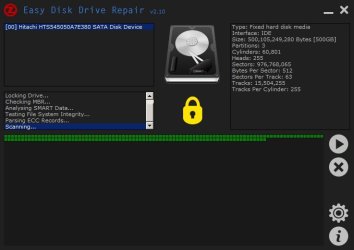
Easy Disk Drive Repair.jpg
 

My Computer

Computer type
Laptop
Computer Manufacturer/Model Number
ASUS
OS
Microsoft Windows 7 Home Premium 64-bit 7601 Multiprocessor Free Service Pack 1
CPU
AMD C-60 APU with Radeon(tm) HD Graphics
Motherboard
ASUSTeK COMPUTER INC. X501U
Memory
4.00 GB
Graphics Card(s)
AMD Radeon HD 6290 Graphics
Sound Card
(1) AMD High Definition Audio Device (2) Realtek High Defi
Screen Resolution
1366 x 768 x 32 bits (4294967296 colors) @ 60 Hz
Hard Drives
Hitachi HTS545050A7E380 SATA Disk Device
Antivirus
Comodo CIS & FW, SecureAplus App Whitelisting, Threatfire
Browser
Cyberfox 64bit, Opera 64bit, Airfox
Other Info
Spy-The-Spy, HitmanPro.Alert, Norton Connect Safe, MJRegWatcher, BitDefender TrafficLight, Voodoo Shield, Zemana AntiMalware
What's it for?

Is it supposed to be a third party chkdsk?

I read their promo material, and I can't figure out what problem it's intended to solve.
 

My Computer

Computer type
Laptop
Computer Manufacturer/Model Number
HP
OS
Dual Boot Win 8.1 x64; Win 7 SP1 x64
CPU
i7-3610QM @ 2.3 GHz
Motherboard
Hewlett-Packard 181C (U3E1)
Memory
8 GB Dual-Channel DDR3 @ 798MHz
Graphics Card(s)
Intel HD Graphics 4000
Hard Drives
Hitachi HTS547575A9E384 SCSI Disk Device;
WD Elements 1042 USB Device
Antivirus
Microsoft Security Essentials; Comodo Firewall w/ Defense +
Easy Drive Repair - info

The only information that I can find other that what's on the website is:

Easy Disk Drive Repair Download - Softpedia

I tend to run chkdsk /f /r at least every week but I'm not exactly sure what Easy Drive Repair does or if it's supposed to fix the same errors as chkdsk.
 

My Computer

Computer type
Laptop
Computer Manufacturer/Model Number
ASUS
OS
Microsoft Windows 7 Home Premium 64-bit 7601 Multiprocessor Free Service Pack 1
CPU
AMD C-60 APU with Radeon(tm) HD Graphics
Motherboard
ASUSTeK COMPUTER INC. X501U
Memory
4.00 GB
Graphics Card(s)
AMD Radeon HD 6290 Graphics
Sound Card
(1) AMD High Definition Audio Device (2) Realtek High Defi
Screen Resolution
1366 x 768 x 32 bits (4294967296 colors) @ 60 Hz
Hard Drives
Hitachi HTS545050A7E380 SATA Disk Device
Antivirus
Comodo CIS & FW, SecureAplus App Whitelisting, Threatfire
Browser
Cyberfox 64bit, Opera 64bit, Airfox
Other Info
Spy-The-Spy, HitmanPro.Alert, Norton Connect Safe, MJRegWatcher, BitDefender TrafficLight, Voodoo Shield, Zemana AntiMalware
Do you know of any forums where people out scam software? Maybe the techsupport alert forums.

I'd love to submit it and see what happens. I have no way of knowing what this does.
 

My Computer

Computer type
Laptop
Computer Manufacturer/Model Number
HP
OS
Dual Boot Win 8.1 x64; Win 7 SP1 x64
CPU
i7-3610QM @ 2.3 GHz
Motherboard
Hewlett-Packard 181C (U3E1)
Memory
8 GB Dual-Channel DDR3 @ 798MHz
Graphics Card(s)
Intel HD Graphics 4000
Hard Drives
Hitachi HTS547575A9E384 SCSI Disk Device;
WD Elements 1042 USB Device
Antivirus
Microsoft Security Essentials; Comodo Firewall w/ Defense +
Easy Drive Repair - looking for info

Do you know of any forums where people out scam software? Maybe the techsupport alert forums.

I'd love to submit it and see what happens. I have no way of knowing what this does.

Well I've posted the question on another forum and if there's any useful feedback I'll post a link to it!
 

My Computer

Computer type
Laptop
Computer Manufacturer/Model Number
ASUS
OS
Microsoft Windows 7 Home Premium 64-bit 7601 Multiprocessor Free Service Pack 1
CPU
AMD C-60 APU with Radeon(tm) HD Graphics
Motherboard
ASUSTeK COMPUTER INC. X501U
Memory
4.00 GB
Graphics Card(s)
AMD Radeon HD 6290 Graphics
Sound Card
(1) AMD High Definition Audio Device (2) Realtek High Defi
Screen Resolution
1366 x 768 x 32 bits (4294967296 colors) @ 60 Hz
Hard Drives
Hitachi HTS545050A7E380 SATA Disk Device
Antivirus
Comodo CIS & FW, SecureAplus App Whitelisting, Threatfire
Browser
Cyberfox 64bit, Opera 64bit, Airfox
Other Info
Spy-The-Spy, HitmanPro.Alert, Norton Connect Safe, MJRegWatcher, BitDefender TrafficLight, Voodoo Shield, Zemana AntiMalware
Repair sector errors

I get the following response:

Just a guess here... it scans HDD sectors and when it finds an error, it repairs it. Most of these tool types do nothing more than scan the surface of your hard disk looking for errors during the read operation (soft read errors). When it detects one, it continues to read that sector until it gets the data without error, then does nothing more that re-write that data back to the original sector. Windows may normally not make that error available to you as it has its own read error count to go through before it starts shouting, and most of the time will read the block successfully before that count is reached. These tools use their own count (usually 1) then just re-write followed by a re-read. If the re-read is successful, it moves on.

That seems to make sense as the developer's site mentions "sector recovery" and "prevention of data loss"

Maybe it's not that useful then....
 

My Computer

Computer type
Laptop
Computer Manufacturer/Model Number
ASUS
OS
Microsoft Windows 7 Home Premium 64-bit 7601 Multiprocessor Free Service Pack 1
CPU
AMD C-60 APU with Radeon(tm) HD Graphics
Motherboard
ASUSTeK COMPUTER INC. X501U
Memory
4.00 GB
Graphics Card(s)
AMD Radeon HD 6290 Graphics
Sound Card
(1) AMD High Definition Audio Device (2) Realtek High Defi
Screen Resolution
1366 x 768 x 32 bits (4294967296 colors) @ 60 Hz
Hard Drives
Hitachi HTS545050A7E380 SATA Disk Device
Antivirus
Comodo CIS & FW, SecureAplus App Whitelisting, Threatfire
Browser
Cyberfox 64bit, Opera 64bit, Airfox
Other Info
Spy-The-Spy, HitmanPro.Alert, Norton Connect Safe, MJRegWatcher, BitDefender TrafficLight, Voodoo Shield, Zemana AntiMalware
Is that what you expected it would do? Or do you just smell snake-oil in general?
 

My Computer

Computer type
Laptop
Computer Manufacturer/Model Number
HP
OS
Dual Boot Win 8.1 x64; Win 7 SP1 x64
CPU
i7-3610QM @ 2.3 GHz
Motherboard
Hewlett-Packard 181C (U3E1)
Memory
8 GB Dual-Channel DDR3 @ 798MHz
Graphics Card(s)
Intel HD Graphics 4000
Hard Drives
Hitachi HTS547575A9E384 SCSI Disk Device;
WD Elements 1042 USB Device
Antivirus
Microsoft Security Essentials; Comodo Firewall w/ Defense +
Chkdsk alternative

Is that what you expected it would do? Or do you just smell snake-oil in general?

Well, like you mentioned, I thought that it might be a chkdsk alternative especially as it mentions "locking" the drive. Obviously that's not the case. I wouldn't say snake-oil exactly as I can see that it might help to run the program infrequently. On the other hand I've always got recent system image backups available.

I can say that it doesn't connect to the internet, displays no adverts and doesn't install any nasty extras.

=======================================================
** Friday 09/01/2015 02:00:07 **
Launched EasyDiskDriveRepair.exe[4528] « explorer.exe[1832]
cmd.exe[4520] « EasyDiskDriveRepair.exe[4528] « explorer.exe[1832]
conhost.exe[1412] « csrss.exe[556]
Run Keys and Startup Files
Registry Key hkey_users\S-1-5-21-165181766-1597162493-719806621-1000\software\microsoft\windows\currentversion\run
Value Easy Disk Drive Repair (S) will be a new value with data
"C:\Program Files (x86)\Easy Disk Drive Repair\EasyDiskDriveRepair.exe" -quickscan
=======================================================
Change Accepted

Maybe it's a faster but less thorough utility than Puran Software's Disk Fresh

DiskFresh | Product Information | windows defrag utilities | Fact-Reviews.com

Reading that info it seems that with regular backups available neither of the above programs are required. :D
 

My Computer

Computer type
Laptop
Computer Manufacturer/Model Number
ASUS
OS
Microsoft Windows 7 Home Premium 64-bit 7601 Multiprocessor Free Service Pack 1
CPU
AMD C-60 APU with Radeon(tm) HD Graphics
Motherboard
ASUSTeK COMPUTER INC. X501U
Memory
4.00 GB
Graphics Card(s)
AMD Radeon HD 6290 Graphics
Sound Card
(1) AMD High Definition Audio Device (2) Realtek High Defi
Screen Resolution
1366 x 768 x 32 bits (4294967296 colors) @ 60 Hz
Hard Drives
Hitachi HTS545050A7E380 SATA Disk Device
Antivirus
Comodo CIS & FW, SecureAplus App Whitelisting, Threatfire
Browser
Cyberfox 64bit, Opera 64bit, Airfox
Other Info
Spy-The-Spy, HitmanPro.Alert, Norton Connect Safe, MJRegWatcher, BitDefender TrafficLight, Voodoo Shield, Zemana AntiMalware
Back
Top