Easy special characters stopped working

barend

New member
Member
VIP
Local time
10:07 PM
Messages
126
Used to place a special character bij holding ctrl or ctrl-shift and selecting like the accent grave (under the esc button), releasing and then pressing the e.
Viola- French "Frere" correctly...
But it stopped working for some reason, only in Word 7 it still works...
Used to work in all software, like my e mail client, in THIS entry box etc.
I know W7 has a complicated solution by copying a character from a list: very tedious.
Keyboard is US Int'l, languages English US and Dutch.
W7 also Dutch.

Anyone?
 

My Computer My Computer

At a glance

Windows 7
OS
Windows 7

My Computer My Computer

At a glance

Windows 7 Ultimate 32bit SP1Intel(R) Core(TM)2 Quad CPU @ 2.40GHz, 2400 MHz4 GBATI Radeon HD 2600 Pro
Computer type
PC/Desktop
Computer Manufacturer/Model Number
Bruce ... somewhere in his 40's
OS
Windows 7 Ultimate 32bit SP1
CPU
Intel(R) Core(TM)2 Quad CPU @ 2.40GHz, 2400 MHz
Motherboard
INTEL/D975XBX2
Memory
4 GB
Graphics Card(s)
ATI Radeon HD 2600 Pro
Monitor(s) Displays
Samsung SyncMaster 914v
Screen Resolution
1280 x 1024
Hard Drives
2/500GB each ... ST3500630AS ATA Device.
One is not connected
PSU
Rocketfish 700 W
Case
G.Skill Gigabyte Chassis
Keyboard
Standard PS/2 Keyboard
Mouse
Microsoft PS/2 Mouse
Internet Speed
DSL
Antivirus
Avira Internet Security
Browser
IE 11
Other Info
ATI HDMI Audio
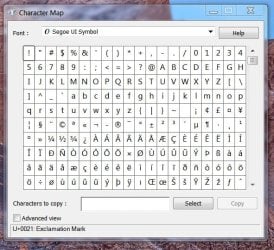
Don't see this as a problem, I pinned the "Character Map" Icon to my taskbar since first using 7. Click it, use it, after some use you will know where to look for the ones you use most. I find "Segoe UI Symbol" to be the most useful.

But I must thank Jacee for that tip, nice one Jacee!
 

Attachments

  • CharaX.JPG
    CharaX.JPG
    69.5 KB · Views: 3

My Computer My Computer

At a glance

Windows 7/64 HPremium.AMD FX-6300.Corsair (2x4) GB DDR3 CMXGX3M2A1337CL9.NVidia/Gigabyte GT730 (2GB) GDDR5.
Computer type
PC/Desktop
Computer Manufacturer/Model Number
bertison
OS
Windows 7/64 HPremium.
CPU
AMD FX-6300.
Motherboard
Asus M5A78L-M LE/USB3.
Memory
Corsair (2x4) GB DDR3 CMXGX3M2A1337CL9.
Graphics Card(s)
NVidia/Gigabyte GT730 (2GB) GDDR5.
Sound Card
Onboard.
Monitor(s) Displays
Iiyama PLE2407HDS.
Screen Resolution
1920 x 1280
Hard Drives
Desktop: 1TB. WD10EZEX-00BN5A0.
Zyxel nsa310 NAS: 2TB Seagate Barracuda 7200.14.
Cache Drive: Sandisk SDSSDRC032G.
Laptop Lenovo B50/80 128 GB SSD.
PSU
Corsair 750M.
Case
Coolermaster N300.
Cooling
FRONT: (2X) 140mm. TOP: (1x) 120mm. REAR: (1x) 120mm.
Keyboard
Logitech K290
Mouse
Trust Optical Wired
Internet Speed
15 Mb Down, 0.55 Up.
Antivirus
Kaspersky Total Security 2017, Hitman Pro.
Browser
Firefox.
Other Info
NETWORK:
Sky "Q box" and router.
Desktop & NAS - 30 Metres Cat6 Ethernet wired, via TP-Link 4-port switch.
Lenovo B50/80 Laptop, 2x Wileyfox phones, Lenovo TAB3-8 tablet - all wireless.
Grandchildren, their parents and friends as bandwidth 'parasites' at various times!
I know, but what I wonder about is why MY favorite method stopped working...
 

My Computer My Computer

At a glance

Windows 7
OS
Windows 7
Back
Top