
You are using an out of date browser. It may not display this or other websites correctly.
You should upgrade or use an alternative browser.
You should upgrade or use an alternative browser.
EasyBCD
- Thread starter LunaEros
- Start date

My Computers
System One System Two
-
- Computer type
- PC/Desktop
- Computer Manufacturer/Model Number
- custom build
- OS
- Windows 7 HP 64
- CPU
- i5 6600K - 800MHz to 4200MHz
- Motherboard
- GA-Z170-HD3P
- Memory
- 4+4G GSkill DDR4 3000
- Graphics Card(s)
- IG - Intel 530
- Monitor(s) Displays
- Samsung 226BW
- Screen Resolution
- 1680x1050
- Hard Drives
- (1) -1 SM951 – 128GB M.2 AHCI PCIe SSD drive for Windows 7 and Lubuntu
(2) -1 WD SATA 3 - 1T for Data
(3) -1 WD SATA 3 - 1T for backup
- PSU
- Thermaltake 450W TR2 gold
- Keyboard
- Old and good Chicony mechanical keyboard
- Mouse
- Logitech mX performance - 9 buttons (had to disable some)
- Internet Speed
- 500Mb/s
- Browser
- Firefox 64
- Other Info
- TinyWall firewall
-
- Computer type
- Laptop
- System Manufacturer/Model Number
- Asus Q550LF
- OS
- Windows 7 Pro
- CPU
- i7-4500U 800MHz to 3.0GHz
- Motherboard
- Asus Q550LF
- Memory
- (4+4)G DDR3 1600
- Graphics Card(s)
- IG intel 4400 + NVIDIA GeForce GT 745M
- Sound Card
- Realtek
- Monitor(s) Displays
- LG Display LP156WF4-SPH1
- Screen Resolution
- 1920 x 1080
- Hard Drives
- BX500 120G SSD for Windows and programs +
1T HDD for data
- Internet Speed
- 500 Mb/s
- Browser
- Firefox
- Other Info
- TinyWall firewall

- Local time
- 8:51 AM
- Messages
- 2,774
What is it exactly that you are wanting to do? Maybe we can give quick answer 
My Computer
- Computer type
- PC/Desktop
- Computer Manufacturer/Model Number
- Antec desktop; Acer Aspire laptops
- OS
- Windows 7 Professional 64-bit
- CPU
- Desktop i5; Acers i5 & i7
- Memory
- desktop 16GB; 1 Acer 8GB & 1 Acer 16GB
- Hard Drives
- 1TB split into 2 equal partitions [OS and data] usable by RJS
- Internet Speed
- AT&T DSL
- Browser
- FF, GChrome, msIE
- Other Info
- Windows 7 Firewall, Emsisoft AM/AV, MSE [scan-only], SpywareBlaster, Ruiware/BillP combine

- Local time
- 9:51 AM
- Messages
- 43
What is it exactly that you are wanting to do? Maybe we can give quick answer
It looks like on the advanced section you can set which drive the bootloader reads the OS from but I'm not sure. My system bootloader files are on my GPT H drive which it boots from in UEFI but it reads the OS boot files from the MBR C: drive.
The advanced section in EasyBCD shows it points to the C: drive for my Win7 and I'm wondering if I can change it to point to the H: drive. The OS is on both drives. If I changed it and it didn't work I'm afraid it would be unbootable and I wouldn't be able to change it back.
My Computer
- Computer type
- PC/Desktop
- OS
- Windows 7 Ultimate x64

- Local time
- 2:51 PM
- Messages
- 16,784
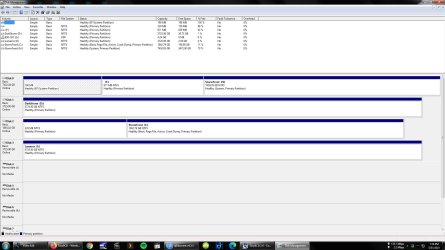
Post a screenshot of the disk management window.
My Computers
System One System Two
-
- Computer type
- PC/Desktop
- OS
- 7 X64
- CPU
- i5 8400
- Motherboard
- gigabyte b365m ds3h
- Memory
- 2x8gb 3200mhz
- Hard Drives
- various
- PSU
- pure power 11 400w cm
- Case
- Coolermaster
- Cooling
- cryorig m9i
-
- Computer type
- PC/Desktop
- OS
- 7x64
- CPU
- g5400
- Motherboard
- ga b365m ds3h
- Memory
- 8gb ddr4 2400
- PSU
- xfx pro 450w
- Local time
- 9:51 AM
- Messages
- 43
My Computer
- Computer type
- PC/Desktop
- OS
- Windows 7 Ultimate x64
On disk 2 you have a 228M partition without a letter assigned to it. What do you have on that partition?
To make a EFI partition on disk 2
- Shrink the 228M partition or on the C: partition by 60M.
- On the 60M unallocated partition, create a FAT32 partition and assign a W: letter to it.
Open a CMD window as administrator and type:
bcdboot C:\Windows /s W: /f UEFI
Shutdown, disconnect (SATA or power cable) disks 0, 1, & 3.
On BIOS change the boot priority to Windows boot manager from disk 0 to disk 2,
Power on and it should boot from drive 2
If it does, shutdown, reconnect (SATA or power cable) disks 0, 1, & 3.
Back to windows, delete the EFI partition on disk 0
To make a EFI partition on disk 2
- Shrink the 228M partition or on the C: partition by 60M.
- On the 60M unallocated partition, create a FAT32 partition and assign a W: letter to it.
Open a CMD window as administrator and type:
bcdboot C:\Windows /s W: /f UEFI
Shutdown, disconnect (SATA or power cable) disks 0, 1, & 3.
On BIOS change the boot priority to Windows boot manager from disk 0 to disk 2,
Power on and it should boot from drive 2
If it does, shutdown, reconnect (SATA or power cable) disks 0, 1, & 3.
Back to windows, delete the EFI partition on disk 0
Last edited:
My Computers
System One System Two
-
- Computer type
- PC/Desktop
- Computer Manufacturer/Model Number
- custom build
- OS
- Windows 7 HP 64
- CPU
- i5 6600K - 800MHz to 4200MHz
- Motherboard
- GA-Z170-HD3P
- Memory
- 4+4G GSkill DDR4 3000
- Graphics Card(s)
- IG - Intel 530
- Monitor(s) Displays
- Samsung 226BW
- Screen Resolution
- 1680x1050
- Hard Drives
- (1) -1 SM951 – 128GB M.2 AHCI PCIe SSD drive for Windows 7 and Lubuntu
(2) -1 WD SATA 3 - 1T for Data
(3) -1 WD SATA 3 - 1T for backup
- PSU
- Thermaltake 450W TR2 gold
- Keyboard
- Old and good Chicony mechanical keyboard
- Mouse
- Logitech mX performance - 9 buttons (had to disable some)
- Internet Speed
- 500Mb/s
- Browser
- Firefox 64
- Other Info
- TinyWall firewall
-
- Computer type
- Laptop
- System Manufacturer/Model Number
- Asus Q550LF
- OS
- Windows 7 Pro
- CPU
- i7-4500U 800MHz to 3.0GHz
- Motherboard
- Asus Q550LF
- Memory
- (4+4)G DDR3 1600
- Graphics Card(s)
- IG intel 4400 + NVIDIA GeForce GT 745M
- Sound Card
- Realtek
- Monitor(s) Displays
- LG Display LP156WF4-SPH1
- Screen Resolution
- 1920 x 1080
- Hard Drives
- BX500 120G SSD for Windows and programs +
1T HDD for data
- Internet Speed
- 500 Mb/s
- Browser
- Firefox
- Other Info
- TinyWall firewall
- Local time
- 9:51 AM
- Messages
- 43
On disk 2 you have a 228M partition without a letter assigned to it. What do you have on that partition?
Nothing? That was there before I even started. I think that's an MS reserved partition or something.
The rest of your instruction it looks like it will boot from disk 2 C drive afterwards. I want it to only boot from Disk 0 H drive. When it does I'm going to remove disk 2 C drive. Once everything's done I want to change that H: to C:
My Computer
- Computer type
- PC/Desktop
- OS
- Windows 7 Ultimate x64
Now it is booting from EFI partition on disk 0 and transferring the boot sequence to disk 2 - C:
The drive letter is assigned by the OS. If you boot from disk 0, H: will become C:
Does disk 0 - H: has a OS on it?
The drive letter is assigned by the OS. If you boot from disk 0, H: will become C:
Does disk 0 - H: has a OS on it?
Last edited:
My Computers
System One System Two
-
- Computer type
- PC/Desktop
- Computer Manufacturer/Model Number
- custom build
- OS
- Windows 7 HP 64
- CPU
- i5 6600K - 800MHz to 4200MHz
- Motherboard
- GA-Z170-HD3P
- Memory
- 4+4G GSkill DDR4 3000
- Graphics Card(s)
- IG - Intel 530
- Monitor(s) Displays
- Samsung 226BW
- Screen Resolution
- 1680x1050
- Hard Drives
- (1) -1 SM951 – 128GB M.2 AHCI PCIe SSD drive for Windows 7 and Lubuntu
(2) -1 WD SATA 3 - 1T for Data
(3) -1 WD SATA 3 - 1T for backup
- PSU
- Thermaltake 450W TR2 gold
- Keyboard
- Old and good Chicony mechanical keyboard
- Mouse
- Logitech mX performance - 9 buttons (had to disable some)
- Internet Speed
- 500Mb/s
- Browser
- Firefox 64
- Other Info
- TinyWall firewall
-
- Computer type
- Laptop
- System Manufacturer/Model Number
- Asus Q550LF
- OS
- Windows 7 Pro
- CPU
- i7-4500U 800MHz to 3.0GHz
- Motherboard
- Asus Q550LF
- Memory
- (4+4)G DDR3 1600
- Graphics Card(s)
- IG intel 4400 + NVIDIA GeForce GT 745M
- Sound Card
- Realtek
- Monitor(s) Displays
- LG Display LP156WF4-SPH1
- Screen Resolution
- 1920 x 1080
- Hard Drives
- BX500 120G SSD for Windows and programs +
1T HDD for data
- Internet Speed
- 500 Mb/s
- Browser
- Firefox
- Other Info
- TinyWall firewall
This is a follow-up to Moving Win 7 to new drive
His issue is that the OS on D0P3 has no boot entry. I have suggested to execute
bcdboot H:\Windows
to create a dual boot of old and new Windows, thus not taking any boot option away immediately.
The boot files are on Drive 0 already.
His issue is that the OS on D0P3 has no boot entry. I have suggested to execute
bcdboot H:\Windows
to create a dual boot of old and new Windows, thus not taking any boot option away immediately.
The boot files are on Drive 0 already.
My Computer
- Computer type
- PC/Desktop
- OS
- Windows 7 Home Premium