XLMNOPENX123
New member
- Local time
- 6:13 PM
- Messages
- 3
Hi all.
I'm using Windows 7 Ultimate version 6.1 build 7601 SP1 (64 bit) with IE9 and can't log in to my eBay account from this one computer (my main system). I can log into eBay with my other computer and all is well and even changed the password to be sure.
I'm stuck in a loop, just takes me back to the login page over and over. I have tried all the usual fixes, cleared cache, cookies, files, set the security to low, accept all cookies, turned off Anti Virus, Reset my browser, turned scripting off then back on, all with no success.
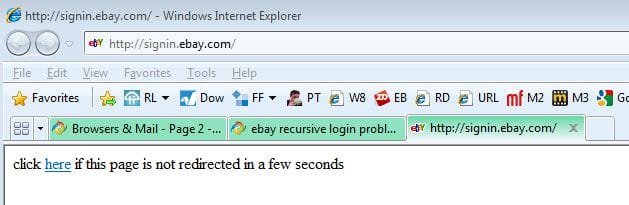
When I try to login there is a screen that appears for one second that states “If you are seeing this page your browser settings are preventing you from automatically redirecting to a new URL” then it goes back to the login page.
If I just open the browser and go to http://signin.ebay.com
I get the ebay screen that says "you signed out. See you again soon"
Looks like an old page is not getting flushed properly.
But, when I go to sign in it just keeps going back to the login screen with the “If you are seeing this page your browser settings are preventing you from automatically redirecting to a new URL” in between.
Any thoughts???
I'm using Windows 7 Ultimate version 6.1 build 7601 SP1 (64 bit) with IE9 and can't log in to my eBay account from this one computer (my main system). I can log into eBay with my other computer and all is well and even changed the password to be sure.
I'm stuck in a loop, just takes me back to the login page over and over. I have tried all the usual fixes, cleared cache, cookies, files, set the security to low, accept all cookies, turned off Anti Virus, Reset my browser, turned scripting off then back on, all with no success.
When I try to login there is a screen that appears for one second that states “If you are seeing this page your browser settings are preventing you from automatically redirecting to a new URL” then it goes back to the login page.
If I just open the browser and go to http://signin.ebay.com
I get the ebay screen that says "you signed out. See you again soon"
Looks like an old page is not getting flushed properly.
But, when I go to sign in it just keeps going back to the login screen with the “If you are seeing this page your browser settings are preventing you from automatically redirecting to a new URL” in between.
Any thoughts???
My Computer
At a glance
Windows 7 Ultimate version 6.1 build 7601 SP1...
- OS
- Windows 7 Ultimate version 6.1 build 7601 SP1 (64 bit) with IE9