
Solved edit registry w/o Win 7?

GranPaSmurf

New member
Member
VIP
Local time
8:52 PM
Messages
100
Location
Near San Antonio, TX
I killed my Win 7 installation. Big time! I used a partition utility to extend the size of the active partition, to give Win 7 a bit more breathing room.
Then it would barely start, got worse until it would not start at all. Nope not Safe Mode either.
Post disaster research turned up a suggestion of tweaking the registry to delete the value for
HKey_local_machine\system\mounted devices
so that windows could take advantage of the additional space.

  1. is this a reasonable trouble shooting step?
  2. is there a way to start machine from another drive I know works (xp) then get to registry settings on the (now slave) Win 7 installation I managed to kill?
Moderator, if I chose the wrong sub-forum, please move my post.
thanks,
GranPaSmurf
 

My Computer

Computer Manufacturer/Model Number
home built several years ago
OS
Win 7 Professional 64-bit
CPU
DUAL AMD OPTERON 246
Motherboard
TYAN THUNDER K8W S2885
Memory
8 Gig
Graphics Card(s)
Gforce FX 6200
Sound Card
internal
Monitor(s) Displays
Acer V223w LCD & Dell 17 LCD
Hard Drives
80 gb IDE Win 7 64 Professional,
240 gb, 1Tb partitioned x4,
plus 300 gb USB external for backup
8 gb USB jump drive/ReadyBoost
PSU
Antec 550w
Case
Antec SERVER 3U RACK MOUNT
Cooling
fans, fans and more fans. Monitored by SpeedFan
Other Info
Internet vendor is Clear wireless. Partially satisfied with them. This PC is networked with 2 other PC's, & 2 laptops.

My Computer

Computer type
PC/Desktop
Computer Manufacturer/Model Number
Dell XPS 420
OS
Windows 10, Home Clean Install
CPU
Intel Core2 processsor Q8200(2.33Ghz 1333FSB) Quad Core Tech
Motherboard
Dell
Memory
6 gb
Graphics Card(s)
ATI Radeon 256MB HD3650
Sound Card
Intergrated 7.1 Channel Audio
Monitor(s) Displays
Dell SP2009W 20"
Hard Drives
640 GB Serial ATA Hard drive
Cooling
Fan
Keyboard
Dell USB Keyboard
Mouse
Dell Premium Optical USB
Internet Speed
DSL 2.85
Granpa Smurf,

Now you know to come here and ask for suggestions before you stump you toe on a Win 7 problem.

First, we have to get you system working correctly again.

The easiest way is, as Rich suggested, choosing a System Restore point from a time before the problem occurred.

Read this tutorial completely, from start to finish, and follow the procedure given therein.
System Restore - How to use

If after that, you still don't have a stable system, then there are more drastic actions we can recommend.

AFter your system is stable, then we can approach the desire to change partition sizes.
 

My Computer

Computer Manufacturer/Model Number
Toshiba Satellite S875D-S7239 laptop
OS
MS Windows 7 Ultimate SP1 64-bit
CPU
AMD A10-4600M
Motherboard
AMD Pumori (Socket FT1)
Memory
6.00 GB Dual-Channel DDR3 @ 798MHz (11-11-12-28)
Graphics Card(s)
AMD Radeon HD 7660G
Sound Card
High Definition Audio Device
Monitor(s) Displays
Generic PnP Monitor (1600x900@60Hz)
Screen Resolution
1600x900@60Hz
Hard Drives
SSD 119GB Corsair CSSD-V128GB2 ATA Device
Keyboard
Standard PS/2 Keyboard
Mouse
HP Wireless Optical Mobile Mouse Model FHA-3410
Internet Speed
What the local pub, local coffee shop offers.
Other Info
Optical Drive:MATSHITA BD-CMB UJ160B ATA Device


Also have an Asus ha1002xp netbook with Win 7 Ultimate installed.
Hey! I left it ticking while I went off for shower, came back to the log-in screen! First time in days! Gotta' leave for the day, I will leave it running. Maybe you guys can pace me through getting it more stable now that W 7 is running. Yeah! :D
 

My Computer

Computer Manufacturer/Model Number
home built several years ago
OS
Win 7 Professional 64-bit
CPU
DUAL AMD OPTERON 246
Motherboard
TYAN THUNDER K8W S2885
Memory
8 Gig
Graphics Card(s)
Gforce FX 6200
Sound Card
internal
Monitor(s) Displays
Acer V223w LCD & Dell 17 LCD
Hard Drives
80 gb IDE Win 7 64 Professional,
240 gb, 1Tb partitioned x4,
plus 300 gb USB external for backup
8 gb USB jump drive/ReadyBoost
PSU
Antec 550w
Case
Antec SERVER 3U RACK MOUNT
Cooling
fans, fans and more fans. Monitored by SpeedFan
Other Info
Internet vendor is Clear wireless. Partially satisfied with them. This PC is networked with 2 other PC's, & 2 laptops.
Now that it's up and running i would use your Win 7 disk and do a repair install and then we'll tackle the extend partition
 

My Computer

Computer Manufacturer/Model Number
Dell XPS 730
OS
Windows 7 Home Premium 64 bit
CPU
Intel Core 2 quad Extreme Q9770 @ 3.2 GHz
Memory
4x2 GB Muskin 1600 MHz ram
Graphics Card(s)
NVidia GTX 250
Sound Card
Soundblaster X-Fi Fatality Champion
Monitor(s) Displays
2 Dell 2007WFP Ultrascans
Screen Resolution
3360 x 1050
Hard Drives
WD Black 1TB sata, 2-WD Black 500 sata, 2-Seagate 500 Go external
PSU
1000 Watt
Cooling
air
Keyboard
MS Natrual Keyboard Pro
Mouse
Logitech Wireless Trackball
Internet Speed
DSL Elite
Thanks, but the partition holding the W 7 installation does not have enough space for repair install. Only 1.27 GB free.
dk
 

My Computer

Computer Manufacturer/Model Number
home built several years ago
OS
Win 7 Professional 64-bit
CPU
DUAL AMD OPTERON 246
Motherboard
TYAN THUNDER K8W S2885
Memory
8 Gig
Graphics Card(s)
Gforce FX 6200
Sound Card
internal
Monitor(s) Displays
Acer V223w LCD & Dell 17 LCD
Hard Drives
80 gb IDE Win 7 64 Professional,
240 gb, 1Tb partitioned x4,
plus 300 gb USB external for backup
8 gb USB jump drive/ReadyBoost
PSU
Antec 550w
Case
Antec SERVER 3U RACK MOUNT
Cooling
fans, fans and more fans. Monitored by SpeedFan
Other Info
Internet vendor is Clear wireless. Partially satisfied with them. This PC is networked with 2 other PC's, & 2 laptops.
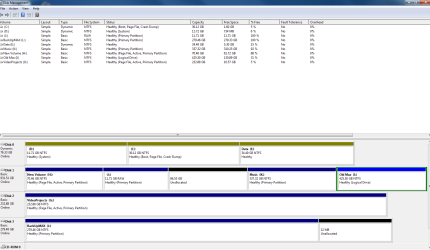
Please post your disk management output.
Follow this procedure:


HOW TO POST A SNAPSHOT OF DISK MANAGEMENT DISPLAY

Run disk management:
WIN | type DISKMGMT.MSC | ENTER
WIN is the key with the wavy flag.

Maximize the output of Disk Management:
ALT Spacebar key combo | X key
Drag the field separators (such as between Status and Capacity) to show entire field.

Make a snapshot:
WIN | type SNIPPING | ENTER
Click the New button.
Drag the cursor around the area you want to snip.
File | Save as | select save location and name | Save button

Post the snapshot:
Screenshot - How to post
 

My Computer

Computer Manufacturer/Model Number
Toshiba Satellite S875D-S7239 laptop
OS
MS Windows 7 Ultimate SP1 64-bit
CPU
AMD A10-4600M
Motherboard
AMD Pumori (Socket FT1)
Memory
6.00 GB Dual-Channel DDR3 @ 798MHz (11-11-12-28)
Graphics Card(s)
AMD Radeon HD 7660G
Sound Card
High Definition Audio Device
Monitor(s) Displays
Generic PnP Monitor (1600x900@60Hz)
Screen Resolution
1600x900@60Hz
Hard Drives
SSD 119GB Corsair CSSD-V128GB2 ATA Device
Keyboard
Standard PS/2 Keyboard
Mouse
HP Wireless Optical Mobile Mouse Model FHA-3410
Internet Speed
What the local pub, local coffee shop offers.
Other Info
Optical Drive:MATSHITA BD-CMB UJ160B ATA Device


Also have an Asus ha1002xp netbook with Win 7 Ultimate installed.
karlsnooks,
Thanks for your patient guidance. Disk Management .png is attached. Disk 0 is an older IDE 80 Gb. Disk 1 is a new SATA 1 Tb. The plan was to copy/move the partitions from Disk 0 to Disk 1, ultimately leaving Disk 0 unpartitioned as C: I used a EASEUS utility to copy D: to J:, then I expanded C: into a bit of unallocated space. That's when my project started to go south.
You will also see the 300 Gb external Maxtor, I plan to use it for backups for the 4 computers in my network.
Thanks again.
dk
 

Attachments

  • DiskManagementCapture.PNG
    DiskManagementCapture.PNG
    34.2 KB · Views: 45

My Computer

Computer Manufacturer/Model Number
home built several years ago
OS
Win 7 Professional 64-bit
CPU
DUAL AMD OPTERON 246
Motherboard
TYAN THUNDER K8W S2885
Memory
8 Gig
Graphics Card(s)
Gforce FX 6200
Sound Card
internal
Monitor(s) Displays
Acer V223w LCD & Dell 17 LCD
Hard Drives
80 gb IDE Win 7 64 Professional,
240 gb, 1Tb partitioned x4,
plus 300 gb USB external for backup
8 gb USB jump drive/ReadyBoost
PSU
Antec 550w
Case
Antec SERVER 3U RACK MOUNT
Cooling
fans, fans and more fans. Monitored by SpeedFan
Other Info
Internet vendor is Clear wireless. Partially satisfied with them. This PC is networked with 2 other PC's, & 2 laptops.
Good the snip explains much.l

Now If you remove all disks except for disk 0, that is disconnect all drives except for your old disk 0,
Does the system boot?

Your problems can be solved. Just do me a big favor and stay away from partitioning and formatting software until the problem is fixed.

I'm back online now so you will receive immediate responses.

karl
 

My Computer

Computer Manufacturer/Model Number
Toshiba Satellite S875D-S7239 laptop
OS
MS Windows 7 Ultimate SP1 64-bit
CPU
AMD A10-4600M
Motherboard
AMD Pumori (Socket FT1)
Memory
6.00 GB Dual-Channel DDR3 @ 798MHz (11-11-12-28)
Graphics Card(s)
AMD Radeon HD 7660G
Sound Card
High Definition Audio Device
Monitor(s) Displays
Generic PnP Monitor (1600x900@60Hz)
Screen Resolution
1600x900@60Hz
Hard Drives
SSD 119GB Corsair CSSD-V128GB2 ATA Device
Keyboard
Standard PS/2 Keyboard
Mouse
HP Wireless Optical Mobile Mouse Model FHA-3410
Internet Speed
What the local pub, local coffee shop offers.
Other Info
Optical Drive:MATSHITA BD-CMB UJ160B ATA Device


Also have an Asus ha1002xp netbook with Win 7 Ultimate installed.
back where I was earlier

Karl,
I shut down and pulled the power on the drives other than disk 0. I seem to be back where I was earlier; it won't boot. I have tried start-up repair several times this afternoon and it says cannot repair. When I try to reboot, it gets to the pulsing logo for a couple of minutes, then flickers BSOD & starts over. Safe Mode still hangs at classPNP.sys. I guess I have done it a dozen times this afternoon with the same result. I work all day Sunday so I will be back to it Monday morning.
dk
 
Last edited:

My Computer

Computer Manufacturer/Model Number
home built several years ago
OS
Win 7 Professional 64-bit
CPU
DUAL AMD OPTERON 246
Motherboard
TYAN THUNDER K8W S2885
Memory
8 Gig
Graphics Card(s)
Gforce FX 6200
Sound Card
internal
Monitor(s) Displays
Acer V223w LCD & Dell 17 LCD
Hard Drives
80 gb IDE Win 7 64 Professional,
240 gb, 1Tb partitioned x4,
plus 300 gb USB external for backup
8 gb USB jump drive/ReadyBoost
PSU
Antec 550w
Case
Antec SERVER 3U RACK MOUNT
Cooling
fans, fans and more fans. Monitored by SpeedFan
Other Info
Internet vendor is Clear wireless. Partially satisfied with them. This PC is networked with 2 other PC's, & 2 laptops.
OK. We will have a go at it on Monday.
Karl
 

My Computer

Computer Manufacturer/Model Number
Toshiba Satellite S875D-S7239 laptop
OS
MS Windows 7 Ultimate SP1 64-bit
CPU
AMD A10-4600M
Motherboard
AMD Pumori (Socket FT1)
Memory
6.00 GB Dual-Channel DDR3 @ 798MHz (11-11-12-28)
Graphics Card(s)
AMD Radeon HD 7660G
Sound Card
High Definition Audio Device
Monitor(s) Displays
Generic PnP Monitor (1600x900@60Hz)
Screen Resolution
1600x900@60Hz
Hard Drives
SSD 119GB Corsair CSSD-V128GB2 ATA Device
Keyboard
Standard PS/2 Keyboard
Mouse
HP Wireless Optical Mobile Mouse Model FHA-3410
Internet Speed
What the local pub, local coffee shop offers.
Other Info
Optical Drive:MATSHITA BD-CMB UJ160B ATA Device


Also have an Asus ha1002xp netbook with Win 7 Ultimate installed.
Do you have access to a Win 7 64bit system (your system specs say that you havea 64bit system)?

If you do, then make a system repair disc. That will make our life easier for fixing your system.

[FONT=&quot]DISC - CREATE A SYSTEM REPAIR DISC[/FONT]
START | type System Repair | Enter key | Create Disc button
 

My Computer

Computer Manufacturer/Model Number
Toshiba Satellite S875D-S7239 laptop
OS
MS Windows 7 Ultimate SP1 64-bit
CPU
AMD A10-4600M
Motherboard
AMD Pumori (Socket FT1)
Memory
6.00 GB Dual-Channel DDR3 @ 798MHz (11-11-12-28)
Graphics Card(s)
AMD Radeon HD 7660G
Sound Card
High Definition Audio Device
Monitor(s) Displays
Generic PnP Monitor (1600x900@60Hz)
Screen Resolution
1600x900@60Hz
Hard Drives
SSD 119GB Corsair CSSD-V128GB2 ATA Device
Keyboard
Standard PS/2 Keyboard
Mouse
HP Wireless Optical Mobile Mouse Model FHA-3410
Internet Speed
What the local pub, local coffee shop offers.
Other Info
Optical Drive:MATSHITA BD-CMB UJ160B ATA Device


Also have an Asus ha1002xp netbook with Win 7 Ultimate installed.
No, sorry. I only have one machine with Win 7 64. I am using XP Pro laptop to troubleshoot with you the Win 7 machine. I cannot boot, regular or Safe Mode. I have been working thru repair possibilities. Deleted and replaced BootCache, downloaded a hotfix from MS that I cannot figure how to use. It is a zip file.
So right now, all I can see is the Win7 Start-up repair.
 

My Computer

Computer Manufacturer/Model Number
home built several years ago
OS
Win 7 Professional 64-bit
CPU
DUAL AMD OPTERON 246
Motherboard
TYAN THUNDER K8W S2885
Memory
8 Gig
Graphics Card(s)
Gforce FX 6200
Sound Card
internal
Monitor(s) Displays
Acer V223w LCD & Dell 17 LCD
Hard Drives
80 gb IDE Win 7 64 Professional,
240 gb, 1Tb partitioned x4,
plus 300 gb USB external for backup
8 gb USB jump drive/ReadyBoost
PSU
Antec 550w
Case
Antec SERVER 3U RACK MOUNT
Cooling
fans, fans and more fans. Monitored by SpeedFan
Other Info
Internet vendor is Clear wireless. Partially satisfied with them. This PC is networked with 2 other PC's, & 2 laptops.
I will be here, fretting, at noon today.
Startp error messages are:
StartupRepairOffline
01: 6.1.7600.16385
02: 6.1.7600.16385
03: unknown
04; 21200785
05: SystemDisk
06: 5
07: 0x6b
OS Version 6.1.7600.2.0.0.256.1
Local ID: 1033
Details after Startup Repair:
all successful except Bugcheck analysis:
Unknown Bugcheck: Bugcheck 6b, Parameters = 0x0,0x0,0x0,0x0
dk
 

My Computer

Computer Manufacturer/Model Number
home built several years ago
OS
Win 7 Professional 64-bit
CPU
DUAL AMD OPTERON 246
Motherboard
TYAN THUNDER K8W S2885
Memory
8 Gig
Graphics Card(s)
Gforce FX 6200
Sound Card
internal
Monitor(s) Displays
Acer V223w LCD & Dell 17 LCD
Hard Drives
80 gb IDE Win 7 64 Professional,
240 gb, 1Tb partitioned x4,
plus 300 gb USB external for backup
8 gb USB jump drive/ReadyBoost
PSU
Antec 550w
Case
Antec SERVER 3U RACK MOUNT
Cooling
fans, fans and more fans. Monitored by SpeedFan
Other Info
Internet vendor is Clear wireless. Partially satisfied with them. This PC is networked with 2 other PC's, & 2 laptops.
Do you have a Win 7 DVD?
 

My Computer

Computer Manufacturer/Model Number
Toshiba Satellite S875D-S7239 laptop
OS
MS Windows 7 Ultimate SP1 64-bit
CPU
AMD A10-4600M
Motherboard
AMD Pumori (Socket FT1)
Memory
6.00 GB Dual-Channel DDR3 @ 798MHz (11-11-12-28)
Graphics Card(s)
AMD Radeon HD 7660G
Sound Card
High Definition Audio Device
Monitor(s) Displays
Generic PnP Monitor (1600x900@60Hz)
Screen Resolution
1600x900@60Hz
Hard Drives
SSD 119GB Corsair CSSD-V128GB2 ATA Device
Keyboard
Standard PS/2 Keyboard
Mouse
HP Wireless Optical Mobile Mouse Model FHA-3410
Internet Speed
What the local pub, local coffee shop offers.
Other Info
Optical Drive:MATSHITA BD-CMB UJ160B ATA Device


Also have an Asus ha1002xp netbook with Win 7 Ultimate installed.
Yessir, I do
 

My Computer

Computer Manufacturer/Model Number
home built several years ago
OS
Win 7 Professional 64-bit
CPU
DUAL AMD OPTERON 246
Motherboard
TYAN THUNDER K8W S2885
Memory
8 Gig
Graphics Card(s)
Gforce FX 6200
Sound Card
internal
Monitor(s) Displays
Acer V223w LCD & Dell 17 LCD
Hard Drives
80 gb IDE Win 7 64 Professional,
240 gb, 1Tb partitioned x4,
plus 300 gb USB external for backup
8 gb USB jump drive/ReadyBoost
PSU
Antec 550w
Case
Antec SERVER 3U RACK MOUNT
Cooling
fans, fans and more fans. Monitored by SpeedFan
Other Info
Internet vendor is Clear wireless. Partially satisfied with them. This PC is networked with 2 other PC's, & 2 laptops.
Excellent.

What you can do is:

Boot from the win 7 dvd into a command prompt.

Once there, then copy or move your important data to one of your unused drives.
The reason here is that you will be performing some operations which may have bad sad effects.

We may get lucky and be able to do some of the normal startup repair operations with no loss but I'd rather be safe than sorry.

When you get to that command prompt, you will find that your disks have other letters than the ones normally shown by Win 7. That's oK but you need to be forewarned.

You will be running a Windows Pre-execution Environment from a ram drive which has been assigned the drive letter X:

After you get to that command prompt, you can remove your Win 7 DVD. Everything needed is already in ram.

The quick brute-force way to determine the new drive letters is simply to go down the alphabet, skipping letters A and B.

For example:
C: to change to drive C
DIR to list the contents of C

Just keep going thru the letters till you locate all your disks.

Move everything dear to you from to an unused drive.

To move, you will use the XCOPY command.

Let's say that you want to move everything from D to G

XCOPY D:\ G:\ /E /C /I /H

[FONT=&quot]COMMAND PROMPT - GO TO A COMMAND PROMPT USING YOUR WIN 7 DVD[/FONT][FONT=&quot][/FONT]
■Boot up from your Windows 7 DVD.
■At the first dialog window, press SHIFT + F10 key combo
■You will have a X:> command prompt
X: is a ram drive created by Windows 7.
 

My Computer

Computer Manufacturer/Model Number
Toshiba Satellite S875D-S7239 laptop
OS
MS Windows 7 Ultimate SP1 64-bit
CPU
AMD A10-4600M
Motherboard
AMD Pumori (Socket FT1)
Memory
6.00 GB Dual-Channel DDR3 @ 798MHz (11-11-12-28)
Graphics Card(s)
AMD Radeon HD 7660G
Sound Card
High Definition Audio Device
Monitor(s) Displays
Generic PnP Monitor (1600x900@60Hz)
Screen Resolution
1600x900@60Hz
Hard Drives
SSD 119GB Corsair CSSD-V128GB2 ATA Device
Keyboard
Standard PS/2 Keyboard
Mouse
HP Wireless Optical Mobile Mouse Model FHA-3410
Internet Speed
What the local pub, local coffee shop offers.
Other Info
Optical Drive:MATSHITA BD-CMB UJ160B ATA Device


Also have an Asus ha1002xp netbook with Win 7 Ultimate installed.
After that I need you to disconnect all drives except for your drive that is causing problems, your main drive.
 

My Computer

Computer Manufacturer/Model Number
Toshiba Satellite S875D-S7239 laptop
OS
MS Windows 7 Ultimate SP1 64-bit
CPU
AMD A10-4600M
Motherboard
AMD Pumori (Socket FT1)
Memory
6.00 GB Dual-Channel DDR3 @ 798MHz (11-11-12-28)
Graphics Card(s)
AMD Radeon HD 7660G
Sound Card
High Definition Audio Device
Monitor(s) Displays
Generic PnP Monitor (1600x900@60Hz)
Screen Resolution
1600x900@60Hz
Hard Drives
SSD 119GB Corsair CSSD-V128GB2 ATA Device
Keyboard
Standard PS/2 Keyboard
Mouse
HP Wireless Optical Mobile Mouse Model FHA-3410
Internet Speed
What the local pub, local coffee shop offers.
Other Info
Optical Drive:MATSHITA BD-CMB UJ160B ATA Device


Also have an Asus ha1002xp netbook with Win 7 Ultimate installed.
Oh heck.

I just noticed that your Disk 0 is a Dynamic drive.

What Operating System do you have installed on which drives?

Why is that a Dynamic drive?

Hold off, if it is not too late on doing anything more until I get the answers to these questions.
 

My Computer

Computer Manufacturer/Model Number
Toshiba Satellite S875D-S7239 laptop
OS
MS Windows 7 Ultimate SP1 64-bit
CPU
AMD A10-4600M
Motherboard
AMD Pumori (Socket FT1)
Memory
6.00 GB Dual-Channel DDR3 @ 798MHz (11-11-12-28)
Graphics Card(s)
AMD Radeon HD 7660G
Sound Card
High Definition Audio Device
Monitor(s) Displays
Generic PnP Monitor (1600x900@60Hz)
Screen Resolution
1600x900@60Hz
Hard Drives
SSD 119GB Corsair CSSD-V128GB2 ATA Device
Keyboard
Standard PS/2 Keyboard
Mouse
HP Wireless Optical Mobile Mouse Model FHA-3410
Internet Speed
What the local pub, local coffee shop offers.
Other Info
Optical Drive:MATSHITA BD-CMB UJ160B ATA Device


Also have an Asus ha1002xp netbook with Win 7 Ultimate installed.
copying to backup in progress. looks like it might take a while. Don't know about Dynamic. XP is on what is now D: partition, Win 7 is on c: partition, the second partition on the drive. I am available until I crash & burn tonight, what is your schedule?
 

My Computer

Computer Manufacturer/Model Number
home built several years ago
OS
Win 7 Professional 64-bit
CPU
DUAL AMD OPTERON 246
Motherboard
TYAN THUNDER K8W S2885
Memory
8 Gig
Graphics Card(s)
Gforce FX 6200
Sound Card
internal
Monitor(s) Displays
Acer V223w LCD & Dell 17 LCD
Hard Drives
80 gb IDE Win 7 64 Professional,
240 gb, 1Tb partitioned x4,
plus 300 gb USB external for backup
8 gb USB jump drive/ReadyBoost
PSU
Antec 550w
Case
Antec SERVER 3U RACK MOUNT
Cooling
fans, fans and more fans. Monitored by SpeedFan
Other Info
Internet vendor is Clear wireless. Partially satisfied with them. This PC is networked with 2 other PC's, & 2 laptops.
Back
Top