EFI system partition on wrong drive

coinup

New member
Local time
9:39 AM
Messages
17
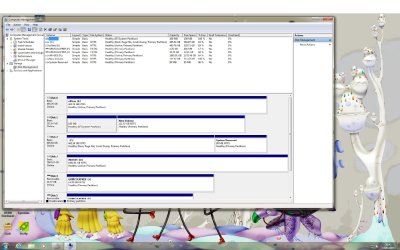
comp manage.jpg

How do I get the efi partition on the c:\ drive????
 

My Computer My Computer

At a glance

7 64bit Ultimatei7 3930k32GB Kingston Hyper X 1600mhzPny gtx 660
Computer type
PC/Desktop
OS
7 64bit Ultimate
CPU
i7 3930k
Motherboard
Sabertooth X79
Memory
32GB Kingston Hyper X 1600mhz
Graphics Card(s)
Pny gtx 660
Monitor(s) Displays
eizo cg243w
Screen Resolution
1920x1200
Hard Drives
WD RE4 500GB, WD Black 2TB, WD 250GB
PSU
Corsair Gaming 800w
Case
Corsair obsidian 650D with Custom Soundproofing
Cooling
Noctua DH-12
Keyboard
Filco Majistouch
Mouse
microsoft Touch
Internet Speed
1000 kb/s
Antivirus
Microsoft Security Essentials
First, volume letters != drive letters. Unless you pre-partition and image yourself, Windows setup will place the EFI partition on the first physical disk presented to setup by the EFI OS, even if it's not actually the first disk installed into the system. I used to get this all the time with an older Asus board, where my (larger) storage volume would get the EFI partition, even though I chose a different physical disk to place the installation volume on. I ended up backing up my data and moving the SATA cables around until it was the way I wanted it (and no, it didn't match the port layout on the motherboard unless I set the Intel ICH configuration from "RAID" to "AHCI".
 

My Computer My Computer

At a glance

Windows 10 Pro x64Intel Core i7 4790K @ 4.5GHz32GB DDR3Nvidia GeForce GTX970
Computer type
PC/Desktop
Computer Manufacturer/Model Number
Custom
OS
Windows 10 Pro x64
CPU
Intel Core i7 4790K @ 4.5GHz
Motherboard
Asus Maximus Hero VII
Memory
32GB DDR3
Graphics Card(s)
Nvidia GeForce GTX970
Sound Card
Realtek HD Audio
Screen Resolution
1920x1200
Hard Drives
1x Samsung 250GB SSD
4x WD RE 2TB (RAIDZ)
PSU
Corsair AX760i
Case
Fractal Design Define R4
Cooling
Noctua NH-D15
This is why all other drives should always be unplugged during any Install or Startup Repair.

To put all of these necessary UEFI partitions on the same drive I would install flexible Macrium Imaging - Windows 7 Help Forums to C and have it save a backup image of the partitions required to boot including EFI System Partition, possible hidden MSR partition, and C. Do not include any of the other partitions in the image.

Then boot the Macrium boot disk you've created to Recover from the image, drag the necessary partitions to the target drive after deleting C using the link on the Recovery page. It should automatically adjust C size but you can manually adjust that using the link it creates under the partition once dragged to the target drive.

Now boot into BIOS setup and set the Win7 drive to boot first instead of the old EFI System drive, Save and Exit to boot Win7.

If for any reason Win7 won't boot, unplug all other drives to boot into the Win7 disk or System Repair Disk to run Startup Repair. Afterwards I would plug Disk0 cable into the Win7 drive so it is in first position where future repairs cannot derail the System partition again.

In the unlikely event this fails, you'll still have the old EFI System partition on the other drive to boot the C image by setting it first to boot in BIOS. Don't let it get set first to boot again otherwise.

Finally, none of those other drive partitions should be marked Active which is only used to flag a drive intended to boot an OS on an MBR disk, so mark them Inactive if they are not there for that purpose alone: Partition - Mark as Inactive - Windows 7 Forums

 
Back
Top