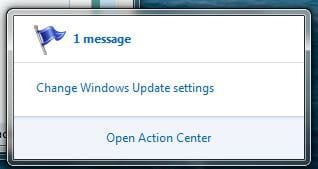
Eliminate Action Center message about Windows Update?

Guy Scharf

New member
Power User
Local time
12:58 AM
Messages
77
Location
WA
I have Windows Update set to download and notify, but not install automatically.

The Action Center is always displaying a message "Change Windows Update Settings."

Is there any way to eliminate that message, besides enabling auto update which I don't want to do?

If I can't eliminate warnings I have determined to be spurious from the Action Center, I think it more a hindrance than a help and might as well turn it off.
 

My Computer My Computer

Computer Manufacturer/Model Number
home-built
OS
Win 7-32, XP Pro-32
CPU
Xeon 3070 (2.66 GHz)
Motherboard
Asus P5W DH Deluxe, BIOS 2901
Memory
4 GB
Graphics Card(s)
PowerColor ATI Radeon HD 5750 (fanless)
Sound Card
on-board
Monitor(s) Displays
Dell U2711
Screen Resolution
2560x1440
Hard Drives
All SATA:
ICH7R (AHCI): 1 Intel X-25M 80GB SSD, 2 Samsung HD103UJ 1TB, 1 Seagate ST3750330MS 750GB;
JMB363: Samsung SH-S223L DVD;
Promise TX4302: two mobile racks, normally powered off
PSU
Seasonic SS-650HT
Case
Antec P180
Cooling
Sunbeam Tuniq Tower 120, 4 120mm fans (variable rpm)
Keyboard
Lexmark IBM Type "M" - PS/2 connector
Mouse
Wacom Intous4, Logitech Wheel Mouse as backup
Internet Speed
Cable ~ 6 mbps
Other Info
DVD: Samsung SH-S223L (SATA),
SanDisk CompactFlash reader,
Epson R280 printer,
HP Laserjet 4100dtn,
Epson scanner,
NeatReceipts scanner

Laptops: Dell XPS 15 L501x, Dell E5420
if you open up action center, there should be an option under Windows Update saying something along the lines of "Do not display messages about Windows Update"

or you can open up action center, click on action center settings on the left and uncheck windows update
 

My Computer My Computer

OS
Windows 7
If you want... you can disable the action center all together. Just open services and disabled the security center
 

My Computer My Computer

Computer Manufacturer/Model Number
HP DV9033CL
OS
Windows 7 Professional 32 Bit
Memory
2 GB
Graphics Card(s)
nVidia GeForce Go 7600
Sound Card
Conexant HD Audio Board
Screen Resolution
1440x900
Internet Speed
aDSL 1.5Mbps / 256 Kbps
Thanks! I wonder why I didn't see that myself? :o
 

My Computer My Computer

Computer Manufacturer/Model Number
home-built
OS
Win 7-32, XP Pro-32
CPU
Xeon 3070 (2.66 GHz)
Motherboard
Asus P5W DH Deluxe, BIOS 2901
Memory
4 GB
Graphics Card(s)
PowerColor ATI Radeon HD 5750 (fanless)
Sound Card
on-board
Monitor(s) Displays
Dell U2711
Screen Resolution
2560x1440
Hard Drives
All SATA:
ICH7R (AHCI): 1 Intel X-25M 80GB SSD, 2 Samsung HD103UJ 1TB, 1 Seagate ST3750330MS 750GB;
JMB363: Samsung SH-S223L DVD;
Promise TX4302: two mobile racks, normally powered off
PSU
Seasonic SS-650HT
Case
Antec P180
Cooling
Sunbeam Tuniq Tower 120, 4 120mm fans (variable rpm)
Keyboard
Lexmark IBM Type "M" - PS/2 connector
Mouse
Wacom Intous4, Logitech Wheel Mouse as backup
Internet Speed
Cable ~ 6 mbps
Other Info
DVD: Samsung SH-S223L (SATA),
SanDisk CompactFlash reader,
Epson R280 printer,
HP Laserjet 4100dtn,
Epson scanner,
NeatReceipts scanner

Laptops: Dell XPS 15 L501x, Dell E5420
no problem!
I have Windows Updates messages in action center disabled myself :)
 

My Computer My Computer

OS
Windows 7
Does that mean you'll never be notified of updates if it's set to check for but do not download or install?
 

My Computer My Computer

Computer type
Laptop
OS
Windows 7 Home Premium 64bit
Does that mean you'll never be notified of updates if it's set to check for but do not download or install?

no it just means you wont get annoyed by the security center, but windows update will still tell you when there are updates.
 

My Computer My Computer

Computer Manufacturer/Model Number
HP dv6519tx
OS
Windows 7 Ultimate x64
CPU
1.80 GHz Intel Core 2 Duo processor T7100
Memory
3 gig ddr2
Graphics Card(s)
NVIDIA GeForce 8400M GS
Sound Card
Realtek High Definition Audio
Monitor(s) Displays
15.4” WXGA High Definition BrightView Widescreen
Screen Resolution
1280 x 800
Hard Drives
Hitachi 320 GB (5400 rpm)
PSU
90 W AC Power Adapter
Cooling
Kitchen plate under the lappy
Keyboard
101 key compatible
Mouse
Touch Pad with On/Off button and dedicated vertical Scroll
Internet Speed
Three Wireless internet prepaid using E160G USB dongle
Great, thanks for that. I did uninstall a security and optional update to test and it worked! Don't know why I didn't think of that in first place...:)
 

My Computer My Computer

Computer type
Laptop
OS
Windows 7 Home Premium 64bit
I do not recommend disabling the Action Center. It will notify you when MS sends fixes to problems which you might not even know you have, like a bad driver or newer webcam software.

This is also another reason to always Send Report to MS as it is interactive and will result in sometimes getting a fix in return, notified there in your System Tray or by typing Problems into Start Search box.

When you get a notifcation that you don't want repeated, then open the Action Center and check the box underneath it to not warn you in the future about that issue.
 
Last edited:
We're only talking about Windows Update messages, not the entire Action Center.
Re: problems, mine's set to ask me.
 

My Computer My Computer

Computer type
Laptop
OS
Windows 7 Home Premium 64bit
Does that mean you'll never be notified of updates if it's set to check for but do not download or install?

no it just means you wont get annoyed by the security center, but windows update will still tell you when there are updates.

Thank you! I was concerned that I wouldn't be notified of available updates if I turned that off. I don't understand the point of always having the Action Center saying I have 1 message:
action center message.JPG

just because I have my Windows Update set to notify me first:

Windows update message.JPG

I'm happy to be able to turn that off and still be properly notified when there are new updates to download.
 

My Computer My Computer

Computer type
Laptop
Computer Manufacturer/Model Number
Toshiba Satellite U845W-S410
OS
Windows 7 Home Premium 64 bit
CPU
Intel ® Core™ i5-3317U Processor
Memory
6GB DDR3 1600MHz
Graphics Card(s)
Mobile Intel ® HD Graphics with 64MB-1696MB dynamically allo
Monitor(s) Displays
All-in-one -- Generic PnP Monitor
Screen Resolution
14.4” diagonal widescreen TruBrite ® TFT display at 1792 x 7
Hard Drives
500GB (5400 RPM, Serial ATA) with dedicated 32GB mSATA SSD disk
cache
Keyboard
Logitech
Mouse
Logitech
It's too bad the icon isn't hidden when there's no message(s).
 

My Computer My Computer

Computer type
Laptop
OS
Windows 7 Home Premium 64bit
Hi,
If you right click o the taskbar, click on propriety and you can choose if you don't want to see the icon, or just see if there is a message.
 

My Computer My Computer

OS
Windows Seven Familiale Premium 64
CPU
i5 520
Memory
4Gb
Graphics Card(s)
ATI Radeon HD 5650
Screen Resolution
1920x1080
But that replaces the flag with an arrow for 'Show hidden icons'. It's silly, if I chose to hide an icon why would I want an icon to ask me to show it again...:)
 

My Computer My Computer

Computer type
Laptop
OS
Windows 7 Home Premium 64bit
But that replaces the flag with an arrow for 'Show hidden icons'. It's silly, if I chose to hide an icon why would I want an icon to ask me to show it again...:)

So you have some access to hidden SysTray controls.

The best setting for Action Center is Hidden unless Notification, then tell it over time not to notify you about things you don't want to be bothered with.

However problem reports should be sent, received gladly and dealt with, as it is pro-active free tech support.
 
Last edited:
Agreed, but I'd rather see the flag over the arrow though. So I'll leave it as is with just Windows updates (I still get notified) and Back ups (I do my own) off.

Thanks for the support,
Selvan
 

My Computer My Computer

Computer type
Laptop
OS
Windows 7 Home Premium 64bit
Not really fixed.

The original issue was that the systray icon seems to think that setting upgrade to a user decision is in some way inherently problematic.

It seems to be a legitimate option so why does it still flag up the systray icon as an issue, and can this SPECIFIC issue be resolved without resorting to more drastic action?

I`d love to know if anbody can REALLY solve this.

None-the-less, thanks for the other options :-)

Stoo.
 

My Computer My Computer

Computer Manufacturer/Model Number
acer aspire 7535g
OS
Windows 7 32 bit Home Premium
CPU
AMD Turion X2 Ultra ZM-82
Motherboard
AMD 780G Rev 0
Memory
4GB
Graphics Card(s)
ATI Mobility Radeon HD4570 and Radoen HD3200 switchable.
Monitor(s) Displays
17"" flatscreen
Screen Resolution
1600 * 900 * High (32Bit)
Hard Drives
500gb hdd
Back
Top