
Action center messages/crazy

jonnyhillow

Banned
Local time
3:42 PM
Messages
637
Location
NJ native & NC
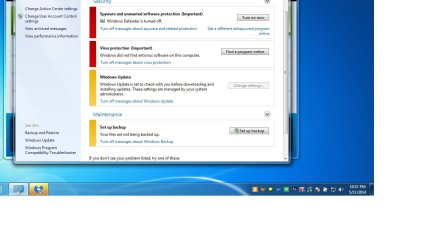
Hello, another issue that I wasn't expecting , after running TFC by Old Timer and clearing my cache in safe mode I got the below messages when I checked action center in regular mode .

My automatic updating for windows update also changed from automatic to (will check with you first before downloading)

Kaspersky says all is well and it's updated so I don't know what's happening , action center is the only thing saying there's issues. Computer scans with various on demand scanners comes up clean.

Any ideas

Thank you everyone
 

Attachments
  • Untitled.jpg
    Untitled.jpg
    74.8 KB · Views: 12

My Computer

Computer type
Laptop
Computer Manufacturer/Model Number
Asus laptop U56E
OS
Microsoft Windows 7 Home Premium 64-bit 7601 Multiprocessor Free Service Pack 1
CPU
Intel(R) Core(TM) i5-2430M CPU @ 2.40GHz
Motherboard
ASUSTeK Computer Inc. U56E
Memory
6.00 GB
Graphics Card(s)
Intel(R) HD Graphics 3000
Sound Card
(1) High Definition Audio Device (2) High Definition Audio
Screen Resolution
1366 x 768 x 32 bits (4294967296 colors) @ 60 Hz
Hard Drives
WDC WD6400BPVT-80HXZT3
If action center is not finding your antivirus (Kaspersky) that is an issue. That vendor fully supports integration with action center. This can possibly be an indication of malware or a corrupt installation of Kaspersky . Did this problem suddenly appear?

A year after windows 7 launched, all antivirus vendors were required to add code so that action center can recognize their product. This way the user is alerted if something is amiss.

Of course if you own your own backup utility you can turn messages off for windows backup.

Windows update settings, did you change them to download and I'll choose when to install them?

If you did not change this setting, and originally action center reported all was well (Meaning it was automatic before) there is an issue.

Windows defender is not concerning, it is pretty much as useless as Microsoft security essentials.

However, if you use internet explorer as your primary browser, I recommend having it enabled and up to date due to the integration for protected mode and smartscreen filter.


As for the virus protection notice, I would try a repair or reinstall of your antivirus product.

Something just does not seem right to me here.....
 

My Computer

Computer type
PC/Desktop
Computer Manufacturer/Model Number
Custom Built
OS
Windows 10 Pro
CPU
AMD Ryzen 5 2400G Processor with Radeon RX Vega 11 Graphics
Motherboard
ASRock X470 Master SLI/AC AM4 AMD Promontory X470 SATA 6Gb/s
Memory
G.SKILL Ripjaws V Series 16GB (2 x 8GB) 288-Pin DDR4 SDRAM D
Graphics Card(s)
2047MB NVIDIA GeForce GTX 1060 6GB (EVGA)
Sound Card
Motherboard Built in
Monitor(s) Displays
Acer R240HY bidx 23.8-Inch IPS HDMI DVI VGA (1920 x 1080) Wi
Screen Resolution
1920 x 1080
Hard Drives
1TB Sandisk SSD PLUS (Main drive)
500 GB Seagate 7200 RPM (Games)
500 GB Western Digital 7200 RPM (Virtual Machines)
PSU
CORSAIR TX Series TX650M 650W 80+ Gold Modular Power Supply
Case
CORSAIR CARBIDE SPEC-02 Mid-Tower Gaming Case, Red LED Fan
Cooling
220mm, two 120mm, and four 60mm fans
Keyboard
Wired Dell keyboard
Mouse
Wireless Logitech mouse
Internet Speed
250mb down, 30mb up
Antivirus
Panda Cloud Antivirus
Browser
Chrome-ish x64
Other Info
Your awesome for reading this.
Hello, another issue that I wasn't expecting , after running TFC by Old Timer and clearing my cache in safe mode I got the below messages when I checked action center in regular mode .

My automatic updating for windows update also changed from automatic to (will check with you first before downloading)

Kaspersky says all is well and it's updated so I don't know what's happening , action center is the only thing saying there's issues. Computer scans with various on demand scanners comes up clean.

Any ideas

Thank you everyone

Installing Kaspesky requires a reboot, did you run TFC around the same time? If so, some files may have been removed by TFC prior to the software being completely installed causing Action Center to misidentify AV protection.
 

My Computer

Computer type
PC/Desktop
Computer Manufacturer/Model Number
Custom Built
OS
Windows 7 Professional x64
CPU
Intel i5 quad processor
Motherboard
DP67BG
Memory
16 GB
Graphics Card(s)
Radeon HD 5770
Sound Card
Realtek High Definition Audio
Monitor(s) Displays
Samsung SyncMaster
Screen Resolution
1920X1080
Hard Drives
WD 2TB (SATA Internal)
WD 1TB (USB External)
PSU
Corsair GS800
Case
Tower (Generic)
Cooling
3 Internal Fans
Keyboard
MS Wireless
Mouse
MS Optical Wired
Internet Speed
54 mbps
Antivirus
Emsisoft
Browser
IE-Version 9, Palemoon-Version 24.2.0
Sorry for the late response guys , i completely forgot about my own thread.

Kaspersky has never been recognized for some reason , one thing that i do know is that a long time ago i had a system repair pending and it didn't complete for some reason, a possible blue screen or something but i can't remember .

The odd thing is that even after numerous reformats and re installs when i run checkdsk i still occasionally get a "system repair pending message " and at other times chkdsk says no integrity issues and all is well.

One thing to note is that when i do a checkdsk in safe mode it will usually say it didn't detect and problems but when i do a chkdsk/f it will say if i want to schedule a scan after a reboot which i click yes.

When it does a scan upon reboot it will find free space marked as allocated which it never finds in safe mode.

I have probably run every on demand scanner there is and all come up clean so i don't get it. No one has been able to figure out this issue but why not try again.

I have also run chkdsk/f/r and i still get a clean bill of slate and then next time in safe mode back to "system repair pending " message.

Thanks for the help
 

My Computer

Computer type
Laptop
Computer Manufacturer/Model Number
Asus laptop U56E
OS
Microsoft Windows 7 Home Premium 64-bit 7601 Multiprocessor Free Service Pack 1
CPU
Intel(R) Core(TM) i5-2430M CPU @ 2.40GHz
Motherboard
ASUSTeK Computer Inc. U56E
Memory
6.00 GB
Graphics Card(s)
Intel(R) HD Graphics 3000
Sound Card
(1) High Definition Audio Device (2) High Definition Audio
Screen Resolution
1366 x 768 x 32 bits (4294967296 colors) @ 60 Hz
Hard Drives
WDC WD6400BPVT-80HXZT3

My Computer

Computer type
PC/Desktop
Computer Manufacturer/Model Number
Custom Built
OS
Windows 10 Pro
CPU
AMD Ryzen 5 2400G Processor with Radeon RX Vega 11 Graphics
Motherboard
ASRock X470 Master SLI/AC AM4 AMD Promontory X470 SATA 6Gb/s
Memory
G.SKILL Ripjaws V Series 16GB (2 x 8GB) 288-Pin DDR4 SDRAM D
Graphics Card(s)
2047MB NVIDIA GeForce GTX 1060 6GB (EVGA)
Sound Card
Motherboard Built in
Monitor(s) Displays
Acer R240HY bidx 23.8-Inch IPS HDMI DVI VGA (1920 x 1080) Wi
Screen Resolution
1920 x 1080
Hard Drives
1TB Sandisk SSD PLUS (Main drive)
500 GB Seagate 7200 RPM (Games)
500 GB Western Digital 7200 RPM (Virtual Machines)
PSU
CORSAIR TX Series TX650M 650W 80+ Gold Modular Power Supply
Case
CORSAIR CARBIDE SPEC-02 Mid-Tower Gaming Case, Red LED Fan
Cooling
220mm, two 120mm, and four 60mm fans
Keyboard
Wired Dell keyboard
Mouse
Wireless Logitech mouse
Internet Speed
250mb down, 30mb up
Antivirus
Panda Cloud Antivirus
Browser
Chrome-ish x64
Other Info
Your awesome for reading this.
Back
Top