Solved Empty Bar at top of Screen

Buddy 123

New member
Local time
9:17 AM
Messages
10
New to forum and thanks for any help. I am getting a blank section at the top of my screens that will not fill in. When I minimize and try to push the IE page up I get a transparent page that fills in under the current page .Any clues. Again Thanks!
 

My Computer My Computer

At a glance

Windows premium 64 bit Dell
OS
Windows premium 64 bit Dell
Welcome to sevenforums.com
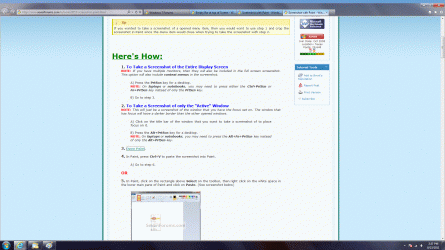
Please make and post a screenshot.
 

My Computer My Computer

At a glance

Windows 8.1 ; Windows 7 x86 (Dec2008-Jan2013)
Computer type
PC/Desktop
OS
Windows 8.1 ; Windows 7 x86 (Dec2008-Jan2013)
Other Info
"The scale icon at the top right of a post or tutorial is how you can give rep to the member."
Hi and welcome to the forums.

I read your description of the issue a couple of times and think I get the idea.

It sounds like the resolution might be set wrong for your monitor?

Paul.
 

My Computer My Computer

At a glance

Windows 7 Professional 64 bit
OS
Windows 7 Professional 64 bit
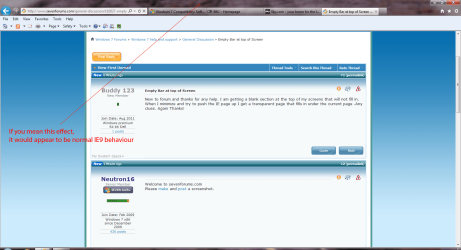
Is this what you mean?

Capture.PNG
 

My Computer My Computer

At a glance

Windows 7 Ultimate SP1 64-BitIntel Core i7 870 @ 2.93GHz8Gb Dual-Channel DDR3 @ 664MHznVidia GeForce GTX 460 1024MB dedicated RAM
Computer Manufacturer/Model Number
HP Pavilion Elite 495UK
OS
Windows 7 Ultimate SP1 64-Bit
CPU
Intel Core i7 870 @ 2.93GHz
Motherboard
MSI 2A9C (CPU1)
Memory
8Gb Dual-Channel DDR3 @ 664MHz
Graphics Card(s)
nVidia GeForce GTX 460 1024MB dedicated RAM
Sound Card
Realtek HD Audio
Monitor(s) Displays
HP2310i
Screen Resolution
1920 x 1080
Hard Drives
1x1954GB Hitachi HDS22020ALA 330 (RAID), 1x1954GB Hitachi External for backup and storage
PSU
460W
Case
HP Elite
Cooling
Air cooled
Keyboard
Logitech K750 solar-powered keyboard
Mouse
Logitech Wireless M180 mouse
Internet Speed
2Mb
Other Info
Pure Avanti Flow Internet Radio with iPod Dock, 64Gb iPod, HP USB Speakers, Sony MDR-V500 Headphones, Sony Vaio F-Series Laptop
Bar at top 2.gif

Bar at top.gif
 

My Computer My Computer

At a glance

Windows premium 64 bit Dell
OS
Windows premium 64 bit Dell
The second pic shows the space at the top. The window wil not fill all the way to the top. When you minimize and try to push it up to try and fill all the way a second transparent screen opens underneth.
 

My Computer My Computer

At a glance

Windows premium 64 bit Dell
OS
Windows premium 64 bit Dell
Ok, not a resolution issue then.

Doe's it just happen with internet explorer?

Do you have another browser such as chrome you could try it with to rule it out?
 

My Computer My Computer

At a glance

Windows 7 Professional 64 bit
OS
Windows 7 Professional 64 bit
Bar at top.gif
Everthing I open has the same empty bar at the top.
 

My Computer My Computer

At a glance

Windows premium 64 bit Dell
OS
Windows premium 64 bit Dell

My Computer My Computer

At a glance

Windows 7 Professional 64 bit
OS
Windows 7 Professional 64 bit
bat3.jpg
 

My Computer My Computer

At a glance

Windows premium 64 bit Dell
OS
Windows premium 64 bit Dell
Sorry Paul,I uploaded the wrong pic.
 

My Computer My Computer

At a glance

Windows premium 64 bit Dell
OS
Windows premium 64 bit Dell
Arhh ok, I get you now.

Think I will have to leave this for someone with a bit more knowledge than me.

Cheers

Paul.
 

My Computer My Computer

At a glance

Windows 7 Professional 64 bit
OS
Windows 7 Professional 64 bit
It acts like something is pinned in that spot . It happened when I tried closing out an open window and hit something by the x.
 

My Computer My Computer

At a glance

Windows premium 64 bit Dell
OS
Windows premium 64 bit Dell
How long has it been happening for?

Perhaps try a system restore to before it happened?
 

My Computer My Computer

At a glance

Windows 7 Professional 64 bit
OS
Windows 7 Professional 64 bit
Just happened about a day ago. Could try SR but I sure would like to figure this out for the next time.
 

My Computer My Computer

At a glance

Windows premium 64 bit Dell
OS
Windows premium 64 bit Dell
Yeah I understand, things like that bug the hell out of me.

I have system restore disabled as I have a 60gb ssd and like to save on space so I must always find my way round problems. Thankfully they don't arise very often!
 

My Computer My Computer

At a glance

Windows 7 Professional 64 bit
OS
Windows 7 Professional 64 bit
Just happened about a day ago. Could try SR but I sure would like to figure this out for the next time.

It could be a corrupt file in the Windows 7 Theme, i'm not sure why it should be corrupt though?
 

My Computer My Computer

At a glance

Windows 7 Ultimate x64AMD Phenom II x4 840 Black Edition8 GbATI Radeon HD 5570 2 Gb DDR3
Computer Manufacturer/Model Number
Custom
OS
Windows 7 Ultimate x64
CPU
AMD Phenom II x4 840 Black Edition
Motherboard
Forgot
Memory
8 Gb
Graphics Card(s)
ATI Radeon HD 5570 2 Gb DDR3
Sound Card
AMD High Definition Audio Device
Monitor(s) Displays
Emprex 21 Inch
Screen Resolution
1280 x 720
Hard Drives
Western Digital 1 TB,
Unknown 160 gb and 1 TB Hitachi External Hard Drive
PSU
600w Custom
Case
Custom
Cooling
Multiple Blue LED Fans
Keyboard
Cyborg V.1
Mouse
Fuhlen Multi Button Gaming Mouse
Internet Speed
20 Mb
Other Info
I own other computers, such as my HP Mini 110 and some of my older computers!
I tried a system restore back several days before the issue and it did not fix the problem. If I grab the frame and push it up into the blank area the pointer area twinkles and the transparent window is just a bit smaller than the background pic. You need to enlarge the photo to really see the transparent window. I am at work right now and on a different pc so anything I can try in the morning will be appreciated.

ZSXD,Anything is possible. It happened when I tried to close a window out. I misqued the pointer in the top corner and drug it around and conjured up this crazy crap. Thanks
 

My Computer My Computer

At a glance

Windows premium 64 bit Dell
OS
Windows premium 64 bit Dell
Found a fix for my problem. Unlock taskbar,drag to top and then back down to normal.Then relock the task bar. Thanks everyone for your time and effort
 

My Computer My Computer

At a glance

Windows premium 64 bit Dell
OS
Windows premium 64 bit Dell
Found a fix for my problem. Unlock taskbar,drag to top and then back down to normal.Then relock the task bar. Thanks everyone for your time and effort

Arhh glad you got it sorted bud:D

Cheers

Paul.
 

My Computer My Computer

At a glance

Windows 7 Professional 64 bit
OS
Windows 7 Professional 64 bit
Back
Top