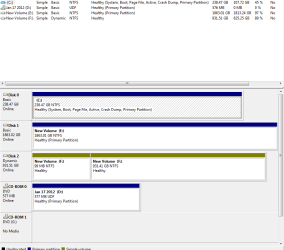
Empty optical drive indicates it has audio cd

Thanks, I'll pass this on to others having similar problems.
 

My Computer My Computer

OS
Windows 7 64 bit
CPU
Core i7-3960
Motherboard
P9x79deluxe
Memory
32 gb
Graphics Card(s)
Gtx580
Sound Card
None
Monitor(s) Displays
Hd tv
Hard Drives
2tb deskstar
1tb seagate
PSU
1200w thermaltake
Heres a thought, just looking at your mobo specs I see it has 6 sata ports, 2 of which are 6.0gbs and 4 are 3.0gbs. Is the drive plugged into the right sata port. I know the ports are backwards compatible but sometimes hardware is port specific or the mobo has conditions on how those ports are used and may need special drivers to enable said ports.
 

My Computer My Computer

Computer Manufacturer/Model Number
Custom built
OS
Windows 7 Ultimate 64 bit
CPU
AMD Phenom II X4 965 Black Edition
Motherboard
Gigabyte GA-MA790X-DS4
Memory
GSkill 4 X 2 GB PC 8500
Graphics Card(s)
XFX Radeon HD 6790 D
Sound Card
On board RealTek HD
Monitor(s) Displays
Dual monitors:Samsung SyncMaster S20B300
Screen Resolution
1600 X 900
Hard Drives
Seagate Barracuda 1TB (primary)
Seagate Barracuda 2 X 320 GB
PSU
Ultra X4 750 watt fully modular
Case
Thermaltake Overseer RX 1 full tower
Cooling
Core-Contact 92 mm CPU Cooler
Keyboard
Logitech G510
Mouse
Razor DeathAdder
Internet Speed
50/5 Mbps UL/DL
Other Info
Optical: Super Muliti DVD burner w/lightscribe, Hauppauge WinTV HVR-1800
Hello,

My optical drives were indicating they had audio CDs in them though they were empty. They were attached to the 3g ports. I attached them to the Marvell 6g ports and now they no longer act as if they have audio CDs when they do not. I attached my (disk 2) f: hard drive to one of my 3g ports. One of the strange things of this is that since I deleted the portion of disk 3 that was my d: drive, disk 2 now visually shows 2 f: drives in disk management. I'll attach an attachment of what that looks like.Capture2.PNG
 

My Computer My Computer

OS
Windows 7 64 bit
CPU
Core i7-3960
Motherboard
P9x79deluxe
Memory
32 gb
Graphics Card(s)
Gtx580
Sound Card
None
Monitor(s) Displays
Hd tv
Hard Drives
2tb deskstar
1tb seagate
PSU
1200w thermaltake
FWIW: I have/had this very same problem -- "Audio CD" is indicated when the drive is empty and it won't autoplay until the drive is re-opened and closed.
My system is a new home-built (by me) based on an ASUS Sabertooth X79 motherboard.
The optical drives afflicted with the phantoms are two different models of LG blu-ray writers recycled from my previous build. They're both plugged into the SATA 3Gbs ports.

I updated, as thenox suggested, to the very latest Intel Rapid Storage Technology drivers (V3.0.0.3011) from the ASUS site and now the two optical drives show as empty as they are. Yay! :D
 

My Computer My Computer

OS
Windows 7 Pro, 64-bit
Back
Top