Solved Emtec 16GB Flash Drive not detected in BIOS

Cross Bones

New member
Local time
10:14 PM
Messages
18
Location
Bellevue, Nebraska
Hello. I bought a little 16 GB flash drive by Emtec yesterday because it was on sale for ten bucks at Office Max. I tested it out transferring a few music files from my laptop to my PC, and it worked like a charm. Around half an hour ago, I decided to see what it can really do. I used Unetbootin and loaded Damn Small Linux. I shut the computer down and opened up the BIOS Boot Options, and I was only picking up my computer's hard drive. Hmm. So I boot it as I normally would, and it went fine. Assuming it was that Linux black magic, I loaded a different distribution, and opened up the BIOS again. What the heck? The USB still isnt' showing up. I restarted a few times just to make sure it wasn't just a fluke, and it's still not showing up.
Any idea what's going on here?
 

My Computer My Computer

At a glance

Windows 7 Home Premium x64AMD E-3000 APU (1.30 GHz)6 GB of DDR3
Computer type
Laptop
Computer Manufacturer/Model Number
HP 2000-412nr
OS
Windows 7 Home Premium x64
CPU
AMD E-3000 APU (1.30 GHz)
Memory
6 GB of DDR3
Antivirus
Norton 360
Browser
Mozilla Firefox

My Computer My Computer

At a glance

Windows 7 Home Premium 32 bit
OS
Windows 7 Home Premium 32 bit
Sorry if I was vague, I loaded it onto the flash drive using Unetbootin on Windows.
 

My Computer My Computer

At a glance

Windows 7 Home Premium x64AMD E-3000 APU (1.30 GHz)6 GB of DDR3
Computer type
Laptop
Computer Manufacturer/Model Number
HP 2000-412nr
OS
Windows 7 Home Premium x64
CPU
AMD E-3000 APU (1.30 GHz)
Memory
6 GB of DDR3
Antivirus
Norton 360
Browser
Mozilla Firefox

My Computer My Computer

At a glance

Windows 7 Home Premium 32 bit
OS
Windows 7 Home Premium 32 bit
No sir, Rufus and the file you recommended did not help one bit. I assume it's a problem with the USB drive. Is there any way to make my computer think it's a hard drive or something?
 

My Computer My Computer

At a glance

Windows 7 Home Premium x64AMD E-3000 APU (1.30 GHz)6 GB of DDR3
Computer type
Laptop
Computer Manufacturer/Model Number
HP 2000-412nr
OS
Windows 7 Home Premium x64
CPU
AMD E-3000 APU (1.30 GHz)
Memory
6 GB of DDR3
Antivirus
Norton 360
Browser
Mozilla Firefox
If you think it is a problem with the Emtec drive, try my suggestion with any other pen drive not touched with UNetbootin

If you are unable to boot from the one time boot menu, try getting into BIOS setup and make the USB drive as first boot. ( I wouldn't advise meddling with the pen drive's firmware to emulate a HDD, though possible.)

Off to Auchan for Sunday shopping.
 

My Computer My Computer

At a glance

Windows 7 Home Premium 32 bit
OS
Windows 7 Home Premium 32 bit
Well, I've used Unetbootin for dual booting off my other flash drive, and I successfully booted Fedora and SliTaz, but my professor "lost" my old USB. The problem here is that the BIOS can't see my USB at all.
 

My Computer My Computer

At a glance

Windows 7 Home Premium x64AMD E-3000 APU (1.30 GHz)6 GB of DDR3
Computer type
Laptop
Computer Manufacturer/Model Number
HP 2000-412nr
OS
Windows 7 Home Premium x64
CPU
AMD E-3000 APU (1.30 GHz)
Memory
6 GB of DDR3
Antivirus
Norton 360
Browser
Mozilla Firefox
Try the Rufus created bootable pen drive on another PC and check whether you can boot.
 
Last edited:

My Computer My Computer

At a glance

Windows 7 Home Premium 32 bit
OS
Windows 7 Home Premium 32 bit
some USB drives are seen as removable and others as hard drives. Make sure you are looking in both lists.
 

My Computer My Computer

At a glance

Win 7 Pro 64-bit 7601AMD Phenom 9650 QuadCore, revision DR-B35 GB yes I run 2x 2GB and 1x 1GB, different b...NVIDIA GeForce 9800 GT 512 Mb, unknown manufa...
Computer type
PC/Desktop
Computer Manufacturer/Model Number
custom built
OS
Win 7 Pro 64-bit 7601
CPU
AMD Phenom 9650 QuadCore, revision DR-B3
Motherboard
ASUS M4A78
Memory
5 GB yes I run 2x 2GB and 1x 1GB, different brand, spank me.
Graphics Card(s)
NVIDIA GeForce 9800 GT 512 Mb, unknown manufacturer.
Sound Card
Crappy Realtek Integrated Audio
Monitor(s) Displays
Fujitsu Siemens P19-3P
Screen Resolution
1280 x 1024 x 32 bits @ 60 Hz Oh yeah, 4:3 rocks!
Hard Drives
(1) MAXTOR S TM3320613AS SATA Disk Device (2) STM35004 18AS SATA Disk Device (3) TOSHIBA USB 2.5"-HDD
PSU
whatever, around 450w
Case
Scavenged from old company PC, 10+ years old
Cooling
CPU fan, GPU fan, case fan, nothing fancy
Keyboard
Microsoft, PS/2, white.
Mouse
Optical, logitec.
Internet Speed
effective max speeds: 70-ish kB/s down 30-ish kB/s up
Antivirus
Avira, free edition.
Browser
Firefox with FXChrome to make it look like Google Chrome :P
Other Info
Was discarded by previous owner due to "horrible performance".
Was running Win Xp from a IDE drive. Yeah. Was a pain.
SATA II drive and Win7 and it zips away! Yay!
Tried it in my 2001 Dell running XP, worked like a charm. This means it's something with my computer? And is there any way to record exactly what happens during startup?
 

My Computer My Computer

At a glance

Windows 7 Home Premium x64AMD E-3000 APU (1.30 GHz)6 GB of DDR3
Computer type
Laptop
Computer Manufacturer/Model Number
HP 2000-412nr
OS
Windows 7 Home Premium x64
CPU
AMD E-3000 APU (1.30 GHz)
Memory
6 GB of DDR3
Antivirus
Norton 360
Browser
Mozilla Firefox
Maybe your USB ports aren't actually "on" until you're actually inside the operating system. For USB to function without an operating system, USB Legacy must be enabled. This can be enabled within the BIOS screen in which you can toggle enable/disable. Good luck!
 

My Computer My Computer

At a glance

Windows 7 Home Premium x64Intel Core i7-3770S Quad @ 3.1 GHz (Turbo-Boo...16GB (DDR3) @1,600MHz Corsair Vengeance 2EVGA GeForce GTX 960 SuperSC ACX 2.0+ 2GB
Computer type
PC/Desktop
Computer Manufacturer/Model Number
Custom Build
OS
Windows 7 Home Premium x64
CPU
Intel Core i7-3770S Quad @ 3.1 GHz (Turbo-Boost to 3.9GHz)
Motherboard
ASUS ROG Maximus V Formula ATX
Memory
16GB (DDR3) @1,600MHz Corsair Vengeance 2
Graphics Card(s)
EVGA GeForce GTX 960 SuperSC ACX 2.0+ 2GB
Monitor(s) Displays
Acer 23" S230HL
Screen Resolution
1920 x 1080
Hard Drives
Seagate 1TB @7,200rpm
PSU
850W Power Supply (Thermaltake - SP850M)
Case
NZXT SWITCH 810 Gun-Metal CA-SW810-G1
Cooling
Cooler Master Hyper 212 EVO (RR-212E-20PK)
Keyboard
Logitech G510
Mouse
Logitech G602
Internet Speed
5Mbps Download / 756kbps Upload
Antivirus
Microsoft Security Essentials
Erm, which tab would that be under? My computer is a post 2006, meaning that I press F10 to enter the BIOS screen, if that helps.
 

My Computer My Computer

At a glance

Windows 7 Home Premium x64AMD E-3000 APU (1.30 GHz)6 GB of DDR3
Computer type
Laptop
Computer Manufacturer/Model Number
HP 2000-412nr
OS
Windows 7 Home Premium x64
CPU
AMD E-3000 APU (1.30 GHz)
Memory
6 GB of DDR3
Antivirus
Norton 360
Browser
Mozilla Firefox
I'm not sure, everyone's BIOS is different based the motherboard manufacturer and model. Just in some way, you need a way to enable your USB ports without having an operating system.

Someone showing USB Legacy support: PC Bios Explained - USB Legacy support - YouTube
 

My Computer My Computer

At a glance

Windows 7 Home Premium x64Intel Core i7-3770S Quad @ 3.1 GHz (Turbo-Boo...16GB (DDR3) @1,600MHz Corsair Vengeance 2EVGA GeForce GTX 960 SuperSC ACX 2.0+ 2GB
Computer type
PC/Desktop
Computer Manufacturer/Model Number
Custom Build
OS
Windows 7 Home Premium x64
CPU
Intel Core i7-3770S Quad @ 3.1 GHz (Turbo-Boost to 3.9GHz)
Motherboard
ASUS ROG Maximus V Formula ATX
Memory
16GB (DDR3) @1,600MHz Corsair Vengeance 2
Graphics Card(s)
EVGA GeForce GTX 960 SuperSC ACX 2.0+ 2GB
Monitor(s) Displays
Acer 23" S230HL
Screen Resolution
1920 x 1080
Hard Drives
Seagate 1TB @7,200rpm
PSU
850W Power Supply (Thermaltake - SP850M)
Case
NZXT SWITCH 810 Gun-Metal CA-SW810-G1
Cooling
Cooler Master Hyper 212 EVO (RR-212E-20PK)
Keyboard
Logitech G510
Mouse
Logitech G602
Internet Speed
5Mbps Download / 756kbps Upload
Antivirus
Microsoft Security Essentials
BobaFettHotmail may be correct.

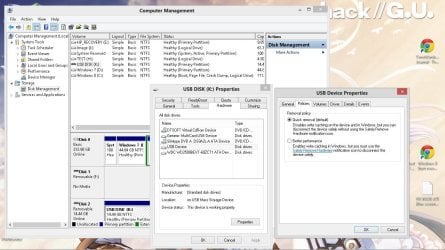
some drives are seen as a harddrive, in this case right click computer and choose manage

then select disk management and see if it is there, it will probably NOT have a drive letter, you will have to assign it.

if it fails to show up regularly in your windows explorer you will have to set how its viewed by windows in its properties.

Its probably set up as a harddrive which will have write cache enabled. Set it for fast removal (aka removable drive)

Under hardware >> Usb device >> policies

usb-policies.jpg
 

My Computer My Computer

At a glance

windows 7 home premium
OS
windows 7 home premium
Fixed! It booted successfully, and is running perfect! Thank you!
 

My Computer My Computer

At a glance

Windows 7 Home Premium x64AMD E-3000 APU (1.30 GHz)6 GB of DDR3
Computer type
Laptop
Computer Manufacturer/Model Number
HP 2000-412nr
OS
Windows 7 Home Premium x64
CPU
AMD E-3000 APU (1.30 GHz)
Memory
6 GB of DDR3
Antivirus
Norton 360
Browser
Mozilla Firefox
Was it a bios or windows issue?

How did you fix it?
 

My Computer My Computer

At a glance

windows 7 home premium
OS
windows 7 home premium
Sorry, that's probably a good thing to say. I just went into my BIOS and moved my USB up on the Boot Order.
 

My Computer My Computer

At a glance

Windows 7 Home Premium x64AMD E-3000 APU (1.30 GHz)6 GB of DDR3
Computer type
Laptop
Computer Manufacturer/Model Number
HP 2000-412nr
OS
Windows 7 Home Premium x64
CPU
AMD E-3000 APU (1.30 GHz)
Memory
6 GB of DDR3
Antivirus
Norton 360
Browser
Mozilla Firefox
Glad your problem is resolved.
 

My Computer My Computer

At a glance

Windows 7 Home Premium 32 bit
OS
Windows 7 Home Premium 32 bit
Back
Top