- Local time
- 2:12 PM
- Messages
- 306
ok, so i put some files of a tv show on the flash drive to watch on my xbox. i had previously formatted the flash drive in NTFS because i had a file larger than 4Gb i needed my wife to send to me in afghanistan. the flash drive wouldnt show up on the xbox and i remembered it was because of the formatting i'd done.
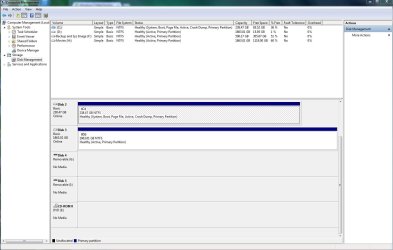
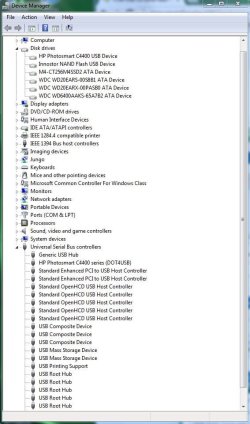
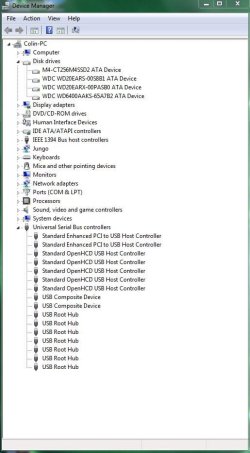
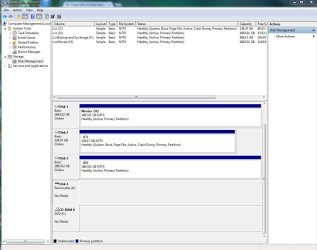
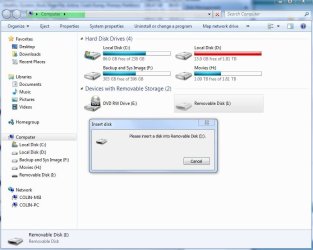
so i formatted the drive in FAT32 and put the files back on the drive. the xbox recognized the drive just fine, but wouldnt play the movie file types. so i put the flash drive back in the computer to wipe it clean and now it won't show up on either one of my computers. it does show up in disk management, however, its not really usable (see the attached picture).
in the picture, disk 5 (I: ) is the flash drive in question. i don't know what disk 4 (G: ) is because i don't have any other removable drives plugged in currently.
any help is appreciated! i've searched through some previous threads, but havent found much, unless i missed something.
thanks!
Colin
so i formatted the drive in FAT32 and put the files back on the drive. the xbox recognized the drive just fine, but wouldnt play the movie file types. so i put the flash drive back in the computer to wipe it clean and now it won't show up on either one of my computers. it does show up in disk management, however, its not really usable (see the attached picture).
in the picture, disk 5 (I: ) is the flash drive in question. i don't know what disk 4 (G: ) is because i don't have any other removable drives plugged in currently.
any help is appreciated! i've searched through some previous threads, but havent found much, unless i missed something.
thanks!
Colin
Attachments
Last edited:
My Computer
At a glance
windows 7 64bit on bothAMD FX-8350 @4.6GHz/Intel Core i7-3610QM @2.3GHz16GB G.Skill 1866MHz/8GB dual channel 1600MHztwo Sapphire HD7970 OC 3Gb in crossfire/GTX66...
- Computer type
- PC/Desktop
- Computer Manufacturer/Model Number
- Custom Build and MSI GE60 0ND laptop
- OS
- windows 7 64bit on both
- CPU
- AMD FX-8350 @4.6GHz/Intel Core i7-3610QM @2.3GHz
- Motherboard
- ASUS M5A99X EVO R2.0/MS-16GA
- Memory
- 16GB G.Skill 1866MHz/8GB dual channel 1600MHz
- Graphics Card(s)
- two Sapphire HD7970 OC 3Gb in crossfire/GTX660M 2Gb
- Sound Card
- Realtek HD Audio/Realtek HD Audio with THX TruStudio Pro
- Monitor(s) Displays
- Hanns-G 27" 1080p /Generic PnP Monitor
- Screen Resolution
- both 1920x1080p 60Hz
- Hard Drives
- 250GB Samsung 840 EVO SSD,
1TB WD Blue
3x2TB WD Greens
/Samsung 840 EVO mSATA
- PSU
- Corsair HX750/laptop psu
- Case
- NZXT Source 530
- Cooling
- CoolerMaster Hyper 212 Evo
- Keyboard
- Logitech G710+/laptop keyboard by steelseries
- Mouse
- Logitec G500s/Logitec G500
- Internet Speed
- 50Mbps down/1-3 Mbps up
- Other Info
- Scythe Kaze Master Pro 5.25 fan controller; APC Back-UPS XS 1500

 rb: type CMD inside the command prompt right click on CMD under Programs (1) choose Run as administrator . If you get the user access control window click on the yes button . Pic below