so u are running ubuntu in windows? ok its pretty easy, first select shared folders in virtualbox and select the folder(s) you want to share, then in ubuntu as root make a place (i use mnt) and mkdir /mnt/foldername then again as root mount the share name to the folder u made? if this is confusing i can explain better, but it is covered in the help manual section 4.3 shared folders.
My Computer
Computer Manufacturer/Model Number
HP dv6519tx
OS
Windows 7 Ultimate x64
CPU
1.80 GHz Intel Core 2 Duo processor T7100
Memory
3 gig ddr2
Graphics Card(s)
NVIDIA GeForce 8400M GS
Sound Card
Realtek High Definition Audio
Monitor(s) Displays
15.4” WXGA High Definition BrightView Widescreen
Screen Resolution
1280 x 800
Hard Drives
Hitachi 320 GB (5400 rpm)
PSU
90 W AC Power Adapter
Cooling
Kitchen plate under the lappy
Keyboard
101 key compatible
Mouse
Touch Pad with On/Off button and dedicated vertical Scroll
Internet Speed
Three Wireless internet prepaid using E160G USB dongle
i cant do anything with the Root file... and that doesnt make sense... i shared the folders on the virtual box side... but i still cant get Ubuntu to see them...
What is the risk of me losing files if i change my windows partitions...
My Computer
Computer Manufacturer/Model Number
Self Built
OS
Windows 7 Professional 64bit + Ubuntu in Virtual Box
root is the user name or account that by default has access to all commands and files on a Linux or other Unix-like Operating System. It is also referred to as the root account, root user and the superuser.....
I also just remember you need to have the Guest Additions installed to use the shared folders feature.
My Computer
Computer Manufacturer/Model Number
HP dv6519tx
OS
Windows 7 Ultimate x64
CPU
1.80 GHz Intel Core 2 Duo processor T7100
Memory
3 gig ddr2
Graphics Card(s)
NVIDIA GeForce 8400M GS
Sound Card
Realtek High Definition Audio
Monitor(s) Displays
15.4” WXGA High Definition BrightView Widescreen
Screen Resolution
1280 x 800
Hard Drives
Hitachi 320 GB (5400 rpm)
PSU
90 W AC Power Adapter
Cooling
Kitchen plate under the lappy
Keyboard
101 key compatible
Mouse
Touch Pad with On/Off button and dedicated vertical Scroll
Internet Speed
Three Wireless internet prepaid using E160G USB dongle
When first running Vbox as well as custom installing the RCs on either VHDs with the 32bit for the VPC or the 64bit on VBox I ran into this problem while the XP Mode continues to see the integrated components supporting direct access to all internal drives.
Lately while the main was down for a bit the chance to try the 32bit 7 out on an old case proved interesting in a few different ways including seeing the XP Mode run not on the Virtual PC which requires hardware support for which the old Socket A case couldn't provide but could run the XP Mode on the VM Lite Workstation for XP Mode without problems once againg seeing the intergrated components support.
What about Vista and XP on VHDs was the problem there? Enabling file sharing and remote desktop access on the host OS(7) as well as fille sharing was one thing tried while another idea found last year was the Gladinet CloudDesktop program for mounting a virtual folder on both host and VMs for file sharing live with the Windows Live SkyDrive option. You simply drag files into the virtual folder to watch upload and be accessed on the other host or VM by download there.
W7 Ultimate x64/W10 Pro x64/W11 Pro Triple Boot - Main PC W7 Remote PC Micro ATX W7 Pro x64/W11 Pro
CPU
AMD Phenom II X4 975 Deneb 3.6ghz - 965 2nd remote pc
Motherboard
Gigabyte GA-790XTA-UD4-Gigabyte GA-880GM-D2H remote pc
Memory
Kingston Hyper X DDR3 1600 1.5v 16gb - Hyper X Fury 8gb 2nd
Graphics Card(s)
MSI HD Radeon 5750 1gb - MSI HD Radeon 6450 on mini tower
Sound Card
Creative Labs X-Fi Xtreme Audio P - Realtek onooard 2nd case
Monitor(s) Displays
ASUS VW199T-P 19" HP 2082a Main-HP 2082a 20" remote pc
Screen Resolution
Asus 1440x900 - HP 1600x900
Hard Drives
WD Black 1TB HD per OS W7, W10, and pending W11 presently on 500gb OS Drive - Pending Triple 1TB HDs for Spanned Storage/backup volume
Single 2TB external USB enclosure, single 1TB System 7 Host/Boot drive, Pending 8TB external HD for system image b
PSU
Corsair 750TX - primary / Corsair CX600 - second
Case
Antec 900-2 - SSD compatible / NZXT Vulcan mini tower
i am guessing its more of a linux issue than virtualbox, and as a linux geek since the 90's i am happy to help!
EDIT: cloud is a way more complicated issue, its just how to mount stuff in linux, lol, then we get to the /etc/fstab so the locations are mounted if u want to reboot! (reminds me of the linux joke about mount then touch then root as linux!!) don't be afraid they are all legit linux commands
Last edited:
My Computer
Computer Manufacturer/Model Number
HP dv6519tx
OS
Windows 7 Ultimate x64
CPU
1.80 GHz Intel Core 2 Duo processor T7100
Memory
3 gig ddr2
Graphics Card(s)
NVIDIA GeForce 8400M GS
Sound Card
Realtek High Definition Audio
Monitor(s) Displays
15.4” WXGA High Definition BrightView Widescreen
Screen Resolution
1280 x 800
Hard Drives
Hitachi 320 GB (5400 rpm)
PSU
90 W AC Power Adapter
Cooling
Kitchen plate under the lappy
Keyboard
101 key compatible
Mouse
Touch Pad with On/Off button and dedicated vertical Scroll
Internet Speed
Three Wireless internet prepaid using E160G USB dongle
I believe TheBull was looking for information on how to see this done in Windows not Linux. Fortunately the TechNet Library may be the better reference as it turns out. Share host drives with a virtual machine
"Updated: July 30, 2009
Applies To: Windows 7"
Again that still applies to the VPC there however.
W7 Ultimate x64/W10 Pro x64/W11 Pro Triple Boot - Main PC W7 Remote PC Micro ATX W7 Pro x64/W11 Pro
CPU
AMD Phenom II X4 975 Deneb 3.6ghz - 965 2nd remote pc
Motherboard
Gigabyte GA-790XTA-UD4-Gigabyte GA-880GM-D2H remote pc
Memory
Kingston Hyper X DDR3 1600 1.5v 16gb - Hyper X Fury 8gb 2nd
Graphics Card(s)
MSI HD Radeon 5750 1gb - MSI HD Radeon 6450 on mini tower
Sound Card
Creative Labs X-Fi Xtreme Audio P - Realtek onooard 2nd case
Monitor(s) Displays
ASUS VW199T-P 19" HP 2082a Main-HP 2082a 20" remote pc
Screen Resolution
Asus 1440x900 - HP 1600x900
Hard Drives
WD Black 1TB HD per OS W7, W10, and pending W11 presently on 500gb OS Drive - Pending Triple 1TB HDs for Spanned Storage/backup volume
Single 2TB external USB enclosure, single 1TB System 7 Host/Boot drive, Pending 8TB external HD for system image b
PSU
Corsair 750TX - primary / Corsair CX600 - second
Case
Antec 900-2 - SSD compatible / NZXT Vulcan mini tower
nighthawk, my last post was simply about this sounding like a linux issue was referring to the work needed in the linux side to make it possible to see the windows folders. Again i refer to the virtualbox help file and suggest (now quite specifically to you) that the precise instructions to use shared folders is right there (Under Guest Additions then submenu Shared Folders). No offence, but u seem determined to find far more complicated solutions to a simple question. Good luck, i guess wanting to find a simple solution to a problem stems from my days as a technician (or possibly because i subscribe to the Ochrams razor theory, the the simplest answer is probably the right one!)
Last edited:
My Computer
Computer Manufacturer/Model Number
HP dv6519tx
OS
Windows 7 Ultimate x64
CPU
1.80 GHz Intel Core 2 Duo processor T7100
Memory
3 gig ddr2
Graphics Card(s)
NVIDIA GeForce 8400M GS
Sound Card
Realtek High Definition Audio
Monitor(s) Displays
15.4” WXGA High Definition BrightView Widescreen
Screen Resolution
1280 x 800
Hard Drives
Hitachi 320 GB (5400 rpm)
PSU
90 W AC Power Adapter
Cooling
Kitchen plate under the lappy
Keyboard
101 key compatible
Mouse
Touch Pad with On/Off button and dedicated vertical Scroll
Internet Speed
Three Wireless internet prepaid using E160G USB dongle
a quick question...
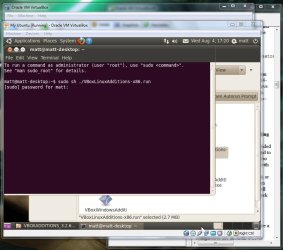
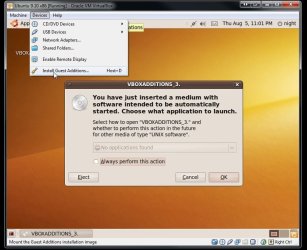
when i run the install for the guest additions.. it says that it needs to abort due to the fact that it needs administrator privileges...
so in order to do this i found this tutorial... HERE IT IS!!!
But when i get to the:
"Choose the right package for your hardware architecture. In our case, this is x86. Open a terminal window and run the script with root privileges:
sudo sh ./<script-relevant-for-your-architecture>"
it runs fine but then requires a sudo password for matt [screenshot included]
but when i try to type in my password that i use to login it wont let me... it doesnt let me type anything...
so whats going on...
Attachments
Password.jpg
68.9 KB
· Views: 20
Last edited:
My Computer
Computer Manufacturer/Model Number
Self Built
OS
Windows 7 Professional 64bit + Ubuntu in Virtual Box
When looking over the "Devices" option seen on the menu bar after starting the ubuntu VM here the option for guest additions is presented in the dropdown menu. Unfortunately I haven't had a chance to look into that part further.
For file sharing purposes setting the host OS options for shared folders is part of that process. The "Transient" main folder will then contain sub folders used for the actual sharing purposes.
W7 Ultimate x64/W10 Pro x64/W11 Pro Triple Boot - Main PC W7 Remote PC Micro ATX W7 Pro x64/W11 Pro
CPU
AMD Phenom II X4 975 Deneb 3.6ghz - 965 2nd remote pc
Motherboard
Gigabyte GA-790XTA-UD4-Gigabyte GA-880GM-D2H remote pc
Memory
Kingston Hyper X DDR3 1600 1.5v 16gb - Hyper X Fury 8gb 2nd
Graphics Card(s)
MSI HD Radeon 5750 1gb - MSI HD Radeon 6450 on mini tower
Sound Card
Creative Labs X-Fi Xtreme Audio P - Realtek onooard 2nd case
Monitor(s) Displays
ASUS VW199T-P 19" HP 2082a Main-HP 2082a 20" remote pc
Screen Resolution
Asus 1440x900 - HP 1600x900
Hard Drives
WD Black 1TB HD per OS W7, W10, and pending W11 presently on 500gb OS Drive - Pending Triple 1TB HDs for Spanned Storage/backup volume
Single 2TB external USB enclosure, single 1TB System 7 Host/Boot drive, Pending 8TB external HD for system image b
PSU
Corsair 750TX - primary / Corsair CX600 - second
Case
Antec 900-2 - SSD compatible / NZXT Vulcan mini tower
When looking over the "Devices" option seen on the menu bar after starting the ubuntu VM here the option for guest additions is presented in the dropdown menu. Unfortunately I haven't had a chance to look into that part further.
For file sharing purposes setting the host OS options for shared folders is part of that process. The "Transient" main folder will then contain sub folders used for the actual sharing purposes.
W7 Ultimate x64/W10 Pro x64/W11 Pro Triple Boot - Main PC W7 Remote PC Micro ATX W7 Pro x64/W11 Pro
CPU
AMD Phenom II X4 975 Deneb 3.6ghz - 965 2nd remote pc
Motherboard
Gigabyte GA-790XTA-UD4-Gigabyte GA-880GM-D2H remote pc
Memory
Kingston Hyper X DDR3 1600 1.5v 16gb - Hyper X Fury 8gb 2nd
Graphics Card(s)
MSI HD Radeon 5750 1gb - MSI HD Radeon 6450 on mini tower
Sound Card
Creative Labs X-Fi Xtreme Audio P - Realtek onooard 2nd case
Monitor(s) Displays
ASUS VW199T-P 19" HP 2082a Main-HP 2082a 20" remote pc
Screen Resolution
Asus 1440x900 - HP 1600x900
Hard Drives
WD Black 1TB HD per OS W7, W10, and pending W11 presently on 500gb OS Drive - Pending Triple 1TB HDs for Spanned Storage/backup volume
Single 2TB external USB enclosure, single 1TB System 7 Host/Boot drive, Pending 8TB external HD for system image b
PSU
Corsair 750TX - primary / Corsair CX600 - second
Case
Antec 900-2 - SSD compatible / NZXT Vulcan mini tower
@nighthawk from reading this thread both OP and nizz seem to be using VirtualBox and not XP mode, would it be possible for you to stop confusing the issue with your ambigous posts that offer no help to both the OP and nizz?
1/ the EXACT information for sharing folders is supplied in the VirtualBox help file as i have specifically posted previously.
2/ I have provided the precise instructions to share folders between win7 and ubuntu, but you insist on (i can only guess, add to your post count) offering information that has no relevance to the problem, and no solution.
3/ My enthusiasm is being waned by the time wasting when i get a notification that there is an update to this thread, but it just turns out to be you adding nothing helpful.
@nizz feel free to message me if i can help you and we can add the solution to this thread.
My Computer
Computer Manufacturer/Model Number
HP dv6519tx
OS
Windows 7 Ultimate x64
CPU
1.80 GHz Intel Core 2 Duo processor T7100
Memory
3 gig ddr2
Graphics Card(s)
NVIDIA GeForce 8400M GS
Sound Card
Realtek High Definition Audio
Monitor(s) Displays
15.4” WXGA High Definition BrightView Widescreen
Screen Resolution
1280 x 800
Hard Drives
Hitachi 320 GB (5400 rpm)
PSU
90 W AC Power Adapter
Cooling
Kitchen plate under the lappy
Keyboard
101 key compatible
Mouse
Touch Pad with On/Off button and dedicated vertical Scroll
Internet Speed
Three Wireless internet prepaid using E160G USB dongle
Well i went back and checked your post stating everything that i needed to do.... but i cant make folders... and the and to me able to share folders i need to download something... is this right?
on a side not.. Pusspa i cant message you...
My Computer
Computer Manufacturer/Model Number
Self Built
OS
Windows 7 Professional 64bit + Ubuntu in Virtual Box
ok lets start from the start.
first you need GuestAdditions installed, have you got that working? the easy way for you to tell me you have is if your mouse will move from win7 to the linux window without you having to use the right control key to take control of the mouse, or if you can go full screen properly without ur linux window being small and being surrounded by a black border.
My Computer
Computer Manufacturer/Model Number
HP dv6519tx
OS
Windows 7 Ultimate x64
CPU
1.80 GHz Intel Core 2 Duo processor T7100
Memory
3 gig ddr2
Graphics Card(s)
NVIDIA GeForce 8400M GS
Sound Card
Realtek High Definition Audio
Monitor(s) Displays
15.4” WXGA High Definition BrightView Widescreen
Screen Resolution
1280 x 800
Hard Drives
Hitachi 320 GB (5400 rpm)
PSU
90 W AC Power Adapter
Cooling
Kitchen plate under the lappy
Keyboard
101 key compatible
Mouse
Touch Pad with On/Off button and dedicated vertical Scroll
Internet Speed
Three Wireless internet prepaid using E160G USB dongle