Enable Hidden Themes

Depends on what you set it to; by default it's every 30 minutes.
 

My Computer

Computer Manufacturer/Model Number
Asus EEE PC 900HD
OS
Windows XP
CPU
Intel Celeron ULV (max 900 mhz; set to 630 mhz)
Memory
1 GB DDR2
Graphics Card(s)
Intel GMA 900 64 MB
Sound Card
Realtek HD Audio
Monitor(s) Displays
8.9 inch LED backlight display
Screen Resolution
1024 by 600
Hard Drives
160 GB
PSU
35 watt
Keyboard
just fine
Mouse
multi-touch touchpad
Internet Speed
slow
Other Info
Using a netbook currently for travel. Also own a Dell 755 and a T500 and a Toshiba P105.
Depends on what you set it to; by default it's every 30 minutes.

Spot on :) after selecting the theme you wish to use, if you click 'Desktop Background' you can select how long between each image & wether or not to shuffle them.
 

My Computer

Computer Manufacturer/Model Number
Compaq Desktop
OS
Windows 7 Ultimate x64
CPU
AMD Sempron Dual Core
Memory
3GB
Graphics Card(s)
NVIDIA GeForce 6150SE nForce 430
Screen Resolution
1024x768
Hard Drives
150GB Sata
where do the images go when you add the theme? and how can i add my own pics?

If you select 'Dekstop Background' you can browse for different wallpapers, for example, from your Pictures library. You can select multiple images & time between images, you can then choose to save the theme once you've clicked ok.

Your new theme will be saved in
c:\users\[your username]\AppData\Local\Microsoft\Windows\Themes

Hope this helps
 

My Computer

Computer Manufacturer/Model Number
Compaq Desktop
OS
Windows 7 Ultimate x64
CPU
AMD Sempron Dual Core
Memory
3GB
Graphics Card(s)
NVIDIA GeForce 6150SE nForce 430
Screen Resolution
1024x768
Hard Drives
150GB Sata
Where are the desktop backgrounds saved for the themes so they are listed with the theme? Do you know this Shark? I could look around but if you know......

Also thanks for the .Zip
 

My Computer

Computer Manufacturer/Model Number
Keeps changing - (Custom)
OS
Windows 7 Professional x64
CPU
Intel Core i7 860
Motherboard
Gigabyte GA-P55-UD4P
Memory
4GB DDR3 Mushkin 1600Mhz @ 7-8-7-20
Graphics Card(s)
MSI GTS250 1GB DDR3 Twin Frozr
Sound Card
Onboard realtek
Monitor(s) Displays
Samsung SyncMaster 24" P2450 + Samsung 20" 2033
Screen Resolution
1920 X 1080 and 1600 X 900 (#2 system 1440 X 900)
Hard Drives
Patriot Inferno 120GB SSD + 3 WD Blue 640GB drives
PSU
Corsair 750 HX Modular
Case
Lancool PC-K62
Cooling
Cooler Master TX3 CPU cooler and 4-140mm and 1-120mm case
Keyboard
Gigabyte USB keyboard
Mouse
Microsoft wireless laser mouse 5000
Internet Speed
7 Mb down 1.5 up
Other Info
System #2: AMD Phenom II X6 1055T (Freezer 7 Pro cooler) - Gigabyte 880GMA-UD2H - WD 500GB Black - 9500GT (1GB) 500W OCZ modular PSU - Antec 200 case. System #3 (LapTop) Core 2 Duo T6670 - 320GB 7200RPM HD - 4GB DDR3 RAM.
Appart from the 1s mention above, they are saved in

c:\windows\web\wallpaper

Hope this helps :)
 

My Computer

Computer Manufacturer/Model Number
Compaq Desktop
OS
Windows 7 Ultimate x64
CPU
AMD Sempron Dual Core
Memory
3GB
Graphics Card(s)
NVIDIA GeForce 6150SE nForce 430
Screen Resolution
1024x768
Hard Drives
150GB Sata
+1 on rep dude. Good work with this, thanks.

Now MS should implement a way to have themes themselves rotated automatically per a user set amount of time. That would be awesome. It would take one of their developers or programmers no time at all to do this, I'm guessing.
 

My Computer

Computer Manufacturer/Model Number
self built
OS
7600.20510 x86
CPU
P4 550 3.4 GHz HT running at 3.5 GHz
Motherboard
MSI PM8M3-V (MS-7211 v1.x) Micro-ATX mainboard
Memory
OCZ 2 GB(2x1GB) DDR400mHz running @ 414 mHz
Graphics Card(s)
HIS Radeon HD 3850 IceQ 3 Turbo HDMI Dual DL-DVI AGP
Sound Card
MOTU Traveler firewire studio interface 192 kHz 24 bit
Monitor(s) Displays
22" widescreen Acer X223W LCD, 17" Compaq P75 CRT
Screen Resolution
1680x1050 and 1280x1024
Hard Drives
SATA I x2 WD, 400 GB and 120 GB, SATA 2 WD Caviar Black 1 TB
PSU
350W generic
Case
Cybertronpc, it glows blue
Cooling
stock cpu fan, Ice-Q 3 gpu and system, many case fans
Keyboard
Logitch Classical Keyboard 200
Mouse
Logitech Mediaplay cordless
Internet Speed
1792/448 kbits/sec
Other Info
SATA II PCI fake RAID adapter, 1 GB Readyboost, original ATI Remote Wonder (even works with WMC perfectly), Logitech Rumblepad 2 game controller x2

My Computer

Computer type
PC/Desktop
Computer Manufacturer/Model Number
Bruce ... somewhere in his 40's
OS
Windows 7 Ultimate 32bit SP1
CPU
Intel(R) Core(TM)2 Quad CPU @ 2.40GHz, 2400 MHz
Motherboard
INTEL/D975XBX2
Memory
4 GB
Graphics Card(s)
ATI Radeon HD 2600 Pro
Monitor(s) Displays
Samsung SyncMaster 914v
Screen Resolution
1280 x 1024
Hard Drives
2/500GB each ... ST3500630AS ATA Device.
One is not connected
PSU
Rocketfish 700 W
Case
G.Skill Gigabyte Chassis
Keyboard
Standard PS/2 Keyboard
Mouse
Microsoft PS/2 Mouse
Internet Speed
DSL
Antivirus
Avira Internet Security
Browser
IE 11
Other Info
ATI HDMI Audio
Hidden default Aero themes

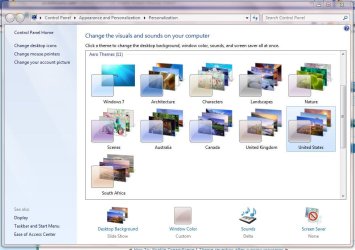
I have located the registry key which controls which global themes are shown within 'Aero Themes'. If you right-click the desktop you only get 1 global theme based on your location (United Kingdom, South Africa, United States, Canada & Australia).

There is a very simple method with which to add all the above to the 'Aero Themes' section rather than as 'Installed Themes'. Just run regedit and navigate to

HKEY_CURRENT_USER\Software\Microsoft\Windows\CurrentVersion\Themes\InstalledThemes\MCT

an add the following string values (edit->new->string value)

1, C:\Windows\Globalization\MCT\MCT-AU\Theme\AU.Theme
2, C:\Windows\Globalization\MCT\MCT-CA\Theme\CA.Theme
3, C:\Windows\Globalization\MCT\MCT-GB\Theme\GB.Theme
4, C:\Windows\Globalization\MCT\MCT-US\Theme\US.Theme
5, C:\Windows\Globalization\MCT\MCT-ZA\Theme\ZA.Theme

(See Pic 1)

NOTE: 1 of these will already be listed in your registry, just add the 4 that aren't

Now, whenever you richt-click the desktop & Personalize, you will have the above listed themes showing as 'Aero Themes'. (See Pic 2)


Jeff
 

Attachments

  • Capture.JPG
    Capture.JPG
    94 KB · Views: 140
  • Capture1.JPG
    Capture1.JPG
    106.8 KB · Views: 195
Last edited:

My Computer

Computer Manufacturer/Model Number
Compaq Desktop
OS
Windows 7 Ultimate x64
CPU
AMD Sempron Dual Core
Memory
3GB
Graphics Card(s)
NVIDIA GeForce 6150SE nForce 430
Screen Resolution
1024x768
Hard Drives
150GB Sata
Thanks Jeff. That worked slick.

Gary
 

My Computer

Computer Manufacturer/Model Number
Dell XPS420
OS
Vista Ult 64 bit Seven Ult RTM x64
CPU
Intel Core2 Quad Q6600 2.40 gigahertz
Memory
Crucial Ballistix 4x2GB PC2 6400
Graphics Card(s)
NVIDIA GeForce 8600 GTS 256 MB
Sound Card
Creative SB X-Fi audio
Monitor(s) Displays
HP w2207 + HPvs15
Screen Resolution
1680x1050 + 1024x768
Hard Drives
2-WD5000AAKS-500 GB
WD5000AAV-500 GB external
Keyboard
Microsoft Comfort Curve
Mouse
MX Revolution
Other Info
Wacom Intuos 2 Graphics Tablet
Experience Index=5.5
Thanks a lot for the easy tutorial on setting up the themes.
 

My Computer

OS
windows 7 x64 v7127
CPU
Q6600
Motherboard
EVGA 680i
Memory
8GB OCZ Platinum
Graphics Card(s)
PNY 9800 gtx+
Sound Card
XFI Fatality
Monitor(s) Displays
Gateway
Screen Resolution
1680x1050
Hard Drives
Seagate 1TB 32MB SATA HD
Seagate 1.5TB 32MB HD
Case
Coolermaster HAF
Cooling
OCZ Vendetta
Keyboard
G15
Mouse
G5
Internet Speed
30/5
You're welcome Jig Saw & welcome to the forums :)
 

My Computer

Computer Manufacturer/Model Number
Compaq Desktop
OS
Windows 7 Ultimate x64
CPU
AMD Sempron Dual Core
Memory
3GB
Graphics Card(s)
NVIDIA GeForce 6150SE nForce 430
Screen Resolution
1024x768
Hard Drives
150GB Sata
Here are the 5 regional themes (Australia, Canada, United Kingdom, United States & South Africa).

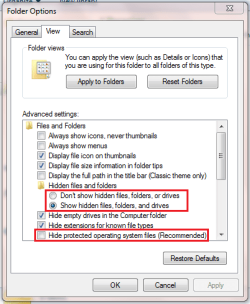
Note: For successfull extraction you will need to have hidden & system files and Protected files enabled
Capture.PNG

The zip files have the full path (c:\windows\globalization\mct\) stored within each. You will need to extract each file to C:\ (or whatever your root directory is).

View attachment Australia (Theme).ZIP
View attachment Canada (Theme).ZIP
View attachment South Africa (Theme).ZIP
View attachment United Kingdon (Theme).ZIP
View attachment United States (Theme).ZIP

These can be activated by either SWI2's link or via the registry edit here - http://www.sevenforums.com/customization/7229-enable-hidden-themes-3.html#post97446
 

My Computer

Computer Manufacturer/Model Number
Compaq Desktop
OS
Windows 7 Ultimate x64
CPU
AMD Sempron Dual Core
Memory
3GB
Graphics Card(s)
NVIDIA GeForce 6150SE nForce 430
Screen Resolution
1024x768
Hard Drives
150GB Sata
If any1 has the any of the other global themes that would be great.

Some of them are

India
Taiwan
Turkey
France
Germany
China
Republic of Korea

+ others
 

My Computer

Computer Manufacturer/Model Number
Compaq Desktop
OS
Windows 7 Ultimate x64
CPU
AMD Sempron Dual Core
Memory
3GB
Graphics Card(s)
NVIDIA GeForce 6150SE nForce 430
Screen Resolution
1024x768
Hard Drives
150GB Sata
  • Like
Reactions: kav
thx m8!

good post!

rep+
 

My Computer

OS
Windows7 x86 build 7127
CPU
DualCore Intel Pentium E2220 @ 2748 MHz
Motherboard
Gigabyte GA-P31-DS3L
Memory
Patriot Memory 4096 MB (DDR2-800)
Graphics Card(s)
Gainward GeForce 9600 GT
Sound Card
onboard
Monitor(s) Displays
Asus VW222
Screen Resolution
1680 x 1050
Hard Drives
Seagate (300 GB, 7200 RPM, SATA-II)
Seagate (120 GB, 7200 RPM, SATA)
PSU
OCZ gameXstream 600W
Case
NZXT Hush
Cooling
-
Keyboard
-
Mouse
Logitech G5
Internet Speed
Down 4,05 Mb/s Up 0,26 Mb/s
Superb!! Thanks very much and rep will be added! :D
 

My Computer

Computer Manufacturer/Model Number
Home Grown!
OS
Vista Ultimate x64 SP1, Windows 7 Ultimate x64 RTM
CPU
E6400 2.13GHz OC'd to 3.25GHz
Motherboard
Asus P5Q
Memory
4GB GEiL PC6400 OC'd to 810MHz
Graphics Card(s)
Nvidia GeForce 8800GT 512MB OC'd mildly!
Sound Card
Creative X-Fi Extreme Music
Monitor(s) Displays
Samsung SM245B+
Screen Resolution
1900 x 1200
Hard Drives
SAMSUNG HD322HJ
SAMSUNG HD501LJ
SEAGATE ST3250820AS
WDC WD2500KS
PSU
Seasonic 430W
Case
Cooler Master 331
Cooling
Arctic Cooler Freezer Pro 7
Keyboard
Saitek Eclipse III
Mouse
Logitech G5 Gaming Mouse
Internet Speed
10MB Virgin
Post details removed
 
Last edited:

My Computer

Computer Manufacturer/Model Number
Compaq Desktop
OS
Windows 7 Ultimate x64
CPU
AMD Sempron Dual Core
Memory
3GB
Graphics Card(s)
NVIDIA GeForce 6150SE nForce 430
Screen Resolution
1024x768
Hard Drives
150GB Sata
Just found more

Post details removed
 
Last edited:

My Computer

Computer Manufacturer/Model Number
Compaq Desktop
OS
Windows 7 Ultimate x64
CPU
AMD Sempron Dual Core
Memory
3GB
Graphics Card(s)
NVIDIA GeForce 6150SE nForce 430
Screen Resolution
1024x768
Hard Drives
150GB Sata
Back
Top