
Enable test mode to solve USB problems?

@CompGeek: I asked Crabby to confirm before executing. That seems to have translated into confirmation from me.

@Crabby: You don't need to wait for me to confirm, wait for a response from the person driving the bus at the time. Sorry I wasn't clearer on that. But the step-by-step, confirm process still worked :)
 

My Computer

Computer type
Laptop
Computer Manufacturer/Model Number
HP Pavilion dv6-6c10us
OS
x64 (6.3.9600) Win8.1 Pro & soon dual boot x64 (6.1.7601) Win7_SP1 HomePrem
CPU
AMD A6-3420M APU with Radeon(tm) HD Graphics
Motherboard
Hewlett-Packard 1805
Memory
6.00 GB
Graphics Card(s)
AMD Radeon(TM) HD 6520G
Sound Card
(1) AMD High Definition Audio Device (2) IDT High Definiti
Monitor(s) Displays
HP W2072a 20" LCD (1600 x 900) @ 60 Hz
Screen Resolution
1366 x 768 x 32 bits (4294967296 colors) @ 60 Hz
Hard Drives
ST640LM0 00 HM641JI SATA Disk Device
Keyboard
Logitech k520 wireless KB
Mouse
Logitech m320 wireless mouse (bundled with KB)
Internet Speed
15/5 | 54 MB Wireless 'n'
Antivirus
Realtime: Defender or Avast | On-demand: Malwarebytes, ESET
Browser
IE 11 on Win8, IE 10 on win 7
Other Info
Media: [Gimp, Audacity, VLC] || Comm: [WEmail 2012, Skype] || Productivity: [OpenOffice,| Textpad] || Utils: [Sysinternals, cCleaner, Speccy, Defraggler]
Are we waiting for someone to say Yes, hit the enter key?;)

I suppose CompGeek is looking at the information we posted. I had a technical issue attaching the sig.txt output to post# 180, it disappeared.

here's the post with the devmgr and sig.txt
I 'quoted' it because I can't see a post# to grab a shortcut
Crabby - if you don't know this already, you can click the orange blob on a quote title bar to take you directly to the quoted post

..... never mind, I can see the post# now ..... ain't technology wonderful


I went back to the Dell (win7 x64 Intel) and reattached it - still not there........ hmmmm
I mucked about for a minute or two until I definitely saw it in the preview and could open it. Now there are two, one inline and one at the bottom - they should be they same - pick one or the other - I'm leaving it alone for now.

Bill
.
 

My Computer

Computer type
Laptop
Computer Manufacturer/Model Number
HP Pavilion dv6-6c10us
OS
x64 (6.3.9600) Win8.1 Pro & soon dual boot x64 (6.1.7601) Win7_SP1 HomePrem
CPU
AMD A6-3420M APU with Radeon(tm) HD Graphics
Motherboard
Hewlett-Packard 1805
Memory
6.00 GB
Graphics Card(s)
AMD Radeon(TM) HD 6520G
Sound Card
(1) AMD High Definition Audio Device (2) IDT High Definiti
Monitor(s) Displays
HP W2072a 20" LCD (1600 x 900) @ 60 Hz
Screen Resolution
1366 x 768 x 32 bits (4294967296 colors) @ 60 Hz
Hard Drives
ST640LM0 00 HM641JI SATA Disk Device
Keyboard
Logitech k520 wireless KB
Mouse
Logitech m320 wireless mouse (bundled with KB)
Internet Speed
15/5 | 54 MB Wireless 'n'
Antivirus
Realtime: Defender or Avast | On-demand: Malwarebytes, ESET
Browser
IE 11 on Win8, IE 10 on win 7
Other Info
Media: [Gimp, Audacity, VLC] || Comm: [WEmail 2012, Skype] || Productivity: [OpenOffice,| Textpad] || Utils: [Sysinternals, cCleaner, Speccy, Defraggler]
I'm awaiting my next instructions.
 

My Computer

Computer type
PC/Desktop
Computer Manufacturer/Model Number
HP Pavilian DV7-7012 notebook
OS
Windows 7 Home Premium 64 bit
CPU
3rd generation Intel Core i7-3610QM Processor
Motherboard
2.30GHz
Memory
8GB DDR3 1600MHz RAM (2 DIMM); 750GB 7200RPM hard drive
Graphics Card(s)
2GB (2048MB) NVIDIA GeForce GT 650M GDDR5 Graphics
Hard Drives
750GB 7200RPM hard drive with HP ProtectSmart Hard Drive Protection
Antivirus
Microsoft
Browser
Firefox, Chrome, Microsoft
CompGeek is driving, so we wait.

So that no one has to look back for this information, I'm bringing it front and center.

HP Pavilion dv7-7012nr: Product home
Reports and other information produced on Crabby's machine.
Speccy: Snapshot
Sysinternals Signature Check: Sigtest.txt
..... and for comparison: Slarty's sigchk


Did you run Windows Update before we changed gears / drivers?
We were discussing the Touchpad update and how to avoid installing it by hiding the update at that time.

I'm not asking you to do that now, just want to know if it was done.

Thanks,

Bill
.
 
Last edited:

My Computer

Computer type
Laptop
Computer Manufacturer/Model Number
HP Pavilion dv6-6c10us
OS
x64 (6.3.9600) Win8.1 Pro & soon dual boot x64 (6.1.7601) Win7_SP1 HomePrem
CPU
AMD A6-3420M APU with Radeon(tm) HD Graphics
Motherboard
Hewlett-Packard 1805
Memory
6.00 GB
Graphics Card(s)
AMD Radeon(TM) HD 6520G
Sound Card
(1) AMD High Definition Audio Device (2) IDT High Definiti
Monitor(s) Displays
HP W2072a 20" LCD (1600 x 900) @ 60 Hz
Screen Resolution
1366 x 768 x 32 bits (4294967296 colors) @ 60 Hz
Hard Drives
ST640LM0 00 HM641JI SATA Disk Device
Keyboard
Logitech k520 wireless KB
Mouse
Logitech m320 wireless mouse (bundled with KB)
Internet Speed
15/5 | 54 MB Wireless 'n'
Antivirus
Realtime: Defender or Avast | On-demand: Malwarebytes, ESET
Browser
IE 11 on Win8, IE 10 on win 7
Other Info
Media: [Gimp, Audacity, VLC] || Comm: [WEmail 2012, Skype] || Productivity: [OpenOffice,| Textpad] || Utils: [Sysinternals, cCleaner, Speccy, Defraggler]
I hid the touchpad update so I wouldn't accidentally install it again. The other updates were installed. I didn't go painting today. It was too cold for some of my painting buddies (65 degrees). Such is life in the sunshine state.
 

My Computer

Computer type
PC/Desktop
Computer Manufacturer/Model Number
HP Pavilian DV7-7012 notebook
OS
Windows 7 Home Premium 64 bit
CPU
3rd generation Intel Core i7-3610QM Processor
Motherboard
2.30GHz
Memory
8GB DDR3 1600MHz RAM (2 DIMM); 750GB 7200RPM hard drive
Graphics Card(s)
2GB (2048MB) NVIDIA GeForce GT 650M GDDR5 Graphics
Hard Drives
750GB 7200RPM hard drive with HP ProtectSmart Hard Drive Protection
Antivirus
Microsoft
Browser
Firefox, Chrome, Microsoft
@Crabby

I threw together my last post just before running out the door... After I left, i thought about it and i think i went on a tangent and didn't answer your actual question! Why do you have one USB 2.0 computer port but have 2 USB 2.0 controllers? I don't really know! LOL maybe that's just how the motherboard comes. In any case, hope you at least found the tangential info about USB interesting.

I'll have a look at the sigcheck files tomorrow. G'nite
 

My Computer

Computer type
PC/Desktop
Computer Manufacturer/Model Number
Dell Optiplex 360 and Optiplex 755
OS
Desk 1: Win 7 Pro x32; Desk 2: Windows 10 x64
Hard Drives
500GB Crucial SSD in both Desktops
Other Info
Buffalo 6TB NAS, Raid 1
Crabby,

65 degrees ? Cold??? If only my house was that warm! :)

Thanks for the update on Windows Update - good to know the status is up-to-date (sans the touchpad)

I PM'd CompGeek about his work on the issue and he said that the malware scans will not interfere with what he's doing.

I guess I'm driving the bus again, unless you want a turn.

Please go ahead with both malware scans. If the tutorial isn't clear, then complain to the author.
Post screenshots if you need help - thanks

The scans I want you to run are in these tutorials:As CompGeek said in our PM, the scans won't fix the issue.
To which I replied, You're correct, but it will prevent any malware, if it exists, from corrupting the files after you fix them.

So yes please run both scans

You can hit the enter key any time you wish.

Bill
.
 

My Computer

Computer type
Laptop
Computer Manufacturer/Model Number
HP Pavilion dv6-6c10us
OS
x64 (6.3.9600) Win8.1 Pro & soon dual boot x64 (6.1.7601) Win7_SP1 HomePrem
CPU
AMD A6-3420M APU with Radeon(tm) HD Graphics
Motherboard
Hewlett-Packard 1805
Memory
6.00 GB
Graphics Card(s)
AMD Radeon(TM) HD 6520G
Sound Card
(1) AMD High Definition Audio Device (2) IDT High Definiti
Monitor(s) Displays
HP W2072a 20" LCD (1600 x 900) @ 60 Hz
Screen Resolution
1366 x 768 x 32 bits (4294967296 colors) @ 60 Hz
Hard Drives
ST640LM0 00 HM641JI SATA Disk Device
Keyboard
Logitech k520 wireless KB
Mouse
Logitech m320 wireless mouse (bundled with KB)
Internet Speed
15/5 | 54 MB Wireless 'n'
Antivirus
Realtime: Defender or Avast | On-demand: Malwarebytes, ESET
Browser
IE 11 on Win8, IE 10 on win 7
Other Info
Media: [Gimp, Audacity, VLC] || Comm: [WEmail 2012, Skype] || Productivity: [OpenOffice,| Textpad] || Utils: [Sysinternals, cCleaner, Speccy, Defraggler]
I might have found something that you can do after the scans are completed and the all clear signal is given with regards to malware. It looks promising, but I'll wait for the scan results before doing further research - it's to much to do right now.

If it gets up to 70 degrees - go paint.
The scans are pretty much push button, start them up and go do something else.
If they need user input, the screen will still be there waiting patiently when you return.

Neither scanner normally runs very long but I want to let you know that each scanner might take a few hours based on the full MSE scan you ran the other day. MSE normally runs fairly fast too, even a full scan should not have taken that long. Every system is different though, especially yours at the moment.

We'll be here.

Did you hit the enter key? Go ahead and run the scans.

Bill
.
 

My Computer

Computer type
Laptop
Computer Manufacturer/Model Number
HP Pavilion dv6-6c10us
OS
x64 (6.3.9600) Win8.1 Pro & soon dual boot x64 (6.1.7601) Win7_SP1 HomePrem
CPU
AMD A6-3420M APU with Radeon(tm) HD Graphics
Motherboard
Hewlett-Packard 1805
Memory
6.00 GB
Graphics Card(s)
AMD Radeon(TM) HD 6520G
Sound Card
(1) AMD High Definition Audio Device (2) IDT High Definiti
Monitor(s) Displays
HP W2072a 20" LCD (1600 x 900) @ 60 Hz
Screen Resolution
1366 x 768 x 32 bits (4294967296 colors) @ 60 Hz
Hard Drives
ST640LM0 00 HM641JI SATA Disk Device
Keyboard
Logitech k520 wireless KB
Mouse
Logitech m320 wireless mouse (bundled with KB)
Internet Speed
15/5 | 54 MB Wireless 'n'
Antivirus
Realtime: Defender or Avast | On-demand: Malwarebytes, ESET
Browser
IE 11 on Win8, IE 10 on win 7
Other Info
Media: [Gimp, Audacity, VLC] || Comm: [WEmail 2012, Skype] || Productivity: [OpenOffice,| Textpad] || Utils: [Sysinternals, cCleaner, Speccy, Defraggler]
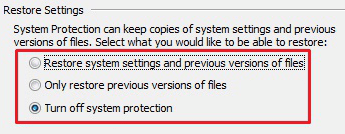
You're in the check for malware phase of trouble shooting the issue.
I need to remember that malware can hide in a few places and be easily resurrected a few ways.

One of the places it can hide is in the hibernation file and another is in Restore Points
To avoid one of those vicious cycles I want you to do two things.
You can do these even if the scanner is already running.
  • Disable hibernation
    Launch an elevated Command Prompt (right click, Run as administrator...) and enter:
    • powercfg /h off
    • exit

  • Turn OFF System Restore
    http://www.sevenforums.com/tutorials/330-system-protection-turn-off.html
    Follow steps 1 through 6, then do step 9
    (C:) is probably the only drive with Protection turned on - if any other drive is On, please let me know, but do turn it off for (C:)
    The image in step 10 might confuse some people because it is generalized for any of the steps
    For this exercise, you want to click the Turn off system protection radio button
    Protect-Off.png
    This action deletes all Restore Points, which is ok for now. When your system is either repaired or I've exhausted the options I know about, there are a few housekeeping chores that need to be done anyway, just add turning protection on again to the list.

The intention of these actions are to prevent any malware from having an easy return path.
IF there is malware, then it could be resurrected from the hibernation file or a Restore Point.

:ar: Only restart if a scanner is not running
- if one of the scanners is already running, let the scan finish before restarting the machine.
 

My Computer

Computer type
Laptop
Computer Manufacturer/Model Number
HP Pavilion dv6-6c10us
OS
x64 (6.3.9600) Win8.1 Pro & soon dual boot x64 (6.1.7601) Win7_SP1 HomePrem
CPU
AMD A6-3420M APU with Radeon(tm) HD Graphics
Motherboard
Hewlett-Packard 1805
Memory
6.00 GB
Graphics Card(s)
AMD Radeon(TM) HD 6520G
Sound Card
(1) AMD High Definition Audio Device (2) IDT High Definiti
Monitor(s) Displays
HP W2072a 20" LCD (1600 x 900) @ 60 Hz
Screen Resolution
1366 x 768 x 32 bits (4294967296 colors) @ 60 Hz
Hard Drives
ST640LM0 00 HM641JI SATA Disk Device
Keyboard
Logitech k520 wireless KB
Mouse
Logitech m320 wireless mouse (bundled with KB)
Internet Speed
15/5 | 54 MB Wireless 'n'
Antivirus
Realtime: Defender or Avast | On-demand: Malwarebytes, ESET
Browser
IE 11 on Win8, IE 10 on win 7
Other Info
Media: [Gimp, Audacity, VLC] || Comm: [WEmail 2012, Skype] || Productivity: [OpenOffice,| Textpad] || Utils: [Sysinternals, cCleaner, Speccy, Defraggler]
IMO Fully understanding Windows drivers is a black art. At best, I'd say my knowledge is a "lighter shade of grey".:geek:

I'm not sure how successful this exercise will be to fix the problem - but I'll explain what i know about things like driver signing, driver packages and staging, and the DriverStore... so you might at least still find this exercise useful.

I should also mention I pick up niece at the airport this afternoon and she'll be around for 5 days. So my time on the thread will be limited at times..

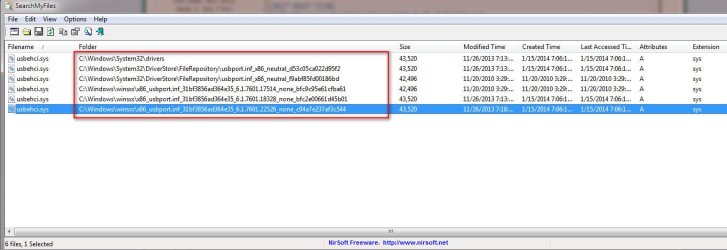
That said, Slarty could you download and run the zip script i provided back in post #114. Attach the output. You can also download the x64 version of SearchMyFiles tool from Nirsoft

You'll be using it (along with Crabby) a bit later.

/* EDIT */
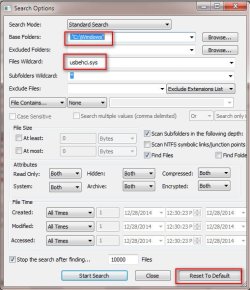
I can save some time and have you both please do the following. Crabby and Slarty please do the following:
> Run SearchMyFiles
> Click Reset to Default (clears any prior search params)
> Browse Base Folders and set to C:\Windows
> For Files Wildcard enter usbehci.sys then click Start Search
Your sample output will look something like below. Please give me a snapshot of the output and I'll explain what we're seeing in next post. (Please be SURE to expand the Folder columns so the full names of all folders are visible)
 

Attachments

  • 2015-01-16_111107.jpg
    2015-01-16_111107.jpg
    72.8 KB · Views: 4
  • 2015-01-16_111512.jpg
    2015-01-16_111512.jpg
    52.1 KB · Views: 18
Last edited:

My Computer

Computer type
PC/Desktop
Computer Manufacturer/Model Number
Dell Optiplex 360 and Optiplex 755
OS
Desk 1: Win 7 Pro x32; Desk 2: Windows 10 x64
Hard Drives
500GB Crucial SSD in both Desktops
Other Info
Buffalo 6TB NAS, Raid 1
I ran the two virus scans prior to seeing the post able disabling things first. So I guess I will have to run them again.
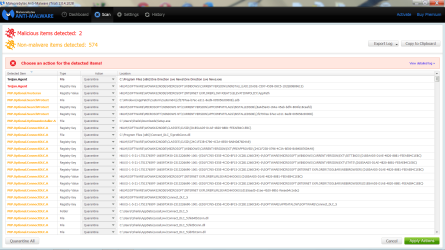
TFSS killer did not find anything when I ran it. Malwarebytes found a bunch of stuff that may or may not be anything bad. It would not make a log file. When I pressed create log file I just got a blank text file. I took a screen shot of the first page of items it found including two "trojans". There are 25 pages of things it found and the only way I can show them to you is to do a screen shot of each of the 25 screens.
I have not taken any action of what malwarebytes found,

I also want to report that there is something funky going on with my keyboard periodically. I will be typing along and all of a sudden the cursor will skip back a few spaces or lines and start inserting the text in the wrong place. I thought it might be that my fingernails on my pinky fingers were too long and I was accidentally pressing the shift or function key or something, so I cut my fingernails, but the problem still persists. I don't see anything in device manager that would indicate a problem with the keyboard.
 

Attachments

  • Malware page 1 screenshot.png
    Malware page 1 screenshot.png
    100.7 KB · Views: 3

My Computer

Computer type
PC/Desktop
Computer Manufacturer/Model Number
HP Pavilian DV7-7012 notebook
OS
Windows 7 Home Premium 64 bit
CPU
3rd generation Intel Core i7-3610QM Processor
Motherboard
2.30GHz
Memory
8GB DDR3 1600MHz RAM (2 DIMM); 750GB 7200RPM hard drive
Graphics Card(s)
2GB (2048MB) NVIDIA GeForce GT 650M GDDR5 Graphics
Hard Drives
750GB 7200RPM hard drive with HP ProtectSmart Hard Drive Protection
Antivirus
Microsoft
Browser
Firefox, Chrome, Microsoft
@CompGeek: - look at post#184 for sigschk

I'll have to fire up the Dell again for the usbehci.sys stuff. I don't want another explorer on my machine, hope native Windows Explorer output is fine for you.

@Crabby: I'm very glad TDSSkiller did not find anything. I'll look at the screen shot and the tutorial. I think Malwarebytes (Mbam) waits to write the log until it's closed but need to check (it would be in the history section.)

There's no need to re-run. The other post (hibernate/RestPoint) can be done after I get back to you on Mbam, leave the window open and hang tight.

Bill
.
 

My Computer

Computer type
Laptop
Computer Manufacturer/Model Number
HP Pavilion dv6-6c10us
OS
x64 (6.3.9600) Win8.1 Pro & soon dual boot x64 (6.1.7601) Win7_SP1 HomePrem
CPU
AMD A6-3420M APU with Radeon(tm) HD Graphics
Motherboard
Hewlett-Packard 1805
Memory
6.00 GB
Graphics Card(s)
AMD Radeon(TM) HD 6520G
Sound Card
(1) AMD High Definition Audio Device (2) IDT High Definiti
Monitor(s) Displays
HP W2072a 20" LCD (1600 x 900) @ 60 Hz
Screen Resolution
1366 x 768 x 32 bits (4294967296 colors) @ 60 Hz
Hard Drives
ST640LM0 00 HM641JI SATA Disk Device
Keyboard
Logitech k520 wireless KB
Mouse
Logitech m320 wireless mouse (bundled with KB)
Internet Speed
15/5 | 54 MB Wireless 'n'
Antivirus
Realtime: Defender or Avast | On-demand: Malwarebytes, ESET
Browser
IE 11 on Win8, IE 10 on win 7
Other Info
Media: [Gimp, Audacity, VLC] || Comm: [WEmail 2012, Skype] || Productivity: [OpenOffice,| Textpad] || Utils: [Sysinternals, cCleaner, Speccy, Defraggler]
As far as the keyboard issue, assuming you're on a laptop, this is almost always due to mouse pad sensitivity and/or your hands hitting the mouse pad. There should be an Fn key to disable the mouse pad. Try to type with it disabled and see if the problem persists.
 

My Computer

Computer type
PC/Desktop
Computer Manufacturer/Model Number
Custom
OS
Dual Boot: Windows 8.1 & Server 2012r2 VMs: Kali Linux, Backbox, Matriux, Windows 8.1
CPU
A10 7700 Kavari SteamRoller
Motherboard
ASUS A88XM-PLUS (FM2+ )
Memory
8GB DDR3 SDRAM PC3-8500
Graphics Card(s)
1024MB ATI AMD Radeon R7 Graphics
Sound Card
Realtek High Definition Audio
Monitor(s) Displays
Samsung
Hard Drives
SSD Crucial 120gb
WD VelociRaptor 1tb
PSU
Rosewill Gaming 650w
Case
Rosewill Galaxy 2
Internet Speed
55/12
Antivirus
Malwarebytes, MSE, SAS
Browser
FireFox, Chrome
Ok, that is a lot

please quarantine all and export the log (as .txt file) and

please alo attach the TDSSkiler log (C:\TDssKiller.....datetime....log) - the tutorial has the full naming schema, but if it's TDSSkiller on C:\ then that's the one (or 2)

I'll look at the logs

There might be some additional scanners after that.

edit: There are a lot of references to common Potentially Unwanted Programs (PUPs) and Mbam only detected 2 malicious items, so it sounds worse than it is, methinks.

PUPS are things like browser hijackers that take you to the site they want you to go and earn revenue form visits or changing your search engine for the same reason - advertising revenue. For the most part, they are more like pranks than any real risk. They are often difficult to remove though
Not all PUPs just pull pranks like changing your home page or search engine though, some do pose a real threat, so I don't mean to be flippant about PUPs. I only recognize one, I won't mention it's name lest another member comments - "oh, that's a bad one" - it isn't, it's just tough to remove.

The others, I'll wait to see the logs and check them in the VirusTotal database - this could take a while.
 
Last edited:

My Computer

Computer type
Laptop
Computer Manufacturer/Model Number
HP Pavilion dv6-6c10us
OS
x64 (6.3.9600) Win8.1 Pro & soon dual boot x64 (6.1.7601) Win7_SP1 HomePrem
CPU
AMD A6-3420M APU with Radeon(tm) HD Graphics
Motherboard
Hewlett-Packard 1805
Memory
6.00 GB
Graphics Card(s)
AMD Radeon(TM) HD 6520G
Sound Card
(1) AMD High Definition Audio Device (2) IDT High Definiti
Monitor(s) Displays
HP W2072a 20" LCD (1600 x 900) @ 60 Hz
Screen Resolution
1366 x 768 x 32 bits (4294967296 colors) @ 60 Hz
Hard Drives
ST640LM0 00 HM641JI SATA Disk Device
Keyboard
Logitech k520 wireless KB
Mouse
Logitech m320 wireless mouse (bundled with KB)
Internet Speed
15/5 | 54 MB Wireless 'n'
Antivirus
Realtime: Defender or Avast | On-demand: Malwarebytes, ESET
Browser
IE 11 on Win8, IE 10 on win 7
Other Info
Media: [Gimp, Audacity, VLC] || Comm: [WEmail 2012, Skype] || Productivity: [OpenOffice,| Textpad] || Utils: [Sysinternals, cCleaner, Speccy, Defraggler]
Please do the hibernation and Disable Restore points after you post the logs.
It will take me a while to look at the logs and check the files.

While I research, I might ask you to run one or two more scans. I'm heading out this evening, so you won't be hearing much from me. I'll look in when I get home, but that will be too late to do much.

Yes, hit enter :) on the disable hibernate and disable System Protection (Restore Points)
 

My Computer

Computer type
Laptop
Computer Manufacturer/Model Number
HP Pavilion dv6-6c10us
OS
x64 (6.3.9600) Win8.1 Pro & soon dual boot x64 (6.1.7601) Win7_SP1 HomePrem
CPU
AMD A6-3420M APU with Radeon(tm) HD Graphics
Motherboard
Hewlett-Packard 1805
Memory
6.00 GB
Graphics Card(s)
AMD Radeon(TM) HD 6520G
Sound Card
(1) AMD High Definition Audio Device (2) IDT High Definiti
Monitor(s) Displays
HP W2072a 20" LCD (1600 x 900) @ 60 Hz
Screen Resolution
1366 x 768 x 32 bits (4294967296 colors) @ 60 Hz
Hard Drives
ST640LM0 00 HM641JI SATA Disk Device
Keyboard
Logitech k520 wireless KB
Mouse
Logitech m320 wireless mouse (bundled with KB)
Internet Speed
15/5 | 54 MB Wireless 'n'
Antivirus
Realtime: Defender or Avast | On-demand: Malwarebytes, ESET
Browser
IE 11 on Win8, IE 10 on win 7
Other Info
Media: [Gimp, Audacity, VLC] || Comm: [WEmail 2012, Skype] || Productivity: [OpenOffice,| Textpad] || Utils: [Sysinternals, cCleaner, Speccy, Defraggler]
Hmmm, just read you post again (empty log file) - I thought they fixed that.

Try copy to clipboard and then paste it into notepad, or view detailed log, then copy or save (I'm not sure what opens with view detail).

What version of Mbam are you running?
 

My Computer

Computer type
Laptop
Computer Manufacturer/Model Number
HP Pavilion dv6-6c10us
OS
x64 (6.3.9600) Win8.1 Pro & soon dual boot x64 (6.1.7601) Win7_SP1 HomePrem
CPU
AMD A6-3420M APU with Radeon(tm) HD Graphics
Motherboard
Hewlett-Packard 1805
Memory
6.00 GB
Graphics Card(s)
AMD Radeon(TM) HD 6520G
Sound Card
(1) AMD High Definition Audio Device (2) IDT High Definiti
Monitor(s) Displays
HP W2072a 20" LCD (1600 x 900) @ 60 Hz
Screen Resolution
1366 x 768 x 32 bits (4294967296 colors) @ 60 Hz
Hard Drives
ST640LM0 00 HM641JI SATA Disk Device
Keyboard
Logitech k520 wireless KB
Mouse
Logitech m320 wireless mouse (bundled with KB)
Internet Speed
15/5 | 54 MB Wireless 'n'
Antivirus
Realtime: Defender or Avast | On-demand: Malwarebytes, ESET
Browser
IE 11 on Win8, IE 10 on win 7
Other Info
Media: [Gimp, Audacity, VLC] || Comm: [WEmail 2012, Skype] || Productivity: [OpenOffice,| Textpad] || Utils: [Sysinternals, cCleaner, Speccy, Defraggler]
I disabled everything and ran the two programs again. TDSSKiller didn't find anything. Malwarebytes found 574 items but I'm not sure what it did with them because the screen doesn't show what they are except for a couple of them. I searched around the screen and found a list of log files buried on C: so I zipped those and attached them. I don't know what to do from here. I don't know if they were quarantined or if they are still active on my computer.
 

Attachments

My Computer

Computer type
PC/Desktop
Computer Manufacturer/Model Number
HP Pavilian DV7-7012 notebook
OS
Windows 7 Home Premium 64 bit
CPU
3rd generation Intel Core i7-3610QM Processor
Motherboard
2.30GHz
Memory
8GB DDR3 1600MHz RAM (2 DIMM); 750GB 7200RPM hard drive
Graphics Card(s)
2GB (2048MB) NVIDIA GeForce GT 650M GDDR5 Graphics
Hard Drives
750GB 7200RPM hard drive with HP ProtectSmart Hard Drive Protection
Antivirus
Microsoft
Browser
Firefox, Chrome, Microsoft
Version of Malwarebytes: 2.04.1028 trial version. It's the one they want you to click on, so I assume it's the newest version.
 

My Computer

Computer type
PC/Desktop
Computer Manufacturer/Model Number
HP Pavilian DV7-7012 notebook
OS
Windows 7 Home Premium 64 bit
CPU
3rd generation Intel Core i7-3610QM Processor
Motherboard
2.30GHz
Memory
8GB DDR3 1600MHz RAM (2 DIMM); 750GB 7200RPM hard drive
Graphics Card(s)
2GB (2048MB) NVIDIA GeForce GT 650M GDDR5 Graphics
Hard Drives
750GB 7200RPM hard drive with HP ProtectSmart Hard Drive Protection
Antivirus
Microsoft
Browser
Firefox, Chrome, Microsoft
Ok thanks. I jumped the gun on the version - I even made sure my tutorial didn't point you to the wrong one - phew!

try not to over think these things. I don't mind asking for you something if I need it
I searched around the screen and found a list of log files buried on C: so I zipped those and attached them.

No harm, no foul posting the quarantined folder/files.


I should read not skim :o- you did fine

But.... I was going to, and still will ask you to run Mbam again with different settings - hold on, I need time to post what settings.

Yes, this is where it gets a little hairy - just ask.
If you pressed the Quarantine button then Mbam quarantined them. They are still on your machine, but rendered harmless.

I'll look at the logs.
 

My Computer

Computer type
Laptop
Computer Manufacturer/Model Number
HP Pavilion dv6-6c10us
OS
x64 (6.3.9600) Win8.1 Pro & soon dual boot x64 (6.1.7601) Win7_SP1 HomePrem
CPU
AMD A6-3420M APU with Radeon(tm) HD Graphics
Motherboard
Hewlett-Packard 1805
Memory
6.00 GB
Graphics Card(s)
AMD Radeon(TM) HD 6520G
Sound Card
(1) AMD High Definition Audio Device (2) IDT High Definiti
Monitor(s) Displays
HP W2072a 20" LCD (1600 x 900) @ 60 Hz
Screen Resolution
1366 x 768 x 32 bits (4294967296 colors) @ 60 Hz
Hard Drives
ST640LM0 00 HM641JI SATA Disk Device
Keyboard
Logitech k520 wireless KB
Mouse
Logitech m320 wireless mouse (bundled with KB)
Internet Speed
15/5 | 54 MB Wireless 'n'
Antivirus
Realtime: Defender or Avast | On-demand: Malwarebytes, ESET
Browser
IE 11 on Win8, IE 10 on win 7
Other Info
Media: [Gimp, Audacity, VLC] || Comm: [WEmail 2012, Skype] || Productivity: [OpenOffice,| Textpad] || Utils: [Sysinternals, cCleaner, Speccy, Defraggler]
Run Mbam again - you have the latest version so you do not need to download anything

Go to Settings on the top menu and match your settings to the image below,

This scan will take longer - it's deeper and more inclusive.
MbamSettingsFull.png

Then go to the Dashboard and start the scan

Thanks,

Bill
 

My Computer

Computer type
Laptop
Computer Manufacturer/Model Number
HP Pavilion dv6-6c10us
OS
x64 (6.3.9600) Win8.1 Pro & soon dual boot x64 (6.1.7601) Win7_SP1 HomePrem
CPU
AMD A6-3420M APU with Radeon(tm) HD Graphics
Motherboard
Hewlett-Packard 1805
Memory
6.00 GB
Graphics Card(s)
AMD Radeon(TM) HD 6520G
Sound Card
(1) AMD High Definition Audio Device (2) IDT High Definiti
Monitor(s) Displays
HP W2072a 20" LCD (1600 x 900) @ 60 Hz
Screen Resolution
1366 x 768 x 32 bits (4294967296 colors) @ 60 Hz
Hard Drives
ST640LM0 00 HM641JI SATA Disk Device
Keyboard
Logitech k520 wireless KB
Mouse
Logitech m320 wireless mouse (bundled with KB)
Internet Speed
15/5 | 54 MB Wireless 'n'
Antivirus
Realtime: Defender or Avast | On-demand: Malwarebytes, ESET
Browser
IE 11 on Win8, IE 10 on win 7
Other Info
Media: [Gimp, Audacity, VLC] || Comm: [WEmail 2012, Skype] || Productivity: [OpenOffice,| Textpad] || Utils: [Sysinternals, cCleaner, Speccy, Defraggler]
Back
Top