Enable test mode to solve USB problems?

I can't find a reference to F.0b on HP for anything other than a ProLiant server and that's only in the service pack name, not a BIOS.

So I'm stumped where that version came from.
The only logical thing to do is to defer to the BIOS version on the HP support page for your machine.
This makes a bit of sense in that the USB 3.0 ports require additional drivers to work properly, it was the USB 2.0 port that troubled me.

I'll wait until I see the other information I requested before giving the green light on BIOS F.0A

Go ahead and download it

Do NOT install it until I see what Windows Update gave you in the option offers and what Device Manager reports as the device errors, ok?

Bill
.
 

My Computer

Computer type
Laptop
Computer Manufacturer/Model Number
HP Pavilion dv6-6c10us
OS
x64 (6.3.9600) Win8.1 Pro & soon dual boot x64 (6.1.7601) Win7_SP1 HomePrem
CPU
AMD A6-3420M APU with Radeon(tm) HD Graphics
Motherboard
Hewlett-Packard 1805
Memory
6.00 GB
Graphics Card(s)
AMD Radeon(TM) HD 6520G
Sound Card
(1) AMD High Definition Audio Device (2) IDT High Definiti
Monitor(s) Displays
HP W2072a 20" LCD (1600 x 900) @ 60 Hz
Screen Resolution
1366 x 768 x 32 bits (4294967296 colors) @ 60 Hz
Hard Drives
ST640LM0 00 HM641JI SATA Disk Device
Keyboard
Logitech k520 wireless KB
Mouse
Logitech m320 wireless mouse (bundled with KB)
Internet Speed
15/5 | 54 MB Wireless 'n'
Antivirus
Realtime: Defender or Avast | On-demand: Malwarebytes, ESET
Browser
IE 11 on Win8, IE 10 on win 7
Other Info
Media: [Gimp, Audacity, VLC] || Comm: [WEmail 2012, Skype] || Productivity: [OpenOffice,| Textpad] || Utils: [Sysinternals, cCleaner, Speccy, Defraggler]
I had to feed my husband. I am now back on the case. I just got a message that the chipset I am trying to install is an older version than the one on my computer. The one on my computer is version 9.3.0.1021. Should I install the older one or abort this mission?
 

My Computer

Computer type
PC/Desktop
Computer Manufacturer/Model Number
HP Pavilian DV7-7012 notebook
OS
Windows 7 Home Premium 64 bit
CPU
3rd generation Intel Core i7-3610QM Processor
Motherboard
2.30GHz
Memory
8GB DDR3 1600MHz RAM (2 DIMM); 750GB 7200RPM hard drive
Graphics Card(s)
2GB (2048MB) NVIDIA GeForce GT 650M GDDR5 Graphics
Hard Drives
750GB 7200RPM hard drive with HP ProtectSmart Hard Drive Protection
Antivirus
Microsoft
Browser
Firefox, Chrome, Microsoft
screen shots

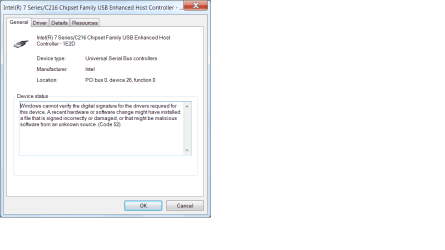
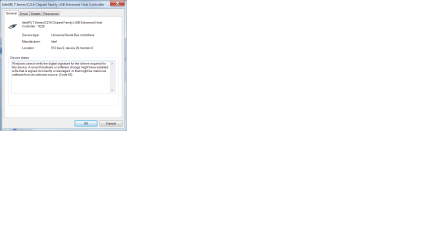
Here are those screen shots of device manager.
 

Attachments

  • screenshot usb3.0.png
    screenshot usb3.0.png
    39.6 KB · Views: 5
  • screenshot controller 1E2D.png
    screenshot controller 1E2D.png
    37.8 KB · Views: 6
  • CONTROLLER 1e26 SCREENSHOT.png
    CONTROLLER 1e26 SCREENSHOT.png
    61.1 KB · Views: 4

My Computer

Computer type
PC/Desktop
Computer Manufacturer/Model Number
HP Pavilian DV7-7012 notebook
OS
Windows 7 Home Premium 64 bit
CPU
3rd generation Intel Core i7-3610QM Processor
Motherboard
2.30GHz
Memory
8GB DDR3 1600MHz RAM (2 DIMM); 750GB 7200RPM hard drive
Graphics Card(s)
2GB (2048MB) NVIDIA GeForce GT 650M GDDR5 Graphics
Hard Drives
750GB 7200RPM hard drive with HP ProtectSmart Hard Drive Protection
Antivirus
Microsoft
Browser
Firefox, Chrome, Microsoft
I had to feed my husband. I am now back on the case. I just got a message that the chipset I am trying to install is an older version than the one on my computer. The one on my computer is version 9.3.0.1021. Should I install the older one or abort this mission?

I'm guessing that you aborted the install - best thing to do.

That was the cosmetic chipset driver - right?
The one from HP is version 9.3.0.1019, so I suppose Windows Update is doing it's job.

Regarding the USB controllers screenshots in Device Mgr (don't worry about the Vista reference)
scratching his head
Code 52: Windows cannot verify the digital signature for the drivers required for this device
Published: May 27, 2010
Updated: May 27, 2010
Applies To: Windows Server 2008, Windows Vista

Device Manager displays the following message in the Device Properties dialog box, on the General tab, in the Device Status text box:

Windows cannot verify the digital signature for the drivers required for this device. A recent hardware or software change might have installed a file that is signed incorrectly or damaged, or that might be malicious software from an unknown source. (Code 52)

Diagnosis
The driver may be unsigned or corrupted.

Resolution
Try one of the following:
• If the device is a CD or DVD drive, use the Automated Troubleshooting Service, at the Microsoft Support Web site.
• Go to the device manufacturer’s Web site and download and install the latest appropriate driver for the device.
• Search for possible solutions for your particular device on the Microsoft Support Web site. For example, for issues related with an iPod, you might search for “code 52” iPod.

None of that is really very useful.
Bullet 1: doesn't apply, but the troubleshooters in Win7 might help. Let me chew on this for a bit.
Bullet 2: You already did that.
Bullet 3: Will take additional research

I think the best approach is to uninstall all three of those drivers
So you don't battle Windows Update, change the option to Check but let me decide when to download and install.

If you don't Windows, then the updates might be downloading and installing in the background while you're trying to manage the drivers in the foreground. This is only temporary, you can change it back to automatic after you are done this exercise.

After changing Windows Update (WU), launch Device manager and uninstall the three problem devices
If there is a prompt or checkbox regarding uninstalling the software for the driver, answer or select yes

Restart the machine and post the Device manager screenshot(s) General tab for the three devices again.
I suspect all three devices will be unknown, but they might still have software on the system.
Check the General tab - if you see:
The drivers for this device are not installed. (Code 28)
in the status box, then you're good and you can try installing the USB chipset driver again.
It should still be on your system, perhaps your Downloads folder, the file name is sp56164.exe

But...but, HP unpacks their software into C:\SwSetup\filename so look there first for a folder named sp56164. Inside that folder should be a setup.exe - that is what really installs the software.

If I explained all that well enough and you understand - use that setup to install the USB Chipset drivers.
Check what Device Manager thinks about the freshly installed driver
code 52 will require a different tact - turning off Driver Signature Enforcement.

So there are at least tow more things to try if the above fails. There's still BIOS F.0A
I'm not sure which should be done first. If you have questions - please feel free to ask. I'll be on and off for the next few hours.

Sort version:
Change Windows update option - not automatic
Uninstall the problem devices in Device manager, remove software for the drivers
resetart
check device manager and devices (code 28 is good)
reinstall USB chipset from C:\SwSetup\sp56164

I know this is frustrating, if the machine was in front of me (or visa-versa), it wouldn't take as long. That unfortunately is the nature of trouble shooting in a forum - it's not real time.

Thanks for being patient, the third possibility was raised in the code 52 message - there might be malicious code on the box. I want to stress MIGHT. Some people get upset when they hear that - we know a lot more than when we started and after the next steps we'll know more. Checking your system for malware will be a step in the process, it's only a matter of which step 4 or 9 (numbers picked randomly with no assigned importance).

Onward and Upward. I'll see how far you get with those instructions and based on the results, provide the remaining steps.

Bill
.

 
Last edited:

My Computer

Computer type
Laptop
Computer Manufacturer/Model Number
HP Pavilion dv6-6c10us
OS
x64 (6.3.9600) Win8.1 Pro & soon dual boot x64 (6.1.7601) Win7_SP1 HomePrem
CPU
AMD A6-3420M APU with Radeon(tm) HD Graphics
Motherboard
Hewlett-Packard 1805
Memory
6.00 GB
Graphics Card(s)
AMD Radeon(TM) HD 6520G
Sound Card
(1) AMD High Definition Audio Device (2) IDT High Definiti
Monitor(s) Displays
HP W2072a 20" LCD (1600 x 900) @ 60 Hz
Screen Resolution
1366 x 768 x 32 bits (4294967296 colors) @ 60 Hz
Hard Drives
ST640LM0 00 HM641JI SATA Disk Device
Keyboard
Logitech k520 wireless KB
Mouse
Logitech m320 wireless mouse (bundled with KB)
Internet Speed
15/5 | 54 MB Wireless 'n'
Antivirus
Realtime: Defender or Avast | On-demand: Malwarebytes, ESET
Browser
IE 11 on Win8, IE 10 on win 7
Other Info
Media: [Gimp, Audacity, VLC] || Comm: [WEmail 2012, Skype] || Productivity: [OpenOffice,| Textpad] || Utils: [Sysinternals, cCleaner, Speccy, Defraggler]
After uninstalling and rebooting, the device manager screenshots look exactly the same as last time. All are code 52.
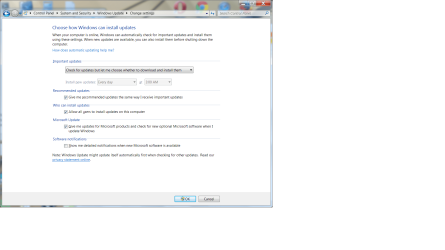
I'm posting a screen shot of Microsoft Update because I am wondering if I should uncheck the bofx that says: "Give me updates for Microsoft products etc..." Could that be downloading something in the background?

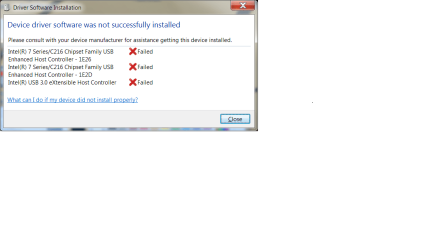
Also posting screen shot of box that came up after I uninstalled devices and rebooted.
As I mentioned, the general tab under each device looks exactly the same as the ones I sent previously.
 

Attachments

  • Microsoft update screen shot.png
    Microsoft update screen shot.png
    205.7 KB · Views: 3
  • device driver software not installed screenshot.png
    device driver software not installed screenshot.png
    56.7 KB · Views: 4

My Computer

Computer type
PC/Desktop
Computer Manufacturer/Model Number
HP Pavilian DV7-7012 notebook
OS
Windows 7 Home Premium 64 bit
CPU
3rd generation Intel Core i7-3610QM Processor
Motherboard
2.30GHz
Memory
8GB DDR3 1600MHz RAM (2 DIMM); 750GB 7200RPM hard drive
Graphics Card(s)
2GB (2048MB) NVIDIA GeForce GT 650M GDDR5 Graphics
Hard Drives
750GB 7200RPM hard drive with HP ProtectSmart Hard Drive Protection
Antivirus
Microsoft
Browser
Firefox, Chrome, Microsoft
If I might also try to help. First, I'd like to collect some additional diagnostic data
List any Problem devices
  • Make sure devices are connected and powered on
  • Click the Start Orb, type msinfo32 in the search box. Hit Enter
  • Click the + sign next to Components to expand it
  • Click Problem Devices. Anything appear?
  • If yes, click on it, Ctrl-A to select all, Ctrl-C to copy it, Ctrl-V to paste into next post
  • On the other hand, if no devices are listed, tell me so
Generate and attach a DirectX report
  • Click the Start Orb, enter dxdiag in the search box
  • When DxDiag opens, look along the buttons at the bottom of the DxDiag window
    ===> If you’re running 64 bit Windows, you’ll see a 64-bit DxDiag button. Click it to run the 64-bit version of dxdiag
  • Notice progress in lower left window corner
  • When done, click Save Information button and save as a text file to your Desktop
  • Upload the file to your next post

@Slartybart
This Chipset update seems as though it only changes the name shown in Device manager.
fyi the name change... Manufacturers burn Plug and Play ID info into device firmware. This includes a device description string.
> When Windows can't find a device driver (this is the case when device is listed under "Other" device), Device Manager displays the PnP device description from the mfr for device name
> Once Windows finds a driver, Device Mgr shows the name found in the driver

That's why the Chipset install changed the device name. The chipset install provided a driver (tho unfortunately the device still doesn't work :( )

/* EDIT */
Ugh. It's not a BIOS issue. I just looked up Code 52: Windows cannot verify the digital signature for the drivers required for this device. Which would also indicate is certainly a software issue.
 

My Computer

Computer type
PC/Desktop
Computer Manufacturer/Model Number
Dell Optiplex 360 and Optiplex 755
OS
Desk 1: Win 7 Pro x32; Desk 2: Windows 10 x64
Hard Drives
500GB Crucial SSD in both Desktops
Other Info
Buffalo 6TB NAS, Raid 1
ComputerGeek, here is what I got in problem devices:

Intel(R) USB 3.0 eXtensible Host Controller PCI\VEN_8086&DEV_1E31&SUBSYS_1818103C&REV_04\3&11583659&0&A0 This device is working properly.
Intel(R) 7 Series/C216 Chipset Family USB Enhanced Host Controller - 1E2D PCI\VEN_8086&DEV_1E2D&SUBSYS_1818103C&REV_04\3&11583659&0&D0 This device is working properly.
Intel(R) 7 Series/C216 Chipset Family USB Enhanced Host Controller - 1E26 PCI\VEN_8086&DEV_1E26&SUBSYS_1818103C&REV_04\3&11583659&0&E8 This device is working properly.
 

My Computer

Computer type
PC/Desktop
Computer Manufacturer/Model Number
HP Pavilian DV7-7012 notebook
OS
Windows 7 Home Premium 64 bit
CPU
3rd generation Intel Core i7-3610QM Processor
Motherboard
2.30GHz
Memory
8GB DDR3 1600MHz RAM (2 DIMM); 750GB 7200RPM hard drive
Graphics Card(s)
2GB (2048MB) NVIDIA GeForce GT 650M GDDR5 Graphics
Hard Drives
750GB 7200RPM hard drive with HP ProtectSmart Hard Drive Protection
Antivirus
Microsoft
Browser
Firefox, Chrome, Microsoft
Here is the directx text file.
 

Attachments

My Computer

Computer type
PC/Desktop
Computer Manufacturer/Model Number
HP Pavilian DV7-7012 notebook
OS
Windows 7 Home Premium 64 bit
CPU
3rd generation Intel Core i7-3610QM Processor
Motherboard
2.30GHz
Memory
8GB DDR3 1600MHz RAM (2 DIMM); 750GB 7200RPM hard drive
Graphics Card(s)
2GB (2048MB) NVIDIA GeForce GT 650M GDDR5 Graphics
Hard Drives
750GB 7200RPM hard drive with HP ProtectSmart Hard Drive Protection
Antivirus
Microsoft
Browser
Firefox, Chrome, Microsoft
The Give me updates for Microsoft products really only affects things such as MS Office, and ancillary offers such as Silverlight, Bing.....

It doesn't have any bearing on what you're trying to accomplish.

The second dialog is interesting - thanks for posting that.

Check one more automatic update setting and temporarily disable it if enabled

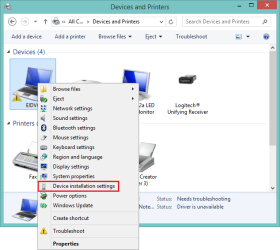
Launch Control Panel -> Devices and Printers
Right click on the Computer icon (it should be labeled with the name of your computer)
Select Device installation settings from the context menu
DevInstSet-a.png

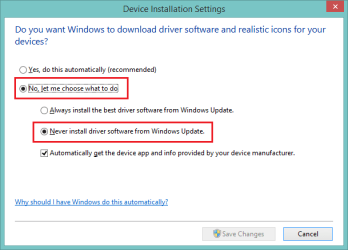
Change the settings to match the image below and press the [Save] button
DevInstSet-b.png

If the settings were already set that way, please let me know.

I guess I should ask some questions I should have already asked
1) Is the user id you log in an administrator id or a standard id?
2) Your specs say Anti-Virus: Microsoft. Is that Microsoft Defender or Microsoft Security Essentials (MSE)?
-> If MSE. when was the last scan performed and were there any threats discovered?

Bill
.
 

My Computer

Computer type
Laptop
Computer Manufacturer/Model Number
HP Pavilion dv6-6c10us
OS
x64 (6.3.9600) Win8.1 Pro & soon dual boot x64 (6.1.7601) Win7_SP1 HomePrem
CPU
AMD A6-3420M APU with Radeon(tm) HD Graphics
Motherboard
Hewlett-Packard 1805
Memory
6.00 GB
Graphics Card(s)
AMD Radeon(TM) HD 6520G
Sound Card
(1) AMD High Definition Audio Device (2) IDT High Definiti
Monitor(s) Displays
HP W2072a 20" LCD (1600 x 900) @ 60 Hz
Screen Resolution
1366 x 768 x 32 bits (4294967296 colors) @ 60 Hz
Hard Drives
ST640LM0 00 HM641JI SATA Disk Device
Keyboard
Logitech k520 wireless KB
Mouse
Logitech m320 wireless mouse (bundled with KB)
Internet Speed
15/5 | 54 MB Wireless 'n'
Antivirus
Realtime: Defender or Avast | On-demand: Malwarebytes, ESET
Browser
IE 11 on Win8, IE 10 on win 7
Other Info
Media: [Gimp, Audacity, VLC] || Comm: [WEmail 2012, Skype] || Productivity: [OpenOffice,| Textpad] || Utils: [Sysinternals, cCleaner, Speccy, Defraggler]
I'm going to bed now and hope the good fairy fixes my usb ports while I sleep.
 

My Computer

Computer type
PC/Desktop
Computer Manufacturer/Model Number
HP Pavilian DV7-7012 notebook
OS
Windows 7 Home Premium 64 bit
CPU
3rd generation Intel Core i7-3610QM Processor
Motherboard
2.30GHz
Memory
8GB DDR3 1600MHz RAM (2 DIMM); 750GB 7200RPM hard drive
Graphics Card(s)
2GB (2048MB) NVIDIA GeForce GT 650M GDDR5 Graphics
Hard Drives
750GB 7200RPM hard drive with HP ProtectSmart Hard Drive Protection
Antivirus
Microsoft
Browser
Firefox, Chrome, Microsoft
Ok, I was just typing a similar post. We can pick this up in the morning.

g'nite
 

My Computer

Computer type
Laptop
Computer Manufacturer/Model Number
HP Pavilion dv6-6c10us
OS
x64 (6.3.9600) Win8.1 Pro & soon dual boot x64 (6.1.7601) Win7_SP1 HomePrem
CPU
AMD A6-3420M APU with Radeon(tm) HD Graphics
Motherboard
Hewlett-Packard 1805
Memory
6.00 GB
Graphics Card(s)
AMD Radeon(TM) HD 6520G
Sound Card
(1) AMD High Definition Audio Device (2) IDT High Definiti
Monitor(s) Displays
HP W2072a 20" LCD (1600 x 900) @ 60 Hz
Screen Resolution
1366 x 768 x 32 bits (4294967296 colors) @ 60 Hz
Hard Drives
ST640LM0 00 HM641JI SATA Disk Device
Keyboard
Logitech k520 wireless KB
Mouse
Logitech m320 wireless mouse (bundled with KB)
Internet Speed
15/5 | 54 MB Wireless 'n'
Antivirus
Realtime: Defender or Avast | On-demand: Malwarebytes, ESET
Browser
IE 11 on Win8, IE 10 on win 7
Other Info
Media: [Gimp, Audacity, VLC] || Comm: [WEmail 2012, Skype] || Productivity: [OpenOffice,| Textpad] || Utils: [Sysinternals, cCleaner, Speccy, Defraggler]
Bill,
I did that last thing with devices and printers, and in answer to your other questions: I don't know how to tell if I am standard or administrator, I am using MSE and I did a full scan of my computer during the week and there were no threats detected.
I'm the only one using this computer, so I assume I am the administrator.
 

My Computer

Computer type
PC/Desktop
Computer Manufacturer/Model Number
HP Pavilian DV7-7012 notebook
OS
Windows 7 Home Premium 64 bit
CPU
3rd generation Intel Core i7-3610QM Processor
Motherboard
2.30GHz
Memory
8GB DDR3 1600MHz RAM (2 DIMM); 750GB 7200RPM hard drive
Graphics Card(s)
2GB (2048MB) NVIDIA GeForce GT 650M GDDR5 Graphics
Hard Drives
750GB 7200RPM hard drive with HP ProtectSmart Hard Drive Protection
Antivirus
Microsoft
Browser
Firefox, Chrome, Microsoft
Now I really am going to bed.
 

My Computer

Computer type
PC/Desktop
Computer Manufacturer/Model Number
HP Pavilian DV7-7012 notebook
OS
Windows 7 Home Premium 64 bit
CPU
3rd generation Intel Core i7-3610QM Processor
Motherboard
2.30GHz
Memory
8GB DDR3 1600MHz RAM (2 DIMM); 750GB 7200RPM hard drive
Graphics Card(s)
2GB (2048MB) NVIDIA GeForce GT 650M GDDR5 Graphics
Hard Drives
750GB 7200RPM hard drive with HP ProtectSmart Hard Drive Protection
Antivirus
Microsoft
Browser
Firefox, Chrome, Microsoft
Bill,
I did that last thing with devices and printers, and in answer to your other questions: I don't know how to tell if I am standard or administrator, I am using MSE and I did a full scan of my computer during the week and there were no threats detected.
I'm the only one using this computer, so I assume I am the administrator.

Ok, you've told the machine not to update anything until you tell it to update something. One of us has to remember to turn those back on when you get through troubleshooting the USB issue.

You are most likely an administrator account, to check
:ar: Launch Control Panel -> User Accounts
you'll have to poke around it's either the main screen or one of the selections (manage another account??) that tells you the account type for a user profile. I'm working on a Win8 machine and the screens are different.

Good to know MSE came up clean.

I think the next step is to rectify the BIOS version, but let me sleep on that.

Now I'm really going to bed, g'nite

Bill
.
 

My Computer

Computer type
Laptop
Computer Manufacturer/Model Number
HP Pavilion dv6-6c10us
OS
x64 (6.3.9600) Win8.1 Pro & soon dual boot x64 (6.1.7601) Win7_SP1 HomePrem
CPU
AMD A6-3420M APU with Radeon(tm) HD Graphics
Motherboard
Hewlett-Packard 1805
Memory
6.00 GB
Graphics Card(s)
AMD Radeon(TM) HD 6520G
Sound Card
(1) AMD High Definition Audio Device (2) IDT High Definiti
Monitor(s) Displays
HP W2072a 20" LCD (1600 x 900) @ 60 Hz
Screen Resolution
1366 x 768 x 32 bits (4294967296 colors) @ 60 Hz
Hard Drives
ST640LM0 00 HM641JI SATA Disk Device
Keyboard
Logitech k520 wireless KB
Mouse
Logitech m320 wireless mouse (bundled with KB)
Internet Speed
15/5 | 54 MB Wireless 'n'
Antivirus
Realtime: Defender or Avast | On-demand: Malwarebytes, ESET
Browser
IE 11 on Win8, IE 10 on win 7
Other Info
Media: [Gimp, Audacity, VLC] || Comm: [WEmail 2012, Skype] || Productivity: [OpenOffice,| Textpad] || Utils: [Sysinternals, cCleaner, Speccy, Defraggler]
Driver's have a digital signature. (This signature verifies the file is not corrupt nor a file simply placed there by a hacker). Digital signatures are stored in ".cat" files (Security Catalog Files).

Some devices have their own .cat file. It resides among the device's other driver files. But there's a system level .cat file as well.

Here's a Microsoft Technet article with instructions to fix a corrupt System level .cat file. It's about Windows Server 2008. (but Server 2008 was built on top of Win 7 Pro so I believe it should apply to your machine too.) Repair the system catalog database.

To start, let's just see if you have any security events logged in your Event Viewer

  • Download VEW and run it
  • Right click VEW.exe then Run as Administrator. When VEW opens
    • Under Select log to query: select Application and System
    • Under Select type to list: select Error and Warning
    • Click the radio button for Number of events, Type 20 in the 1 to 20 box
    • Click the Run button. It may take several seconds, Notepad will open with the output log
    • In the Notepad window, click Ctrl+A to select all, then Ctrl+C to copy, then Ctrl-V to paste the result in your post
(VEW tool courtesy rev-Olie)
 

My Computer

Computer type
PC/Desktop
Computer Manufacturer/Model Number
Dell Optiplex 360 and Optiplex 755
OS
Desk 1: Win 7 Pro x32; Desk 2: Windows 10 x64
Hard Drives
500GB Crucial SSD in both Desktops
Other Info
Buffalo 6TB NAS, Raid 1
If I might also try to help. First, I'd like to collect some additional diagnostic data
@Slartybart
This Chipset update seems as though it only changes the name shown in Device manager.
fyi the name change... Manufacturers burn Plug and Play ID info into device firmware. This includes a device description string.
> When Windows can't find a device driver (this is the case when device is listed under "Other" device), Device Manager displays the PnP device description from the mfr for device name
> Once Windows finds a driver, Device Mgr shows the name found in the driver

That's why the Chipset install changed the device name. The chipset install provided a driver (tho unfortunately the device still doesn't work :( )

/* EDIT */
Ugh. It's not a BIOS issue. I just looked up Code 52: Windows cannot verify the digital signature for the drivers required for this device. Which would also indicate is certainly a software issue.

More help on this is appreciated as long as we don't bang heads or confuse the other member ;)

Yeah, without the driver, there's no string to display - got it.

The BIOS issue is separate from the USB issue, but being BIOS could be relative to a solution. I had to check about 5 times, to be sure ... the HP assistant report F.0B, the HP support page for the machine reports F.0A; typos or failure to update versions on the webpage or bugs in HP assistant could be possible causes for the discrepancy. After searching HP for a BIOS that superseded F.0A and finding none, I thought maybe the HP assistant reported F.08 and my eyes saw F.0B. Anyway, at this point, there is no F.0B on HP, and I saw correctly the version as F,0B in HP Assistant - phew!

Code 52 can be handled by turning off driver signature enforcement in advanced boot - but I'm hesitant to do that until more things are researched. I've never seen a driver from a vendor be flagged that way. Drivers found by Googling, sure, but not from a vendor.

I want to double check the other driver warnings Crabby posted (after uninstalling), but believe that is just another instance of code 52, but from the automatic driver updates - those are turned off now.

I have yet to read the information Crabby posted to satisfy your request, I will right after this post.

The short plan:

UNinstall the 3 drivers if they're installed (I forget if the last one was successful or not).

Maybe .. maybe ... probably suggest cCleaner to look at any Registry entries related to the devices. DriveCleaner would have taken care of ghost device entries, but we've made at least one attempt to install after running that utility. Might be worth running DriveCleaner again before attempting the next driver install.

Install the F.0A BIOS
Check everything again before proceeding.

Install the USB chipset driver
If all goes well (no code 52), we're done.

Last ditch effort (unless another solution presents itself) - disable device checking.
Install the USB chipset driver.

Enable all of the things disabled (WU, Driver install, Device checking)

That's the plan as I see it - any thoughts?

@Crabby, I'll read the info you posted for CompGeek. Then I'll finalize the above and post it
- I always like to measure twice, cut once if you know what I mean.

Bill
.
 

My Computer

Computer type
Laptop
Computer Manufacturer/Model Number
HP Pavilion dv6-6c10us
OS
x64 (6.3.9600) Win8.1 Pro & soon dual boot x64 (6.1.7601) Win7_SP1 HomePrem
CPU
AMD A6-3420M APU with Radeon(tm) HD Graphics
Motherboard
Hewlett-Packard 1805
Memory
6.00 GB
Graphics Card(s)
AMD Radeon(TM) HD 6520G
Sound Card
(1) AMD High Definition Audio Device (2) IDT High Definiti
Monitor(s) Displays
HP W2072a 20" LCD (1600 x 900) @ 60 Hz
Screen Resolution
1366 x 768 x 32 bits (4294967296 colors) @ 60 Hz
Hard Drives
ST640LM0 00 HM641JI SATA Disk Device
Keyboard
Logitech k520 wireless KB
Mouse
Logitech m320 wireless mouse (bundled with KB)
Internet Speed
15/5 | 54 MB Wireless 'n'
Antivirus
Realtime: Defender or Avast | On-demand: Malwarebytes, ESET
Browser
IE 11 on Win8, IE 10 on win 7
Other Info
Media: [Gimp, Audacity, VLC] || Comm: [WEmail 2012, Skype] || Productivity: [OpenOffice,| Textpad] || Utils: [Sysinternals, cCleaner, Speccy, Defraggler]

My Computer

Computer type
Laptop
Computer Manufacturer/Model Number
HP Pavilion dv6-6c10us
OS
x64 (6.3.9600) Win8.1 Pro & soon dual boot x64 (6.1.7601) Win7_SP1 HomePrem
CPU
AMD A6-3420M APU with Radeon(tm) HD Graphics
Motherboard
Hewlett-Packard 1805
Memory
6.00 GB
Graphics Card(s)
AMD Radeon(TM) HD 6520G
Sound Card
(1) AMD High Definition Audio Device (2) IDT High Definiti
Monitor(s) Displays
HP W2072a 20" LCD (1600 x 900) @ 60 Hz
Screen Resolution
1366 x 768 x 32 bits (4294967296 colors) @ 60 Hz
Hard Drives
ST640LM0 00 HM641JI SATA Disk Device
Keyboard
Logitech k520 wireless KB
Mouse
Logitech m320 wireless mouse (bundled with KB)
Internet Speed
15/5 | 54 MB Wireless 'n'
Antivirus
Realtime: Defender or Avast | On-demand: Malwarebytes, ESET
Browser
IE 11 on Win8, IE 10 on win 7
Other Info
Media: [Gimp, Audacity, VLC] || Comm: [WEmail 2012, Skype] || Productivity: [OpenOffice,| Textpad] || Utils: [Sysinternals, cCleaner, Speccy, Defraggler]
ComputerGeek, here is what I got in problem devices:

Intel(R) USB 3.0 eXtensible Host Controller PCI\VEN_8086&DEV_1E31&SUBSYS_1818103C&REV_04\3&11583659&0&A0 This device is working properly.
Intel(R) 7 Series/C216 Chipset Family USB Enhanced Host Controller - 1E2D PCI\VEN_8086&DEV_1E2D&SUBSYS_1818103C&REV_04\3&11583659&0&D0 This device is working properly.
Intel(R) 7 Series/C216 Chipset Family USB Enhanced Host Controller - 1E26 PCI\VEN_8086&DEV_1E26&SUBSYS_1818103C&REV_04\3&11583659&0&E8 This device is working properly.

Hey ... who threw that wrench in the machinery ;)

dxDiag says This device is working properly for all three devices.
DevMgr shows an error and the devices don't work.

The HWIDs are good to have - thanks. I've been thinking there's more base drivers that might bear further investigation.

I have trouble finding the chipset drivers to install on my own dv6, only because HP doesn't break them out of the APU and AMD makes it hard to get updates directly from them.

The dv7 machine is Intel, but it's HP ... so more research ... it's HP!
Who knows, maybe the IME chipset has more than IME drivers in it.

I think that looking at Intel is another option, but it should be done after BIOS F.0A

Bill
.
 

My Computer

Computer type
Laptop
Computer Manufacturer/Model Number
HP Pavilion dv6-6c10us
OS
x64 (6.3.9600) Win8.1 Pro & soon dual boot x64 (6.1.7601) Win7_SP1 HomePrem
CPU
AMD A6-3420M APU with Radeon(tm) HD Graphics
Motherboard
Hewlett-Packard 1805
Memory
6.00 GB
Graphics Card(s)
AMD Radeon(TM) HD 6520G
Sound Card
(1) AMD High Definition Audio Device (2) IDT High Definiti
Monitor(s) Displays
HP W2072a 20" LCD (1600 x 900) @ 60 Hz
Screen Resolution
1366 x 768 x 32 bits (4294967296 colors) @ 60 Hz
Hard Drives
ST640LM0 00 HM641JI SATA Disk Device
Keyboard
Logitech k520 wireless KB
Mouse
Logitech m320 wireless mouse (bundled with KB)
Internet Speed
15/5 | 54 MB Wireless 'n'
Antivirus
Realtime: Defender or Avast | On-demand: Malwarebytes, ESET
Browser
IE 11 on Win8, IE 10 on win 7
Other Info
Media: [Gimp, Audacity, VLC] || Comm: [WEmail 2012, Skype] || Productivity: [OpenOffice,| Textpad] || Utils: [Sysinternals, cCleaner, Speccy, Defraggler]
Driver's have a digital signature. (This signature verifies the file is not corrupt nor a file simply placed there by a hacker). Digital signatures are stored in ".cat" files (Security Catalog Files).

Some devices have their own .cat file. It resides among the device's other driver files. But there's a system level .cat file as well.

Here's a Microsoft Technet article with instructions to fix a corrupt System level .cat file. It's about Windows Server 2008. (but Server 2008 was built on top of Win 7 Pro so I believe it should apply to your machine too.) Repair the system catalog database.

To start, let's just see if you have any security events logged in your Event Viewer

  • Download VEW and run it
  • Right click VEW.exe then Run as Administrator. When VEW opens
    • Under Select log to query: select Application and System
    • Under Select type to list: select Error and Warning
    • Click the radio button for Number of events, Type 20 in the 1 to 20 box
    • Click the Run button. It may take several seconds, Notepad will open with the output log
    • In the Notepad window, click Ctrl+A to select all, then Ctrl+C to copy, then Ctrl-V to paste the result in your post
(VEW tool courtesy rev-Olie)

Thanks, this is a good place for me to sit on the side until CompGeek does his Event Viewer VooDoo. I'm not giving up on the issue, just passing the baton :)

VEW is a tool I will add to my toolbox.
edit: I've also bookmarked the catalog repair/rebuild page. Thanks CompGeek for bringing that information forward.

Bill
.
 
Last edited:

My Computer

Computer type
Laptop
Computer Manufacturer/Model Number
HP Pavilion dv6-6c10us
OS
x64 (6.3.9600) Win8.1 Pro & soon dual boot x64 (6.1.7601) Win7_SP1 HomePrem
CPU
AMD A6-3420M APU with Radeon(tm) HD Graphics
Motherboard
Hewlett-Packard 1805
Memory
6.00 GB
Graphics Card(s)
AMD Radeon(TM) HD 6520G
Sound Card
(1) AMD High Definition Audio Device (2) IDT High Definiti
Monitor(s) Displays
HP W2072a 20" LCD (1600 x 900) @ 60 Hz
Screen Resolution
1366 x 768 x 32 bits (4294967296 colors) @ 60 Hz
Hard Drives
ST640LM0 00 HM641JI SATA Disk Device
Keyboard
Logitech k520 wireless KB
Mouse
Logitech m320 wireless mouse (bundled with KB)
Internet Speed
15/5 | 54 MB Wireless 'n'
Antivirus
Realtime: Defender or Avast | On-demand: Malwarebytes, ESET
Browser
IE 11 on Win8, IE 10 on win 7
Other Info
Media: [Gimp, Audacity, VLC] || Comm: [WEmail 2012, Skype] || Productivity: [OpenOffice,| Textpad] || Utils: [Sysinternals, cCleaner, Speccy, Defraggler]
ComputerGeek, here is what I got in problem devices:

Intel(R) USB 3.0 eXtensible Host Controller PCI\VEN_8086&DEV_1E31&SUBSYS_1818103C&REV_04\3&11583659&0&A0 This device is working properly.
Intel(R) 7 Series/C216 Chipset Family USB Enhanced Host Controller - 1E2D PCI\VEN_8086&DEV_1E2D&SUBSYS_1818103C&REV_04\3&11583659&0&D0 This device is working properly.
Intel(R) 7 Series/C216 Chipset Family USB Enhanced Host Controller - 1E26 PCI\VEN_8086&DEV_1E26&SUBSYS_1818103C&REV_04\3&11583659&0&E8 This device is working properly.
Some 'splaining to do: It's an anomaly that "device is working properly" is even appearing in this Problem Report
  • A device shouldn't be included in the report if it really is working properly in the first place!
  • I believe those 3 devices truly have errors. The HWID reported is true, but the status string reported is not. I think they really have code 52 errors (digital signature issues) as reported by OP and show in the snapshots
re: the device Problem Report tool fyi... From experience over time of trying to use it, it can be helpful but certainly not definitive. Not every device with an error appears in a Problem Report. Some types of devices seem to appear in the report when they have problems while others do not. (And this is the first time i've seen it state "device is working" - which i think is not true in this case)

Oh, if we could only figure out all the nuances of MS Windows and its tools!@
 

My Computer

Computer type
PC/Desktop
Computer Manufacturer/Model Number
Dell Optiplex 360 and Optiplex 755
OS
Desk 1: Win 7 Pro x32; Desk 2: Windows 10 x64
Hard Drives
500GB Crucial SSD in both Desktops
Other Info
Buffalo 6TB NAS, Raid 1
Back
Top