Enable test mode to solve USB problems?

Would this be a good time for me to re-ask the OP to try running Ubuntu?
Burned to a CD, Booted from CD (not installed on hard drive).

Assuming the laptop has a CD drive, of course.

Go here:
Download Ubuntu Desktop | Download | Ubuntu
And download Ubuntu. The file will be an ISO. By double clicking on the .iso file you will be able to burn the program to a blank write-able CD using Windows or your preferred burning program.

Then place the disk in the optical drive and boot from it.
You will be asked if you want to install Ubuntu or just try it. Choose try it.

Ubuntu will run on your PC as a stand alone operating system. It will not affect Windows or your hard drive if run this way. Once you exit and remove the disk everything will go back to the way it was.

In Ubuntu you can look to see if your USB ports are recognized. Plug in a USB device or memory stick to see. There is a small learning curve to see where to look for drives, but pretty straightforward.
Let us know what you find.
 

My Computer

Computer type
PC/Desktop
Computer Manufacturer/Model Number
Home Built - Jan 2013
OS
Windows 7 64 Bit Home Premium SP1
CPU
i7-3820
Motherboard
Asus P9X79-PRO - Bios 4608
Memory
GSkill F3-14900CL9Q - 16GB
Graphics Card(s)
EVGA GeForce GTX660 - Driver 352.86
Sound Card
On board Realtek ALC898
Monitor(s) Displays
Acer S271HL
Screen Resolution
1920 x 1080
Hard Drives
#1- Samsung 840 Pro Series
#2- Western Digital WD1002FAEX Sata3 Black
#3- Western Digital WD1002FAEX Sata3 Black
PSU
Corsair CMPSU-850TX-V2 - 850 watt (by Seasonic)
Case
Corsair Obsidian 550D
Cooling
Standard 3 120mm case fans, Cooler Master Hyper 212 EVO
Keyboard
MS KC-0405
Mouse
Intellimouse 5-button
Internet Speed
56 Mbits/Sec (on a good day)
Antivirus
Avast & Malwarebytes
Browser
Firefox
Other Info
Asus DVD - DRW-24B1ST 24X
Would this be a good time for me to re-ask the OP to try running Ubuntu?
That's often a good diagnostic test with device errors. However, in this case OP reports devices all have code 52 which means
Windows cannot verify the digital signature for the drivers required for this device. A recent hardware or software change might have installed a file that is signed incorrectly or damaged, or that might be malicious software from an unknown source. (Code 52)
Which i interpret as software issue
 

My Computer

Computer type
PC/Desktop
Computer Manufacturer/Model Number
Dell Optiplex 360 and Optiplex 755
OS
Desk 1: Win 7 Pro x32; Desk 2: Windows 10 x64
Hard Drives
500GB Crucial SSD in both Desktops
Other Info
Buffalo 6TB NAS, Raid 1
Could be, but it does not hurt to check.

The basic USB ports should install with the standard drivers supplied with Windows 7. That is what is suspicious.
Only USB3 ports would require a separate driver before you could use them.

Either this laptop is so new that it only has USB 3.0 ports, or there is a reason the standard Windows drivers will not install.
 

My Computer

Computer type
PC/Desktop
Computer Manufacturer/Model Number
Home Built - Jan 2013
OS
Windows 7 64 Bit Home Premium SP1
CPU
i7-3820
Motherboard
Asus P9X79-PRO - Bios 4608
Memory
GSkill F3-14900CL9Q - 16GB
Graphics Card(s)
EVGA GeForce GTX660 - Driver 352.86
Sound Card
On board Realtek ALC898
Monitor(s) Displays
Acer S271HL
Screen Resolution
1920 x 1080
Hard Drives
#1- Samsung 840 Pro Series
#2- Western Digital WD1002FAEX Sata3 Black
#3- Western Digital WD1002FAEX Sata3 Black
PSU
Corsair CMPSU-850TX-V2 - 850 watt (by Seasonic)
Case
Corsair Obsidian 550D
Cooling
Standard 3 120mm case fans, Cooler Master Hyper 212 EVO
Keyboard
MS KC-0405
Mouse
Intellimouse 5-button
Internet Speed
56 Mbits/Sec (on a good day)
Antivirus
Avast & Malwarebytes
Browser
Firefox
Other Info
Asus DVD - DRW-24B1ST 24X
I was just looking at TV's suggestion of Ubuntu and it made me think of Wolfgang's little tutorial that uses Linux Mint MATE it looks as good as the Ubuntu perhaps a little better.

The reference is at post #1150 in this http://www.sevenforums.com/tutorials/73828-imaging-free-macrium-116.html click on where he says try this and the small tutorial will come up.

What I like about it is it can be kept on a separate drive in a machine and run by just changing the BIOS boot order.
 

My Computer

Computer type
PC/Desktop
Computer Manufacturer/Model Number
Own build (new) Desk1 / Asus ROG Win 7 / Desk2 1st build
OS
Desk1 7 Home Prem / Desk2 10 Pro / Main lap Asus ROG 10 Pro 2 laptop Toshiba 7 Pro Asus P2520 7 & 10
CPU
Desk1 i5 3750K / Laptop i7 GTX 860M / Desk2 i5 2500
Motherboard
Desk1 Asus P877-V / Desk2 Gigabyte H67 UD3H / Laptop ?
Memory
Desk1 8GB (1866) / Desk2 16GB (1333) / Laptop 8Gb DDR3
Graphics Card(s)
Desk 1& 2NVidia GTX 650 & Laptops on board Intel
Sound Card
Desk 1 & 2 -XONAR DG Realtek High Def audio Laptop
Monitor(s) Displays
Desk 1 Benq HD 2450 / Desk2 Philips 24" / Laptop 17.5"
Screen Resolution
1920x1080 D1 & D2 & Laptop 1
Hard Drives
Desk1 Samsung 120GB 830 SSD
Asus ROG 256GB 850 Pro SSD
Desk2 Samsung 840 256 SSD
Toshiba 120GB EVO
PSU
Desk 1 Corsair HX 1050/ Laptop ? / Desk 2 Corsair HX 650
Case
Desk 1 Cooler HAF XM ? Toshiba laptop / Desk2 Coolermaster
Cooling
Fans on all Desk1 -2 Desk2 - all Coolermasters 5 Laptop ?
Keyboard
Desk 1 MS Sidewinder X6 Desk 2 MS Sidewinder X 4
Mouse
Desk 1&2 - Gigabyte MS 900 gamer - laptop - Logitec wireless
Internet Speed
ADSL2+
Other Info
One other Desktop (tester) and spare Toshba laptop both with SSD's
Running Kaspersky 2016 ISS on all machines config'd identically
Logitec audio stereo systems on each machine (x3)
Canon MG5250MFC
Router/modem TP-Link running WPA2SK
Could be, but it does not hurt to check.
Absolutely, never hurts to check.

And I agree the USB 2.0 drivers come with the OS. But it's also important to consider the device error code in this case it's code 52. The drivers ARE there. Problem is the driver's digital signature isn't correct. (Which i interpret as should be a software issue).

So IMHO next step makes sense to check for any crypto events in Event Viewer, and repairing the system catalog file (where Windows stores the digital signatures for those USB devices)

just my current guess at we try that next
 

My Computer

Computer type
PC/Desktop
Computer Manufacturer/Model Number
Dell Optiplex 360 and Optiplex 755
OS
Desk 1: Win 7 Pro x32; Desk 2: Windows 10 x64
Hard Drives
500GB Crucial SSD in both Desktops
Other Info
Buffalo 6TB NAS, Raid 1
No problem with that approach here.
 

My Computer

Computer type
PC/Desktop
Computer Manufacturer/Model Number
Home Built - Jan 2013
OS
Windows 7 64 Bit Home Premium SP1
CPU
i7-3820
Motherboard
Asus P9X79-PRO - Bios 4608
Memory
GSkill F3-14900CL9Q - 16GB
Graphics Card(s)
EVGA GeForce GTX660 - Driver 352.86
Sound Card
On board Realtek ALC898
Monitor(s) Displays
Acer S271HL
Screen Resolution
1920 x 1080
Hard Drives
#1- Samsung 840 Pro Series
#2- Western Digital WD1002FAEX Sata3 Black
#3- Western Digital WD1002FAEX Sata3 Black
PSU
Corsair CMPSU-850TX-V2 - 850 watt (by Seasonic)
Case
Corsair Obsidian 550D
Cooling
Standard 3 120mm case fans, Cooler Master Hyper 212 EVO
Keyboard
MS KC-0405
Mouse
Intellimouse 5-button
Internet Speed
56 Mbits/Sec (on a good day)
Antivirus
Avast & Malwarebytes
Browser
Firefox
Other Info
Asus DVD - DRW-24B1ST 24X
Well let me take a guess too and say that using Ubuntu or the Linux approach might show up better what is on that or those drive/s in the way of drivers as the Windows install maybe a little out of whack and the Ubuntu or Linux cannot lie about what they see because of some corruption in the Windows install.

Sounds but whacky but that's just me.
 

My Computer

Computer type
PC/Desktop
Computer Manufacturer/Model Number
Own build (new) Desk1 / Asus ROG Win 7 / Desk2 1st build
OS
Desk1 7 Home Prem / Desk2 10 Pro / Main lap Asus ROG 10 Pro 2 laptop Toshiba 7 Pro Asus P2520 7 & 10
CPU
Desk1 i5 3750K / Laptop i7 GTX 860M / Desk2 i5 2500
Motherboard
Desk1 Asus P877-V / Desk2 Gigabyte H67 UD3H / Laptop ?
Memory
Desk1 8GB (1866) / Desk2 16GB (1333) / Laptop 8Gb DDR3
Graphics Card(s)
Desk 1& 2NVidia GTX 650 & Laptops on board Intel
Sound Card
Desk 1 & 2 -XONAR DG Realtek High Def audio Laptop
Monitor(s) Displays
Desk 1 Benq HD 2450 / Desk2 Philips 24" / Laptop 17.5"
Screen Resolution
1920x1080 D1 & D2 & Laptop 1
Hard Drives
Desk1 Samsung 120GB 830 SSD
Asus ROG 256GB 850 Pro SSD
Desk2 Samsung 840 256 SSD
Toshiba 120GB EVO
PSU
Desk 1 Corsair HX 1050/ Laptop ? / Desk 2 Corsair HX 650
Case
Desk 1 Cooler HAF XM ? Toshiba laptop / Desk2 Coolermaster
Cooling
Fans on all Desk1 -2 Desk2 - all Coolermasters 5 Laptop ?
Keyboard
Desk 1 MS Sidewinder X6 Desk 2 MS Sidewinder X 4
Mouse
Desk 1&2 - Gigabyte MS 900 gamer - laptop - Logitec wireless
Internet Speed
ADSL2+
Other Info
One other Desktop (tester) and spare Toshba laptop both with SSD's
Running Kaspersky 2016 ISS on all machines config'd identically
Logitec audio stereo systems on each machine (x3)
Canon MG5250MFC
Router/modem TP-Link running WPA2SK
Well let me take a guess too and say that using Ubuntu or the Linux approach might show up better what is on that or those drive/s in the way of drivers as the Windows install maybe a little out of whack and the Ubuntu or Linux cannot lie about what they see because of some corruption in the Windows install.
Understood, and never hurts to try.

But at same (understand, I'm not trying to be stubborn but just trying to explain): When we see device error code 52 and crypto errors reported, then the problem has to be software. (OK. Nothings 100% with computers, but 99.9% sure h/w isn't the cause of driver signature crypto errors). The digital signature contained in the driver and the signature stored system catalog must match. And both are software)

btw.. This is just friendly banter....
 

My Computer

Computer type
PC/Desktop
Computer Manufacturer/Model Number
Dell Optiplex 360 and Optiplex 755
OS
Desk 1: Win 7 Pro x32; Desk 2: Windows 10 x64
Hard Drives
500GB Crucial SSD in both Desktops
Other Info
Buffalo 6TB NAS, Raid 1
No offence meant or taken CG I was just thinking out loud and sort of laterally a bit as this one I think I took up the cudgel in the beginning and have been watching the progress and it does look to be a quirky one for want of a better way of putting it.

I've often used Ubuntu until I saw Wolfgang's tutorial to see into even dead drives so thought well nothing tried nothing gained eh?;)
 

My Computer

Computer type
PC/Desktop
Computer Manufacturer/Model Number
Own build (new) Desk1 / Asus ROG Win 7 / Desk2 1st build
OS
Desk1 7 Home Prem / Desk2 10 Pro / Main lap Asus ROG 10 Pro 2 laptop Toshiba 7 Pro Asus P2520 7 & 10
CPU
Desk1 i5 3750K / Laptop i7 GTX 860M / Desk2 i5 2500
Motherboard
Desk1 Asus P877-V / Desk2 Gigabyte H67 UD3H / Laptop ?
Memory
Desk1 8GB (1866) / Desk2 16GB (1333) / Laptop 8Gb DDR3
Graphics Card(s)
Desk 1& 2NVidia GTX 650 & Laptops on board Intel
Sound Card
Desk 1 & 2 -XONAR DG Realtek High Def audio Laptop
Monitor(s) Displays
Desk 1 Benq HD 2450 / Desk2 Philips 24" / Laptop 17.5"
Screen Resolution
1920x1080 D1 & D2 & Laptop 1
Hard Drives
Desk1 Samsung 120GB 830 SSD
Asus ROG 256GB 850 Pro SSD
Desk2 Samsung 840 256 SSD
Toshiba 120GB EVO
PSU
Desk 1 Corsair HX 1050/ Laptop ? / Desk 2 Corsair HX 650
Case
Desk 1 Cooler HAF XM ? Toshiba laptop / Desk2 Coolermaster
Cooling
Fans on all Desk1 -2 Desk2 - all Coolermasters 5 Laptop ?
Keyboard
Desk 1 MS Sidewinder X6 Desk 2 MS Sidewinder X 4
Mouse
Desk 1&2 - Gigabyte MS 900 gamer - laptop - Logitec wireless
Internet Speed
ADSL2+
Other Info
One other Desktop (tester) and spare Toshba laptop both with SSD's
Running Kaspersky 2016 ISS on all machines config'd identically
Logitec audio stereo systems on each machine (x3)
Canon MG5250MFC
Router/modem TP-Link running WPA2SK
Ok, I'm all caught up on the input from other members.

TVeblen makes a good point (amplified by ICIT2LOL) - a non Windows OS definitely answers the hardware / driver question.
The machine isn't that new and Crabby reported early on that neither 3.0 or 20 USB ports worked. I also find the USB 2.0 port not working to be problematic and it almost always points directly to hardware.

ComputerGeek makes an equally valid point - the driver signature is what is being reported by Windows.
MSE reported no malware, the driver was freshly installed form the HP site - that leaves crypto

The system is definitely wonky.
BIOS is reported as F.0B (HP assistant) - HP ftp site has no reference to F.0B
The latest on the download page is F.0A

dxDiag reports device working properly - an anomaly no doubt.

So we don't overload or confuse Crabby, I suggest that CompGeek get the Event logs previously requested to determine if there are any crypto entries. If there are, CompGeek pointed the way to fix that (or attempt to fix that anyway).

If there are not, then I think BIOS needs to be addressed as the next step (flashing F.0A), regardless of what the Event logs show about crypto.

The drivers will have to be installed and tested - we want a clean driver install.
edit: The device signature enforcement can be disabled if necessary, let's not lose track of that.

Here is where I think a non Windows OS would come in handy to test the hardware.

If at any point the devices work (except if they work in Linux), we should stop and breathe before going any further with housekeeping.

@Crabby,
don't let our tech talk discourage you. We're thinking out loud to find the best approach to solve the issue on your machine - it's a tough one.

I think that leaves you back with CompGeek and the request to see the Event logs using VEW (see post# 55)

I'd also like to refresh my request for a Speccy report
Publish a Speccy report

It's easy to lose track of requests, even for us ;)

Bill

+edit2
Was this machine originally Vista?
Does the touchpad work or are you using an external mouse?
-edit2
 
Last edited:

My Computer

Computer type
Laptop
Computer Manufacturer/Model Number
HP Pavilion dv6-6c10us
OS
x64 (6.3.9600) Win8.1 Pro & soon dual boot x64 (6.1.7601) Win7_SP1 HomePrem
CPU
AMD A6-3420M APU with Radeon(tm) HD Graphics
Motherboard
Hewlett-Packard 1805
Memory
6.00 GB
Graphics Card(s)
AMD Radeon(TM) HD 6520G
Sound Card
(1) AMD High Definition Audio Device (2) IDT High Definiti
Monitor(s) Displays
HP W2072a 20" LCD (1600 x 900) @ 60 Hz
Screen Resolution
1366 x 768 x 32 bits (4294967296 colors) @ 60 Hz
Hard Drives
ST640LM0 00 HM641JI SATA Disk Device
Keyboard
Logitech k520 wireless KB
Mouse
Logitech m320 wireless mouse (bundled with KB)
Internet Speed
15/5 | 54 MB Wireless 'n'
Antivirus
Realtime: Defender or Avast | On-demand: Malwarebytes, ESET
Browser
IE 11 on Win8, IE 10 on win 7
Other Info
Media: [Gimp, Audacity, VLC] || Comm: [WEmail 2012, Skype] || Productivity: [OpenOffice,| Textpad] || Utils: [Sysinternals, cCleaner, Speccy, Defraggler]
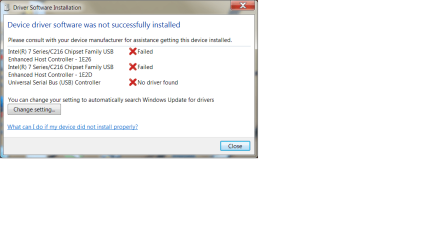
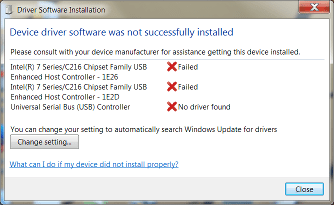
Here I am again. I just read through all these messages rather quickly. A while ago I went back and uninstalled all three devices from device manager and also clicked on remove software. Then the machine tried putting them back on and here is a screenshot of the message I got. Maybe I shouldn't have done that.

I will now try to do those other two things before I have to feed my husband again.
 

Attachments

  • jan 12 screen shot after uninstalling devices.png
    jan 12 screen shot after uninstalling devices.png
    76.6 KB · Views: 3

My Computer

Computer type
PC/Desktop
Computer Manufacturer/Model Number
HP Pavilian DV7-7012 notebook
OS
Windows 7 Home Premium 64 bit
CPU
3rd generation Intel Core i7-3610QM Processor
Motherboard
2.30GHz
Memory
8GB DDR3 1600MHz RAM (2 DIMM); 750GB 7200RPM hard drive
Graphics Card(s)
2GB (2048MB) NVIDIA GeForce GT 650M GDDR5 Graphics
Hard Drives
750GB 7200RPM hard drive with HP ProtectSmart Hard Drive Protection
Antivirus
Microsoft
Browser
Firefox, Chrome, Microsoft
Here is the VEW file.
 

Attachments

My Computer

Computer type
PC/Desktop
Computer Manufacturer/Model Number
HP Pavilian DV7-7012 notebook
OS
Windows 7 Home Premium 64 bit
CPU
3rd generation Intel Core i7-3610QM Processor
Motherboard
2.30GHz
Memory
8GB DDR3 1600MHz RAM (2 DIMM); 750GB 7200RPM hard drive
Graphics Card(s)
2GB (2048MB) NVIDIA GeForce GT 650M GDDR5 Graphics
Hard Drives
750GB 7200RPM hard drive with HP ProtectSmart Hard Drive Protection
Antivirus
Microsoft
Browser
Firefox, Chrome, Microsoft

My Computer

Computer type
PC/Desktop
Computer Manufacturer/Model Number
HP Pavilian DV7-7012 notebook
OS
Windows 7 Home Premium 64 bit
CPU
3rd generation Intel Core i7-3610QM Processor
Motherboard
2.30GHz
Memory
8GB DDR3 1600MHz RAM (2 DIMM); 750GB 7200RPM hard drive
Graphics Card(s)
2GB (2048MB) NVIDIA GeForce GT 650M GDDR5 Graphics
Hard Drives
750GB 7200RPM hard drive with HP ProtectSmart Hard Drive Protection
Antivirus
Microsoft
Browser
Firefox, Chrome, Microsoft
I forgot to mention that the machine never ran Vista. It was running Windows7 home edition or home premium, whatever. I am using the touchpad. The touchpad stopped working at one point but I was able to restore it in device manager, which took me a while to figure out since I didn't have a mouse and had to tab into safe mode or something, can't remember what I did. Is there some way to run an external mouse without any USB ports? My finger is getting tired.
Someone asked about whether all my ports are uSB3. No. Three are USB3 and one is USB2, but the USB2 completely disappeared out of device manager after I uninstalled all the devices a week ago while trying to get them working again.
 

My Computer

Computer type
PC/Desktop
Computer Manufacturer/Model Number
HP Pavilian DV7-7012 notebook
OS
Windows 7 Home Premium 64 bit
CPU
3rd generation Intel Core i7-3610QM Processor
Motherboard
2.30GHz
Memory
8GB DDR3 1600MHz RAM (2 DIMM); 750GB 7200RPM hard drive
Graphics Card(s)
2GB (2048MB) NVIDIA GeForce GT 650M GDDR5 Graphics
Hard Drives
750GB 7200RPM hard drive with HP ProtectSmart Hard Drive Protection
Antivirus
Microsoft
Browser
Firefox, Chrome, Microsoft
Admittedly, not quite what I expected. But clearly something's preventing the USB drivers from loading. (p.s. and since the message is "not loading" vs. "not found" i believe the drivers are, in fact, there)

VEW Results
I can see the drivers for your 3 USB controllers failing to load but no reason why. (usbehci is your 2.0 controller. iusb3xhc is USB 3.0.

Though I'm not seeing any crypto messages in Event Viewer :confused:). Can you have another look at each failed controller in DevMgr. Right Click->Properties look at the General tab. Does each controller still show Code 52? or do they now show a different code #? You can just tell me the code numbers. You don't have to create snap shots
Code:
Log: 'System' Date/Time: 12/01/2015 9:08:46 PM
Type: Warning Category: 212
Event: 219 Source: Microsoft-Windows-Kernel-PnP
The driver \Driver\usbehci failed to load for the device PCI\VEN_8086&DEV_1E26&SUBSYS_1818103C&REV_04\3&11583659&0&E8.

Log: 'System' Date/Time: 12/01/2015 9:08:45 PM
Type: Warning Category: 212
Event: 219 Source: Microsoft-Windows-Kernel-PnP
The driver \Driver\usbehci failed to load for the device PCI\VEN_8086&DEV_1E2D&SUBSYS_1818103C&REV_04\3&11583659&0&D0.

Log: 'System' Date/Time: 12/01/2015 9:08:45 PM
Type: Warning Category: 212
Event: 219 Source: Microsoft-Windows-Kernel-PnP
The driver \Driver\iusb3xhc failed to load for the device PCI\VEN_8086&DEV_1E31&SUBSYS_1818103C&REV_04\3&11583659&0&A0.

BIOS
@Crabby, Have you ever upgraded the BIOS on that machine? @Slaty When i googled i did find 0b BIOS versions on other HP computers. But as you note, 0A is the one listed for Crabby's machine. Another :confused:

Device Manager Trace File
By default, device manager creates a basic trace log of install/uninstall events. The "basic" trace might have a clue what's causing the drivers not to load.
> Delete C:\WINDOWS\inf\setupapi.dev.log
> Shutdown and reboot your machine. I'm guessing the drivers will attempt to load again. And fail again. Or do whatever you do to get them to attempt to install again so I can see the trace log
> You'll find a newly created C:\WINDOWS\inf\setupapi.dev.log, change .log extension to .txt and attach to next post
 

My Computer

Computer type
PC/Desktop
Computer Manufacturer/Model Number
Dell Optiplex 360 and Optiplex 755
OS
Desk 1: Win 7 Pro x32; Desk 2: Windows 10 x64
Hard Drives
500GB Crucial SSD in both Desktops
Other Info
Buffalo 6TB NAS, Raid 1
The universal serial bus controller is now back under "other devices" showing a code 28. The other two show code 52.
I have never upgraded the BIOS unless the tech guys did when I took it into the shop last week.

I'll do the trace file next.
 

My Computer

Computer type
PC/Desktop
Computer Manufacturer/Model Number
HP Pavilian DV7-7012 notebook
OS
Windows 7 Home Premium 64 bit
CPU
3rd generation Intel Core i7-3610QM Processor
Motherboard
2.30GHz
Memory
8GB DDR3 1600MHz RAM (2 DIMM); 750GB 7200RPM hard drive
Graphics Card(s)
2GB (2048MB) NVIDIA GeForce GT 650M GDDR5 Graphics
Hard Drives
750GB 7200RPM hard drive with HP ProtectSmart Hard Drive Protection
Antivirus
Microsoft
Browser
Firefox, Chrome, Microsoft
I don't see the setupapi.dev.log anywhere on my computer.
 

My Computer

Computer type
PC/Desktop
Computer Manufacturer/Model Number
HP Pavilian DV7-7012 notebook
OS
Windows 7 Home Premium 64 bit
CPU
3rd generation Intel Core i7-3610QM Processor
Motherboard
2.30GHz
Memory
8GB DDR3 1600MHz RAM (2 DIMM); 750GB 7200RPM hard drive
Graphics Card(s)
2GB (2048MB) NVIDIA GeForce GT 650M GDDR5 Graphics
Hard Drives
750GB 7200RPM hard drive with HP ProtectSmart Hard Drive Protection
Antivirus
Microsoft
Browser
Firefox, Chrome, Microsoft
That's strange unless someone or somehow logging was turned off :confused:

Download attached file and unzip. Its a .reg file. Right click the reg file Run as Admin and allow it to change registry. (It's a simple change that sets Verbose level logging). Then attempt device installation again. Also, right click a controller and select Update Driver. I know update driver should also generate log entries.

The file should be located C:\WINDOWS\inf\setupapi.dev.log. You can see the Windows\inf folder, yes?
 

Attachments

My Computer

Computer type
PC/Desktop
Computer Manufacturer/Model Number
Dell Optiplex 360 and Optiplex 755
OS
Desk 1: Win 7 Pro x32; Desk 2: Windows 10 x64
Hard Drives
500GB Crucial SSD in both Desktops
Other Info
Buffalo 6TB NAS, Raid 1
Ok, another recap and feeding time.

I think you disabled all automatic updates, but it was done after this window popped up
x.png
The unknown device (code 28) and the other two problematic USB devise (code 52) is ok, given the steps taken.
I forgot to mention that the machine never ran Vista.
.....
I am using the touchpad. The touchpad stopped working at one point but I was able to restore it in device manager, which took me a while to figure out since I didn't have a mouse and had to tab into safe mode or something, can't remember what I did.
.....
... but the USB2 completely disappeared out of device manager after I uninstalled all the devices a week ago while trying to get them working again.

Ok, always Win7.
You uninstalled all devices or all USB devices? I've uninstalled all USB devices on my machine to test something without dire consequences.

BIOS - the only thing I know for certain is that HP support for your machine shows version F.0A - that is the version you should be running. How it became F.0B is not important - you can ask the shop if you are curious (you know you didn't flash the BIOS, I know I didn't flash the BIOS ;))
CompGeek didn't find any crypto event log entries. ... but provided some other good information.
CompGeek is in the middle of his investigation and I need some time to review Speccy.

When CompGeek gives the "All clear, I'm done with what I was looking at" signal, then you can move to the next steps. Other members might want to see something before you do that though. Timing is everything.

Here's what I'd like you to try next, before flashing BIOS F.0A - go through the uninstall process again for the three devices (answer yes to the uninstall question or tick the box that says uninstall software. There's usually a "Are you sure you want to uninstall the software for this device...?" confirmation dialog ).

I know you already did this, but I think Windows tried and failed to reinstall the devices - you changed the driver install settings after that. If you get the dialog window showing the failed install this time, click the [Change setting...] button and make sure it is set to NOT update. I think it will take you to the same place you already made that change, but let's see where it goes.

After uninstalling the devices and associated driver software, I think it time to fix BIOS and flash F.0A

Thanks for being patient, you're doing a good job doing what we're asking and the feedback you've been giving helps a lot.

Bill
.
 

My Computer

Computer type
Laptop
Computer Manufacturer/Model Number
HP Pavilion dv6-6c10us
OS
x64 (6.3.9600) Win8.1 Pro & soon dual boot x64 (6.1.7601) Win7_SP1 HomePrem
CPU
AMD A6-3420M APU with Radeon(tm) HD Graphics
Motherboard
Hewlett-Packard 1805
Memory
6.00 GB
Graphics Card(s)
AMD Radeon(TM) HD 6520G
Sound Card
(1) AMD High Definition Audio Device (2) IDT High Definiti
Monitor(s) Displays
HP W2072a 20" LCD (1600 x 900) @ 60 Hz
Screen Resolution
1366 x 768 x 32 bits (4294967296 colors) @ 60 Hz
Hard Drives
ST640LM0 00 HM641JI SATA Disk Device
Keyboard
Logitech k520 wireless KB
Mouse
Logitech m320 wireless mouse (bundled with KB)
Internet Speed
15/5 | 54 MB Wireless 'n'
Antivirus
Realtime: Defender or Avast | On-demand: Malwarebytes, ESET
Browser
IE 11 on Win8, IE 10 on win 7
Other Info
Media: [Gimp, Audacity, VLC] || Comm: [WEmail 2012, Skype] || Productivity: [OpenOffice,| Textpad] || Utils: [Sysinternals, cCleaner, Speccy, Defraggler]
When I right click on Set LogLevel VERBOSE.reg it does not give me a run option.
 

My Computer

Computer type
PC/Desktop
Computer Manufacturer/Model Number
HP Pavilian DV7-7012 notebook
OS
Windows 7 Home Premium 64 bit
CPU
3rd generation Intel Core i7-3610QM Processor
Motherboard
2.30GHz
Memory
8GB DDR3 1600MHz RAM (2 DIMM); 750GB 7200RPM hard drive
Graphics Card(s)
2GB (2048MB) NVIDIA GeForce GT 650M GDDR5 Graphics
Hard Drives
750GB 7200RPM hard drive with HP ProtectSmart Hard Drive Protection
Antivirus
Microsoft
Browser
Firefox, Chrome, Microsoft
Back
Top