Enable test mode to solve USB problems?

oh. you're right. i forgot the sequence... so just double left click the reg file, it should run and prompt with a warning and ask to proceed. Allow it to proceed
 

My Computer

Computer type
PC/Desktop
Computer Manufacturer/Model Number
Dell Optiplex 360 and Optiplex 755
OS
Desk 1: Win 7 Pro x32; Desk 2: Windows 10 x64
Hard Drives
500GB Crucial SSD in both Desktops
Other Info
Buffalo 6TB NAS, Raid 1
I got the same failed driver install message and it still shows not to install software from Windows Update.
 

My Computer

Computer type
PC/Desktop
Computer Manufacturer/Model Number
HP Pavilian DV7-7012 notebook
OS
Windows 7 Home Premium 64 bit
CPU
3rd generation Intel Core i7-3610QM Processor
Motherboard
2.30GHz
Memory
8GB DDR3 1600MHz RAM (2 DIMM); 750GB 7200RPM hard drive
Graphics Card(s)
2GB (2048MB) NVIDIA GeForce GT 650M GDDR5 Graphics
Hard Drives
750GB 7200RPM hard drive with HP ProtectSmart Hard Drive Protection
Antivirus
Microsoft
Browser
Firefox, Chrome, Microsoft
Adding VERBOSE to registry was successful.
 

My Computer

Computer type
PC/Desktop
Computer Manufacturer/Model Number
HP Pavilian DV7-7012 notebook
OS
Windows 7 Home Premium 64 bit
CPU
3rd generation Intel Core i7-3610QM Processor
Motherboard
2.30GHz
Memory
8GB DDR3 1600MHz RAM (2 DIMM); 750GB 7200RPM hard drive
Graphics Card(s)
2GB (2048MB) NVIDIA GeForce GT 650M GDDR5 Graphics
Hard Drives
750GB 7200RPM hard drive with HP ProtectSmart Hard Drive Protection
Antivirus
Microsoft
Browser
Firefox, Chrome, Microsoft
More stuff

That's strange unless someone or somehow logging was turned off :confused:

Download attached file and unzip. Its a .reg file. Right click the reg file Run as Admin and allow it to change registry. (It's a simple change that sets Verbose level logging). Then attempt device installation again. Also, right click a controller and select Update Driver. I know update driver should also generate log entries.

The file should be located C:\WINDOWS\inf\setupapi.dev.log. You can see the Windows\inf folder, yes?
I uninstalled USBs again, rebooted, got failed messages again. Right clicked on each controller. The USB controller that is showign up under other devices said that the software could not be found on the computer. It says the other two USB devices have the most up to date driver software installed.
I see an inf folder but no setupapi.dev.log and it does not show up when I search for the log file.
http://www.sevenforums.com//www.pinterest.com/pin/create/extension/
 

My Computer

Computer type
PC/Desktop
Computer Manufacturer/Model Number
HP Pavilian DV7-7012 notebook
OS
Windows 7 Home Premium 64 bit
CPU
3rd generation Intel Core i7-3610QM Processor
Motherboard
2.30GHz
Memory
8GB DDR3 1600MHz RAM (2 DIMM); 750GB 7200RPM hard drive
Graphics Card(s)
2GB (2048MB) NVIDIA GeForce GT 650M GDDR5 Graphics
Hard Drives
750GB 7200RPM hard drive with HP ProtectSmart Hard Drive Protection
Antivirus
Microsoft
Browser
Firefox, Chrome, Microsoft
I got the same failed driver install message and it still shows not to install software from Windows Update.
Very good, thanks.

After quick review of your Speccy, here are a few things I'd like you to do.

1) Uninstall PC Optimizer in Control Panel -> Programs and Features
remove the entry for PC Optimizer in Control Panel -> Administrative Tools -> Task Scheduler

Perform only STEP ONE in this tutorial to disable all non-Microsoft services
http://www.sevenforums.com/tutorial...ation-conflicts-performing-clean-startup.html

Before #5 [Restart] - please disable all entries, except your touch pad, on the Startup tab.

Then restart your machine.

CompGeek should confirm that this will not interfere with anything he's trying to determine before you do those things tough.

I'll defer to him on when - I don't want to possibly change anything he's looking at.

CompGeek, please give the green light on the above and Crabby can then just do it.

Thanks.

Bill
.
 

My Computer

Computer type
Laptop
Computer Manufacturer/Model Number
HP Pavilion dv6-6c10us
OS
x64 (6.3.9600) Win8.1 Pro & soon dual boot x64 (6.1.7601) Win7_SP1 HomePrem
CPU
AMD A6-3420M APU with Radeon(tm) HD Graphics
Motherboard
Hewlett-Packard 1805
Memory
6.00 GB
Graphics Card(s)
AMD Radeon(TM) HD 6520G
Sound Card
(1) AMD High Definition Audio Device (2) IDT High Definiti
Monitor(s) Displays
HP W2072a 20" LCD (1600 x 900) @ 60 Hz
Screen Resolution
1366 x 768 x 32 bits (4294967296 colors) @ 60 Hz
Hard Drives
ST640LM0 00 HM641JI SATA Disk Device
Keyboard
Logitech k520 wireless KB
Mouse
Logitech m320 wireless mouse (bundled with KB)
Internet Speed
15/5 | 54 MB Wireless 'n'
Antivirus
Realtime: Defender or Avast | On-demand: Malwarebytes, ESET
Browser
IE 11 on Win8, IE 10 on win 7
Other Info
Media: [Gimp, Audacity, VLC] || Comm: [WEmail 2012, Skype] || Productivity: [OpenOffice,| Textpad] || Utils: [Sysinternals, cCleaner, Speccy, Defraggler]
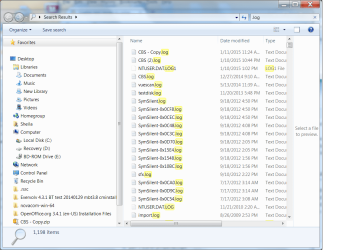
Here is what I get when I search on .log
 

Attachments

  • log file screenshot.png
    log file screenshot.png
    65.6 KB · Views: 1

My Computer

Computer type
PC/Desktop
Computer Manufacturer/Model Number
HP Pavilian DV7-7012 notebook
OS
Windows 7 Home Premium 64 bit
CPU
3rd generation Intel Core i7-3610QM Processor
Motherboard
2.30GHz
Memory
8GB DDR3 1600MHz RAM (2 DIMM); 750GB 7200RPM hard drive
Graphics Card(s)
2GB (2048MB) NVIDIA GeForce GT 650M GDDR5 Graphics
Hard Drives
750GB 7200RPM hard drive with HP ProtectSmart Hard Drive Protection
Antivirus
Microsoft
Browser
Firefox, Chrome, Microsoft
While we wait for CompGeek to return, this scan won't affect anything he's looking at.

Please go ahead and run this - no need to wait. He's probably doing some research, eating dinner, or working an issue on another thread.


AdwCleaner is a two step process. Scan then Clean

Click here to download AdwCleaner (author: Xplode)
--> save the application to your Desktop.

  • Right-click AdwCleaner.exe on your Desktop and select Run As Administrator to run the scanner with full privilege rights.
    AdwCleaner is a standalone executable, there is no install.

  • Click on the Scan button.
    • AdwCleaner begins scanning your system. It might take some time to complete.

    • Review the detected objects grouped under each of the tabs.
      --> If there is something you KNOW should NOT be cleaned, clear the checkbox
      picture.php
      next to the object. If you're not sure about an object, paste the scan logfile (AdwCleaner[R#].txt) in a new post for a member to review and advise you.
      Otherwise, go to the next step.

  • After the scan has finished and you have reviewed the objects to be cleaned, click on the Clean button.
    • Answer OK to the close all programs prompt, then follow the onscreen prompts.
    • Answer OK to the restart the computer prompt to complete the removal process.
      The AdwCleaner log file is opened in your default Text editor when the machine has restarted.
      Each time AdwCleaner runs, the log file number [#] is incremented, the highest number is the most recent. There are two log files, one for the scan (AdwCleaner[R#].txt) and one for the clean (AdwCleaner[S#].txt).
Paste the entire clean logfile (AdwCleaner[S#].txt) in your next post.
--> AdwCleaner logs are located in the C:\AdwCleaner folder if you need to reference them again
 

My Computer

Computer type
Laptop
Computer Manufacturer/Model Number
HP Pavilion dv6-6c10us
OS
x64 (6.3.9600) Win8.1 Pro & soon dual boot x64 (6.1.7601) Win7_SP1 HomePrem
CPU
AMD A6-3420M APU with Radeon(tm) HD Graphics
Motherboard
Hewlett-Packard 1805
Memory
6.00 GB
Graphics Card(s)
AMD Radeon(TM) HD 6520G
Sound Card
(1) AMD High Definition Audio Device (2) IDT High Definiti
Monitor(s) Displays
HP W2072a 20" LCD (1600 x 900) @ 60 Hz
Screen Resolution
1366 x 768 x 32 bits (4294967296 colors) @ 60 Hz
Hard Drives
ST640LM0 00 HM641JI SATA Disk Device
Keyboard
Logitech k520 wireless KB
Mouse
Logitech m320 wireless mouse (bundled with KB)
Internet Speed
15/5 | 54 MB Wireless 'n'
Antivirus
Realtime: Defender or Avast | On-demand: Malwarebytes, ESET
Browser
IE 11 on Win8, IE 10 on win 7
Other Info
Media: [Gimp, Audacity, VLC] || Comm: [WEmail 2012, Skype] || Productivity: [OpenOffice,| Textpad] || Utils: [Sysinternals, cCleaner, Speccy, Defraggler]
Hmmm. Adwcleaner is already on my computer. I must have run this before. I'll do it again.
 

My Computer

Computer type
PC/Desktop
Computer Manufacturer/Model Number
HP Pavilian DV7-7012 notebook
OS
Windows 7 Home Premium 64 bit
CPU
3rd generation Intel Core i7-3610QM Processor
Motherboard
2.30GHz
Memory
8GB DDR3 1600MHz RAM (2 DIMM); 750GB 7200RPM hard drive
Graphics Card(s)
2GB (2048MB) NVIDIA GeForce GT 650M GDDR5 Graphics
Hard Drives
750GB 7200RPM hard drive with HP ProtectSmart Hard Drive Protection
Antivirus
Microsoft
Browser
Firefox, Chrome, Microsoft
Ok, I checked the thread and I didn't see where anyone suggested AdwCleaner before (I thought I might have ;))
Please download a fresh copy of AdwCleaner
The developer is always adding great stuff.
 

My Computer

Computer type
Laptop
Computer Manufacturer/Model Number
HP Pavilion dv6-6c10us
OS
x64 (6.3.9600) Win8.1 Pro & soon dual boot x64 (6.1.7601) Win7_SP1 HomePrem
CPU
AMD A6-3420M APU with Radeon(tm) HD Graphics
Motherboard
Hewlett-Packard 1805
Memory
6.00 GB
Graphics Card(s)
AMD Radeon(TM) HD 6520G
Sound Card
(1) AMD High Definition Audio Device (2) IDT High Definiti
Monitor(s) Displays
HP W2072a 20" LCD (1600 x 900) @ 60 Hz
Screen Resolution
1366 x 768 x 32 bits (4294967296 colors) @ 60 Hz
Hard Drives
ST640LM0 00 HM641JI SATA Disk Device
Keyboard
Logitech k520 wireless KB
Mouse
Logitech m320 wireless mouse (bundled with KB)
Internet Speed
15/5 | 54 MB Wireless 'n'
Antivirus
Realtime: Defender or Avast | On-demand: Malwarebytes, ESET
Browser
IE 11 on Win8, IE 10 on win 7
Other Info
Media: [Gimp, Audacity, VLC] || Comm: [WEmail 2012, Skype] || Productivity: [OpenOffice,| Textpad] || Utils: [Sysinternals, cCleaner, Speccy, Defraggler]
Here is the AdwCleaner log file. The only question I have is about the items under registry. I don't know what those are.
 

Attachments

My Computer

Computer type
PC/Desktop
Computer Manufacturer/Model Number
HP Pavilian DV7-7012 notebook
OS
Windows 7 Home Premium 64 bit
CPU
3rd generation Intel Core i7-3610QM Processor
Motherboard
2.30GHz
Memory
8GB DDR3 1600MHz RAM (2 DIMM); 750GB 7200RPM hard drive
Graphics Card(s)
2GB (2048MB) NVIDIA GeForce GT 650M GDDR5 Graphics
Hard Drives
750GB 7200RPM hard drive with HP ProtectSmart Hard Drive Protection
Antivirus
Microsoft
Browser
Firefox, Chrome, Microsoft
I ran it before I saw your message to download it again. Now I remember, I ran AdwCleaner a couple weeks ago after downloading some files to install Android on my HP Touchpad and ended up with some advertising nagware that kept popping up when I tried to order stuff on Amazon.com. I think I googled to find something to clean off the adware. This one was recommended. Anyway, should I download it again or do you think I'm good for now.
 

My Computer

Computer type
PC/Desktop
Computer Manufacturer/Model Number
HP Pavilian DV7-7012 notebook
OS
Windows 7 Home Premium 64 bit
CPU
3rd generation Intel Core i7-3610QM Processor
Motherboard
2.30GHz
Memory
8GB DDR3 1600MHz RAM (2 DIMM); 750GB 7200RPM hard drive
Graphics Card(s)
2GB (2048MB) NVIDIA GeForce GT 650M GDDR5 Graphics
Hard Drives
750GB 7200RPM hard drive with HP ProtectSmart Hard Drive Protection
Antivirus
Microsoft
Browser
Firefox, Chrome, Microsoft
Please get it fresh - a few weeks for AdwCleaner is a long time - those guys the developer, Xplode, updates regularly.

Thanks
 

My Computer

Computer type
Laptop
Computer Manufacturer/Model Number
HP Pavilion dv6-6c10us
OS
x64 (6.3.9600) Win8.1 Pro & soon dual boot x64 (6.1.7601) Win7_SP1 HomePrem
CPU
AMD A6-3420M APU with Radeon(tm) HD Graphics
Motherboard
Hewlett-Packard 1805
Memory
6.00 GB
Graphics Card(s)
AMD Radeon(TM) HD 6520G
Sound Card
(1) AMD High Definition Audio Device (2) IDT High Definiti
Monitor(s) Displays
HP W2072a 20" LCD (1600 x 900) @ 60 Hz
Screen Resolution
1366 x 768 x 32 bits (4294967296 colors) @ 60 Hz
Hard Drives
ST640LM0 00 HM641JI SATA Disk Device
Keyboard
Logitech k520 wireless KB
Mouse
Logitech m320 wireless mouse (bundled with KB)
Internet Speed
15/5 | 54 MB Wireless 'n'
Antivirus
Realtime: Defender or Avast | On-demand: Malwarebytes, ESET
Browser
IE 11 on Win8, IE 10 on win 7
Other Info
Media: [Gimp, Audacity, VLC] || Comm: [WEmail 2012, Skype] || Productivity: [OpenOffice,| Textpad] || Utils: [Sysinternals, cCleaner, Speccy, Defraggler]
@Slartybart
Thanks for checking. Go ahead as what you're doing won't have any impact on my trying to produce that log file.

@Crabby
It's very strange as I've never seen that log file not created before. If you'd humor me, I don't always trust Windows search as its results can be filtered. Try one more thing (and if that still doesn't work I'll throw up my hands in defeat)
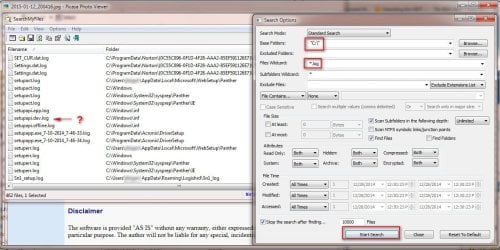
  • Download SearchMyFiles (64 bit version) and run the executable - no installation needed. (p.s. Personally, I find this interface much simpler to use then Windows search (and it can be used across all versions of Windows)
  • Browse to the C:\ drive, Files Wildcard *.log, click Start Search
  • Any better luck? <Fingers crossed>
 

Attachments

  • 2015-01-12_201058.jpg
    2015-01-12_201058.jpg
    132.4 KB · Views: 1

My Computer

Computer type
PC/Desktop
Computer Manufacturer/Model Number
Dell Optiplex 360 and Optiplex 755
OS
Desk 1: Win 7 Pro x32; Desk 2: Windows 10 x64
Hard Drives
500GB Crucial SSD in both Desktops
Other Info
Buffalo 6TB NAS, Raid 1
Here is the new AdwCleaner file. Looks the same. Should I press clean or do I need those registry files?
 

Attachments

My Computer

Computer type
PC/Desktop
Computer Manufacturer/Model Number
HP Pavilian DV7-7012 notebook
OS
Windows 7 Home Premium 64 bit
CPU
3rd generation Intel Core i7-3610QM Processor
Motherboard
2.30GHz
Memory
8GB DDR3 1600MHz RAM (2 DIMM); 750GB 7200RPM hard drive
Graphics Card(s)
2GB (2048MB) NVIDIA GeForce GT 650M GDDR5 Graphics
Hard Drives
750GB 7200RPM hard drive with HP ProtectSmart Hard Drive Protection
Antivirus
Microsoft
Browser
Firefox, Chrome, Microsoft
@CompGeek: I've been in some difficult threads where there are a lot of people suggesting completely different paths. The Thread Starter tries to do everything everyone asks and ... well, you get the drift.

When a search is in question I always drop down to an elevated Command prompt and use the dir command
To eliminate folder location, I start at the root
Right click Command Prompt
Select Run as Administrator...
Enter the following commands
cd \
dir /a /b /s setupapi*.log
I used setupapi*.log in this case, to eliminate setupapiDEV.log as a possible missed file

In any case, I searched my Win8 dv6 for that string (plus a few more variants) and it's not here either.
I chalked it up to Win8 or the fact that I didn't merge the reg file you supplied. It only found two files in Inf
C:\Windows\Inf\setupapi.offline.log
C:\Windows\Inf\setupapi.setup.log​

I'll go back to the path after I see the AdwCleaner stuff and you see what SearchMyFiles finds or doesn't find.

The clean start requires a restart, so that would interrupt some work ;)

I had the opportunity to triple check the BIOS - same conclusion - it has to be done.
I was able to locate a F.0B REV A for dv6 and dv7 machines but it's 2011,
F.0A on the machine support page is 2012 and that's what I want to see on the box.

Bill
.

 

My Computer

Computer type
Laptop
Computer Manufacturer/Model Number
HP Pavilion dv6-6c10us
OS
x64 (6.3.9600) Win8.1 Pro & soon dual boot x64 (6.1.7601) Win7_SP1 HomePrem
CPU
AMD A6-3420M APU with Radeon(tm) HD Graphics
Motherboard
Hewlett-Packard 1805
Memory
6.00 GB
Graphics Card(s)
AMD Radeon(TM) HD 6520G
Sound Card
(1) AMD High Definition Audio Device (2) IDT High Definiti
Monitor(s) Displays
HP W2072a 20" LCD (1600 x 900) @ 60 Hz
Screen Resolution
1366 x 768 x 32 bits (4294967296 colors) @ 60 Hz
Hard Drives
ST640LM0 00 HM641JI SATA Disk Device
Keyboard
Logitech k520 wireless KB
Mouse
Logitech m320 wireless mouse (bundled with KB)
Internet Speed
15/5 | 54 MB Wireless 'n'
Antivirus
Realtime: Defender or Avast | On-demand: Malwarebytes, ESET
Browser
IE 11 on Win8, IE 10 on win 7
Other Info
Media: [Gimp, Audacity, VLC] || Comm: [WEmail 2012, Skype] || Productivity: [OpenOffice,| Textpad] || Utils: [Sysinternals, cCleaner, Speccy, Defraggler]
Here is the new AdwCleaner file. Looks the same. Should I press clean or do I need those registry files?

Yep - go ahead and clean it, then restart the machine
 

My Computer

Computer type
Laptop
Computer Manufacturer/Model Number
HP Pavilion dv6-6c10us
OS
x64 (6.3.9600) Win8.1 Pro & soon dual boot x64 (6.1.7601) Win7_SP1 HomePrem
CPU
AMD A6-3420M APU with Radeon(tm) HD Graphics
Motherboard
Hewlett-Packard 1805
Memory
6.00 GB
Graphics Card(s)
AMD Radeon(TM) HD 6520G
Sound Card
(1) AMD High Definition Audio Device (2) IDT High Definiti
Monitor(s) Displays
HP W2072a 20" LCD (1600 x 900) @ 60 Hz
Screen Resolution
1366 x 768 x 32 bits (4294967296 colors) @ 60 Hz
Hard Drives
ST640LM0 00 HM641JI SATA Disk Device
Keyboard
Logitech k520 wireless KB
Mouse
Logitech m320 wireless mouse (bundled with KB)
Internet Speed
15/5 | 54 MB Wireless 'n'
Antivirus
Realtime: Defender or Avast | On-demand: Malwarebytes, ESET
Browser
IE 11 on Win8, IE 10 on win 7
Other Info
Media: [Gimp, Audacity, VLC] || Comm: [WEmail 2012, Skype] || Productivity: [OpenOffice,| Textpad] || Utils: [Sysinternals, cCleaner, Speccy, Defraggler]
@Crabby: When you get back to the forum, please humor CompGeek (his words) and do the SearchMyFiles post he requested.

then read through my post#85 and complete the Clean Startup stuff.

If PC Optimizer is not in the uninstall list - do the Task Scheduler part (I saw the task in Speccy, so I know it is there)

Try installing the Intel USB 3.0 Host Controller Driver again
C:\SwSetup\sp56164\setup.exe

Tell me what DevMgr thinks about the device now. Back to code 52, but no longer unknown?
You can leave it as it is - no need to uninstall it again. The software (if installed) is from the support page for your machine. That's about as good a driver as you're going to get for now.

Bill
.
 

My Computer

Computer type
Laptop
Computer Manufacturer/Model Number
HP Pavilion dv6-6c10us
OS
x64 (6.3.9600) Win8.1 Pro & soon dual boot x64 (6.1.7601) Win7_SP1 HomePrem
CPU
AMD A6-3420M APU with Radeon(tm) HD Graphics
Motherboard
Hewlett-Packard 1805
Memory
6.00 GB
Graphics Card(s)
AMD Radeon(TM) HD 6520G
Sound Card
(1) AMD High Definition Audio Device (2) IDT High Definiti
Monitor(s) Displays
HP W2072a 20" LCD (1600 x 900) @ 60 Hz
Screen Resolution
1366 x 768 x 32 bits (4294967296 colors) @ 60 Hz
Hard Drives
ST640LM0 00 HM641JI SATA Disk Device
Keyboard
Logitech k520 wireless KB
Mouse
Logitech m320 wireless mouse (bundled with KB)
Internet Speed
15/5 | 54 MB Wireless 'n'
Antivirus
Realtime: Defender or Avast | On-demand: Malwarebytes, ESET
Browser
IE 11 on Win8, IE 10 on win 7
Other Info
Media: [Gimp, Audacity, VLC] || Comm: [WEmail 2012, Skype] || Productivity: [OpenOffice,| Textpad] || Utils: [Sysinternals, cCleaner, Speccy, Defraggler]
I do see setupapi.dev.log. Change to txt and attached as zip.
 

Attachments

My Computer

Computer type
PC/Desktop
Computer Manufacturer/Model Number
HP Pavilian DV7-7012 notebook
OS
Windows 7 Home Premium 64 bit
CPU
3rd generation Intel Core i7-3610QM Processor
Motherboard
2.30GHz
Memory
8GB DDR3 1600MHz RAM (2 DIMM); 750GB 7200RPM hard drive
Graphics Card(s)
2GB (2048MB) NVIDIA GeForce GT 650M GDDR5 Graphics
Hard Drives
750GB 7200RPM hard drive with HP ProtectSmart Hard Drive Protection
Antivirus
Microsoft
Browser
Firefox, Chrome, Microsoft
No PC Optimizer

I got the same failed driver install message and it still shows not to install software from Windows Update.
Very good, thanks.

After quick review of your Speccy, here are a few things I'd like you to do.

1) Uninstall PC Optimizer in Control Panel -> Programs and Features
remove the entry for PC Optimizer in Control Panel -> Administrative Tools -> Task Scheduler

Perform only STEP ONE in this tutorial to disable all non-Microsoft services
http://www.sevenforums.com/tutorial...ation-conflicts-performing-clean-startup.html

Before #5 [Restart] - please disable all entries, except your touch pad, on the Startup tab.

Then restart your machine.

CompGeek should confirm that this will not interfere with anything he's trying to determine before you do those things tough.

I'll defer to him on when - I don't want to possibly change anything he's looking at.

CompGeek, please give the green light on the above and Crabby can then just do it.

Thanks.

Bill
.

I don't see PC Optimizer in either location.
 

My Computer

Computer type
PC/Desktop
Computer Manufacturer/Model Number
HP Pavilian DV7-7012 notebook
OS
Windows 7 Home Premium 64 bit
CPU
3rd generation Intel Core i7-3610QM Processor
Motherboard
2.30GHz
Memory
8GB DDR3 1600MHz RAM (2 DIMM); 750GB 7200RPM hard drive
Graphics Card(s)
2GB (2048MB) NVIDIA GeForce GT 650M GDDR5 Graphics
Hard Drives
750GB 7200RPM hard drive with HP ProtectSmart Hard Drive Protection
Antivirus
Microsoft
Browser
Firefox, Chrome, Microsoft
Ok, skip PC Optimizer then, work on the Clean Start.

AdwCleaner might have done the PC Optimizer work for you (one of the registry entries) - it wasn't critical
 

My Computer

Computer type
Laptop
Computer Manufacturer/Model Number
HP Pavilion dv6-6c10us
OS
x64 (6.3.9600) Win8.1 Pro & soon dual boot x64 (6.1.7601) Win7_SP1 HomePrem
CPU
AMD A6-3420M APU with Radeon(tm) HD Graphics
Motherboard
Hewlett-Packard 1805
Memory
6.00 GB
Graphics Card(s)
AMD Radeon(TM) HD 6520G
Sound Card
(1) AMD High Definition Audio Device (2) IDT High Definiti
Monitor(s) Displays
HP W2072a 20" LCD (1600 x 900) @ 60 Hz
Screen Resolution
1366 x 768 x 32 bits (4294967296 colors) @ 60 Hz
Hard Drives
ST640LM0 00 HM641JI SATA Disk Device
Keyboard
Logitech k520 wireless KB
Mouse
Logitech m320 wireless mouse (bundled with KB)
Internet Speed
15/5 | 54 MB Wireless 'n'
Antivirus
Realtime: Defender or Avast | On-demand: Malwarebytes, ESET
Browser
IE 11 on Win8, IE 10 on win 7
Other Info
Media: [Gimp, Audacity, VLC] || Comm: [WEmail 2012, Skype] || Productivity: [OpenOffice,| Textpad] || Utils: [Sysinternals, cCleaner, Speccy, Defraggler]
Back
Top