Enable test mode to solve USB problems?

I ran EasyBCD and the USB ports still don't work and still are giving me code 52.
 

My Computer My Computer

Computer type
PC/Desktop
Computer Manufacturer/Model Number
HP Pavilian DV7-7012 notebook
OS
Windows 7 Home Premium 64 bit
CPU
3rd generation Intel Core i7-3610QM Processor
Motherboard
2.30GHz
Memory
8GB DDR3 1600MHz RAM (2 DIMM); 750GB 7200RPM hard drive
Graphics Card(s)
2GB (2048MB) NVIDIA GeForce GT 650M GDDR5 Graphics
Hard Drives
750GB 7200RPM hard drive with HP ProtectSmart Hard Drive Protection
Antivirus
Microsoft
Browser
Firefox, Chrome, Microsoft
I didn't want to do a clean install because all my software is in Michigan. Also, I don't have a lot of my files backed up (I know. I know). The tech guys suggested a clean install and would back up my files first. (If I go that route, I'm going to buy another storage device and back up my files. I have 2 storage devices but one is almost full and the other one, a WD, crashed and burned, was only able to retrieve a portion of the files. )

I will now move along to the next step.
 

My Computer My Computer

Computer type
PC/Desktop
Computer Manufacturer/Model Number
HP Pavilian DV7-7012 notebook
OS
Windows 7 Home Premium 64 bit
CPU
3rd generation Intel Core i7-3610QM Processor
Motherboard
2.30GHz
Memory
8GB DDR3 1600MHz RAM (2 DIMM); 750GB 7200RPM hard drive
Graphics Card(s)
2GB (2048MB) NVIDIA GeForce GT 650M GDDR5 Graphics
Hard Drives
750GB 7200RPM hard drive with HP ProtectSmart Hard Drive Protection
Antivirus
Microsoft
Browser
Firefox, Chrome, Microsoft
I did the registry cleanup and still no USBs. Code 52s.
 

My Computer My Computer

Computer type
PC/Desktop
Computer Manufacturer/Model Number
HP Pavilian DV7-7012 notebook
OS
Windows 7 Home Premium 64 bit
CPU
3rd generation Intel Core i7-3610QM Processor
Motherboard
2.30GHz
Memory
8GB DDR3 1600MHz RAM (2 DIMM); 750GB 7200RPM hard drive
Graphics Card(s)
2GB (2048MB) NVIDIA GeForce GT 650M GDDR5 Graphics
Hard Drives
750GB 7200RPM hard drive with HP ProtectSmart Hard Drive Protection
Antivirus
Microsoft
Browser
Firefox, Chrome, Microsoft
Thanks, I forgot about MI

I only asked because it's your time - a reinstall is 99.9% guaranteed to solve issues and is a faster way to solve most issues (bad hardware being the exception).

I'm happy to go the route we're on - step-by-step troubleshooting, but some folks get frustrated by either the lack of a resolution, the speed of a resolution, or the requests to use a new tool to gather information. Some times it feels as though there isn't any progress being made. In this case, we are making some progress and there's already a lot of information about your machine.

Anyway, now that I know you're willing to continue on the troubleshooting path - so am I. It's also good to know that you have the resources to purchase another drive. That makes a lot of sense ... but let me throw something into the mix for your consideration

A new SSD drive and an external enclosure for your existing HDD would give you the best of both worlds.
Then you would have a backup on the HDD (in the enclosure) and you would have a speedy main SSD drive in the laptop which you could install Windows. Just something to think about if you decide on a re-install.

As with anything else with been doing (install this, test that, uninstall this...) it is your machine and you decide how to proceed. I can only offer you advice.

And now .... back to the regularly scheduled program

Bill
.
 

My Computer My Computer

Computer type
Laptop
Computer Manufacturer/Model Number
HP Pavilion dv6-6c10us
OS
x64 (6.3.9600) Win8.1 Pro & soon dual boot x64 (6.1.7601) Win7_SP1 HomePrem
CPU
AMD A6-3420M APU with Radeon(tm) HD Graphics
Motherboard
Hewlett-Packard 1805
Memory
6.00 GB
Graphics Card(s)
AMD Radeon(TM) HD 6520G
Sound Card
(1) AMD High Definition Audio Device (2) IDT High Definiti
Monitor(s) Displays
HP W2072a 20" LCD (1600 x 900) @ 60 Hz
Screen Resolution
1366 x 768 x 32 bits (4294967296 colors) @ 60 Hz
Hard Drives
ST640LM0 00 HM641JI SATA Disk Device
Keyboard
Logitech k520 wireless KB
Mouse
Logitech m320 wireless mouse (bundled with KB)
Internet Speed
15/5 | 54 MB Wireless 'n'
Antivirus
Realtime: Defender or Avast | On-demand: Malwarebytes, ESET
Browser
IE 11 on Win8, IE 10 on win 7
Other Info
Media: [Gimp, Audacity, VLC] || Comm: [WEmail 2012, Skype] || Productivity: [OpenOffice,| Textpad] || Utils: [Sysinternals, cCleaner, Speccy, Defraggler]
May I add Bill when that CCleaner is run that crabby checks the cookies in Options and saves the cookies that are linked to her passworded sites or else she will lose them and have to login all over again:) - it saves lot of time and what I always do.
 

My Computer My Computer

Computer type
PC/Desktop
Computer Manufacturer/Model Number
Own build (new) Desk1 / Asus ROG Win 7 / Desk2 1st build
OS
Desk1 7 Home Prem / Desk2 10 Pro / Main lap Asus ROG 10 Pro 2 laptop Toshiba 7 Pro Asus P2520 7 & 10
CPU
Desk1 i5 3750K / Laptop i7 GTX 860M / Desk2 i5 2500
Motherboard
Desk1 Asus P877-V / Desk2 Gigabyte H67 UD3H / Laptop ?
Memory
Desk1 8GB (1866) / Desk2 16GB (1333) / Laptop 8Gb DDR3
Graphics Card(s)
Desk 1& 2NVidia GTX 650 & Laptops on board Intel
Sound Card
Desk 1 & 2 -XONAR DG Realtek High Def audio Laptop
Monitor(s) Displays
Desk 1 Benq HD 2450 / Desk2 Philips 24" / Laptop 17.5"
Screen Resolution
1920x1080 D1 & D2 & Laptop 1
Hard Drives
Desk1 Samsung 120GB 830 SSD
Asus ROG 256GB 850 Pro SSD
Desk2 Samsung 840 256 SSD
Toshiba 120GB EVO
PSU
Desk 1 Corsair HX 1050/ Laptop ? / Desk 2 Corsair HX 650
Case
Desk 1 Cooler HAF XM ? Toshiba laptop / Desk2 Coolermaster
Cooling
Fans on all Desk1 -2 Desk2 - all Coolermasters 5 Laptop ?
Keyboard
Desk 1 MS Sidewinder X6 Desk 2 MS Sidewinder X 4
Mouse
Desk 1&2 - Gigabyte MS 900 gamer - laptop - Logitec wireless
Internet Speed
ADSL2+
Other Info
One other Desktop (tester) and spare Toshba laptop both with SSD's
Running Kaspersky 2016 ISS on all machines config'd identically
Logitec audio stereo systems on each machine (x3)
Canon MG5250MFC
Router/modem TP-Link running WPA2SK
Ok, did you restart the machine after cCleaner?

Some of the work I ask you to do is prep work. Moving things out of the way for the next step(s).
Not everything will affect the issue, but I appreciate you checking the status of the drivers - who knows, there might be a good side affect of the housekeeping.

I think you're in a good position to flash the BIOS. This also might not change the status of the devices, but it puts the correct version on the box.

If you have connected to the Internet and can get to SevenForums,
If you have connected to the Internet and can get to SevenForums on the older laptop, then you should go ahead and flash the BIOS on the dv7 machine. Connecting with the old box is only for communicating if there is an issue after updating the dv7 BIOS. I don't expect any, but...

BIOS F.0A

Go ahead and download, then run it.
 

My Computer My Computer

Computer type
Laptop
Computer Manufacturer/Model Number
HP Pavilion dv6-6c10us
OS
x64 (6.3.9600) Win8.1 Pro & soon dual boot x64 (6.1.7601) Win7_SP1 HomePrem
CPU
AMD A6-3420M APU with Radeon(tm) HD Graphics
Motherboard
Hewlett-Packard 1805
Memory
6.00 GB
Graphics Card(s)
AMD Radeon(TM) HD 6520G
Sound Card
(1) AMD High Definition Audio Device (2) IDT High Definiti
Monitor(s) Displays
HP W2072a 20" LCD (1600 x 900) @ 60 Hz
Screen Resolution
1366 x 768 x 32 bits (4294967296 colors) @ 60 Hz
Hard Drives
ST640LM0 00 HM641JI SATA Disk Device
Keyboard
Logitech k520 wireless KB
Mouse
Logitech m320 wireless mouse (bundled with KB)
Internet Speed
15/5 | 54 MB Wireless 'n'
Antivirus
Realtime: Defender or Avast | On-demand: Malwarebytes, ESET
Browser
IE 11 on Win8, IE 10 on win 7
Other Info
Media: [Gimp, Audacity, VLC] || Comm: [WEmail 2012, Skype] || Productivity: [OpenOffice,| Textpad] || Utils: [Sysinternals, cCleaner, Speccy, Defraggler]
May I add Bill when that CCleaner is run that crabby checks the cookies in Options and saves the cookies that are linked to her passworded sites or else she will lose them and have to login all over again:) - it saves lot of time and what I always do.
Good point John, I'm fairly certain the default rules for the cleaner feature does not include cookie cleanup.
But ... I only asked her to run the Registry feature.

Smart Cookies is the name cCleaner uses - I use that, but you have to actually tell cCleaner that you want to preserve a certain cookie.

Bill
.
 

My Computer My Computer

Computer type
Laptop
Computer Manufacturer/Model Number
HP Pavilion dv6-6c10us
OS
x64 (6.3.9600) Win8.1 Pro & soon dual boot x64 (6.1.7601) Win7_SP1 HomePrem
CPU
AMD A6-3420M APU with Radeon(tm) HD Graphics
Motherboard
Hewlett-Packard 1805
Memory
6.00 GB
Graphics Card(s)
AMD Radeon(TM) HD 6520G
Sound Card
(1) AMD High Definition Audio Device (2) IDT High Definiti
Monitor(s) Displays
HP W2072a 20" LCD (1600 x 900) @ 60 Hz
Screen Resolution
1366 x 768 x 32 bits (4294967296 colors) @ 60 Hz
Hard Drives
ST640LM0 00 HM641JI SATA Disk Device
Keyboard
Logitech k520 wireless KB
Mouse
Logitech m320 wireless mouse (bundled with KB)
Internet Speed
15/5 | 54 MB Wireless 'n'
Antivirus
Realtime: Defender or Avast | On-demand: Malwarebytes, ESET
Browser
IE 11 on Win8, IE 10 on win 7
Other Info
Media: [Gimp, Audacity, VLC] || Comm: [WEmail 2012, Skype] || Productivity: [OpenOffice,| Textpad] || Utils: [Sysinternals, cCleaner, Speccy, Defraggler]
Would I be insulting anyone if I said I didn't want to flash the BIOS? I am afraid to do it. I have read if I screw it up I could fry my motherboard. I think the tech guys might have tried this because one of them told me he had tried "one more thing" and that it had shut down my computer and he had a lot of trouble getting it back up again. When he handed my computer back, he said "Be very, very careful". He also said motherboards on this machine are very expensive. I'm thinking maybe I should just have them do the clean reinstall. I have most of the software on my other notebook. It's just very, very slow.
 

My Computer My Computer

Computer type
PC/Desktop
Computer Manufacturer/Model Number
HP Pavilian DV7-7012 notebook
OS
Windows 7 Home Premium 64 bit
CPU
3rd generation Intel Core i7-3610QM Processor
Motherboard
2.30GHz
Memory
8GB DDR3 1600MHz RAM (2 DIMM); 750GB 7200RPM hard drive
Graphics Card(s)
2GB (2048MB) NVIDIA GeForce GT 650M GDDR5 Graphics
Hard Drives
750GB 7200RPM hard drive with HP ProtectSmart Hard Drive Protection
Antivirus
Microsoft
Browser
Firefox, Chrome, Microsoft
I wouldn't be insulted, but I do think it's important to fix.
If the tech guys did it, you can do it too.

There's a roll back feature for BIOS, so it's not as scary as most people think. It is something that you want to take seriously though.

Restoring the BIOS

It's unfortunate that the issue revolves around the USB devices. HP_TOOLS on an external USB is a great way to be as sure as you can be that recovering BIOS is easy.

Let me see if I can find the HP instructions that talk about the HDD HP_TOOLS. I just flash my BIOS using the package and I forget if that populates the BIOS backup.

A few things you can check are:

Is there a partition named HP_TOOLS on your machine?

Is the HP UEFI diagnostic feature installed on your machine?

The two are related, I think I see the HP UEFI in your Speccy, but you can always install it from the HP site if you don't see it in Control Panel -> Programs and Features.

Let me know if both are there - thanks.


We can revisit that if you want to try a few more things, but the BIOS is what controls all hardware and this is a hardware realted issue.

While you ponder that, try this:
Uninstall Intel Management Engine in Control Panel.

Restart and then check the devices. It's a long shot.
 

My Computer My Computer

Computer type
Laptop
Computer Manufacturer/Model Number
HP Pavilion dv6-6c10us
OS
x64 (6.3.9600) Win8.1 Pro & soon dual boot x64 (6.1.7601) Win7_SP1 HomePrem
CPU
AMD A6-3420M APU with Radeon(tm) HD Graphics
Motherboard
Hewlett-Packard 1805
Memory
6.00 GB
Graphics Card(s)
AMD Radeon(TM) HD 6520G
Sound Card
(1) AMD High Definition Audio Device (2) IDT High Definiti
Monitor(s) Displays
HP W2072a 20" LCD (1600 x 900) @ 60 Hz
Screen Resolution
1366 x 768 x 32 bits (4294967296 colors) @ 60 Hz
Hard Drives
ST640LM0 00 HM641JI SATA Disk Device
Keyboard
Logitech k520 wireless KB
Mouse
Logitech m320 wireless mouse (bundled with KB)
Internet Speed
15/5 | 54 MB Wireless 'n'
Antivirus
Realtime: Defender or Avast | On-demand: Malwarebytes, ESET
Browser
IE 11 on Win8, IE 10 on win 7
Other Info
Media: [Gimp, Audacity, VLC] || Comm: [WEmail 2012, Skype] || Productivity: [OpenOffice,| Textpad] || Utils: [Sysinternals, cCleaner, Speccy, Defraggler]
I don't have an HP_TOOLS partition and I don't see anything called HP UEFI in programs and features.
 

My Computer My Computer

Computer type
PC/Desktop
Computer Manufacturer/Model Number
HP Pavilian DV7-7012 notebook
OS
Windows 7 Home Premium 64 bit
CPU
3rd generation Intel Core i7-3610QM Processor
Motherboard
2.30GHz
Memory
8GB DDR3 1600MHz RAM (2 DIMM); 750GB 7200RPM hard drive
Graphics Card(s)
2GB (2048MB) NVIDIA GeForce GT 650M GDDR5 Graphics
Hard Drives
750GB 7200RPM hard drive with HP ProtectSmart Hard Drive Protection
Antivirus
Microsoft
Browser
Firefox, Chrome, Microsoft
Would Intel Management Engine be the same as Intel Management Engine Components?
 

My Computer My Computer

Computer type
PC/Desktop
Computer Manufacturer/Model Number
HP Pavilian DV7-7012 notebook
OS
Windows 7 Home Premium 64 bit
CPU
3rd generation Intel Core i7-3610QM Processor
Motherboard
2.30GHz
Memory
8GB DDR3 1600MHz RAM (2 DIMM); 750GB 7200RPM hard drive
Graphics Card(s)
2GB (2048MB) NVIDIA GeForce GT 650M GDDR5 Graphics
Hard Drives
750GB 7200RPM hard drive with HP ProtectSmart Hard Drive Protection
Antivirus
Microsoft
Browser
Firefox, Chrome, Microsoft
BTW, I am now getting a message that Windows Help and Support can't start.
 

My Computer My Computer

Computer type
PC/Desktop
Computer Manufacturer/Model Number
HP Pavilian DV7-7012 notebook
OS
Windows 7 Home Premium 64 bit
CPU
3rd generation Intel Core i7-3610QM Processor
Motherboard
2.30GHz
Memory
8GB DDR3 1600MHz RAM (2 DIMM); 750GB 7200RPM hard drive
Graphics Card(s)
2GB (2048MB) NVIDIA GeForce GT 650M GDDR5 Graphics
Hard Drives
750GB 7200RPM hard drive with HP ProtectSmart Hard Drive Protection
Antivirus
Microsoft
Browser
Firefox, Chrome, Microsoft
HP has changed the 'helper' applications, Advisor and Assistant, packaged on their machines a few times over the past few years.

These links are a good reference to what those helper applications do, but the actual tool on your machine might be a different version. One of the pages I looked recommends updating to the newest version of the HP Software Assistant (advisor?) HPSA - I only did a quick scan to make sure the page applied to Win7 and notebooks.

Anyway, due diligence on your part is a good idea. Once you read more bit about the flashing BIOS process, you should feel more comfortable doing it. Read first, ask questions, and I'll try to answer them as best I can. I don't keep those helper apps on my machine, so I'll have to refer to and rely the HP documentation.

I'll look at the screen shot you posted earlier - but it would be good to know what version of the HP assistant is on your machine (it might be visible on the image you posted) ... it will definitely be in the help -> about section of the app.

Here are a few HP docs on the assistant, with references to flashing BIOSIf you launch HP Assistant, does it tell you anywhere when the BIOS was updaed?
Not the date of the BIOS itself, but when it was put on your machine.

Please understand that I'm not making any assertions, other than an incorrect BIOS version, or accusations below:
If the tech guys did it, you might take it back to them and say "Fix this, it is wrong!"
You can point to the HP support page if they argue it's a later version.
It's not, it's a different version that is not correct for your machine. In fact, it's a year older than the F.0A BIOS

The date it was put on your machine will tell you if they did flash it. If you can't determine the date the BIOS was flashed, then I don't think you'll have much success determining (proving) they updated BIOS.

You could always just ask them, then pursue their responsibility.

I don't know the shop, so I don't know if they're good guys - most shops are honest enough to admit when they made a mistake. Again, I don't know when the BIOS was flashed or who did it. The only relevant thing, from my perspective, is that is wrong and needs to be corrected in order to effectively troubleshoot any issue on the machine.​

There's only one other thing that I have in my bag of tricks (I think - that's why I post things and say these are for later reference ... let me go over my own notes ;))

Bill
.
 

My Computer My Computer

Computer type
Laptop
Computer Manufacturer/Model Number
HP Pavilion dv6-6c10us
OS
x64 (6.3.9600) Win8.1 Pro & soon dual boot x64 (6.1.7601) Win7_SP1 HomePrem
CPU
AMD A6-3420M APU with Radeon(tm) HD Graphics
Motherboard
Hewlett-Packard 1805
Memory
6.00 GB
Graphics Card(s)
AMD Radeon(TM) HD 6520G
Sound Card
(1) AMD High Definition Audio Device (2) IDT High Definiti
Monitor(s) Displays
HP W2072a 20" LCD (1600 x 900) @ 60 Hz
Screen Resolution
1366 x 768 x 32 bits (4294967296 colors) @ 60 Hz
Hard Drives
ST640LM0 00 HM641JI SATA Disk Device
Keyboard
Logitech k520 wireless KB
Mouse
Logitech m320 wireless mouse (bundled with KB)
Internet Speed
15/5 | 54 MB Wireless 'n'
Antivirus
Realtime: Defender or Avast | On-demand: Malwarebytes, ESET
Browser
IE 11 on Win8, IE 10 on win 7
Other Info
Media: [Gimp, Audacity, VLC] || Comm: [WEmail 2012, Skype] || Productivity: [OpenOffice,| Textpad] || Utils: [Sysinternals, cCleaner, Speccy, Defraggler]
I don't have an HP_TOOLS partition and I don't see anything called HP UEFI in programs and features.
Would Intel Management Engine be the same as Intel Management Engine Components?
BTW, I am now getting a message that Windows Help and Support can't start.

Ok, no HP_TOOLS partition or (specific name used here) HP Unified Extensible Firmware Interface (UEFI) Support Environment

That's quite odd. Those are both standard issue for most HP laptops. Different models might have different setups I suppose. The HP support page does reference the UEFI support though. It's not UEFI in the true sense of how the machine boots, it's only a diagnostic interface - a hybrid of sorts.

Please post information about your drive(s)
See: http://www.sevenforums.com/tutorials/274797-disk-management-post-screen-capture-image.html

:ar: Yes on the Intel Management Engine question, same thing. Please uninstall that.

Windows Help and Support won't start? Please post a screen shot of what you see.
This probably stems from the Clean Startup I asked you to perform. Although this would be a Microsoft Service, which should NOT have been disabled. It happens though, some people miss that in the tutorial.
I won't know more until I see the image, but I suspect it's an HP help and support, not Windows.

Thanks
 

My Computer My Computer

Computer type
Laptop
Computer Manufacturer/Model Number
HP Pavilion dv6-6c10us
OS
x64 (6.3.9600) Win8.1 Pro & soon dual boot x64 (6.1.7601) Win7_SP1 HomePrem
CPU
AMD A6-3420M APU with Radeon(tm) HD Graphics
Motherboard
Hewlett-Packard 1805
Memory
6.00 GB
Graphics Card(s)
AMD Radeon(TM) HD 6520G
Sound Card
(1) AMD High Definition Audio Device (2) IDT High Definiti
Monitor(s) Displays
HP W2072a 20" LCD (1600 x 900) @ 60 Hz
Screen Resolution
1366 x 768 x 32 bits (4294967296 colors) @ 60 Hz
Hard Drives
ST640LM0 00 HM641JI SATA Disk Device
Keyboard
Logitech k520 wireless KB
Mouse
Logitech m320 wireless mouse (bundled with KB)
Internet Speed
15/5 | 54 MB Wireless 'n'
Antivirus
Realtime: Defender or Avast | On-demand: Malwarebytes, ESET
Browser
IE 11 on Win8, IE 10 on win 7
Other Info
Media: [Gimp, Audacity, VLC] || Comm: [WEmail 2012, Skype] || Productivity: [OpenOffice,| Textpad] || Utils: [Sysinternals, cCleaner, Speccy, Defraggler]
I don't have an HP_TOOLS partition and I don't see anything called HP UEFI in programs and features.
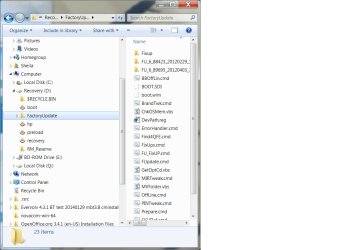
I forgot to mention that I do have a recovery D drive with some hp recovery tools.
Here is a screen shot.
 

Attachments

  • screen shot of D drive.png
    screen shot of D drive.png
    51.8 KB · Views: 1

My Computer My Computer

Computer type
PC/Desktop
Computer Manufacturer/Model Number
HP Pavilian DV7-7012 notebook
OS
Windows 7 Home Premium 64 bit
CPU
3rd generation Intel Core i7-3610QM Processor
Motherboard
2.30GHz
Memory
8GB DDR3 1600MHz RAM (2 DIMM); 750GB 7200RPM hard drive
Graphics Card(s)
2GB (2048MB) NVIDIA GeForce GT 650M GDDR5 Graphics
Hard Drives
750GB 7200RPM hard drive with HP ProtectSmart Hard Drive Protection
Antivirus
Microsoft
Browser
Firefox, Chrome, Microsoft
The HP Recovery partition should be hidden or have an entry in the Desktop.ini file that prevents you from seeing it.
That's how HP distributes the install media - most vendors do something similar and they do not provide discs.

This machine has been changed a LOT, and methinks it was a someone, not a something (Malware does other stuff).
As I've said, it's not important to me who changed things.

Do you have a CD-r available? Your post made me think. It's always a good idea to have a System Repair disc in case you need an alternate way to repair windows.
http://www.sevenforums.com/tutorials/2083-system-repair-disc-create.html

Go ahead and make the repair disc and check my recent previous posts .. some things are slipping through the cracks.
Screenshot for the Windows help and support msg and status on Intel Management uninstall for example.
The Disk Management screen is what I want to see - please post that.

If I missed the post where you told already me, just let me know the post #- thanks.
 

My Computer My Computer

Computer type
Laptop
Computer Manufacturer/Model Number
HP Pavilion dv6-6c10us
OS
x64 (6.3.9600) Win8.1 Pro & soon dual boot x64 (6.1.7601) Win7_SP1 HomePrem
CPU
AMD A6-3420M APU with Radeon(tm) HD Graphics
Motherboard
Hewlett-Packard 1805
Memory
6.00 GB
Graphics Card(s)
AMD Radeon(TM) HD 6520G
Sound Card
(1) AMD High Definition Audio Device (2) IDT High Definiti
Monitor(s) Displays
HP W2072a 20" LCD (1600 x 900) @ 60 Hz
Screen Resolution
1366 x 768 x 32 bits (4294967296 colors) @ 60 Hz
Hard Drives
ST640LM0 00 HM641JI SATA Disk Device
Keyboard
Logitech k520 wireless KB
Mouse
Logitech m320 wireless mouse (bundled with KB)
Internet Speed
15/5 | 54 MB Wireless 'n'
Antivirus
Realtime: Defender or Avast | On-demand: Malwarebytes, ESET
Browser
IE 11 on Win8, IE 10 on win 7
Other Info
Media: [Gimp, Audacity, VLC] || Comm: [WEmail 2012, Skype] || Productivity: [OpenOffice,| Textpad] || Utils: [Sysinternals, cCleaner, Speccy, Defraggler]
I installed the updated HP Support Assistant. I could not find anything indicating when the bios was updated, only that the bios is version F.0B
I'm not going to worry about Windows Help and Support right now. I probably can fix that myself later.
 

My Computer My Computer

Computer type
PC/Desktop
Computer Manufacturer/Model Number
HP Pavilian DV7-7012 notebook
OS
Windows 7 Home Premium 64 bit
CPU
3rd generation Intel Core i7-3610QM Processor
Motherboard
2.30GHz
Memory
8GB DDR3 1600MHz RAM (2 DIMM); 750GB 7200RPM hard drive
Graphics Card(s)
2GB (2048MB) NVIDIA GeForce GT 650M GDDR5 Graphics
Hard Drives
750GB 7200RPM hard drive with HP ProtectSmart Hard Drive Protection
Antivirus
Microsoft
Browser
Firefox, Chrome, Microsoft
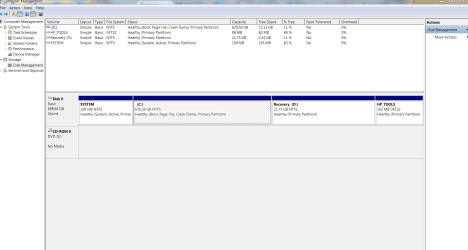
Here is the disk management screen shot.
 

Attachments

  • Snip Capture.PNG
    Snip Capture.PNG
    40.4 KB · Views: 3

My Computer My Computer

Computer type
PC/Desktop
Computer Manufacturer/Model Number
HP Pavilian DV7-7012 notebook
OS
Windows 7 Home Premium 64 bit
CPU
3rd generation Intel Core i7-3610QM Processor
Motherboard
2.30GHz
Memory
8GB DDR3 1600MHz RAM (2 DIMM); 750GB 7200RPM hard drive
Graphics Card(s)
2GB (2048MB) NVIDIA GeForce GT 650M GDDR5 Graphics
Hard Drives
750GB 7200RPM hard drive with HP ProtectSmart Hard Drive Protection
Antivirus
Microsoft
Browser
Firefox, Chrome, Microsoft
I uninstalled the Intel Management Engine. Still no change in device manager. All showing code 52.
 

My Computer My Computer

Computer type
PC/Desktop
Computer Manufacturer/Model Number
HP Pavilian DV7-7012 notebook
OS
Windows 7 Home Premium 64 bit
CPU
3rd generation Intel Core i7-3610QM Processor
Motherboard
2.30GHz
Memory
8GB DDR3 1600MHz RAM (2 DIMM); 750GB 7200RPM hard drive
Graphics Card(s)
2GB (2048MB) NVIDIA GeForce GT 650M GDDR5 Graphics
Hard Drives
750GB 7200RPM hard drive with HP ProtectSmart Hard Drive Protection
Antivirus
Microsoft
Browser
Firefox, Chrome, Microsoft
The HP Recovery partition should be hidden or have an entry in the Desktop.ini file that prevents you from seeing it.
That's how HP distributes the install media - most vendors do something similar and they do not provide discs.

This machine has been changed a LOT, and methinks it was a someone, not a something (Malware does other stuff).
As I've said, it's not important to me who changed things.

Do you have a CD-r available? Your post made me think. It's always a good idea to have a System Repair disc in case you need an alternate way to repair windows.
http://www.sevenforums.com/tutorials/2083-system-repair-disc-create.html

Go ahead and make the repair disc and check my recent previous posts .. some things are slipping through the cracks.
Screenshot for the Windows help and support msg and status on Intel Management uninstall for example.
The Disk Management screen is what I want to see - please post that.

If I missed the post where you told already me, just let me know the post #- thanks.

I made the system recovery disk.
 

My Computer My Computer

Computer type
PC/Desktop
Computer Manufacturer/Model Number
HP Pavilian DV7-7012 notebook
OS
Windows 7 Home Premium 64 bit
CPU
3rd generation Intel Core i7-3610QM Processor
Motherboard
2.30GHz
Memory
8GB DDR3 1600MHz RAM (2 DIMM); 750GB 7200RPM hard drive
Graphics Card(s)
2GB (2048MB) NVIDIA GeForce GT 650M GDDR5 Graphics
Hard Drives
750GB 7200RPM hard drive with HP ProtectSmart Hard Drive Protection
Antivirus
Microsoft
Browser
Firefox, Chrome, Microsoft
Back
Top