Enable wireless adaptor

kpva33

New member
Local time
3:20 AM
Messages
3
So I just got a brand new laptop, a Dell Inspiron. I turned it on, started adjusting properties to suit me, and tried to connect to my internet connection. In the process I wanted to disconnect from my internet, but nstead I pressed disable. Now I can't figure out at all how to enable the thing again. I try to troubleshoot it and it tells me that the wireless adaptor is disabled, but gives me absolutely no clues on how to enable it again.

How do I do this? 5 minutes old and I already have problems...
 

My Computer

OS
Windows 7
Hi,

Usually its a special keystroke, something like ALT+F8 - check above the laptop keys : are there special functions shown, perhaps a wireless icon?

If you are able to take a photo of the keyboard and post here we can solve it in two shakes of a lambs tail.

Regards,
Golden
 

My Computer

Computer type
PC/Desktop
Computer Manufacturer/Model Number
Golden Mk. I.4
OS
Windows 10 Pro x64 ; Xubuntu x64
CPU
Intel i7 860 @ 2.80 GHz O/C'ed to 4.0GHz
Motherboard
Gigabyte P55A-UD3R Rev.1. Award BIOS F13
Memory
16GB Corsair Vengance DDR3 @ 661 MHz Dual Channel (9-9-9-24)
Graphics Card(s)
EVGA NVidia GTX 560 1024MB
Sound Card
Realtek Integrated
Monitor(s) Displays
Dual Samsung SyncMaster 2494HS
Screen Resolution
1920*1080 and 1920*1080
Hard Drives
1*Samsung 840 EVO 120GB SSD;
1*OCZ Vertex 2 60GB SSD;
2*Samsung F3 SpinPoint 1TB in RAID0;
1*Samsung F1 SpinPoint 1TB;
2*Western Digital 1TB External USB 3.0
1*Western Digital 500GB External USB 3.0
1*Seagate 500GB External USB 2.0
PSU
Thermaltake ToughPower QFan 750W
Case
Thermaltake Element S VK60001W2Z
Cooling
Corsair H60 Water Cooling, 2*230mm and 2*80mm case fans
Keyboard
Logitech G110
Mouse
Logitech MX518
on my (oldish) inspiron laptop, the wireless button is fn-f2 - may well be different on yours - the symbol looks like a transmission tower, broadcasting 'waves'.

when you say 'you pressed disable' - what did you press to disable it?

oh, and welcome to sevenforums, kpva33! :)
 

My Computer

Computer Manufacturer/Model Number
mickey megabyte 1234
OS
ultimate 64 sp1
CPU
i5 2500K [email protected]
Motherboard
MSI P67A-GD53
Memory
8 gigs GSkill Ripjaws 1600
Graphics Card(s)
amd hd6950
Sound Card
creative x-fi gamer
Monitor(s) Displays
samsung 24"
Screen Resolution
1920x1080
Hard Drives
ocz vertex 2e 60 gig, samsung f3 1tb, buffalo 2tb ext
PSU
antec 550
Case
antec three hundred
Cooling
i'm a cooling fan
Keyboard
saitek eclipse ii
Mouse
logitech g3
Internet Speed
about 4 Mbps
Other Info
i love win7
It didn't help. When I pressed it, it says it is connected, but it still says the wireless network connection adapter is disabled.
 

My Computer

OS
Windows 7
ok, let's take this slowly.

what says it is connected?

and what says that it's disabled?

have you looked in device manager?
 

My Computer

Computer Manufacturer/Model Number
mickey megabyte 1234
OS
ultimate 64 sp1
CPU
i5 2500K [email protected]
Motherboard
MSI P67A-GD53
Memory
8 gigs GSkill Ripjaws 1600
Graphics Card(s)
amd hd6950
Sound Card
creative x-fi gamer
Monitor(s) Displays
samsung 24"
Screen Resolution
1920x1080
Hard Drives
ocz vertex 2e 60 gig, samsung f3 1tb, buffalo 2tb ext
PSU
antec 550
Case
antec three hundred
Cooling
i'm a cooling fan
Keyboard
saitek eclipse ii
Mouse
logitech g3
Internet Speed
about 4 Mbps
Other Info
i love win7
Ah, I found it-- I went to Control Panel --> Network/Internet --> Network Connections and then right-clicked on Wireless network connection, which I could then choose to enable. So strange I couldn't find it more readily accessible.
 

My Computer

OS
Windows 7
there should be a little symbol in your notification area, near your clock.

wl.PNG

you should be able to click that to connect/disconnect.
 

My Computer

Computer Manufacturer/Model Number
mickey megabyte 1234
OS
ultimate 64 sp1
CPU
i5 2500K [email protected]
Motherboard
MSI P67A-GD53
Memory
8 gigs GSkill Ripjaws 1600
Graphics Card(s)
amd hd6950
Sound Card
creative x-fi gamer
Monitor(s) Displays
samsung 24"
Screen Resolution
1920x1080
Hard Drives
ocz vertex 2e 60 gig, samsung f3 1tb, buffalo 2tb ext
PSU
antec 550
Case
antec three hundred
Cooling
i'm a cooling fan
Keyboard
saitek eclipse ii
Mouse
logitech g3
Internet Speed
about 4 Mbps
Other Info
i love win7
It didn't help. When I pressed it, it says it is connected, but it still says the wireless network connection adapter is disabled.

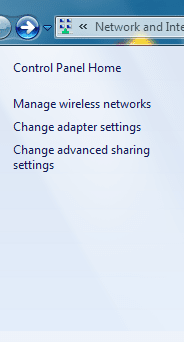
click on this

open network and sharing center

Click on change adapter settings and click enable
 

Attachments

  • net.PNG
    net.PNG
    364 bytes · Views: 18,329
  • ada.PNG
    ada.PNG
    9.4 KB · Views: 154

My Computer

Computer Manufacturer/Model Number
aspire 5920
OS
Windows 8 Professional x64
CPU
core 2 duo T5550
Memory
4 GB
Graphics Card(s)
GMA X3100
Hard Drives
160 GB + 320 GB
Internet Speed
2 mbps
Ah, I found it-- I went to Control Panel --> Network/Internet --> Network Connections and then right-clicked on Wireless network connection, which I could then choose to enable. So strange I couldn't find it more readily accessible.

Yep thats where the network connection are at. You can also do this in Device Manager.
 

My Computer

Computer type
PC/Desktop
Computer Manufacturer/Model Number
Home built
OS
Windows 7 Ult, Windows 8.1 Pro,
CPU
Q9650-4.275GHz, E8600 4.5GHz, E6750-3.8GHz
Motherboard
Evga 780i FTW
Memory
G.Skill PC2 9600 1200Mhz 5 5 5 15 2T
Graphics Card(s)
GTX480
Sound Card
Asus Xonar D2
Monitor(s) Displays
HannsG
Screen Resolution
1680X1050
Hard Drives
GSkill Phoenix Pro 120GB SSD
PSU
ThermalTake Toughpower 1000Watt modular
Case
ThermalTake XaserV
Cooling
Xigmatek S1283
Keyboard
Logitech G15
Mouse
Logitech G9
Internet Speed
T1
Back
Top