Enabling Custom Themes - Windows 7

How to Enable Custom Themes without Modifying System Files


   Information
This will show you how to enable and use custom themes without modifying system files. This method (in the form of a runnable service) was created and maintained by Rafael Rivera at Within Windows
   Note
This method can be used on Windows XP Service Pack 2-3, Windows Vista (All Service Packs), and Windows 7
   Warning
The UxStyle installer checks to see if typical patched files (like uxtheme.dll) have been patched. If they have, the installer will fail and you must replace these patched files with the original Windows' copies. Check the Frequently Asked Questions part of the tutorial for help with resolving this issue


Here's How:
1. Disable User Account Control (this is only temporary, Windows Vista and 7 only)

2. Download UxStyle Core Beta here and save the file to a meaningful location (such as the desktop)
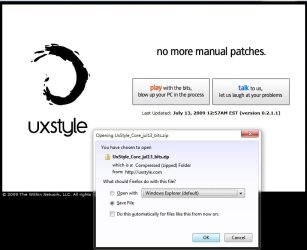
UxStyle.jpg
3. Extract the files and run the installer that matches your architecture: x86 or x64 (In this example I will be running the x64 installer)
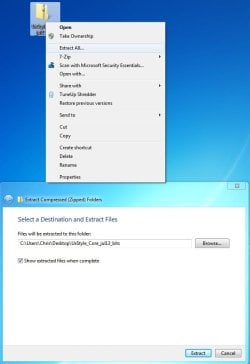
UxStyle2.jpg
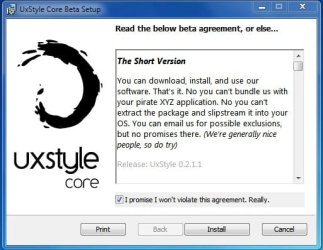
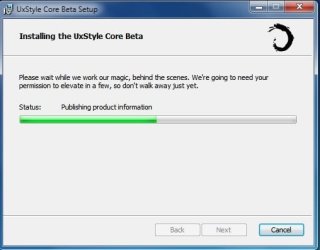
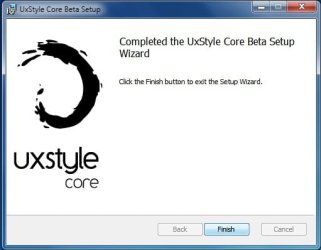
4. Follow the onscreen instructions
UxStyle3.jpg

UxStyle4.jpg

UxStyle5.jpg
5. Reboot the computer

6. Enable User Account Control again (Only Windows Vista and 7 users)

Frequently Asked Questions


Q: Exactly how is this different from using utilities like the universal patcher?

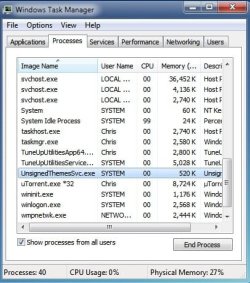
A: This program installs a service called UnsignedThemesSvc that takes less than a MB of RAM (520K for me on x64 in the screen shot below). The process will *trick* Windows into thinking all themes are signed thus allowing any installed custom theme to run. The patch modifies system files that could potentially end up being corrupted in the process, resulting in a repair install or a format

UxStyle6.jpg


Q: I installed the program but I can't see the process nor can I use a theme...help!
A: This normally is the result of not turning off UAC completely before installing the program. Uninstall UxStyle Core Beta from Programs and Features, restart the computer, turn off UAC, restart the computer, install UxStyle Core Beta, restart the computer. Your theme should work then.

Q: I tried running the installer but it keeps telling me that my subsystem has been tampered with...help!
A: This occurs when you have attempted to apply a patch to system files such as uxtheme.dll. To remedy this (in 95% of all scenarios) you must open a command prompt (run as Administrator) and execute the following command: sfc /scannow. After it finishes you should be able to run the installer for the program with no issue. See Run as Adminstrator and SFC /SCANNON Command - System File Checker in Related Links at the top for more info

Q: Okay, I got UxStyle Core running...now what?
A: The fun part...install some themes! Manually installing themes is easy...extract the theme to C:\Windows\Resources\Themes and choose it under the Installed Themes segment in Personalization (See tutorials above in Related Links to get more info on this)!

Q: Where can I find custom themes?
A: Some places to look would be in the Customization area of SevenForums and using the search terms "Windows 7 themes" on deviantART. You may also wish to contact members who hold the GFX Team badge as some of them are currently making themes or have released them


Hope it helps,
Chris


Attachments

Last edited by a moderator:
Cannot use Ave's style builder....

hello guys,i already install Ave's style builder.after i install,n try to import theme but nothing happens.in the style builder menu,there showing there's no theme even i already import it.i download theme frm Deviant art.can u show me how exactly to put theme in style builder?
 

My Computer

Computer Manufacturer/Model Number
Acer Aspire 4520
OS
Windows 7 Ultimate x86/Ubuntu 10.10
Memory
2.5 GB
Graphics Card(s)
Nvidia GeForce 7000M
Hmmm... this doesn't seem to work with Mr. Grimm's Dark7 Ultimate theme. I guess I'll have to do the standard uxtheme patches to get that theme to render correctly.
 

My Computer

Computer Manufacturer/Model Number
me / #1
OS
windows 7 x64 Home Premium
CPU
intel q6600
Motherboard
gigbyte ga ep45 ud3l
Memory
g.skill 8gb ddr2 1066 (pc2 8500)
Graphics Card(s)
evga geforce 9800 gtx 512 mb
Screen Resolution
1680 x 1050
Hard Drives
wd caviar black 500 gb
wd caviar black 1tb
wd elements 1tb external hd x2
PSU
raidmax 500w
Case
smilodon (yes, t'was the pretty blue lites that got me!)
Hmmm... this doesn't seem to work with Mr. Grimm's Dark7 Ultimate theme. I guess I'll have to do the standard uxtheme patches to get that theme to render correctly.

Err...I believe that the theme has nothing to do with it...UxStyle must be having an issue on your machine...

To be sure...let me contact Mark and see
 

My Computer

Computer Manufacturer/Model Number
Compal JFT02 (Custom Build Laptop)
OS
Windows 7 Home Premium x64 - Mac OS X 10.6.4 x64
CPU
Intel Core 2 Duo T9300 2.5 GHz
Motherboard
JFT02
Memory
4GB Kingston DDR2-800
Graphics Card(s)
NVIDIA Geforce 8600M GT (512MB Model)
Sound Card
Realtek HD Audio
Monitor(s) Displays
WUXGA Standard Laptop Display
Screen Resolution
1680*1050
Hard Drives
Toshiba 320GB 5400RPM Laptop HD
PSU
Standard Laptop Power Supply
Case
Standard Laptop Case
Cooling
Standard Laptop Cooling
Keyboard
Standard Laptop 105 Key-Keyboard
Mouse
Synaptics Touchpad
Internet Speed
Verizion Online DSL 3360/864 kbs (dl/up)
Err...I believe that the theme has nothing to do with it...UxStyle must be having an issue on your machine...

To be sure...let me contact Mark and see
That would be great. I'd like to use custom themes without "breaking" the files again...
Thanks!
 

My Computer

Computer Manufacturer/Model Number
me / #1
OS
windows 7 x64 Home Premium
CPU
intel q6600
Motherboard
gigbyte ga ep45 ud3l
Memory
g.skill 8gb ddr2 1066 (pc2 8500)
Graphics Card(s)
evga geforce 9800 gtx 512 mb
Screen Resolution
1680 x 1050
Hard Drives
wd caviar black 500 gb
wd caviar black 1tb
wd elements 1tb external hd x2
PSU
raidmax 500w
Case
smilodon (yes, t'was the pretty blue lites that got me!)
hey m8s! my problem is that I must restore theme subsystem (e.g. uxtheme.dll,themeui.dll etc.)??? what can I do? :confused: I lost all my themes just like that and I can't install any of them....what happened? help!

no need to answer me I've opened new thread
 
Last edited:

My Computer

OS
Windows 7 Ultimate edition x64
CPU
AMD Athlon 64 x2 Dual Core 4600+ 2.39GHz
Memory
4GB
Graphics Card(s)
Nvidia Gforce 9600 GT 512
Sound Card
Realtek HD
Monitor(s) Displays
LG 19`
Screen Resolution
1280X1024
Hard Drives
two HDs 300GB
Internet Speed
1Mb
Final update to the tutorial...I did some spacing adjustment and included a way to resolve the Subsystem Error warning
 

My Computer

Computer Manufacturer/Model Number
Compal JFT02 (Custom Build Laptop)
OS
Windows 7 Home Premium x64 - Mac OS X 10.6.4 x64
CPU
Intel Core 2 Duo T9300 2.5 GHz
Motherboard
JFT02
Memory
4GB Kingston DDR2-800
Graphics Card(s)
NVIDIA Geforce 8600M GT (512MB Model)
Sound Card
Realtek HD Audio
Monitor(s) Displays
WUXGA Standard Laptop Display
Screen Resolution
1680*1050
Hard Drives
Toshiba 320GB 5400RPM Laptop HD
PSU
Standard Laptop Power Supply
Case
Standard Laptop Case
Cooling
Standard Laptop Cooling
Keyboard
Standard Laptop 105 Key-Keyboard
Mouse
Synaptics Touchpad
Internet Speed
Verizion Online DSL 3360/864 kbs (dl/up)

My Computer

Computer Manufacturer/Model Number
Samsung NP550P5C-S02IN
OS
Windows 7 Ultimate - 64-bit | Windows 8 Pro - 64-bit
CPU
Intel® Core™ i7 Processor 3,610QM (2.30Hz, 6MB L3 Cach
Memory
8 GB
Graphics Card(s)
NVIDIA® GeForce® GT 650M 2GB Graphics, Optimus™ techno
Sound Card
SoundAlive™ JBL 3 Speakers (With sub-Woofer)
Monitor(s) Displays
39.62cm (15.6) SuperBright 300nit HD+ LED Display
Screen Resolution
1,600 x 900, Anti-Reflective
Hard Drives
1TB S-ATA II Hard Drive (5,400RPM)
I said no more updates...but I remembered something else...

This IS the final update:p (unless something changes)
 

My Computer

Computer Manufacturer/Model Number
Compal JFT02 (Custom Build Laptop)
OS
Windows 7 Home Premium x64 - Mac OS X 10.6.4 x64
CPU
Intel Core 2 Duo T9300 2.5 GHz
Motherboard
JFT02
Memory
4GB Kingston DDR2-800
Graphics Card(s)
NVIDIA Geforce 8600M GT (512MB Model)
Sound Card
Realtek HD Audio
Monitor(s) Displays
WUXGA Standard Laptop Display
Screen Resolution
1680*1050
Hard Drives
Toshiba 320GB 5400RPM Laptop HD
PSU
Standard Laptop Power Supply
Case
Standard Laptop Case
Cooling
Standard Laptop Cooling
Keyboard
Standard Laptop 105 Key-Keyboard
Mouse
Synaptics Touchpad
Internet Speed
Verizion Online DSL 3360/864 kbs (dl/up)
I install and apply this without problem, but after some day after a restart custom themes no more works. The process and service running.....why this ?

Thank
 

My Computer

OS
windows 7
I install and apply this without problem, but after some day after a restart custom themes no more works. The process and service running.....why this ?

Thank
Hm...this could be a number of things...

Answer the following questions:
1. What theme are you running
2. What changes occurred to the computer within the time frame that UxStyle stopped working (updates, programs that were installed, etc...)
3. Did you try uninstalling UxStyle and reinstalling it
4. Did you try changing to a default Aero theme and then changing back to your custom theme?
5. Did you try to System Restore back to a point in time before UxStyle stopped working
 

My Computer

Computer Manufacturer/Model Number
Compal JFT02 (Custom Build Laptop)
OS
Windows 7 Home Premium x64 - Mac OS X 10.6.4 x64
CPU
Intel Core 2 Duo T9300 2.5 GHz
Motherboard
JFT02
Memory
4GB Kingston DDR2-800
Graphics Card(s)
NVIDIA Geforce 8600M GT (512MB Model)
Sound Card
Realtek HD Audio
Monitor(s) Displays
WUXGA Standard Laptop Display
Screen Resolution
1680*1050
Hard Drives
Toshiba 320GB 5400RPM Laptop HD
PSU
Standard Laptop Power Supply
Case
Standard Laptop Case
Cooling
Standard Laptop Cooling
Keyboard
Standard Laptop 105 Key-Keyboard
Mouse
Synaptics Touchpad
Internet Speed
Verizion Online DSL 3360/864 kbs (dl/up)
I just saw another post from Sergio's patch tutorial you made

Thank for the tutorial, but in my computer not run well. I patch files, reboot and all is okay but when i restart computer again, windows 7 arrive to logon and stopped. I must start windows in safe mode, restore original file and windows 7 start this time normally, but naturally without custom themes ??

Why this ??
Thank
Hispanico

If you patched your system with Sergio's patch...it will break UxStyle
 

My Computer

Computer Manufacturer/Model Number
Compal JFT02 (Custom Build Laptop)
OS
Windows 7 Home Premium x64 - Mac OS X 10.6.4 x64
CPU
Intel Core 2 Duo T9300 2.5 GHz
Motherboard
JFT02
Memory
4GB Kingston DDR2-800
Graphics Card(s)
NVIDIA Geforce 8600M GT (512MB Model)
Sound Card
Realtek HD Audio
Monitor(s) Displays
WUXGA Standard Laptop Display
Screen Resolution
1680*1050
Hard Drives
Toshiba 320GB 5400RPM Laptop HD
PSU
Standard Laptop Power Supply
Case
Standard Laptop Case
Cooling
Standard Laptop Cooling
Keyboard
Standard Laptop 105 Key-Keyboard
Mouse
Synaptics Touchpad
Internet Speed
Verizion Online DSL 3360/864 kbs (dl/up)
Its been two weeks since I reinstalled 7 to fix the uxtheme patch problems and I have had no trouble at all. The work around in this tutorial works great with all of the themes I have tried, and it doesn't corrupt other Windows functions!

If you patched your system the other uxtheme patches, you'll probably have to do a Repair Install, as simply removing the old patches doesn't always fix the problems, and this work-around doesn't always work right on a system that was patched and then unpatched.

(I hope that wasn't too confusing...:p)
 

My Computer

Computer Manufacturer/Model Number
me / #1
OS
windows 7 x64 Home Premium
CPU
intel q6600
Motherboard
gigbyte ga ep45 ud3l
Memory
g.skill 8gb ddr2 1066 (pc2 8500)
Graphics Card(s)
evga geforce 9800 gtx 512 mb
Screen Resolution
1680 x 1050
Hard Drives
wd caviar black 500 gb
wd caviar black 1tb
wd elements 1tb external hd x2
PSU
raidmax 500w
Case
smilodon (yes, t'was the pretty blue lites that got me!)
@Zidane24,

6. Enable User Account Control again (Only Windows Vista and 7 users)

Do you need to do this or is it optional ?
 

My Computer

Computer Manufacturer/Model Number
6.1.7600 (Win7 RTM)
OS
Windows 7 Ultimate x64
CPU
Q6600 2.4 GHz Overclocked to 3.6 GHz
Motherboard
Asus Formula SE X38
Memory
4 GB (DDR2-800 DDR2 SDRAM)
Graphics Card(s)
EVGA NVIDIA GeForce 8800 Ultra (768 MB)
Sound Card
SoundMAX Integrated Digital HD Audio
Monitor(s) Displays
Samsung SyncMaster 206BW (20")
Hard Drives
Seagate 2x 1 TB
Hitachi 2x 1 TB
Case
NZXT BLackline Lexa Blue Lad
Cooling
Antec Tricolor Blue
@Zidane24,

6. Enable User Account Control again (Only Windows Vista and 7 users)

Do you need to do this or is it optional ?
Optional but as we are a community that tries to promote safe computing...UAC is a safeguard and is recommended
 

My Computer

Computer Manufacturer/Model Number
Compal JFT02 (Custom Build Laptop)
OS
Windows 7 Home Premium x64 - Mac OS X 10.6.4 x64
CPU
Intel Core 2 Duo T9300 2.5 GHz
Motherboard
JFT02
Memory
4GB Kingston DDR2-800
Graphics Card(s)
NVIDIA Geforce 8600M GT (512MB Model)
Sound Card
Realtek HD Audio
Monitor(s) Displays
WUXGA Standard Laptop Display
Screen Resolution
1680*1050
Hard Drives
Toshiba 320GB 5400RPM Laptop HD
PSU
Standard Laptop Power Supply
Case
Standard Laptop Case
Cooling
Standard Laptop Cooling
Keyboard
Standard Laptop 105 Key-Keyboard
Mouse
Synaptics Touchpad
Internet Speed
Verizion Online DSL 3360/864 kbs (dl/up)
When I unzipped the file with IZarc and extracted it didn't give me choice of 32 or 64 bit system, it just jumped right to the next window. I thought that was strange and continued on, but what I ended with was that the unsigned theme won't start..... I was getting a message that says file can't be found, error 2! What gives??
 

My Computer

OS
windows 7 64 bit
Im having a problem when installing uxstyles for 64bit, after I install it i restarted my pc and i don't have unassignedthemessvc.exe in my task manager processes. I have not patched my files and i disabled UAC before the install. I can install themes but they look nothing like they should.

Cheers.
 

My Computer

OS
Windows 7 Home Premium x64
Back
Top