Enabling Custom Themes - Windows 7

How to Enable Custom Themes without Modifying System Files


   Information
This will show you how to enable and use custom themes without modifying system files. This method (in the form of a runnable service) was created and maintained by Rafael Rivera at Within Windows
   Note
This method can be used on Windows XP Service Pack 2-3, Windows Vista (All Service Packs), and Windows 7
   Warning
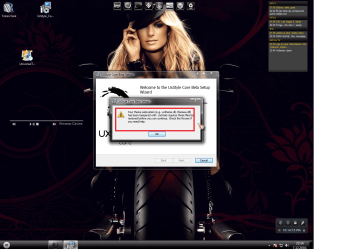
The UxStyle installer checks to see if typical patched files (like uxtheme.dll) have been patched. If they have, the installer will fail and you must replace these patched files with the original Windows' copies. Check the Frequently Asked Questions part of the tutorial for help with resolving this issue


Here's How:
1. Disable User Account Control (this is only temporary, Windows Vista and 7 only)

2. Download UxStyle Core Beta here and save the file to a meaningful location (such as the desktop)
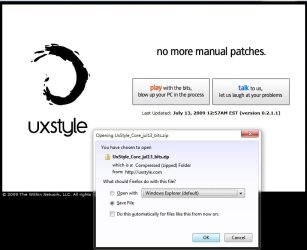
UxStyle.jpg
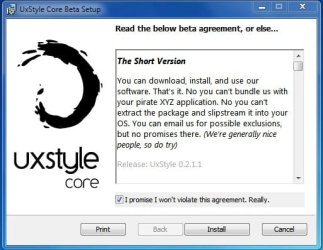
3. Extract the files and run the installer that matches your architecture: x86 or x64 (In this example I will be running the x64 installer)
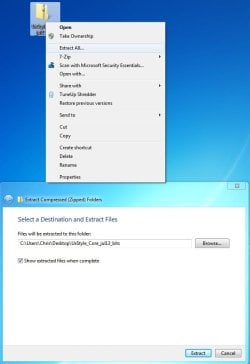
UxStyle2.jpg
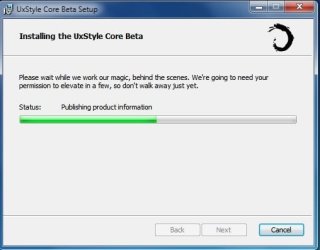
4. Follow the onscreen instructions
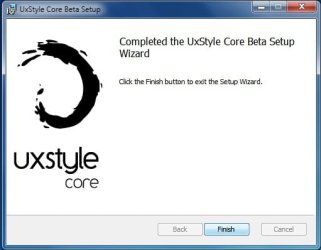
UxStyle3.jpg

UxStyle4.jpg

UxStyle5.jpg
5. Reboot the computer

6. Enable User Account Control again (Only Windows Vista and 7 users)

Frequently Asked Questions


Q: Exactly how is this different from using utilities like the universal patcher?

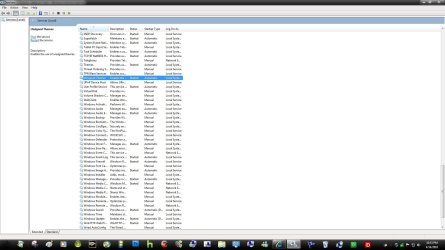
A: This program installs a service called UnsignedThemesSvc that takes less than a MB of RAM (520K for me on x64 in the screen shot below). The process will *trick* Windows into thinking all themes are signed thus allowing any installed custom theme to run. The patch modifies system files that could potentially end up being corrupted in the process, resulting in a repair install or a format
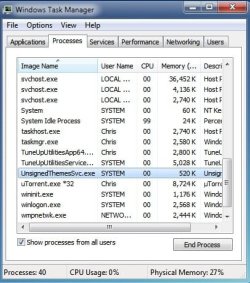

UxStyle6.jpg


Q: I installed the program but I can't see the process nor can I use a theme...help!
A: This normally is the result of not turning off UAC completely before installing the program. Uninstall UxStyle Core Beta from Programs and Features, restart the computer, turn off UAC, restart the computer, install UxStyle Core Beta, restart the computer. Your theme should work then.

Q: I tried running the installer but it keeps telling me that my subsystem has been tampered with...help!
A: This occurs when you have attempted to apply a patch to system files such as uxtheme.dll. To remedy this (in 95% of all scenarios) you must open a command prompt (run as Administrator) and execute the following command: sfc /scannow. After it finishes you should be able to run the installer for the program with no issue. See Run as Adminstrator and SFC /SCANNON Command - System File Checker in Related Links at the top for more info

Q: Okay, I got UxStyle Core running...now what?
A: The fun part...install some themes! Manually installing themes is easy...extract the theme to C:\Windows\Resources\Themes and choose it under the Installed Themes segment in Personalization (See tutorials above in Related Links to get more info on this)!

Q: Where can I find custom themes?
A: Some places to look would be in the Customization area of SevenForums and using the search terms "Windows 7 themes" on deviantART. You may also wish to contact members who hold the GFX Team badge as some of them are currently making themes or have released them


Hope it helps,
Chris


Attachments

Last edited by a moderator:
"A: This program installs a service called UnsignedThemesSvc that takes less than a MB of RAM (520K for me on x64 in the screen shot below). The process will *trick* Windows into thinking all themes are signed thus allowing any installed custom theme to run. The patch modifies system files that could potentially end up being corrupted in the process, resulting in a repair install or a format"


The quote has been taken from the tutorial posted by Zidane24, This worries me....has this happend to anyone, that UxStyle Core corrupted there Win7 system files????
Are there any programs out there that WON't cause this. I'm new with the customization of win7 and I don't want the above to happen.

Thanks
 

My Computer

Computer Manufacturer/Model Number
-ME-
OS
Windows 7 Ultimate 64 bit
CPU
INTEL sandybridge i7 2600 @ 3,4ghz
Motherboard
Asus p8p67 REV 3.1
Memory
Corsiar 1333mhz 4x2gig DDR3, total 8gig
Graphics Card(s)
MSI GTX560 ti Twin Frozer II 1gb 256bit GDDR5
Monitor(s) Displays
Samsung B2330 23" , LG 22" Flatron W2242S
Screen Resolution
1920x1080p , 1680 x 1050
Hard Drives
250 gig WD : System,
1TB Seagate Barraguda 7200rpm,
2TB Seagate Barraguda 7200rpm,
1TB Seagate Barraguda 7200rpm external
2TB WD Elements External
PSU
Corsair TX750w
Case
Cooler Master 690 ii Advance Side Window
Cooling
CPU: CM Hyper 212 Plus with 2 Blue LED 120mm CM fans
Keyboard
Microsoft Sidewinder 4
Mouse
Saitec CYBORG R.A.T.5 Lazer gaming mouse
"A: This program installs a service called UnsignedThemesSvc that takes less than a MB of RAM (520K for me on x64 in the screen shot below). The process will *trick* Windows into thinking all themes are signed thus allowing any installed custom theme to run. The patch modifies system files that could potentially end up being corrupted in the process, resulting in a repair install or a format"


The quote has been taken from the tutorial posted by Zidane24, This worries me....has this happend to anyone, that UxStyle Core corrupted there Win7 system files????
Are there any programs out there that WON't cause this. I'm new with the customization of win7 and I don't want the above to happen.

Thanks
The quote was taken out of context...

That was in reference to the common System Files Patches (UniversalThemePatch or something like that) that replace system files...

UxStyle Core DOES NOT and I mean DOES NOT modify system files or components

It is perfectly safe to use
 

My Computer

Computer Manufacturer/Model Number
Compal JFT02 (Custom Build Laptop)
OS
Windows 7 Home Premium x64 - Mac OS X 10.6.4 x64
CPU
Intel Core 2 Duo T9300 2.5 GHz
Motherboard
JFT02
Memory
4GB Kingston DDR2-800
Graphics Card(s)
NVIDIA Geforce 8600M GT (512MB Model)
Sound Card
Realtek HD Audio
Monitor(s) Displays
WUXGA Standard Laptop Display
Screen Resolution
1680*1050
Hard Drives
Toshiba 320GB 5400RPM Laptop HD
PSU
Standard Laptop Power Supply
Case
Standard Laptop Case
Cooling
Standard Laptop Cooling
Keyboard
Standard Laptop 105 Key-Keyboard
Mouse
Synaptics Touchpad
Internet Speed
Verizion Online DSL 3360/864 kbs (dl/up)
I installed Uxstyle after doing extensive researh on it....I downloaded it and applied a theme I found at Deviant art. Everything went fine, I restarted my pc and then did a complete shut down, when I turned the pc back on windows opened up perfectly fine!! No dreaded errors or failings, no high processor readings on my CPU or memory meters...everything is working smoothly and fine!!!
 

My Computer

OS
windows 7 64 bit
"A: This program installs a service called UnsignedThemesSvc that takes less than a MB of RAM (520K for me on x64 in the screen shot below). The process will *trick* Windows into thinking all themes are signed thus allowing any installed custom theme to run. The patch modifies system files that could potentially end up being corrupted in the process, resulting in a repair install or a format"


The quote has been taken from the tutorial posted by Zidane24, This worries me....has this happend to anyone, that UxStyle Core corrupted there Win7 system files????
Are there any programs out there that WON't cause this. I'm new with the customization of win7 and I don't want the above to happen.

Thanks
The quote was taken out of context...

That was in reference to the common System Files Patches (UniversalThemePatch or something like that) that replace system files...

UxStyle Core DOES NOT and I mean DOES NOT modify system files or components

It is perfectly safe to use


if you say so.

I'll try it in a VM first
 

My Computer

Computer Manufacturer/Model Number
-ME-
OS
Windows 7 Ultimate 64 bit
CPU
INTEL sandybridge i7 2600 @ 3,4ghz
Motherboard
Asus p8p67 REV 3.1
Memory
Corsiar 1333mhz 4x2gig DDR3, total 8gig
Graphics Card(s)
MSI GTX560 ti Twin Frozer II 1gb 256bit GDDR5
Monitor(s) Displays
Samsung B2330 23" , LG 22" Flatron W2242S
Screen Resolution
1920x1080p , 1680 x 1050
Hard Drives
250 gig WD : System,
1TB Seagate Barraguda 7200rpm,
2TB Seagate Barraguda 7200rpm,
1TB Seagate Barraguda 7200rpm external
2TB WD Elements External
PSU
Corsair TX750w
Case
Cooler Master 690 ii Advance Side Window
Cooling
CPU: CM Hyper 212 Plus with 2 Blue LED 120mm CM fans
Keyboard
Microsoft Sidewinder 4
Mouse
Saitec CYBORG R.A.T.5 Lazer gaming mouse
"A: This program installs a service called UnsignedThemesSvc that takes less than a MB of RAM (520K for me on x64 in the screen shot below). The process will *trick* Windows into thinking all themes are signed thus allowing any installed custom theme to run. The patch modifies system files that could potentially end up being corrupted in the process, resulting in a repair install or a format"


The quote has been taken from the tutorial posted by Zidane24, This worries me....has this happend to anyone, that UxStyle Core corrupted there Win7 system files????
Are there any programs out there that WON't cause this. I'm new with the customization of win7 and I don't want the above to happen.

Thanks
The quote was taken out of context...

That was in reference to the common System Files Patches (UniversalThemePatch or something like that) that replace system files...

UxStyle Core DOES NOT and I mean DOES NOT modify system files or components

It is perfectly safe to use


if you say so.

I'll try it in a VM first

It's safe, it installs a service so you don't have to patch like the other one.
 

Attachments

  • ux.jpg
    ux.jpg
    371.3 KB · Views: 392

My Computer

Computer type
PC/Desktop
Computer Manufacturer/Model Number
Self Built
OS
Win 10 Pro x64
CPU
Intel I5-2500K @3.3GHz
Motherboard
Asrock P67 Extreme4
Memory
16GB G.Skill Ripjaws X (4x4GB)
Graphics Card(s)
EVGA GeForce 750 Ti SC 2GB
Sound Card
ASUS Xonar DG 5.1 Channels 24-bit 96KHz PCI Interface Sound
Monitor(s) Displays
auria eq2367
Screen Resolution
1920 x 1080
Hard Drives
250GB Samsung 850 EVO SSD
1TB WD Blue
1TB Hitachi
PSU
SeaSonic X 650W 80 Plus Gold
Case
Corsair Obsidian 750D
Cooling
Corsair H60, Three 140mm case fans
Keyboard
Logitech Wireless Keyboard K520
Mouse
Logitech Wireless Mouse M310
Internet Speed
Wave Broadband ~ 100 dn 5 up
Antivirus
Windows Defender, Malwarebytes Premium
Browser
Edge, IE11, Chrome
Other Info
Laptop specs: HP g7-1365dx /
CPU: AMD A6-3420M APU with Radeon(tm) HD Graphics /
RAM: Crucial 8Gb (2x4Gb) /
SSD: Crucial M4-CT128M4SSD2 ATA Device/ FW 000F /
GFX: AMD Radeon HD 6520G /
OS: Windows 10 Pro x64
10x bro ,,,,,, that was easy

I was using the "Universal Theme Patcher">> I didn't know what is the difference btw the 2 ways ,,,,
anyway>> the only thing that I need now is how 2 change the start menu , back and forward buttons :D
 

My Computer

Computer Manufacturer/Model Number
Gigabyte Technology Co., Ltd.
OS
Windows 7 Ultimate 32-bit
CPU
Intel(R) Core(TM)2 Duo CPU E7400 @ 2.80GHz
Motherboard
GIGABYTE(P31-ES3G)
Memory
4GB (Kingstone)
Graphics Card(s)
512 MB--Nvidia Geforce 9500GT
Screen Resolution
1024 x 768
Hard Drives
Samsung 500+80
hi, wonderful tutorial. Thanks.

I am new here, and I just wanted to know if it is easy / troublefree to go back to the windows 7 built in themes, in case I don't want to stick with the others?

Thanks and cheers.
 

My Computer

Computer Manufacturer/Model Number
Dell XPS M1530
OS
Windows 7 Ultimate
CPU
Intel Core 2 Duo T9500 2.6 GHz
Memory
4GB
Graphics Card(s)
nVidia GeForce 8600M GT
Sound Card
SigmaTel
Hard Drives
WD 320 GB
10x bro ,,,,,, that was easy

I was using the "Universal Theme Patcher">> I didn't know what is the difference btw the 2 ways ,,,,
anyway>> the only thing that I need now is how 2 change the start menu , back and forward buttons :D

I am also curious about the start menu, and back/ forward buttons.
 

My Computer

OS
Win 7 Pro 64bit sp1
CPU
Core i5 2500k
Motherboard
Asrock Z68 Pro Gen 3
Memory
Gskill RipJaw X 8gb (2x4)
Graphics Card(s)
ATI 6950
Hard Drives
Drive #1 - WDC WD7501AALS-00J7B0 (698 GB)
Drive #2 - WDC WD7501AALS-00J7B0 (698 GB)
Drive #3 - WDC WD7501AALS-00J7B0 (698 GB)
Drive #4 - WDC WD6401AALS-00L3B2 (596 GB)
Drive #5 - Seagate FreeAgent (596 GB)
Case
CM Storm Trooper
This is great. Thanx!
 

My Computer

Computer Manufacturer/Model Number
Gateway
OS
Windows 7 Home Premium 64-bit (7600)
CPU
AMD Phenom II x4 805 2.55Ghz
Memory
8.00 Gb DDR2
Graphics Card(s)
ATI Radeon HD 3200 and HD 5770
Monitor(s) Displays
Philips 42" LCD

Attachments

  • uxstyleerror.png
    uxstyleerror.png
    1,019.3 KB · Views: 547

My Computer

Computer Manufacturer/Model Number
Custom build PC
OS
Windows 7 Ultimate x64
CPU
AMD Athlon X2 2.7GHz
Motherboard
Gigabyte
Memory
DDR2 4GB
Graphics Card(s)
ATI Radeon HD 4350 512mb/Hyper Memory 1GB
Monitor(s) Displays
Samsung SyncMaster 720n
Hard Drives
Kingston 160GB
Case
MS
Cooling
Cooler Master Fan (red)
UxStyle is down.

http://uxstyle.com/builds/UxStyle_Core_jul13_bits.zip

Internal Server Error The server encountered an internal error or misconfiguration and was unable to complete your request.
Please contact the server administrator, [email protected] and inform them of the time the error occurred, and anything you might have done that may have caused the error.
More information about this error may be available in the server error log.
Additionally, a 404 Not Found error was encountered while trying to use an ErrorDocument to handle the request.
 

My Computer

OS
Windows 7 Ultimate x64
UxStyle is down.

http://uxstyle.com/builds/UxStyle_Core_jul13_bits.zip

Internal Server Error The server encountered an internal error or misconfiguration and was unable to complete your request.
Please contact the server administrator, [email protected] and inform them of the time the error occurred, and anything you might have done that may have caused the error.
More information about this error may be available in the server error log.
Additionally, a 404 Not Found error was encountered while trying to use an ErrorDocument to handle the request.

Use Universal Theme Patcher
 

My Computer

Computer type
PC/Desktop
Computer Manufacturer/Model Number
Novatech iRush Pro
OS
Windows 7 Ultimate SP1 - 64 Bit
CPU
Intel Core i5 2500k
Motherboard
Foxconn H67M-S/H67M-V/H67
Memory
2x4GB DDR3 1333Hz
Graphics Card(s)
Ati Radeon 6770
Sound Card
None
Monitor(s) Displays
Samsung S22B150
Screen Resolution
1920x1080
Hard Drives
2x500GB
PSU
500W
Cooling
Fan
Keyboard
HP KU0316
Mouse
Wireless Logitech M185
Internet Speed
20MB/s
Antivirus
Avast Free
Browser
Google Chrome
Other Info
Logitech M185 Mouse
KU-M316 Keyboard
UxStyle is down.

http://uxstyle.com/builds/UxStyle_Core_jul13_bits.zip

Internal Server Error The server encountered an internal error or misconfiguration and was unable to complete your request.
Please contact the server administrator, [email protected] and inform them of the time the error occurred, and anything you might have done that may have caused the error.
More information about this error may be available in the server error log.
Additionally, a 404 Not Found error was encountered while trying to use an ErrorDocument to handle the request.

Use Universal Theme Patcher

Either one works, it's personal preference.

Here's our tutorial for that as well,

http://www.sevenforums.com/tutorials/28377-theme-how-apply-custom-themes.html

I prefer Uxstyle myself since there are no files to patch, you just install a service.
 

My Computer

Computer type
PC/Desktop
Computer Manufacturer/Model Number
Self Built
OS
Win 10 Pro x64
CPU
Intel I5-2500K @3.3GHz
Motherboard
Asrock P67 Extreme4
Memory
16GB G.Skill Ripjaws X (4x4GB)
Graphics Card(s)
EVGA GeForce 750 Ti SC 2GB
Sound Card
ASUS Xonar DG 5.1 Channels 24-bit 96KHz PCI Interface Sound
Monitor(s) Displays
auria eq2367
Screen Resolution
1920 x 1080
Hard Drives
250GB Samsung 850 EVO SSD
1TB WD Blue
1TB Hitachi
PSU
SeaSonic X 650W 80 Plus Gold
Case
Corsair Obsidian 750D
Cooling
Corsair H60, Three 140mm case fans
Keyboard
Logitech Wireless Keyboard K520
Mouse
Logitech Wireless Mouse M310
Internet Speed
Wave Broadband ~ 100 dn 5 up
Antivirus
Windows Defender, Malwarebytes Premium
Browser
Edge, IE11, Chrome
Other Info
Laptop specs: HP g7-1365dx /
CPU: AMD A6-3420M APU with Radeon(tm) HD Graphics /
RAM: Crucial 8Gb (2x4Gb) /
SSD: Crucial M4-CT128M4SSD2 ATA Device/ FW 000F /
GFX: AMD Radeon HD 6520G /
OS: Windows 10 Pro x64

My Computer

Computer type
PC/Desktop
Computer Manufacturer/Model Number
Novatech iRush Pro
OS
Windows 7 Ultimate SP1 - 64 Bit
CPU
Intel Core i5 2500k
Motherboard
Foxconn H67M-S/H67M-V/H67
Memory
2x4GB DDR3 1333Hz
Graphics Card(s)
Ati Radeon 6770
Sound Card
None
Monitor(s) Displays
Samsung S22B150
Screen Resolution
1920x1080
Hard Drives
2x500GB
PSU
500W
Cooling
Fan
Keyboard
HP KU0316
Mouse
Wireless Logitech M185
Internet Speed
20MB/s
Antivirus
Avast Free
Browser
Google Chrome
Other Info
Logitech M185 Mouse
KU-M316 Keyboard
the d/l link in step 2 gives me an error. ideas?
 

My Computer

Computer type
PC/Desktop
Computer Manufacturer/Model Number
HP (HP-P6212F)
OS
Microsoft Windows 7 Home Premium 64-bit 7601 Multiprocessor Free Service Pack 1
CPU
Pentium(R) Dual-Core CPU E5300 @ 2.60GHz
Motherboard
PEGATRON CORPORATION Benicia
Memory
6.00 GB
Graphics Card(s)
Intel(R) G33/G31 Express Chipset Family
Sound Card
Realtek High Definition Audio
Monitor(s) Displays
24'' HP WS LCD
Screen Resolution
1920 x 1080 x 32 bits (4294967296 colors) @ 60 Hz
Hard Drives
(1) ATA Hitachi HDT72106 SCSI Disk Device (2) Generic- Compact Flash USB Device (3) Generic- MS/MS-Pro USB Device (4) Generic- SD/MMC USB Device (5) Generic- SM/xD-Picture USB Device (6) Verbatim STORE N GO USB Device
Keyboard
Logitech G510s
Mouse
Logitech Trackball M570
Antivirus
Microsoft Security Essentials / Malwarebytes
Browser
IE / Firefox / Chrome
The download link for UxStyle is working again. :party:
 

My Computer

Computer type
PC/Desktop
Computer Manufacturer/Model Number
Self built custom
OS
64-bit Windows 11 Pro for Workstations
CPU
Intel i7-8700K OC'd to 5 GHz
Motherboard
ASUS ROG Maximus XI Formula Z390
Memory
64 GB (4x16GB) G.SKILL TridentZ RGB DDR4 3600 MHz
Graphics Card(s)
ASUS ROG-STRIX-GTX1080TI-O11G-GAMING
Sound Card
Integrated
Monitor(s) Displays
2 x Samsung Odyssey G7 27"
Screen Resolution
2560x1440
Hard Drives
1TB Samsung 990 PRO M.2,
4TB Samsung 990 PRO PRO M.2,
TerraMaster F8 SSD Plus NAS
PSU
Seasonic Prime Titanium 850W
Case
Thermaltake Core P3
Cooling
Corsair Hydro H115i
Keyboard
Logitech wireless K800
Mouse
Logitech MX Master 4
Internet Speed
2 Gb/s Download and 100 Mb/s Upload
Antivirus
Malwarebyte Anti-Malware Premium
Browser
Google Chrome
Other Info
Logitech Z625 speaker system,
Logitech BRIO 4K Pro webcam,
HP Color LaserJet Pro MFP M477fdn,
APC SMART-UPS RT 1000 XL - SURT1000XLI,
Galaxy S23 Plus phone
Help?

The UxStyle process won't show up on my task manager, and my new theme won't work. At first I installed it without turning off the UAC, which was the problem, but then I followed all the steps to fix it and it still won't work. I uninstalled, rebooted, turned off UAC, rebooted, installed, and rebooted, but it still doesn't show up. Anything I'm doing wrong?
 

My Computer

OS
Windows 7 Home Premium 32bit
The UxStyle process won't show up on my task manager, and my new theme won't work. At first I installed it without turning off the UAC, which was the problem, but then I followed all the steps to fix it and it still won't work. I uninstalled, rebooted, turned off UAC, rebooted, installed, and rebooted, but it still doesn't show up. Anything I'm doing wrong?

Take a look in Control Panel. Is UxStyle Core Beta listed there?
 

My Computer

Computer Manufacturer/Model Number
me / #1
OS
windows 7 x64 Home Premium
CPU
intel q6600
Motherboard
gigbyte ga ep45 ud3l
Memory
g.skill 8gb ddr2 1066 (pc2 8500)
Graphics Card(s)
evga geforce 9800 gtx 512 mb
Screen Resolution
1680 x 1050
Hard Drives
wd caviar black 500 gb
wd caviar black 1tb
wd elements 1tb external hd x2
PSU
raidmax 500w
Case
smilodon (yes, t'was the pretty blue lites that got me!)
The UxStyle process won't show up on my task manager, and my new theme won't work. At first I installed it without turning off the UAC, which was the problem, but then I followed all the steps to fix it and it still won't work. I uninstalled, rebooted, turned off UAC, rebooted, installed, and rebooted, but it still doesn't show up. Anything I'm doing wrong?

Take a look in Control Panel. Is UxStyle Core Beta listed there?

Under the uninstall/change program list? It is, yes.
 

My Computer

OS
Windows 7 Home Premium 32bit
Back
Top