Encoding Speed

seekermeister

Old School
Guru
Gold Member
VIP
Local time
5:45 PM
Messages
6,618
Location
Indian Territory
By speed, I'm not referring to the amount of time that an encodes takes, but the FPS at which it runs. I understand that there are a lot of variables from one movies to another, which probably accounts for the differences in FPS on each, but since I have encountered movies that seem similar on the surface, they will vary in FPS from ~107-220. I'm certain that there is no firm guide available to predetermine what to expect, but is there anything that would be available on the DVD's case label specs that would provide any rule of thumb?
 

My Computer My Computer

At a glance

W7x64 Pro, SuSe 12.1/** W7 x64 Pro, XP MCEPhenom II 1090T w/Noctua NH-D14 /**4400+ X2 w...2 x 2GB Patriot PGS34g1600LLKA/**4x1GB Corsai...EVGA GTX460 SC/**EVGA 8800GTS
Computer Manufacturer/Model Number
DIY
OS
W7x64 Pro, SuSe 12.1/** W7 x64 Pro, XP MCE
CPU
Phenom II 1090T w/Noctua NH-D14 /**4400+ X2 w/CM Hyper TX 3
Motherboard
ASRock 890FX Deluxe 4/**A8N-SLI
Memory
2 x 2GB Patriot PGS34g1600LLKA/**4x1GB Corsair VS
Graphics Card(s)
EVGA GTX460 SC/**EVGA 8800GTS
Sound Card
Asus Xonar D2X/**Xonar D1
Monitor(s) Displays
Acer X233H, Dell E152FPc /**LG M237-WD
Screen Resolution
1920x1080 & 1024x768/**1980x1080
Hard Drives
WDC 2TB, 1.5TB, 1TB, 500GB,Seagate 500GB , Maxtor 80GB /**500GB Seagate & WDC 1TB Black
PSU
CM RS600 w/ APC BX1000G/**Antec 500 TP w/ APC BX1000
Case
HAF922/**Antec 1040IIB
Cooling
3x200mm, 1x140 and 1x120mm/**5x80mm fans
Keyboard
Logitech Media USB/**Saitek Eclipse
Mouse
Cordless Trackman Wheel/**Ditto
Internet Speed
3.3Mbps
Other Info
SB 560 5.1 w/ Sennheiser RS140/**Creative T20 speakers, Dvico FusionHDTV7 Gold RT, Cisco E3000, HP 5510V AIO, Linksys E3000, Belkin F5U237 hub and **F5D8055 adapter
(** = 2nd rig)
Im not sure I understand exactly what you are asking.

If you mean the FPS the orginal film was encoded at and plays back at :

For BluRay its usually 24 FPS.
For DVD, its usually 29FPS

Pretty standard and they all follow the same guidelines. But thats NTFS format. PAL may be a bit different.


If you mean the FPS that you Endoder can recode a DVD, it really depends on many factors. How powerful your PC is for 1, and scondly the settings you are using to encode the video. Ref frames, bitrate etc.
 

My Computer My Computer

At a glance

Windows 7 Home Premium 64bitIntel Core i7 2700k8GB Mushkin Redline Ridgebacks @1866EVGA GTX570 SC
Computer Manufacturer/Model Number
Custom (Self Build)
OS
Windows 7 Home Premium 64bit
CPU
Intel Core i7 2700k
Motherboard
eVGA P67 SLI
Memory
8GB Mushkin Redline Ridgebacks @1866
Graphics Card(s)
EVGA GTX570 SC
Sound Card
XiFi Titanium HD
Monitor(s) Displays
LG W2453V
Screen Resolution
1920x1080
Hard Drives
Intel 320 80GB -- Intel X25-V 40GB --WD Black 1TB x2 -- WD Blue 640GB
PSU
Seasonic x750
Case
Corsair 600T SE White
Cooling
eVGA Superclocked CPU Cooler
Keyboard
Saitek Cyborg
Antivirus
Kaspersky
Browser
IE
Other Info
LG BD/DVD
My question was regarding the last sentence of your post. However, it is not about how hardware or settings are involved. The variance that I spoke of is with the same hardware and settings in all cases. Therefore, it must be something about the nature of the videos themselves. Yet, on the face of it, they appear pretty similar.
 

My Computer My Computer

At a glance

W7x64 Pro, SuSe 12.1/** W7 x64 Pro, XP MCEPhenom II 1090T w/Noctua NH-D14 /**4400+ X2 w...2 x 2GB Patriot PGS34g1600LLKA/**4x1GB Corsai...EVGA GTX460 SC/**EVGA 8800GTS
Computer Manufacturer/Model Number
DIY
OS
W7x64 Pro, SuSe 12.1/** W7 x64 Pro, XP MCE
CPU
Phenom II 1090T w/Noctua NH-D14 /**4400+ X2 w/CM Hyper TX 3
Motherboard
ASRock 890FX Deluxe 4/**A8N-SLI
Memory
2 x 2GB Patriot PGS34g1600LLKA/**4x1GB Corsair VS
Graphics Card(s)
EVGA GTX460 SC/**EVGA 8800GTS
Sound Card
Asus Xonar D2X/**Xonar D1
Monitor(s) Displays
Acer X233H, Dell E152FPc /**LG M237-WD
Screen Resolution
1920x1080 & 1024x768/**1980x1080
Hard Drives
WDC 2TB, 1.5TB, 1TB, 500GB,Seagate 500GB , Maxtor 80GB /**500GB Seagate & WDC 1TB Black
PSU
CM RS600 w/ APC BX1000G/**Antec 500 TP w/ APC BX1000
Case
HAF922/**Antec 1040IIB
Cooling
3x200mm, 1x140 and 1x120mm/**5x80mm fans
Keyboard
Logitech Media USB/**Saitek Eclipse
Mouse
Cordless Trackman Wheel/**Ditto
Internet Speed
3.3Mbps
Other Info
SB 560 5.1 w/ Sennheiser RS140/**Creative T20 speakers, Dvico FusionHDTV7 Gold RT, Cisco E3000, HP 5510V AIO, Linksys E3000, Belkin F5U237 hub and **F5D8055 adapter
(** = 2nd rig)
My question was regarding the last sentence of your post. However, it is not about how hardware or settings are involved. The variance that I spoke of is with the same hardware and settings in all cases. Therefore, it must be something about the nature of the videos themselves. Yet, on the face of it, they appear pretty similar.
I can't speak for videos, but in the case of audio files, bitrates can vary wildly if you're using a VBR setting due to varying complexity of the music.....i.e.Bob Dylan and his acoustic guitar would be far lower bitrate and complexity than a speed metal band thrashing madly away.

Perhaps there's something similar with video?
 

My Computer My Computer

At a glance

Win 7 Ultimate 64-bit SP1 (desktop)Intel Core 2 Duo E84002x 2GB OCZ DDR II SDRAM PC2-6400NVIDIA GeForce 9400GT
Computer type
PC/Desktop
Computer Manufacturer/Model Number
Gigabyte Technology Co., Ltd.
OS
Win 7 Ultimate 64-bit SP1 (desktop)
CPU
Intel Core 2 Duo E8400
Motherboard
Gigabyte GA-EP35-DS3R
Memory
2x 2GB OCZ DDR II SDRAM PC2-6400
Graphics Card(s)
NVIDIA GeForce 9400GT
Monitor(s) Displays
HP 2009m(primary), Acer P191W
Screen Resolution
1600x900, 1440x900
Hard Drives
Internal:WD Caviar Black 640GB 32MB cache 7200RPM
External:Samsung Story Station 1TB HDD desktop drive
500GB Toshiba portable drive
PSU
Antec Earthwatts EA500D
Case
Antec Sonata III
Cooling
4 fans
Keyboard
Logitech Wave
Mouse
Logitech M-SBF90
Internet Speed
Slow due to home Wireless-G router
Antivirus
MSE, Hitman Pro, Malwarebytes
Browser
Chrome and Palemoon
Other Info
Laptop....Acer 5750Z-4835
15.6" HD Widescreen CineCrystal™ LED-backlit LCD Display: (1366x768 resolution, 16:9 aspect ratio)
Intel® Pentium® Processor B940 (2.0GHz, 2MB L3 cache)
Windows® 7 Home Premium,500GB Hard Drive,4GB DDR3 RAM, Intel® HD Graphics,8X DVD-Super Multi Double-Layer Drive
Multi-in-1 Digital Media Card Reader,802.11b/g/n Wi-Fi
Chrome and Palemoon, MSE, Hitman Pro
It may depend also on the orginal video codec used, its bitrate.
But, my guess would be the major thing would be if the DVD video stream is Interlaced or Progressive Scan.

For example, lets say the are the same setting, and its also set to de-interlace as it encodes.

A Interlaced DVD will take longer (FPS will be lower) than a DVD thats Progressive Scan. Simply because the De-Interlacing processing takes more work, and therfore the FPS will be lower.
If the DVD is a Progressive scan, it can completly skip the de-interlace step, and proceed with recoding.

If this is whats happening, different videos may still show some FPS variation. As there are several methods to De-Interlace, depending on the source.
Some being slower than others.
 

My Computer My Computer

At a glance

Windows 7 Home Premium 64bitIntel Core i7 2700k8GB Mushkin Redline Ridgebacks @1866EVGA GTX570 SC
Computer Manufacturer/Model Number
Custom (Self Build)
OS
Windows 7 Home Premium 64bit
CPU
Intel Core i7 2700k
Motherboard
eVGA P67 SLI
Memory
8GB Mushkin Redline Ridgebacks @1866
Graphics Card(s)
EVGA GTX570 SC
Sound Card
XiFi Titanium HD
Monitor(s) Displays
LG W2453V
Screen Resolution
1920x1080
Hard Drives
Intel 320 80GB -- Intel X25-V 40GB --WD Black 1TB x2 -- WD Blue 640GB
PSU
Seasonic x750
Case
Corsair 600T SE White
Cooling
eVGA Superclocked CPU Cooler
Keyboard
Saitek Cyborg
Antivirus
Kaspersky
Browser
IE
Other Info
LG BD/DVD
It may depend also on the orginal video codec used, its bitrate.
But, my guess would be the major thing would be if the DVD video stream is Interlaced or Progressive Scan.

For example, lets say the are the same setting, and its also set to de-interlace as it encodes.

A Interlaced DVD will take longer (FPS will be lower) than a DVD thats Progressive Scan. Simply because the De-Interlacing processing takes more work, and therfore the FPS will be lower.
If the DVD is a Progressive scan, it can completly skip the de-interlace step, and proceed with recoding.

If this is whats happening, different videos may still show some FPS variation. As there are several methods to De-Interlace, depending on the source.
Some being slower than others.

If this is true, how would one determine whether a DVD is interlaced or Progressive, and how would one then setup the encoder to work at the higher speed? Would the result be desirable, or a disaster?
 

My Computer My Computer

At a glance

W7x64 Pro, SuSe 12.1/** W7 x64 Pro, XP MCEPhenom II 1090T w/Noctua NH-D14 /**4400+ X2 w...2 x 2GB Patriot PGS34g1600LLKA/**4x1GB Corsai...EVGA GTX460 SC/**EVGA 8800GTS
Computer Manufacturer/Model Number
DIY
OS
W7x64 Pro, SuSe 12.1/** W7 x64 Pro, XP MCE
CPU
Phenom II 1090T w/Noctua NH-D14 /**4400+ X2 w/CM Hyper TX 3
Motherboard
ASRock 890FX Deluxe 4/**A8N-SLI
Memory
2 x 2GB Patriot PGS34g1600LLKA/**4x1GB Corsair VS
Graphics Card(s)
EVGA GTX460 SC/**EVGA 8800GTS
Sound Card
Asus Xonar D2X/**Xonar D1
Monitor(s) Displays
Acer X233H, Dell E152FPc /**LG M237-WD
Screen Resolution
1920x1080 & 1024x768/**1980x1080
Hard Drives
WDC 2TB, 1.5TB, 1TB, 500GB,Seagate 500GB , Maxtor 80GB /**500GB Seagate & WDC 1TB Black
PSU
CM RS600 w/ APC BX1000G/**Antec 500 TP w/ APC BX1000
Case
HAF922/**Antec 1040IIB
Cooling
3x200mm, 1x140 and 1x120mm/**5x80mm fans
Keyboard
Logitech Media USB/**Saitek Eclipse
Mouse
Cordless Trackman Wheel/**Ditto
Internet Speed
3.3Mbps
Other Info
SB 560 5.1 w/ Sennheiser RS140/**Creative T20 speakers, Dvico FusionHDTV7 Gold RT, Cisco E3000, HP 5510V AIO, Linksys E3000, Belkin F5U237 hub and **F5D8055 adapter
(** = 2nd rig)
All DVDs both NTFS and PAL are interlaced. I don't know about BluRay.
 

My Computer My Computer

At a glance

Microsoft Windows 7 Home Premium 64-bit Servi...Intel(R) Core(TM) i3 CPU M 330 @ 2.13GHz8 GB DDR3Intel(R) HD Graphics
Computer type
Laptop
Computer Manufacturer/Model Number
Hewlett-Packard/G62-107SA Notebook
OS
Microsoft Windows 7 Home Premium 64-bit Service Pack 1
CPU
Intel(R) Core(TM) i3 CPU M 330 @ 2.13GHz
Motherboard
Hewlett-Packard 1425
Memory
8 GB DDR3
Graphics Card(s)
Intel(R) HD Graphics
Sound Card
Realtek High Definition Audio
Monitor(s) Displays
Builtin
Screen Resolution
1366 x 768 x 32 bits (4294967296 colors) @ 60 Hz
Hard Drives
250 GB SATA Hard Disk Drive 7200 rpm
2TB Seagate GoFlex USB 2 Drive
1TB Iomega Prestige USB 2 Drive
1.5TB Iomega Prestige USB 2 Drive (Samsung)
2TB WD MyBook Live NAS.
Mouse
Logitech Anywhere MX
Internet Speed
152 Mbs download 10 Mbs upload
Antivirus
Norton 360
Browser
Chrome
BluRay are Progressive Scan 24FPS.

DVD can be either Interlaced or Progressive.
Most older DVD will be interlaced though, and many of the TV series.
But some newer movies are Progressive.


You can try TsMuxer.
Just open it up and choose add, and add the first .VOB file.

After it analyses, it will give all the stream info.
Look at the resolution.
In this example as you can see it says 720x480i.
the "i" means its interlaced.
Capture.JPG

If the Source is progressive, it will just say 720x480.

There are other ways of finding out, such as File Indexing in MeGUI ... and Im sure there other other tools that can show you as well. These are just the only ones Im familiar with.
 

My Computer My Computer

At a glance

Windows 7 Home Premium 64bitIntel Core i7 2700k8GB Mushkin Redline Ridgebacks @1866EVGA GTX570 SC
Computer Manufacturer/Model Number
Custom (Self Build)
OS
Windows 7 Home Premium 64bit
CPU
Intel Core i7 2700k
Motherboard
eVGA P67 SLI
Memory
8GB Mushkin Redline Ridgebacks @1866
Graphics Card(s)
EVGA GTX570 SC
Sound Card
XiFi Titanium HD
Monitor(s) Displays
LG W2453V
Screen Resolution
1920x1080
Hard Drives
Intel 320 80GB -- Intel X25-V 40GB --WD Black 1TB x2 -- WD Blue 640GB
PSU
Seasonic x750
Case
Corsair 600T SE White
Cooling
eVGA Superclocked CPU Cooler
Keyboard
Saitek Cyborg
Antivirus
Kaspersky
Browser
IE
Other Info
LG BD/DVD
I would suggest keeping the number of software as low as possible when working with video encoding. Too many tools, and you will get a habit of running into, well, not problems, but much longer setup times before you can actually encode the video(s). Most open-source encoders have detailed descriptions on the video properties, and will act accordingly to specific aspects of the video.

Some basic tips, I assume, you already know: never change the video's Frame Rate, never upsize videos etc.
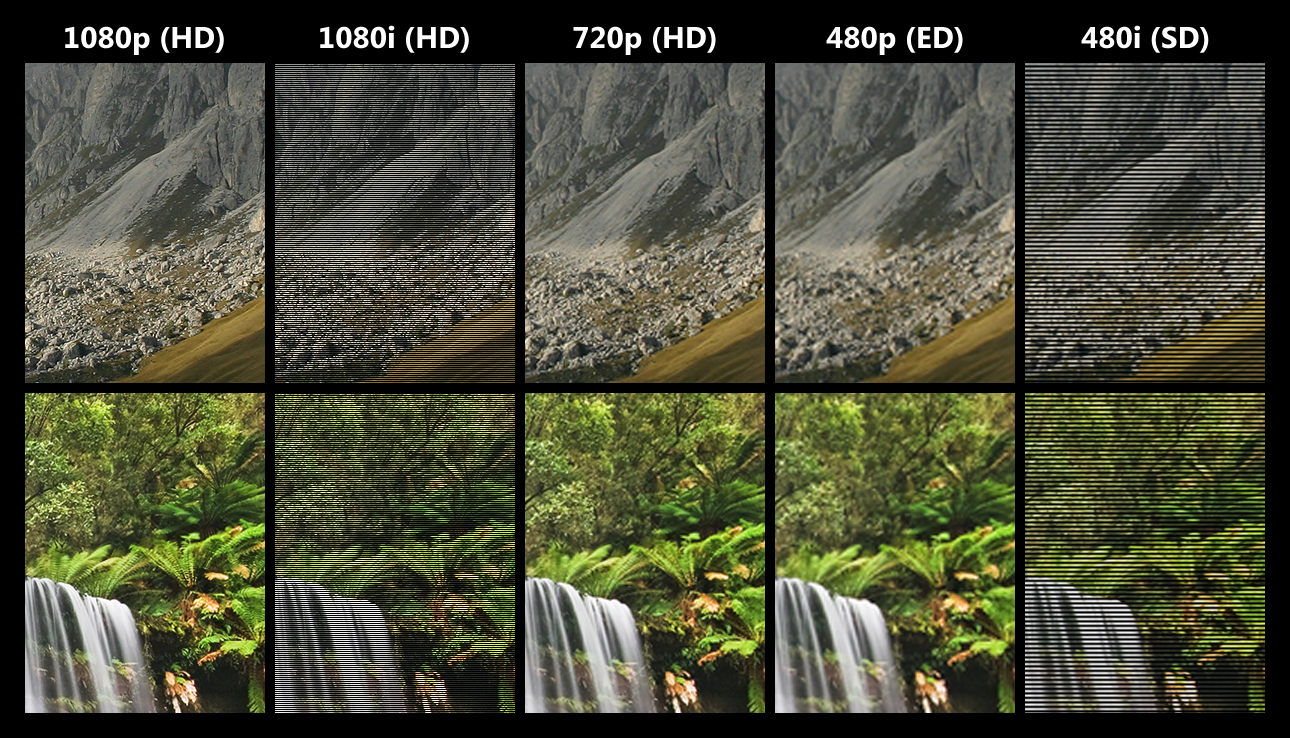
But as far as interlacing and deinterlacing go, it is really simple to tell the difference between the two, just open the movie in your fav media player (making sure you don't have any deinterlacing filters enabled) and look for the differences. Here's a great example I found on Bing:

HD_SD_resolutions_interlaced.png


Though these examples seem a bit "overdramatic", differences can be a lot more subtle.
The ones that look "smooth" and clean are deinterlaced frames, the ones with lots of lines and jagging are interlaced.
There are a lot of different types of interlaced frames, which most encoders can efficiently detect and suggest an appropriate deinterlace filter.

If you haven't, you should definitely try either MeGUI or, if you want things to look a bit more simple, Handbrake. I've been using Handbrake for quite a while now, and i can assure you that its GUI will suffice with everything you would wish to apply to the encoder before you start processing your videos.And even then, you can simply choose to encode a small part of the file, like just one minute, to see if the settings you applied give you the expected quality before you start encoding the whole file. This is very important because it easily gives you an insight on what you may have set up wrong in the encoder, and lets you correct it before moving on.
 

My Computer My Computer

At a glance

Windows 7 Home Premium x64Intel Core i5 2500K8GB DDR3nVidia GeForce GTX650 Ti BOOST
Computer type
Laptop
Computer Manufacturer/Model Number
Custom
OS
Windows 7 Home Premium x64
CPU
Intel Core i5 2500K
Motherboard
MSI MS-7750
Memory
8GB DDR3
Graphics Card(s)
nVidia GeForce GTX650 Ti BOOST
Sound Card
Realtek
Monitor(s) Displays
21' Philips
Screen Resolution
Full HD
Hard Drives
1TB
PSU
500W
The last two posts are informative, but unless I've missed the point, they do not address the problem. All of the things mentioned are considerations for encoding in general, but do not explain why two different movies that seem to be of the same type, should vary so much in encoding speed. As far as other programs open, this doesn't change from one encode to another, therefore should not be a factor. Interlaced/deinterlaced could be involved, I will have to look into that further. I do not think that the choice of encoders is at issue either, because I'm speaking of differences while using the same encoder, not differences between encoders. I most often use DVDFab8, because it is fast, easy and for the most part, reliable. With Wishmaster's help, I tried MeGUI, and found it too complex for my feeble mind. Handbrake is excellent, except that it won't handle encryption. I have also found it somewhat slower than DVDFab8.
 

My Computer My Computer

At a glance

W7x64 Pro, SuSe 12.1/** W7 x64 Pro, XP MCEPhenom II 1090T w/Noctua NH-D14 /**4400+ X2 w...2 x 2GB Patriot PGS34g1600LLKA/**4x1GB Corsai...EVGA GTX460 SC/**EVGA 8800GTS
Computer Manufacturer/Model Number
DIY
OS
W7x64 Pro, SuSe 12.1/** W7 x64 Pro, XP MCE
CPU
Phenom II 1090T w/Noctua NH-D14 /**4400+ X2 w/CM Hyper TX 3
Motherboard
ASRock 890FX Deluxe 4/**A8N-SLI
Memory
2 x 2GB Patriot PGS34g1600LLKA/**4x1GB Corsair VS
Graphics Card(s)
EVGA GTX460 SC/**EVGA 8800GTS
Sound Card
Asus Xonar D2X/**Xonar D1
Monitor(s) Displays
Acer X233H, Dell E152FPc /**LG M237-WD
Screen Resolution
1920x1080 & 1024x768/**1980x1080
Hard Drives
WDC 2TB, 1.5TB, 1TB, 500GB,Seagate 500GB , Maxtor 80GB /**500GB Seagate & WDC 1TB Black
PSU
CM RS600 w/ APC BX1000G/**Antec 500 TP w/ APC BX1000
Case
HAF922/**Antec 1040IIB
Cooling
3x200mm, 1x140 and 1x120mm/**5x80mm fans
Keyboard
Logitech Media USB/**Saitek Eclipse
Mouse
Cordless Trackman Wheel/**Ditto
Internet Speed
3.3Mbps
Other Info
SB 560 5.1 w/ Sennheiser RS140/**Creative T20 speakers, Dvico FusionHDTV7 Gold RT, Cisco E3000, HP 5510V AIO, Linksys E3000, Belkin F5U237 hub and **F5D8055 adapter
(** = 2nd rig)

You should remember that slower is actually better sometimes. The more time an encoder has to analyze every frame in the first pass, the better quality output may be presented at the end, because the encoder would be a lot more efficient.

Deinterlacing sometimes requires a lot "power" from the encoder, this could be the main cause of the "problem" you're facing. Also, anything and everything you actually do on your PC while the encoder does its magic also affects the FPS speed at which it runs: antivirus software, system and other services, apps, gadgets etc. Because encoders rely on the power of the CPU to do their job, chances that two "similar" video clips encode at the same FPS is, at least to my knowledge, extremely small, because not only two similar clips but also multiple scenes within one video clip may vary enough to require certain changes in the encoder behavior. The more you actually use your PC while encoding, the slower the encoder will be; which, again, may not be a bad thing for complicated jobs including, as mentioned, deinterlacing, but also deblocking, hardsubbing (especially if the video clip is very long; 2+ hours) and a lot more (depending on your encoder settings), but isn't efficient with fairly simple encodes, that much I agree.

So, to conclude my weird and complicated answer: probably not. There are too many variables an encoder needs to determine how to process, while also depending on your settings and CPU power available ATM; despite the fact that two movies, as you said, "similar on the surface" should produce the same encoding speed i.e. FPS (it is, actually, practically the same thing).

For some reason I got the feeling that you may be looking at this FPS thing the same way FPS is considered in video games; these are two entirely different concepts, so you shouldn't really worry if an encoder runs at a lower FPS than what you expected. If not, I apologize in advance. Hope this cleared some concerns for you.
 

My Computer My Computer

At a glance

Windows 7 Home Premium x64Intel Core i5 2500K8GB DDR3nVidia GeForce GTX650 Ti BOOST
Computer type
Laptop
Computer Manufacturer/Model Number
Custom
OS
Windows 7 Home Premium x64
CPU
Intel Core i5 2500K
Motherboard
MSI MS-7750
Memory
8GB DDR3
Graphics Card(s)
nVidia GeForce GTX650 Ti BOOST
Sound Card
Realtek
Monitor(s) Displays
21' Philips
Screen Resolution
Full HD
Hard Drives
1TB
PSU
500W
While I did say that encoding and FPS were not equal to each other, I'm not sure now exactly what I meant, because they do seem to be opposite sides of the same coin. Therefore, if a fast encode produces the same quality as a slower one, I will choose the program that is faster. But this was not about the speed of one program versus another, or encoding methods, it was about the speed of encoding when all things appear equal on the same program, with the same settings, on the same hardware, just different movies. I do believe that there must be a difference that I'm not seeing, when there is a noticeable difference in speeds under this conditions, but that was what my question was about. I guess that it doesn't really matter, so long as the job get done, but my curiousity was itching and I wanted to scratch it.
 

My Computer My Computer

At a glance

W7x64 Pro, SuSe 12.1/** W7 x64 Pro, XP MCEPhenom II 1090T w/Noctua NH-D14 /**4400+ X2 w...2 x 2GB Patriot PGS34g1600LLKA/**4x1GB Corsai...EVGA GTX460 SC/**EVGA 8800GTS
Computer Manufacturer/Model Number
DIY
OS
W7x64 Pro, SuSe 12.1/** W7 x64 Pro, XP MCE
CPU
Phenom II 1090T w/Noctua NH-D14 /**4400+ X2 w/CM Hyper TX 3
Motherboard
ASRock 890FX Deluxe 4/**A8N-SLI
Memory
2 x 2GB Patriot PGS34g1600LLKA/**4x1GB Corsair VS
Graphics Card(s)
EVGA GTX460 SC/**EVGA 8800GTS
Sound Card
Asus Xonar D2X/**Xonar D1
Monitor(s) Displays
Acer X233H, Dell E152FPc /**LG M237-WD
Screen Resolution
1920x1080 & 1024x768/**1980x1080
Hard Drives
WDC 2TB, 1.5TB, 1TB, 500GB,Seagate 500GB , Maxtor 80GB /**500GB Seagate & WDC 1TB Black
PSU
CM RS600 w/ APC BX1000G/**Antec 500 TP w/ APC BX1000
Case
HAF922/**Antec 1040IIB
Cooling
3x200mm, 1x140 and 1x120mm/**5x80mm fans
Keyboard
Logitech Media USB/**Saitek Eclipse
Mouse
Cordless Trackman Wheel/**Ditto
Internet Speed
3.3Mbps
Other Info
SB 560 5.1 w/ Sennheiser RS140/**Creative T20 speakers, Dvico FusionHDTV7 Gold RT, Cisco E3000, HP 5510V AIO, Linksys E3000, Belkin F5U237 hub and **F5D8055 adapter
(** = 2nd rig)
I agree with Gornot.
Theres just to many variables that come onto play when you see the FPS its encoding at.

In regards to De-Interlacing to video, there are different methods, depending on the video. So depending what method it uses, even if they are using the exact same settings otherwise, may show differnt results.

Also, you must keep in mind the other varying factors.
Are you downmixing to Stereo Audio? Are you using AAC, or AC3 audio? Keeping original Audio?
if recoding it, Downmixing AC3 5.1 to AAC 2.0 for example will take some time. Or Even DTS to AC3 5.1. Some conversions take longer than others.


One other thing I havent seen mentioned yet is, scene complexity.
A scene with a close up of actor talking, is much faster and easier to encode than say, a car chase through New York City.
Again, this goes back your settings. If you want the encoder to use an average of bitrate of say, 2000 ....

It must first anylyse the film. Then figure out where it can use lower bitrates, and where needs higher bitrates to average out to what you are asking of it.

This is really where the "lower is not always better" really comes into play the most, and I too agree.

Theres also the resizers. Soem are slower (but more accurate) than the Faster (less accurate) ones.


The only thing I slightly disagree about, is never changing the Frame rate.
For example, DVD is generally 30 FPS (or 29.97)

I find that by letting the encoder use a framerate of 23.976, its able to produce much better results. In fact, the x264 encoder (at least in MeGUI) is quite fond of doing this, and prefers it.
Its easier to throw away frames, and decide what to use as reference etc, than it is to add. It also allows for much better compression, without much loss in quality .. at least that the eye can see.

However, I agree that increasing framerate will do more harm than good. You can not really add, and get good results.
 

My Computer My Computer

At a glance

Windows 7 Home Premium 64bitIntel Core i7 2700k8GB Mushkin Redline Ridgebacks @1866EVGA GTX570 SC
Computer Manufacturer/Model Number
Custom (Self Build)
OS
Windows 7 Home Premium 64bit
CPU
Intel Core i7 2700k
Motherboard
eVGA P67 SLI
Memory
8GB Mushkin Redline Ridgebacks @1866
Graphics Card(s)
EVGA GTX570 SC
Sound Card
XiFi Titanium HD
Monitor(s) Displays
LG W2453V
Screen Resolution
1920x1080
Hard Drives
Intel 320 80GB -- Intel X25-V 40GB --WD Black 1TB x2 -- WD Blue 640GB
PSU
Seasonic x750
Case
Corsair 600T SE White
Cooling
eVGA Superclocked CPU Cooler
Keyboard
Saitek Cyborg
Antivirus
Kaspersky
Browser
IE
Other Info
LG BD/DVD
could be the length of the cuts and scene changes in the films. More variance between frames will cause the FPS to drop due to more processing required.
 

My Computer My Computer

At a glance

Windows 7 Ultimate 64bitIntel i7 3770K16GB DDR3 1333 Corsair XMS3XFX HD6950 2GB EyeFinity
Computer Manufacturer/Model Number
HAL-9000
OS
Windows 7 Ultimate 64bit
CPU
Intel i7 3770K
Motherboard
Asus Sabertooth Z77
Memory
16GB DDR3 1333 Corsair XMS3
Graphics Card(s)
XFX HD6950 2GB EyeFinity
Sound Card
Logitech G35 & Sennheiser PC135 & VIA HD
Monitor(s) Displays
23" HP 2310e, 23" Samsung B2230, 21.5" Viewsonic
Screen Resolution
5760x1080
Hard Drives
16TB of Storage
128GB & 256GB Crucial M4 SSD's, 2X 1TB WD Black, 3x 2TB WD, 3x 2TB Samsung F4, 1.5TB Seagate, WD 500GB,
PSU
Antec True Power New 650watt
Case
Cooler Master HAF-932
Cooling
Corsair H60 Hydro Cooler, 3x 230mm Fans, 2x120mm Fan
Keyboard
Logitech G15 and G13
Mouse
Logitech G700 Gaming Mouse
Internet Speed
50/10 Mbit
Other Info
Speakers : Alesis M1 Active Mk2 Studio Monitors , APC RS 1200 UPS, HP 4500DN Color Laser, HP P1006 mono Laser, Kodak 8500 Dye-Sub, Epson 1280 inkjet, Epson Worforce 610 MFC
Guess I didn't just mention it, so thanks to Wishmaster; yes, when I meant change the frame rate, I meant increase the frame rate ;)

Also, meister, buddy, you keep repeating "just different movies". This is everything BUT a small factor to encoding comparison, despite using same settings used over and over again.
A fast encode can never wield the same results as a slow encode (and in some cases, vice versa); again, taking into account what Zepher said, which is absolutely true. This is also why some movies can be compressed to a very small size, for example, as low as 350MB, and wield the same visual quality as a fast action movie which, depending on your preference, can only be compressed to an extent.

If you, for example, compare an encoding job of an episode from an Anime DVD, and a random Disney cartoon, which visually may look similar, anime episodes will require much less processing by the encoder because there are a lot less visuals in them, while "a random Disney cartoon" may encode as long as a fairly simple motion picture without action sequences, complicated/detailed special effects etc.

I guess what I'm trying to say is that there can never be two movies so similar that you can just use the same settings over and over again. It may work for one movie, but it certainly doesn't mean that it will work for the other, exactly because of all the variables we mentioned, even though you visually may not tell the difference between them.
 

My Computer My Computer

At a glance

Windows 7 Home Premium x64Intel Core i5 2500K8GB DDR3nVidia GeForce GTX650 Ti BOOST
Computer type
Laptop
Computer Manufacturer/Model Number
Custom
OS
Windows 7 Home Premium x64
CPU
Intel Core i5 2500K
Motherboard
MSI MS-7750
Memory
8GB DDR3
Graphics Card(s)
nVidia GeForce GTX650 Ti BOOST
Sound Card
Realtek
Monitor(s) Displays
21' Philips
Screen Resolution
Full HD
Hard Drives
1TB
PSU
500W
because of all the variables we mentioned, even though you visually may not tell the difference between them.

Exactly.
We may not be able to tell any difference, but to the Encoder itself, it sees a night and day difference.
 

My Computer My Computer

At a glance

Windows 7 Home Premium 64bitIntel Core i7 2700k8GB Mushkin Redline Ridgebacks @1866EVGA GTX570 SC
Computer Manufacturer/Model Number
Custom (Self Build)
OS
Windows 7 Home Premium 64bit
CPU
Intel Core i7 2700k
Motherboard
eVGA P67 SLI
Memory
8GB Mushkin Redline Ridgebacks @1866
Graphics Card(s)
EVGA GTX570 SC
Sound Card
XiFi Titanium HD
Monitor(s) Displays
LG W2453V
Screen Resolution
1920x1080
Hard Drives
Intel 320 80GB -- Intel X25-V 40GB --WD Black 1TB x2 -- WD Blue 640GB
PSU
Seasonic x750
Case
Corsair 600T SE White
Cooling
eVGA Superclocked CPU Cooler
Keyboard
Saitek Cyborg
Antivirus
Kaspersky
Browser
IE
Other Info
LG BD/DVD
Back
Top