
I have a top level folder where all folders, subfolders and files are encrypted.
I purchased these Adobe Lightroom tutorials which are mainly Quicktime formatted. The folders also contain several PDF files. These files where received as Zip files and extracted by me. The folder and file names display with green text.
My backup software skips all encrypted files and I am not allowed to copy these files to another location. I tried using file properties to remove the encryption but this failed.
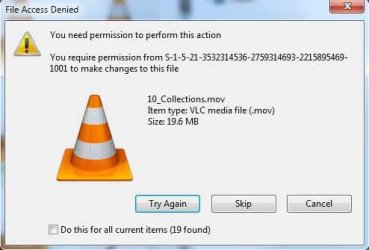
Attempting to copy any of these files gets me a "File Access Denied" dialog. See screenshot jpg.
Thanks for any help, Floyd.
I purchased these Adobe Lightroom tutorials which are mainly Quicktime formatted. The folders also contain several PDF files. These files where received as Zip files and extracted by me. The folder and file names display with green text.
My backup software skips all encrypted files and I am not allowed to copy these files to another location. I tried using file properties to remove the encryption but this failed.
Attempting to copy any of these files gets me a "File Access Denied" dialog. See screenshot jpg.
Thanks for any help, Floyd.
Attachments
My Computer
- Computer Manufacturer/Model Number
- Custom Build
- OS
- Window 7x64 Professional
- CPU
- Intel (R) Core (TM) 2 Quad CPU Q9550 @ 2.83GHz
- Motherboard
- Gigabyte EP45-UD3R
- Memory
- 8 GB
- Graphics Card(s)
- Nvidia GeForce GTS 250
- Monitor(s) Displays
- NEC MultiSync PA 241W
- Screen Resolution
- 1920x1200
- Hard Drives
- C:/ Windows 7 Professional x64 OS
D:/ Partition on C:/ with Vista Ultimate x64 OS
E:/ 1TB-1
F:/ 1TB-2
G:/ Photos (2TB)
H:/ Photos2 (2TB)
J:/ WD My Book External (2TB)
K:/ WD My Book External (2TB)
- PSU
- 850 W.
- Keyboard
- Logitech LX 700
- Mouse
- Wireless (Came as package with LX 700)
- Internet Speed
- Verizon FiOS 30mbs up 25mbs down
- Other Info
- USB3 expansion Cards (2) connected to WD external drives (2) and Lexor USB 3 CF/SD card reader.