Ensure Microsoft Security Essentials appears only in task tray please?

MadMudMob

New member
The icon for Microsoft Security Essentials only appears in the task tray about 60% of the times I start or restart my pc.

So I carefully followed the advice here ....
http://www.sevenforums.com/system-security/80240-mse-not-showing-up-taskbar-first-time.html
which I have got working and I then clicked on its Properties and selected Run: Minimized.

But, I am still getting the program page open and appear on my desktop after each start where it will stay unless I manually close it .... is there any way to stop this and make it go straight to just the task tray please?

All and any help or advice most gratefully received.
1923_th_whacky011_1.gif
 

My Computer

Computer type
PC/Desktop
Computer Manufacturer/Model Number
Dell
OS
Windows 7 Pro 64bit
CPU
Intel (R) Core(TM) i3-3320 CPU @ 3.30ghz
Motherboard
Dell Inc OT 10XY version A01
Memory
4GB
Graphics Card(s)
Intel(R) HT Graphics
Sound Card
ATI HDMI Audio
Monitor(s) Displays
Acer AL1714
Screen Resolution
1280 - 1024
Hard Drives
KC 45
SATA 3.0, 6.0Gb/s (Current 3.0Gb/s)
ATA8-ACS T 13/1699-D revision 4
RMP(R/s) 7200
PSU
Not known
Case
Not known
Cooling
Not known
Keyboard
Standard Keyboard
Mouse
Konig
Internet Speed
Ping:12ms Down:37.44 Mb/s Up:9.51 Mb/s
Antivirus
Avast Internet Security
Browser
Firefox (and occasionally Internet Explorer)
Other Info
Regularly use ...
~ Super AntiSpyware
~ Malwarebytes Anti-Malware
~ Wise Care365
~ CCleaner
~ Dropbox (for backups)
and defrag once a month

My Computer

Computer type
PC/Desktop
Computer Manufacturer/Model Number
Own build (new) Desk1 / Asus ROG Win 7 / Desk2 1st build
OS
Desk1 7 Home Prem / Desk2 10 Pro / Main lap Asus ROG 10 Pro 2 laptop Toshiba 7 Pro Asus P2520 7 & 10
CPU
Desk1 i5 3750K / Laptop i7 GTX 860M / Desk2 i5 2500
Motherboard
Desk1 Asus P877-V / Desk2 Gigabyte H67 UD3H / Laptop ?
Memory
Desk1 8GB (1866) / Desk2 16GB (1333) / Laptop 8Gb DDR3
Graphics Card(s)
Desk 1& 2NVidia GTX 650 & Laptops on board Intel
Sound Card
Desk 1 & 2 -XONAR DG Realtek High Def audio Laptop
Monitor(s) Displays
Desk 1 Benq HD 2450 / Desk2 Philips 24" / Laptop 17.5"
Screen Resolution
1920x1080 D1 & D2 & Laptop 1
Hard Drives
Desk1 Samsung 120GB 830 SSD
Asus ROG 256GB 850 Pro SSD
Desk2 Samsung 840 256 SSD
Toshiba 120GB EVO
PSU
Desk 1 Corsair HX 1050/ Laptop ? / Desk 2 Corsair HX 650
Case
Desk 1 Cooler HAF XM ? Toshiba laptop / Desk2 Coolermaster
Cooling
Fans on all Desk1 -2 Desk2 - all Coolermasters 5 Laptop ?
Keyboard
Desk 1 MS Sidewinder X6 Desk 2 MS Sidewinder X 4
Mouse
Desk 1&2 - Gigabyte MS 900 gamer - laptop - Logitec wireless
Internet Speed
ADSL2+
Other Info
One other Desktop (tester) and spare Toshba laptop both with SSD's
Running Kaspersky 2016 ISS on all machines config'd identically
Logitec audio stereo systems on each machine (x3)
Canon MG5250MFC
Router/modem TP-Link running WPA2SK
Thankyou ... as far as I know I did that with the help of good old CCleaner :)
 

My Computer

Computer type
PC/Desktop
Computer Manufacturer/Model Number
Dell
OS
Windows 7 Pro 64bit
CPU
Intel (R) Core(TM) i3-3320 CPU @ 3.30ghz
Motherboard
Dell Inc OT 10XY version A01
Memory
4GB
Graphics Card(s)
Intel(R) HT Graphics
Sound Card
ATI HDMI Audio
Monitor(s) Displays
Acer AL1714
Screen Resolution
1280 - 1024
Hard Drives
KC 45
SATA 3.0, 6.0Gb/s (Current 3.0Gb/s)
ATA8-ACS T 13/1699-D revision 4
RMP(R/s) 7200
PSU
Not known
Case
Not known
Cooling
Not known
Keyboard
Standard Keyboard
Mouse
Konig
Internet Speed
Ping:12ms Down:37.44 Mb/s Up:9.51 Mb/s
Antivirus
Avast Internet Security
Browser
Firefox (and occasionally Internet Explorer)
Other Info
Regularly use ...
~ Super AntiSpyware
~ Malwarebytes Anti-Malware
~ Wise Care365
~ CCleaner
~ Dropbox (for backups)
and defrag once a month
Ok mate well it would not be such a bad idea just to check using that method CC is good as i use it all the time but I do like the tutorial method to be absolutely sure.

Now thinking further the task tray I assume you mean the Notifications area? If so it might just be a matter of customising it by hiding the MSE icon and just show notifications. If the task tray is the task bar then a right click on it and just unpin the icon from it. To restore that link shows you and I just click on Start > All programs > right click on the program or part of the program that has the icon > pin to task bar.

I find for often used programs like reedit and the command prompt I pin them to the Start menu for easy access. You could do that with MSE if you want to.
 

My Computer

Computer type
PC/Desktop
Computer Manufacturer/Model Number
Own build (new) Desk1 / Asus ROG Win 7 / Desk2 1st build
OS
Desk1 7 Home Prem / Desk2 10 Pro / Main lap Asus ROG 10 Pro 2 laptop Toshiba 7 Pro Asus P2520 7 & 10
CPU
Desk1 i5 3750K / Laptop i7 GTX 860M / Desk2 i5 2500
Motherboard
Desk1 Asus P877-V / Desk2 Gigabyte H67 UD3H / Laptop ?
Memory
Desk1 8GB (1866) / Desk2 16GB (1333) / Laptop 8Gb DDR3
Graphics Card(s)
Desk 1& 2NVidia GTX 650 & Laptops on board Intel
Sound Card
Desk 1 & 2 -XONAR DG Realtek High Def audio Laptop
Monitor(s) Displays
Desk 1 Benq HD 2450 / Desk2 Philips 24" / Laptop 17.5"
Screen Resolution
1920x1080 D1 & D2 & Laptop 1
Hard Drives
Desk1 Samsung 120GB 830 SSD
Asus ROG 256GB 850 Pro SSD
Desk2 Samsung 840 256 SSD
Toshiba 120GB EVO
PSU
Desk 1 Corsair HX 1050/ Laptop ? / Desk 2 Corsair HX 650
Case
Desk 1 Cooler HAF XM ? Toshiba laptop / Desk2 Coolermaster
Cooling
Fans on all Desk1 -2 Desk2 - all Coolermasters 5 Laptop ?
Keyboard
Desk 1 MS Sidewinder X6 Desk 2 MS Sidewinder X 4
Mouse
Desk 1&2 - Gigabyte MS 900 gamer - laptop - Logitec wireless
Internet Speed
ADSL2+
Other Info
One other Desktop (tester) and spare Toshba laptop both with SSD's
Running Kaspersky 2016 ISS on all machines config'd identically
Logitec audio stereo systems on each machine (x3)
Canon MG5250MFC
Router/modem TP-Link running WPA2SK
...I then clicked on its Properties and selected Run: Minimized....
As you found out, that will not prevent the app from showing its window.

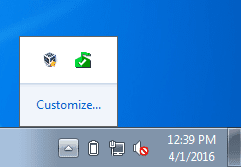
By default, the MSE tray icon will be set to hidden.

MSE1.PNG


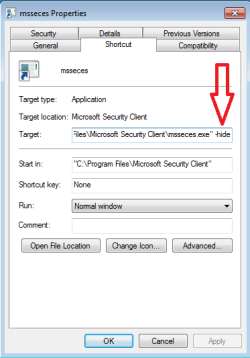
If the MSE tray icon is not showing anywhere, then stick with your method of using a shortcut in one of the startup folder - just add the "-hide" switch to the target line - so that you won't see the MSE window.

MSE2.png


Code:
"C:\Program Files\Microsoft Security Client\msseces.exe" -hide
 
Last edited:

My Computer

Computer type
Laptop
Computer Manufacturer/Model Number
Employer provided Dell Latitude
OS
W7 Pro SP1 64bit
CPU
i7
Memory
8GB
Graphics Card(s)
Intel HD Graphics
Hard Drives
crappy SSD
Antivirus
Employer mandated Symantec Endpoint Protection
Browser
Pale Moon 64bit, IE11 64bit & Chrome 64bit
thanks-8.gif
 

My Computer

Computer type
PC/Desktop
Computer Manufacturer/Model Number
Dell
OS
Windows 7 Pro 64bit
CPU
Intel (R) Core(TM) i3-3320 CPU @ 3.30ghz
Motherboard
Dell Inc OT 10XY version A01
Memory
4GB
Graphics Card(s)
Intel(R) HT Graphics
Sound Card
ATI HDMI Audio
Monitor(s) Displays
Acer AL1714
Screen Resolution
1280 - 1024
Hard Drives
KC 45
SATA 3.0, 6.0Gb/s (Current 3.0Gb/s)
ATA8-ACS T 13/1699-D revision 4
RMP(R/s) 7200
PSU
Not known
Case
Not known
Cooling
Not known
Keyboard
Standard Keyboard
Mouse
Konig
Internet Speed
Ping:12ms Down:37.44 Mb/s Up:9.51 Mb/s
Antivirus
Avast Internet Security
Browser
Firefox (and occasionally Internet Explorer)
Other Info
Regularly use ...
~ Super AntiSpyware
~ Malwarebytes Anti-Malware
~ Wise Care365
~ CCleaner
~ Dropbox (for backups)
and defrag once a month
As you found out, that will not prevent the app from showing its window

Hmm much simpler way of saying what I was trying to get at ;)
 

My Computer

Computer type
PC/Desktop
Computer Manufacturer/Model Number
Own build (new) Desk1 / Asus ROG Win 7 / Desk2 1st build
OS
Desk1 7 Home Prem / Desk2 10 Pro / Main lap Asus ROG 10 Pro 2 laptop Toshiba 7 Pro Asus P2520 7 & 10
CPU
Desk1 i5 3750K / Laptop i7 GTX 860M / Desk2 i5 2500
Motherboard
Desk1 Asus P877-V / Desk2 Gigabyte H67 UD3H / Laptop ?
Memory
Desk1 8GB (1866) / Desk2 16GB (1333) / Laptop 8Gb DDR3
Graphics Card(s)
Desk 1& 2NVidia GTX 650 & Laptops on board Intel
Sound Card
Desk 1 & 2 -XONAR DG Realtek High Def audio Laptop
Monitor(s) Displays
Desk 1 Benq HD 2450 / Desk2 Philips 24" / Laptop 17.5"
Screen Resolution
1920x1080 D1 & D2 & Laptop 1
Hard Drives
Desk1 Samsung 120GB 830 SSD
Asus ROG 256GB 850 Pro SSD
Desk2 Samsung 840 256 SSD
Toshiba 120GB EVO
PSU
Desk 1 Corsair HX 1050/ Laptop ? / Desk 2 Corsair HX 650
Case
Desk 1 Cooler HAF XM ? Toshiba laptop / Desk2 Coolermaster
Cooling
Fans on all Desk1 -2 Desk2 - all Coolermasters 5 Laptop ?
Keyboard
Desk 1 MS Sidewinder X6 Desk 2 MS Sidewinder X 4
Mouse
Desk 1&2 - Gigabyte MS 900 gamer - laptop - Logitec wireless
Internet Speed
ADSL2+
Other Info
One other Desktop (tester) and spare Toshba laptop both with SSD's
Running Kaspersky 2016 ISS on all machines config'd identically
Logitec audio stereo systems on each machine (x3)
Canon MG5250MFC
Router/modem TP-Link running WPA2SK
I lost the startup of MSE completely.
Making a shortcut to msseces.exe and putting it in the startup folder and adding the -hide suffix in it's properties got it to start properly....Not in a window or in task bar but just in the system tray, as it should..!

Code:
"C:\Program Files\Microsoft Security Client\msseces.exe" -hide
 

My Computer

Computer type
PC/Desktop
Computer Manufacturer/Model Number
Custom
OS
Windows 7 Ultimate x64
CPU
AMD A10 5800k
Motherboard
Asrock FMA75 Pro 4
Memory
2x4GB GSkill Sniper 1866MHz
Graphics Card(s)
Sapphire HD7770
Hard Drives
Kingston 128GB SSD
WD Blue 1TB
Antivirus
MSE
Browser
Waterfox
Back
Top