
Thunderdome
New member
- Local time
- 2:40 PM
- Messages
- 5
I have 3 PCs running Windows 7 Home Premium, connected via a switch. Basically, ever since I upgraded to W7, my entire home network has been dropping out at very random times. Fixing the issue requires rebooting the modem, router, and switch in that order. Once in a blue moon, I have been able to fix it by resetting the adapter on my desktop PC, but that only fixes it for one machine, and that doesn't always do the trick.
I called Cox(my ISP) and they said W7 is doing something fishy. I don't really believe him, but I definitely knew I wasn't going to get any more help from them.
I originally had a Netlink router and a Trendnet switch, but I've since replaced both items in an attempt to trouble shoot. My current set up has my cox cable modem running to a TP-Link router, which is connect to a TP-Link gigabit switch. My 3 PCs, an HD Homerun TV tuner, and my xbox 360 are all connected to the router.
The issue kills my entire network for all devices. Nothing can see nothing...but just resetting the switch, or switch & router doesn't fix it. I have to reset the modem, router, and switch...in that order. I haven't changed any settings on W7 pertaining to my network(except creating a homegroup).
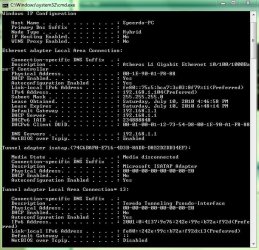
I'm just not very experienced with network issues and I was hoping someone could shed some light. It happens at least once a day. Here is my ipconfig screen.
Thanks in advance for any effort!
I called Cox(my ISP) and they said W7 is doing something fishy. I don't really believe him, but I definitely knew I wasn't going to get any more help from them.
I originally had a Netlink router and a Trendnet switch, but I've since replaced both items in an attempt to trouble shoot. My current set up has my cox cable modem running to a TP-Link router, which is connect to a TP-Link gigabit switch. My 3 PCs, an HD Homerun TV tuner, and my xbox 360 are all connected to the router.
The issue kills my entire network for all devices. Nothing can see nothing...but just resetting the switch, or switch & router doesn't fix it. I have to reset the modem, router, and switch...in that order. I haven't changed any settings on W7 pertaining to my network(except creating a homegroup).
I'm just not very experienced with network issues and I was hoping someone could shed some light. It happens at least once a day. Here is my ipconfig screen.
Thanks in advance for any effort!
Attachments
My Computer
At a glance
W7 HP
- OS
- W7 HP