Epson NX415 can't be recognized

ibjw

New member
Local time
7:09 PM
Messages
7
Location
Phoenix
Windows 7 Home Premium 64bit. Intel Q9550 2.83Ghz on Gigabyte MB #GA-EP43t-USB3, Corsair 1333 DDR3 8GB. Been working on this problem 4 days now. Checked all your threads relating to this, can't find fix.

Epson NX415 is a all-in-one printer. It worked fine with my old OS Win XP Prof. 32bit. Had ASUS MB, w Pentium 4, 2.8Ghz & 2 Gigs of Memory. Re-built with above components, everything else i add or do works great except the printer. When I plug it in, USB, The OS will not recognize the printer anywhere. It will recognize the scanner part of it though. In "Printers and Devices" and "Device Manager" it will show the scanner with a Yellow Exclamation point. The printer does not show up anywhere. I can download the New Driver for the scanner and the exclamations are removed and the scanner works fine but, I cannot download the new Printer Driver without the Printer being recognized. Anything you can suggest would be Greaaatly Appreciated.
 

My Computer My Computer

Computer Manufacturer/Model Number
Built Myself
OS
Windows 7 Home Premium 64bit
CPU
Intel Q9550 2.83Ghz.
Motherboard
Gigabyte - GA-EP43T-USB3
Memory
Corsair 1333 DDR3 - 8Gb.
Graphics Card(s)
Nvida GeForce 210
Sound Card
on board
Monitor(s) Displays
1- Starlogic 20" Flat
Screen Resolution
720P
Hard Drives
1- Western Digital - 500Gb - WD5000AADS - 56S9B0 - Serial ATA
PSU
550W
Case
ATX
Cooling
1 - CPU, 1- Case, 2 - Power Supply
Keyboard
Microsoft Wireless IntelliType Pro 5.2
Mouse
Microsoft Wireless IntelliPoint Pro 5.2
Internet Speed
20Mbps/Dn 5Mbps/Up

My Computer My Computer

Computer Manufacturer/Model Number
Alienware AREA-51 M17x
OS
windows 7 ultimate 64bit
CPU
Intel Core2 Extreme x9000 2.8GHZ
Motherboard
Asus P965 Intel chipset
Memory
4Gig
Graphics Card(s)
2 NVidia GeForce 8800M GTX (SLi)
Sound Card
onboard
Monitor(s) Displays
17in. built-in, 47in JVC LCD
Screen Resolution
1080p
Hard Drives
2 250Gig Hitachi (RAID 0) @ 7200RPM
Case
17in. laptop
Mouse
touchpad, Logitech Anywhere Mouse cordless laser
Internet Speed
cable
Yes.
 

My Computer My Computer

Computer Manufacturer/Model Number
Built Myself
OS
Windows 7 Home Premium 64bit
CPU
Intel Q9550 2.83Ghz.
Motherboard
Gigabyte - GA-EP43T-USB3
Memory
Corsair 1333 DDR3 - 8Gb.
Graphics Card(s)
Nvida GeForce 210
Sound Card
on board
Monitor(s) Displays
1- Starlogic 20" Flat
Screen Resolution
720P
Hard Drives
1- Western Digital - 500Gb - WD5000AADS - 56S9B0 - Serial ATA
PSU
550W
Case
ATX
Cooling
1 - CPU, 1- Case, 2 - Power Supply
Keyboard
Microsoft Wireless IntelliType Pro 5.2
Mouse
Microsoft Wireless IntelliPoint Pro 5.2
Internet Speed
20Mbps/Dn 5Mbps/Up
what is the error message you get with the exclamation point?
 

My Computer My Computer

Computer Manufacturer/Model Number
Alienware AREA-51 M17x
OS
windows 7 ultimate 64bit
CPU
Intel Core2 Extreme x9000 2.8GHZ
Motherboard
Asus P965 Intel chipset
Memory
4Gig
Graphics Card(s)
2 NVidia GeForce 8800M GTX (SLi)
Sound Card
onboard
Monitor(s) Displays
17in. built-in, 47in JVC LCD
Screen Resolution
1080p
Hard Drives
2 250Gig Hitachi (RAID 0) @ 7200RPM
Case
17in. laptop
Mouse
touchpad, Logitech Anywhere Mouse cordless laser
Internet Speed
cable
Download or install? Big difference. You can download anything, but installing is another story. Also when you download the driver select save (can save it anywhere you want), then run it after.

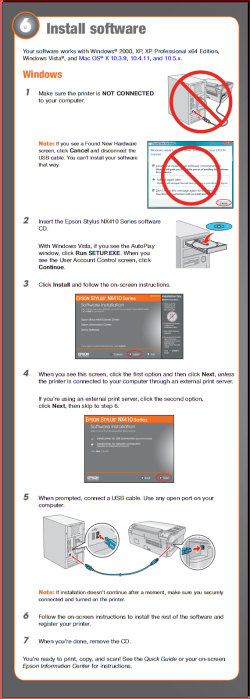
Also just in case you forgot from when you first got the printer, you have to install the driver before connecting the printer,

nx415.PNG

That is one reason that Windows isn't detecting the printer. Just in case you lost the manual for your printer you can find it here,

Epson Stylus NX415, Documents & Manuals - Technical Support - Epson America, Inc.
 

My Computer My Computer

Computer type
PC/Desktop
Computer Manufacturer/Model Number
Me
OS
Win 7 Ultimate x64
CPU
FX-8350 @ 4.6 GHz so far
Motherboard
Asus M5A97 EVO
Memory
ADATA XPG V1 Series Black 8GB DDR3 1600
Graphics Card(s)
Sapphire R9 270x Dual-X
Sound Card
Xonar DGX w/ Corsair Vengence 1300
Monitor(s) Displays
Acer S232HL Abid
Screen Resolution
1920x1080
Hard Drives
120 GB OCZ Vertex 3
500 GB Seagate 7200.12
PSU
Antec Earthwatts 650W Green
Case
Antec Three Hundred
Cooling
Cooler Master 212 EVO
Keyboard
Logitech G510
Mouse
Logitech G500s
Internet Speed
35000/3000
The drivers for this device are not installed. (Code 28). That's just for the Scanner. When I install the driver that disappears. The Printer does not show up at all.
 

My Computer My Computer

Computer Manufacturer/Model Number
Built Myself
OS
Windows 7 Home Premium 64bit
CPU
Intel Q9550 2.83Ghz.
Motherboard
Gigabyte - GA-EP43T-USB3
Memory
Corsair 1333 DDR3 - 8Gb.
Graphics Card(s)
Nvida GeForce 210
Sound Card
on board
Monitor(s) Displays
1- Starlogic 20" Flat
Screen Resolution
720P
Hard Drives
1- Western Digital - 500Gb - WD5000AADS - 56S9B0 - Serial ATA
PSU
550W
Case
ATX
Cooling
1 - CPU, 1- Case, 2 - Power Supply
Keyboard
Microsoft Wireless IntelliType Pro 5.2
Mouse
Microsoft Wireless IntelliPoint Pro 5.2
Internet Speed
20Mbps/Dn 5Mbps/Up
When I use my original printer software CD, A window pops up and says this version of windows not compatible. Will not allow me to go any further. Will not recognize the printer when I plug it in. Only the scanner part of it gets recognized
 

My Computer My Computer

Computer Manufacturer/Model Number
Built Myself
OS
Windows 7 Home Premium 64bit
CPU
Intel Q9550 2.83Ghz.
Motherboard
Gigabyte - GA-EP43T-USB3
Memory
Corsair 1333 DDR3 - 8Gb.
Graphics Card(s)
Nvida GeForce 210
Sound Card
on board
Monitor(s) Displays
1- Starlogic 20" Flat
Screen Resolution
720P
Hard Drives
1- Western Digital - 500Gb - WD5000AADS - 56S9B0 - Serial ATA
PSU
550W
Case
ATX
Cooling
1 - CPU, 1- Case, 2 - Power Supply
Keyboard
Microsoft Wireless IntelliType Pro 5.2
Mouse
Microsoft Wireless IntelliPoint Pro 5.2
Internet Speed
20Mbps/Dn 5Mbps/Up

My Computer My Computer

Computer type
PC/Desktop
Computer Manufacturer/Model Number
Me
OS
Win 7 Ultimate x64
CPU
FX-8350 @ 4.6 GHz so far
Motherboard
Asus M5A97 EVO
Memory
ADATA XPG V1 Series Black 8GB DDR3 1600
Graphics Card(s)
Sapphire R9 270x Dual-X
Sound Card
Xonar DGX w/ Corsair Vengence 1300
Monitor(s) Displays
Acer S232HL Abid
Screen Resolution
1920x1080
Hard Drives
120 GB OCZ Vertex 3
500 GB Seagate 7200.12
PSU
Antec Earthwatts 650W Green
Case
Antec Three Hundred
Cooling
Cooler Master 212 EVO
Keyboard
Logitech G510
Mouse
Logitech G500s
Internet Speed
35000/3000
Unless there is Windows 7 drivers on the CD, it won't work,

Epson America, Inc. - Support - Highlights

you have to download the Windows 7 driver from Epson,

Epson America, Inc. - Support: Microsoft Windows 7 Support for the Epson Stylus NX415

If that link doesn't work start here,

Epson America, Inc. - Support: Microsoft Windows 7 Support

and select your model from the dropdown list.

I did already. The problem is in order for the install to work there has to be a printer in the device list for it to work. I cannot get the printer side on the list, only the scanner shows up
 

My Computer My Computer

Computer Manufacturer/Model Number
Built Myself
OS
Windows 7 Home Premium 64bit
CPU
Intel Q9550 2.83Ghz.
Motherboard
Gigabyte - GA-EP43T-USB3
Memory
Corsair 1333 DDR3 - 8Gb.
Graphics Card(s)
Nvida GeForce 210
Sound Card
on board
Monitor(s) Displays
1- Starlogic 20" Flat
Screen Resolution
720P
Hard Drives
1- Western Digital - 500Gb - WD5000AADS - 56S9B0 - Serial ATA
PSU
550W
Case
ATX
Cooling
1 - CPU, 1- Case, 2 - Power Supply
Keyboard
Microsoft Wireless IntelliType Pro 5.2
Mouse
Microsoft Wireless IntelliPoint Pro 5.2
Internet Speed
20Mbps/Dn 5Mbps/Up
Could the Printer be causing this problem?
 

My Computer My Computer

Computer Manufacturer/Model Number
Built Myself
OS
Windows 7 Home Premium 64bit
CPU
Intel Q9550 2.83Ghz.
Motherboard
Gigabyte - GA-EP43T-USB3
Memory
Corsair 1333 DDR3 - 8Gb.
Graphics Card(s)
Nvida GeForce 210
Sound Card
on board
Monitor(s) Displays
1- Starlogic 20" Flat
Screen Resolution
720P
Hard Drives
1- Western Digital - 500Gb - WD5000AADS - 56S9B0 - Serial ATA
PSU
550W
Case
ATX
Cooling
1 - CPU, 1- Case, 2 - Power Supply
Keyboard
Microsoft Wireless IntelliType Pro 5.2
Mouse
Microsoft Wireless IntelliPoint Pro 5.2
Internet Speed
20Mbps/Dn 5Mbps/Up
The problem is in order for the install to work there has to be a printer in the device list for it to work

Which goes against everything the manual for your printer (and most printers for that matter) in that you start the driver install then connect the printer when it asks you to. May be why it won't install or detect at all now.

A couple of things to try to see if you can get the driver install to start,

1. Uninstall anything and everything from Epson in Programs and Features, then run the downloaded driver file and only connect the printer once it asks you to.

2. If that fails do a system restore to a point before you first installed the printer driver, then try the install again.

Also do not use the disk that came with it, only use the downloaded driver.
 

My Computer My Computer

Computer type
PC/Desktop
Computer Manufacturer/Model Number
Me
OS
Win 7 Ultimate x64
CPU
FX-8350 @ 4.6 GHz so far
Motherboard
Asus M5A97 EVO
Memory
ADATA XPG V1 Series Black 8GB DDR3 1600
Graphics Card(s)
Sapphire R9 270x Dual-X
Sound Card
Xonar DGX w/ Corsair Vengence 1300
Monitor(s) Displays
Acer S232HL Abid
Screen Resolution
1920x1080
Hard Drives
120 GB OCZ Vertex 3
500 GB Seagate 7200.12
PSU
Antec Earthwatts 650W Green
Case
Antec Three Hundred
Cooling
Cooler Master 212 EVO
Keyboard
Logitech G510
Mouse
Logitech G500s
Internet Speed
35000/3000
Thanks for all your help. I contacted Epson a few days ago and with some troubleshooting, their Tech said it was the printer. It was under warranty, so they sent me out another, but i figured I'd still troubleshoot while I was waiting for it. It just arrived during your last post. I'd figure I would try that one before I did a Sys Restore. It worked! Installed the New Drivers, plugged in the printer, and everything up and running just like we thought it should do. Again, Thanks for you time, I really appreciate it.
 

My Computer My Computer

Computer Manufacturer/Model Number
Built Myself
OS
Windows 7 Home Premium 64bit
CPU
Intel Q9550 2.83Ghz.
Motherboard
Gigabyte - GA-EP43T-USB3
Memory
Corsair 1333 DDR3 - 8Gb.
Graphics Card(s)
Nvida GeForce 210
Sound Card
on board
Monitor(s) Displays
1- Starlogic 20" Flat
Screen Resolution
720P
Hard Drives
1- Western Digital - 500Gb - WD5000AADS - 56S9B0 - Serial ATA
PSU
550W
Case
ATX
Cooling
1 - CPU, 1- Case, 2 - Power Supply
Keyboard
Microsoft Wireless IntelliType Pro 5.2
Mouse
Microsoft Wireless IntelliPoint Pro 5.2
Internet Speed
20Mbps/Dn 5Mbps/Up
Back
Top