Equalizer for ALL programs! REALTEK HD

th3r0ck

New member
Local time
7:31 PM
Messages
112
Location
Dhaka, Bangladesh
the new REALTEK HD Audio Sound manager. for gigabyte [g31] mobo doesn't give an equalizer.

I installed this
dono6f.jpg


and

got this

ih0e1s.jpg


is there any software for this? :(

all i need an equalizer that works in all programs.

i can use win media player graphic equilizer for only audio songs.
but it aint work for vids/games.
so please someone tell me how can i control it instead of using preset mood. :huh:
:D

thank you!
 

My Computer My Computer

At a glance

Windows 7 Ultimate x64AMD PHENOM II X44GB DDR3 1333Sapphire Radeon 4770HD
Computer Manufacturer/Model Number
Self Built AMD Clone PC....
OS
Windows 7 Ultimate x64
CPU
AMD PHENOM II X4
Motherboard
MSI p33 740M
Memory
4GB DDR3 1333
Graphics Card(s)
Sapphire Radeon 4770HD
Sound Card
ViaTech HD Built in: with MICROLAB M-111 2.1 Speakers
Monitor(s) Displays
Greatwall 19" W & LG 15"W Parallel
Screen Resolution
1400X900 & 1280X720
Hard Drives
Hitachi 920GB[1TB] SATA
PSU
Delux
Case
Space + 2 Bluelight Cooling fan from side
Cooling
Builtin+ Extra coler fan
Keyboard
Delux Multimedia USB
Mouse
A4-tech x7 2x office
Internet Speed
60KB/s
Other Info
GAMING is my passion!
You have an equalizer, the area where it says <None> is a drop down menu that offers several types of EQ.
Also, the row of icons at the bottom "Pop, Club, Rock" are EQ settings.

You might have to download the latest Realtek drivers to have a "User" setting available. Some versions of the Realtek drivers only had presets. Current driver is 2.47.


Ap
 

My Computer My Computer

At a glance

Windows 7 Home PremiumIntel Core 2 Duo @ 3.00gHz4 GBATI Radeon HD 2600 XT
Computer Manufacturer/Model Number
Assembled in my workshop
OS
Windows 7 Home Premium
CPU
Intel Core 2 Duo @ 3.00gHz
Motherboard
Gigabyte GA-P35-S3G
Memory
4 GB
Graphics Card(s)
ATI Radeon HD 2600 XT
Sound Card
RME 24/96 Card, Realtek Internal Audio PreSonus FireStudio
Monitor(s) Displays
Acer 1917 (x2)
Screen Resolution
1280 x 1024 on both monitors
Hard Drives
Three 250GB Seagate SATA Barracuda 7200rpm
PSU
Rosewill 500-watt
Case
Rosewill mid-tower
Cooling
Noctua NH-U9B (CPU), PwrSupply fan + single large case Fan
Keyboard
Macally w/2/USB ports.
Mouse
Trackman Wheel
Other Info
Event 20/20 bas studio monitors, Yamaha sub.
Rackmount Korg/Roland/Yamaha synthesizers,
Cubase MIDI/audio recording. Sony Soundforge audio/mastering software. CD Architect Mastering. RME & Presonus audio interfaces.
You might have to download the latest Realtek drivers to have a "User" setting available. Some versions of the Realtek drivers only had presets. Current driver is 2.47.
Yes, the latest Realtek driver certainly has the old 10-band "graphic EQ" restored. It actually was finally reinstalled into the drivers a while back... I think with 2.43 or so.

On that Sound Effects tab, just to the right of the RESET button, there's a "toggle" icon button to choose either (a) preset EQ, or (b) graphic EQ.

And it does allow saving your EQ settings under a custom name, just as the WinXP driver could. Unfortunately there is no known way to preserve any of these custom-saved EQ settings so that they're wiped out and lost every time a new driver version is installed (through the 2-step uninstall/reinstall method that's been in place for a while now when upgrading drivers)!
 

My Computer My Computer

At a glance

Windows 7 Pro x64 (1), Win7 Pro X64 (2)i5-3350p 3.1Ghz/6MB-cache (1); E8400 3.0Ghz/6...8GB PC3-12800 DDR3 (1); 4GB PC3-10600 DDR3 (2)ATI HD7750 (1), (see TV cards); ATI R7 250 (2)
Computer type
PC/Desktop
Computer Manufacturer/Model Number
Home-built, two systems (1) and (2)
OS
Windows 7 Pro x64 (1), Win7 Pro X64 (2)
CPU
i5-3350p 3.1Ghz/6MB-cache (1); E8400 3.0Ghz/6MB-cache (2)
Motherboard
ASUS P8Z77-V Pro (1); ASUS P5Q3 (2)
Memory
8GB PC3-12800 DDR3 (1); 4GB PC3-10600 DDR3 (2)
Graphics Card(s)
ATI HD7750 (1), (see TV cards); ATI R7 250 (2)
Sound Card
Realtek ALC892 HD Audio (1); Realtek ALC1200 HD Audio (2)
Monitor(s) Displays
Eizo HD2441W LCD, Eizo S2433W (1); Eizo 24" S2433W (2)
Screen Resolution
1920x1200, 1920x1200 (1); 1920x1200 (2)
Hard Drives
(1) 1TB SATA-II (7200RPM), 2x2TB SATA-III (7200RPM), 250GB SATA-III (10000RPM) for OS; 2x2TB external USB 3.0

(2) 320GB SATA-II (7200RPM), 750GB SATA-II (7200RPM), 150GB SATA-II (10000RPM) for OS; 2TB external USB 3.0
PSU
Nesteq ECS-6001 600W (1); Nesteq ECS-5001 500W (2)
Case
Acousti-Case 360 (1) and (2)
Cooling
Noctua NH-U12P SE2 for CPU, 2x120mm case fans (1) and (2)
Keyboard
IBM PS/2 (1) and (2)
Mouse
Logitech MX Revolution wireless (1); Microsoft wired (2)
Internet Speed
100mbps down / 10mbps up
Antivirus
Microsoft Security Essentials; Malwarebyte Anti-Malware Pro
Browser
Firefox
Other Info
Ceton InfiniTV 4-tuner cablecard-enabled TV card as well as Hauppauge HVR-2250 OTA/ATSC 2-tuner TV card in (1), running under Win7 WMC
And it does allow saving your EQ settings under a custom name, just as the WinXP driver could. Unfortunately there is no known way to preserve any of these custom-saved EQ settings so that they're wiped out and lost every time a new driver version is installed!


Yes, annoying isn't it. I had a few saved favorites, one for DVD, one for music...etc. After the upgrade, gone!

I just keep one now.:huh:

I may not upgrade anymore as the latest drivers plus one of the Microsoft optional upgrades has fixed all of my audio issues. Right now I can run multiple audio streams, (You Tube, Winamp, WMP playing a DVD) plus browse the Internet without so much as a whimper.. the audio system feels unbreakable at this point.

Ap
 

My Computer My Computer

At a glance

Windows 7 Home PremiumIntel Core 2 Duo @ 3.00gHz4 GBATI Radeon HD 2600 XT
Computer Manufacturer/Model Number
Assembled in my workshop
OS
Windows 7 Home Premium
CPU
Intel Core 2 Duo @ 3.00gHz
Motherboard
Gigabyte GA-P35-S3G
Memory
4 GB
Graphics Card(s)
ATI Radeon HD 2600 XT
Sound Card
RME 24/96 Card, Realtek Internal Audio PreSonus FireStudio
Monitor(s) Displays
Acer 1917 (x2)
Screen Resolution
1280 x 1024 on both monitors
Hard Drives
Three 250GB Seagate SATA Barracuda 7200rpm
PSU
Rosewill 500-watt
Case
Rosewill mid-tower
Cooling
Noctua NH-U9B (CPU), PwrSupply fan + single large case Fan
Keyboard
Macally w/2/USB ports.
Mouse
Trackman Wheel
Other Info
Event 20/20 bas studio monitors, Yamaha sub.
Rackmount Korg/Roland/Yamaha synthesizers,
Cubase MIDI/audio recording. Sony Soundforge audio/mastering software. CD Architect Mastering. RME & Presonus audio interfaces.
Don't have anything with onboard Realtek on it at the moment, but have you given a good look through any Realtek folders that may be located in any of the three folders here,

C:\Users\Your Name\AppData

or possibly the ProgramData folder (need to have "Show hidden, files, folders and drives" in Folder Options to see both).

If there is anything there it could be an ini, xml, dat, cfg or just about any other extension.
 

My Computer My Computer

At a glance

Win 7 Ultimate x64FX-8350 @ 4.6 GHz so farADATA XPG V1 Series Black 8GB DDR3 1600Sapphire R9 270x Dual-X
Computer type
PC/Desktop
Computer Manufacturer/Model Number
Me
OS
Win 7 Ultimate x64
CPU
FX-8350 @ 4.6 GHz so far
Motherboard
Asus M5A97 EVO
Memory
ADATA XPG V1 Series Black 8GB DDR3 1600
Graphics Card(s)
Sapphire R9 270x Dual-X
Sound Card
Xonar DGX w/ Corsair Vengence 1300
Monitor(s) Displays
Acer S232HL Abid
Screen Resolution
1920x1080
Hard Drives
120 GB OCZ Vertex 3
500 GB Seagate 7200.12
PSU
Antec Earthwatts 650W Green
Case
Antec Three Hundred
Cooling
Cooler Master 212 EVO
Keyboard
Logitech G510
Mouse
Logitech G500s
Internet Speed
35000/3000
Don't have anything with onboard Realtek on it at the moment, but have you given a good look through any Realtek folders that may be located in any of the three folders here,

C:\Users\Your Name\AppData

or possibly the ProgramData folder (need to have "Show hidden, files, folders and drives" in Folder Options to see both).

If there is anything there it could be an ini, xml, dat, cfg or just about any other extension.
I'll look again, but I'm pretty sure I have exhausted my ideas about where whatever it is that contains the EQ settings gets saved, including the Registry.

Nada.

Nothing seems to have a significant name or date, even after I save an EQ. I just can't find anything that corresponds to what I just did.

But I'm willing to look again.

Anyway, I've got a screenshot of the EQ I use, so at least I can manually rebuild it without too much trouble after a new driver install... though it might not be exactly 100% identical.
 

My Computer My Computer

At a glance

Windows 7 Pro x64 (1), Win7 Pro X64 (2)i5-3350p 3.1Ghz/6MB-cache (1); E8400 3.0Ghz/6...8GB PC3-12800 DDR3 (1); 4GB PC3-10600 DDR3 (2)ATI HD7750 (1), (see TV cards); ATI R7 250 (2)
Computer type
PC/Desktop
Computer Manufacturer/Model Number
Home-built, two systems (1) and (2)
OS
Windows 7 Pro x64 (1), Win7 Pro X64 (2)
CPU
i5-3350p 3.1Ghz/6MB-cache (1); E8400 3.0Ghz/6MB-cache (2)
Motherboard
ASUS P8Z77-V Pro (1); ASUS P5Q3 (2)
Memory
8GB PC3-12800 DDR3 (1); 4GB PC3-10600 DDR3 (2)
Graphics Card(s)
ATI HD7750 (1), (see TV cards); ATI R7 250 (2)
Sound Card
Realtek ALC892 HD Audio (1); Realtek ALC1200 HD Audio (2)
Monitor(s) Displays
Eizo HD2441W LCD, Eizo S2433W (1); Eizo 24" S2433W (2)
Screen Resolution
1920x1200, 1920x1200 (1); 1920x1200 (2)
Hard Drives
(1) 1TB SATA-II (7200RPM), 2x2TB SATA-III (7200RPM), 250GB SATA-III (10000RPM) for OS; 2x2TB external USB 3.0

(2) 320GB SATA-II (7200RPM), 750GB SATA-II (7200RPM), 150GB SATA-II (10000RPM) for OS; 2TB external USB 3.0
PSU
Nesteq ECS-6001 600W (1); Nesteq ECS-5001 500W (2)
Case
Acousti-Case 360 (1) and (2)
Cooling
Noctua NH-U12P SE2 for CPU, 2x120mm case fans (1) and (2)
Keyboard
IBM PS/2 (1) and (2)
Mouse
Logitech MX Revolution wireless (1); Microsoft wired (2)
Internet Speed
100mbps down / 10mbps up
Antivirus
Microsoft Security Essentials; Malwarebyte Anti-Malware Pro
Browser
Firefox
Other Info
Ceton InfiniTV 4-tuner cablecard-enabled TV card as well as Hauppauge HVR-2250 OTA/ATSC 2-tuner TV card in (1), running under Win7 WMC

My Computer My Computer

At a glance

Windows 7 Ultimate x64AMD PHENOM II X44GB DDR3 1333Sapphire Radeon 4770HD
Computer Manufacturer/Model Number
Self Built AMD Clone PC....
OS
Windows 7 Ultimate x64
CPU
AMD PHENOM II X4
Motherboard
MSI p33 740M
Memory
4GB DDR3 1333
Graphics Card(s)
Sapphire Radeon 4770HD
Sound Card
ViaTech HD Built in: with MICROLAB M-111 2.1 Speakers
Monitor(s) Displays
Greatwall 19" W & LG 15"W Parallel
Screen Resolution
1400X900 & 1280X720
Hard Drives
Hitachi 920GB[1TB] SATA
PSU
Delux
Case
Space + 2 Bluelight Cooling fan from side
Cooling
Builtin+ Extra coler fan
Keyboard
Delux Multimedia USB
Mouse
A4-tech x7 2x office
Internet Speed
60KB/s
Other Info
GAMING is my passion!
done! thanks to you all!
the new driver 2.47

download link


Glad that worked for you.


dsperber:

If you run a search in Regedit for one of your saved EQ names it should show up under one of the Audio/Realtek "FXProperties" keys.

Ap
 

My Computer My Computer

At a glance

Windows 7 Home PremiumIntel Core 2 Duo @ 3.00gHz4 GBATI Radeon HD 2600 XT
Computer Manufacturer/Model Number
Assembled in my workshop
OS
Windows 7 Home Premium
CPU
Intel Core 2 Duo @ 3.00gHz
Motherboard
Gigabyte GA-P35-S3G
Memory
4 GB
Graphics Card(s)
ATI Radeon HD 2600 XT
Sound Card
RME 24/96 Card, Realtek Internal Audio PreSonus FireStudio
Monitor(s) Displays
Acer 1917 (x2)
Screen Resolution
1280 x 1024 on both monitors
Hard Drives
Three 250GB Seagate SATA Barracuda 7200rpm
PSU
Rosewill 500-watt
Case
Rosewill mid-tower
Cooling
Noctua NH-U9B (CPU), PwrSupply fan + single large case Fan
Keyboard
Macally w/2/USB ports.
Mouse
Trackman Wheel
Other Info
Event 20/20 bas studio monitors, Yamaha sub.
Rackmount Korg/Roland/Yamaha synthesizers,
Cubase MIDI/audio recording. Sony Soundforge audio/mastering software. CD Architect Mastering. RME & Presonus audio interfaces.
dsperber:

If you run a search in Regedit for one of your saved EQ names it should show up under one of the Audio/Realtek "FXProperties" keys.
Yes... but...

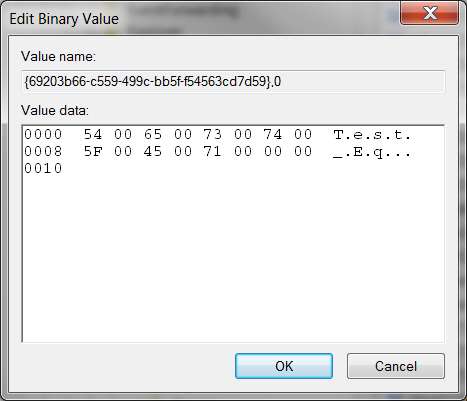
What is the essence of this entry? I don't see any values in it that correspond to the 10 band EQ-slider settings that correspond to my custom entry? It appears to be nothing more than the name of the custom entry. Where are the 10 values themselves kept???

registryentrytesteq.jpg
 

My Computer My Computer

At a glance

Windows 7 Pro x64 (1), Win7 Pro X64 (2)i5-3350p 3.1Ghz/6MB-cache (1); E8400 3.0Ghz/6...8GB PC3-12800 DDR3 (1); 4GB PC3-10600 DDR3 (2)ATI HD7750 (1), (see TV cards); ATI R7 250 (2)
Computer type
PC/Desktop
Computer Manufacturer/Model Number
Home-built, two systems (1) and (2)
OS
Windows 7 Pro x64 (1), Win7 Pro X64 (2)
CPU
i5-3350p 3.1Ghz/6MB-cache (1); E8400 3.0Ghz/6MB-cache (2)
Motherboard
ASUS P8Z77-V Pro (1); ASUS P5Q3 (2)
Memory
8GB PC3-12800 DDR3 (1); 4GB PC3-10600 DDR3 (2)
Graphics Card(s)
ATI HD7750 (1), (see TV cards); ATI R7 250 (2)
Sound Card
Realtek ALC892 HD Audio (1); Realtek ALC1200 HD Audio (2)
Monitor(s) Displays
Eizo HD2441W LCD, Eizo S2433W (1); Eizo 24" S2433W (2)
Screen Resolution
1920x1200, 1920x1200 (1); 1920x1200 (2)
Hard Drives
(1) 1TB SATA-II (7200RPM), 2x2TB SATA-III (7200RPM), 250GB SATA-III (10000RPM) for OS; 2x2TB external USB 3.0

(2) 320GB SATA-II (7200RPM), 750GB SATA-II (7200RPM), 150GB SATA-II (10000RPM) for OS; 2TB external USB 3.0
PSU
Nesteq ECS-6001 600W (1); Nesteq ECS-5001 500W (2)
Case
Acousti-Case 360 (1) and (2)
Cooling
Noctua NH-U12P SE2 for CPU, 2x120mm case fans (1) and (2)
Keyboard
IBM PS/2 (1) and (2)
Mouse
Logitech MX Revolution wireless (1); Microsoft wired (2)
Internet Speed
100mbps down / 10mbps up
Antivirus
Microsoft Security Essentials; Malwarebyte Anti-Malware Pro
Browser
Firefox
Other Info
Ceton InfiniTV 4-tuner cablecard-enabled TV card as well as Hauppauge HVR-2250 OTA/ATSC 2-tuner TV card in (1), running under Win7 WMC
dsperber:

If you run a search in Regedit for one of your saved EQ names it should show up under one of the Audio/Realtek "FXProperties" keys.

Yes... but...
What is the essence of this entry? I don't see any values in it that correspond to the 10 band EQ-slider settings that correspond to my custom entry? It appears to be nothing more than the name of the custom entry. Where are the 10 values themselves kept???


I was thinking it may be stored somewhere in the FXProperties key.

One way to test it out.

Ap
 

My Computer My Computer

At a glance

Windows 7 Home PremiumIntel Core 2 Duo @ 3.00gHz4 GBATI Radeon HD 2600 XT
Computer Manufacturer/Model Number
Assembled in my workshop
OS
Windows 7 Home Premium
CPU
Intel Core 2 Duo @ 3.00gHz
Motherboard
Gigabyte GA-P35-S3G
Memory
4 GB
Graphics Card(s)
ATI Radeon HD 2600 XT
Sound Card
RME 24/96 Card, Realtek Internal Audio PreSonus FireStudio
Monitor(s) Displays
Acer 1917 (x2)
Screen Resolution
1280 x 1024 on both monitors
Hard Drives
Three 250GB Seagate SATA Barracuda 7200rpm
PSU
Rosewill 500-watt
Case
Rosewill mid-tower
Cooling
Noctua NH-U9B (CPU), PwrSupply fan + single large case Fan
Keyboard
Macally w/2/USB ports.
Mouse
Trackman Wheel
Other Info
Event 20/20 bas studio monitors, Yamaha sub.
Rackmount Korg/Roland/Yamaha synthesizers,
Cubase MIDI/audio recording. Sony Soundforge audio/mastering software. CD Architect Mastering. RME & Presonus audio interfaces.
I was thinking it may be stored somewhere in the FXProperties key.
Doesn't appear that way to me. I moved another slider and saved a second EQ. Notice that there's no difference in the key itself, just a 0 vs. 1 in the key-suffix (whatever that is).

registryentrytesteq2.jpg
 

My Computer My Computer

At a glance

Windows 7 Pro x64 (1), Win7 Pro X64 (2)i5-3350p 3.1Ghz/6MB-cache (1); E8400 3.0Ghz/6...8GB PC3-12800 DDR3 (1); 4GB PC3-10600 DDR3 (2)ATI HD7750 (1), (see TV cards); ATI R7 250 (2)
Computer type
PC/Desktop
Computer Manufacturer/Model Number
Home-built, two systems (1) and (2)
OS
Windows 7 Pro x64 (1), Win7 Pro X64 (2)
CPU
i5-3350p 3.1Ghz/6MB-cache (1); E8400 3.0Ghz/6MB-cache (2)
Motherboard
ASUS P8Z77-V Pro (1); ASUS P5Q3 (2)
Memory
8GB PC3-12800 DDR3 (1); 4GB PC3-10600 DDR3 (2)
Graphics Card(s)
ATI HD7750 (1), (see TV cards); ATI R7 250 (2)
Sound Card
Realtek ALC892 HD Audio (1); Realtek ALC1200 HD Audio (2)
Monitor(s) Displays
Eizo HD2441W LCD, Eizo S2433W (1); Eizo 24" S2433W (2)
Screen Resolution
1920x1200, 1920x1200 (1); 1920x1200 (2)
Hard Drives
(1) 1TB SATA-II (7200RPM), 2x2TB SATA-III (7200RPM), 250GB SATA-III (10000RPM) for OS; 2x2TB external USB 3.0

(2) 320GB SATA-II (7200RPM), 750GB SATA-II (7200RPM), 150GB SATA-II (10000RPM) for OS; 2TB external USB 3.0
PSU
Nesteq ECS-6001 600W (1); Nesteq ECS-5001 500W (2)
Case
Acousti-Case 360 (1) and (2)
Cooling
Noctua NH-U12P SE2 for CPU, 2x120mm case fans (1) and (2)
Keyboard
IBM PS/2 (1) and (2)
Mouse
Logitech MX Revolution wireless (1); Microsoft wired (2)
Internet Speed
100mbps down / 10mbps up
Antivirus
Microsoft Security Essentials; Malwarebyte Anti-Malware Pro
Browser
Firefox
Other Info
Ceton InfiniTV 4-tuner cablecard-enabled TV card as well as Hauppauge HVR-2250 OTA/ATSC 2-tuner TV card in (1), running under Win7 WMC
I've had a look for this on a previous occasion and haven't manage to locate anything other than this registry key. However, on further examination, I think that this key is actually a pointer to within one of the .DLL files or some other support file that makes up the driver package, and it is within that file that changes are actually made as regards the equalizer settings. It would certainly explain why settings are not maintained when the driver is updated.
 

My Computer My Computer

At a glance

Windows 8.1 Pro RTM x64Intel Core-i5-3570K 4-core @ 3.4GHz (Ivy Brid...4 x 4GB DDR3-1600 Corsair Vengeance CMZ8GX3M2...MSI GeForce GTX770 Gaming OC 2GB
Computer type
PC/Desktop
Computer Manufacturer/Model Number
Dwarf Dwf/11/2012 r09/2013
OS
Windows 8.1 Pro RTM x64
CPU
Intel Core-i5-3570K 4-core @ 3.4GHz (Ivy Bridge) (OC 4.4GHz)
Motherboard
ASRock Z77 Extreme4-M
Memory
4 x 4GB DDR3-1600 Corsair Vengeance CMZ8GX3M2A1600C9B (16GB)
Graphics Card(s)
MSI GeForce GTX770 Gaming OC 2GB
Sound Card
Realtek High Definition on board solution (ALC 898)
Monitor(s) Displays
ViewSonic VA1912w Widescreen (VGA)
Screen Resolution
1440x900
Hard Drives
OCZ Agility 3 SSD 120GB SATA III x2 (RAID 0)
Samsung HD501LJ 500GB SATA II x2
Hitachi HDS721010CLA332 1TB SATA II
Iomega 1.5TB Ext USB 2.0
WD 2.0TB Ext USB 3.0
PSU
XFX Pro Series 850W Semi-Modular
Case
Gigabyte IF233
Cooling
1 x 120mm Front Inlet 1 x 120mm Rear Exhaust
Keyboard
Microsoft Comfort Curve Keyboard 3000 (USB)
Mouse
Microsoft Comfort Mouse 3000 for Business (USB)
Internet Speed
NetGear DG834Gv3 ADSL Modem/Router (Ethernet) ~4.0 Mb/s (O2)
Antivirus
Avast! 8.0.1497
Browser
IE 11
Other Info
Optical Drive: HL-DT-ST BD-RE BH10LS30 SATA Bluray
Lexmark S305 Printer/Scanner/Copier (USB)
WEI Score: 8.1/8.1/8.5/8.5/8.25
Asus Eee PC 1011PX Netbook (Windows 7 x86 Starter)
I've had a look for this on a previous occasion and haven't manage to locate anything other than this registry key. However, on further examination, I think that this key is actually a pointer to within one of the .DLL files or some other support file that makes up the driver package, and it is within that file that changes are actually made as regards the equalizer settings. It would certainly explain why settings are not maintained when the driver is updated.
This seems like a bizarre theory.

Why would they make it so obscure? What's the point of "protecting" something that one would normally expect to be in an INI or CFG or DAT or XML or someplace meaningful... and preservable?

Why would they want us NOT to find it, or be able to save it across driver installs? It makes no sense they they would have consciously decided to make these obvious user-settings so impenetrable and cryptic.

I'm not trying to be difficult. I just think we're missing something very obvious. Who would design such a hidden implementation of an obvious user-customization that the user would want to retain across driver upgrades?
 

My Computer My Computer

At a glance

Windows 7 Pro x64 (1), Win7 Pro X64 (2)i5-3350p 3.1Ghz/6MB-cache (1); E8400 3.0Ghz/6...8GB PC3-12800 DDR3 (1); 4GB PC3-10600 DDR3 (2)ATI HD7750 (1), (see TV cards); ATI R7 250 (2)
Computer type
PC/Desktop
Computer Manufacturer/Model Number
Home-built, two systems (1) and (2)
OS
Windows 7 Pro x64 (1), Win7 Pro X64 (2)
CPU
i5-3350p 3.1Ghz/6MB-cache (1); E8400 3.0Ghz/6MB-cache (2)
Motherboard
ASUS P8Z77-V Pro (1); ASUS P5Q3 (2)
Memory
8GB PC3-12800 DDR3 (1); 4GB PC3-10600 DDR3 (2)
Graphics Card(s)
ATI HD7750 (1), (see TV cards); ATI R7 250 (2)
Sound Card
Realtek ALC892 HD Audio (1); Realtek ALC1200 HD Audio (2)
Monitor(s) Displays
Eizo HD2441W LCD, Eizo S2433W (1); Eizo 24" S2433W (2)
Screen Resolution
1920x1200, 1920x1200 (1); 1920x1200 (2)
Hard Drives
(1) 1TB SATA-II (7200RPM), 2x2TB SATA-III (7200RPM), 250GB SATA-III (10000RPM) for OS; 2x2TB external USB 3.0

(2) 320GB SATA-II (7200RPM), 750GB SATA-II (7200RPM), 150GB SATA-II (10000RPM) for OS; 2TB external USB 3.0
PSU
Nesteq ECS-6001 600W (1); Nesteq ECS-5001 500W (2)
Case
Acousti-Case 360 (1) and (2)
Cooling
Noctua NH-U12P SE2 for CPU, 2x120mm case fans (1) and (2)
Keyboard
IBM PS/2 (1) and (2)
Mouse
Logitech MX Revolution wireless (1); Microsoft wired (2)
Internet Speed
100mbps down / 10mbps up
Antivirus
Microsoft Security Essentials; Malwarebyte Anti-Malware Pro
Browser
Firefox
Other Info
Ceton InfiniTV 4-tuner cablecard-enabled TV card as well as Hauppauge HVR-2250 OTA/ATSC 2-tuner TV card in (1), running under Win7 WMC
I've just had a look through the list of files included with the audio driver (according to the Readme file), and this one looks a likely candidate, given its name: MaxxAudioEQ.dll. I'm going to see if this is the actual file in question by saving the current file and then reinstalling the driver. I'll report back.
 

My Computer My Computer

At a glance

Windows 8.1 Pro RTM x64Intel Core-i5-3570K 4-core @ 3.4GHz (Ivy Brid...4 x 4GB DDR3-1600 Corsair Vengeance CMZ8GX3M2...MSI GeForce GTX770 Gaming OC 2GB
Computer type
PC/Desktop
Computer Manufacturer/Model Number
Dwarf Dwf/11/2012 r09/2013
OS
Windows 8.1 Pro RTM x64
CPU
Intel Core-i5-3570K 4-core @ 3.4GHz (Ivy Bridge) (OC 4.4GHz)
Motherboard
ASRock Z77 Extreme4-M
Memory
4 x 4GB DDR3-1600 Corsair Vengeance CMZ8GX3M2A1600C9B (16GB)
Graphics Card(s)
MSI GeForce GTX770 Gaming OC 2GB
Sound Card
Realtek High Definition on board solution (ALC 898)
Monitor(s) Displays
ViewSonic VA1912w Widescreen (VGA)
Screen Resolution
1440x900
Hard Drives
OCZ Agility 3 SSD 120GB SATA III x2 (RAID 0)
Samsung HD501LJ 500GB SATA II x2
Hitachi HDS721010CLA332 1TB SATA II
Iomega 1.5TB Ext USB 2.0
WD 2.0TB Ext USB 3.0
PSU
XFX Pro Series 850W Semi-Modular
Case
Gigabyte IF233
Cooling
1 x 120mm Front Inlet 1 x 120mm Rear Exhaust
Keyboard
Microsoft Comfort Curve Keyboard 3000 (USB)
Mouse
Microsoft Comfort Mouse 3000 for Business (USB)
Internet Speed
NetGear DG834Gv3 ADSL Modem/Router (Ethernet) ~4.0 Mb/s (O2)
Antivirus
Avast! 8.0.1497
Browser
IE 11
Other Info
Optical Drive: HL-DT-ST BD-RE BH10LS30 SATA Bluray
Lexmark S305 Printer/Scanner/Copier (USB)
WEI Score: 8.1/8.1/8.5/8.5/8.25
Asus Eee PC 1011PX Netbook (Windows 7 x86 Starter)
I tried the above, and didn't have any success, sorry. I guess that we'll have to wait and see whether equaliser profiles can be saved and loaded in a future driver release.
 

My Computer My Computer

At a glance

Windows 8.1 Pro RTM x64Intel Core-i5-3570K 4-core @ 3.4GHz (Ivy Brid...4 x 4GB DDR3-1600 Corsair Vengeance CMZ8GX3M2...MSI GeForce GTX770 Gaming OC 2GB
Computer type
PC/Desktop
Computer Manufacturer/Model Number
Dwarf Dwf/11/2012 r09/2013
OS
Windows 8.1 Pro RTM x64
CPU
Intel Core-i5-3570K 4-core @ 3.4GHz (Ivy Bridge) (OC 4.4GHz)
Motherboard
ASRock Z77 Extreme4-M
Memory
4 x 4GB DDR3-1600 Corsair Vengeance CMZ8GX3M2A1600C9B (16GB)
Graphics Card(s)
MSI GeForce GTX770 Gaming OC 2GB
Sound Card
Realtek High Definition on board solution (ALC 898)
Monitor(s) Displays
ViewSonic VA1912w Widescreen (VGA)
Screen Resolution
1440x900
Hard Drives
OCZ Agility 3 SSD 120GB SATA III x2 (RAID 0)
Samsung HD501LJ 500GB SATA II x2
Hitachi HDS721010CLA332 1TB SATA II
Iomega 1.5TB Ext USB 2.0
WD 2.0TB Ext USB 3.0
PSU
XFX Pro Series 850W Semi-Modular
Case
Gigabyte IF233
Cooling
1 x 120mm Front Inlet 1 x 120mm Rear Exhaust
Keyboard
Microsoft Comfort Curve Keyboard 3000 (USB)
Mouse
Microsoft Comfort Mouse 3000 for Business (USB)
Internet Speed
NetGear DG834Gv3 ADSL Modem/Router (Ethernet) ~4.0 Mb/s (O2)
Antivirus
Avast! 8.0.1497
Browser
IE 11
Other Info
Optical Drive: HL-DT-ST BD-RE BH10LS30 SATA Bluray
Lexmark S305 Printer/Scanner/Copier (USB)
WEI Score: 8.1/8.1/8.5/8.5/8.25
Asus Eee PC 1011PX Netbook (Windows 7 x86 Starter)
its okey! but i am dedicated to GUI! :D :D
 

My Computer My Computer

At a glance

Windows 7 Ultimate x64AMD PHENOM II X44GB DDR3 1333Sapphire Radeon 4770HD
Computer Manufacturer/Model Number
Self Built AMD Clone PC....
OS
Windows 7 Ultimate x64
CPU
AMD PHENOM II X4
Motherboard
MSI p33 740M
Memory
4GB DDR3 1333
Graphics Card(s)
Sapphire Radeon 4770HD
Sound Card
ViaTech HD Built in: with MICROLAB M-111 2.1 Speakers
Monitor(s) Displays
Greatwall 19" W & LG 15"W Parallel
Screen Resolution
1400X900 & 1280X720
Hard Drives
Hitachi 920GB[1TB] SATA
PSU
Delux
Case
Space + 2 Bluelight Cooling fan from side
Cooling
Builtin+ Extra coler fan
Keyboard
Delux Multimedia USB
Mouse
A4-tech x7 2x office
Internet Speed
60KB/s
Other Info
GAMING is my passion!
I tried the above, and didn't have any success, sorry. I guess that we'll have to wait and see whether equaliser profiles can be saved and loaded in a future driver release.

in this driver eq you can save ur settings.

but i didnt try that for other user. i am the only one who is using this pc :D
 

My Computer My Computer

At a glance

Windows 7 Ultimate x64AMD PHENOM II X44GB DDR3 1333Sapphire Radeon 4770HD
Computer Manufacturer/Model Number
Self Built AMD Clone PC....
OS
Windows 7 Ultimate x64
CPU
AMD PHENOM II X4
Motherboard
MSI p33 740M
Memory
4GB DDR3 1333
Graphics Card(s)
Sapphire Radeon 4770HD
Sound Card
ViaTech HD Built in: with MICROLAB M-111 2.1 Speakers
Monitor(s) Displays
Greatwall 19" W & LG 15"W Parallel
Screen Resolution
1400X900 & 1280X720
Hard Drives
Hitachi 920GB[1TB] SATA
PSU
Delux
Case
Space + 2 Bluelight Cooling fan from side
Cooling
Builtin+ Extra coler fan
Keyboard
Delux Multimedia USB
Mouse
A4-tech x7 2x office
Internet Speed
60KB/s
Other Info
GAMING is my passion!
I am well aware that you can save user eq settings with this driver release. What you are after is being able to transfer these settings between drivers so that you don't have to re-enter them every time a new driver is released. At the moment, there doesn't appear to be any other way of reinstating user eq profiles except by manually re-entering them. Like I say, perhaps a new driver release will incorporate this. After all, they did eventually include the equalizer.
 

My Computer My Computer

At a glance

Windows 8.1 Pro RTM x64Intel Core-i5-3570K 4-core @ 3.4GHz (Ivy Brid...4 x 4GB DDR3-1600 Corsair Vengeance CMZ8GX3M2...MSI GeForce GTX770 Gaming OC 2GB
Computer type
PC/Desktop
Computer Manufacturer/Model Number
Dwarf Dwf/11/2012 r09/2013
OS
Windows 8.1 Pro RTM x64
CPU
Intel Core-i5-3570K 4-core @ 3.4GHz (Ivy Bridge) (OC 4.4GHz)
Motherboard
ASRock Z77 Extreme4-M
Memory
4 x 4GB DDR3-1600 Corsair Vengeance CMZ8GX3M2A1600C9B (16GB)
Graphics Card(s)
MSI GeForce GTX770 Gaming OC 2GB
Sound Card
Realtek High Definition on board solution (ALC 898)
Monitor(s) Displays
ViewSonic VA1912w Widescreen (VGA)
Screen Resolution
1440x900
Hard Drives
OCZ Agility 3 SSD 120GB SATA III x2 (RAID 0)
Samsung HD501LJ 500GB SATA II x2
Hitachi HDS721010CLA332 1TB SATA II
Iomega 1.5TB Ext USB 2.0
WD 2.0TB Ext USB 3.0
PSU
XFX Pro Series 850W Semi-Modular
Case
Gigabyte IF233
Cooling
1 x 120mm Front Inlet 1 x 120mm Rear Exhaust
Keyboard
Microsoft Comfort Curve Keyboard 3000 (USB)
Mouse
Microsoft Comfort Mouse 3000 for Business (USB)
Internet Speed
NetGear DG834Gv3 ADSL Modem/Router (Ethernet) ~4.0 Mb/s (O2)
Antivirus
Avast! 8.0.1497
Browser
IE 11
Other Info
Optical Drive: HL-DT-ST BD-RE BH10LS30 SATA Bluray
Lexmark S305 Printer/Scanner/Copier (USB)
WEI Score: 8.1/8.1/8.5/8.5/8.25
Asus Eee PC 1011PX Netbook (Windows 7 x86 Starter)
I was thinking it may be stored somewhere in the FXProperties key.
Doesn't appear that way to me. I moved another slider and saved a second EQ. Notice that there's no difference in the key itself, just a 0 vs. 1 in the key-suffix (whatever that is).

registryentrytesteq2.jpg

I show other additions to the key.
With each new EQ added there's a corresponding Binary Value added to the key.
See the marks in the in the graphic I'm uploading.

Ap


FXProp.jpg
 

My Computer My Computer

At a glance

Windows 7 Home PremiumIntel Core 2 Duo @ 3.00gHz4 GBATI Radeon HD 2600 XT
Computer Manufacturer/Model Number
Assembled in my workshop
OS
Windows 7 Home Premium
CPU
Intel Core 2 Duo @ 3.00gHz
Motherboard
Gigabyte GA-P35-S3G
Memory
4 GB
Graphics Card(s)
ATI Radeon HD 2600 XT
Sound Card
RME 24/96 Card, Realtek Internal Audio PreSonus FireStudio
Monitor(s) Displays
Acer 1917 (x2)
Screen Resolution
1280 x 1024 on both monitors
Hard Drives
Three 250GB Seagate SATA Barracuda 7200rpm
PSU
Rosewill 500-watt
Case
Rosewill mid-tower
Cooling
Noctua NH-U9B (CPU), PwrSupply fan + single large case Fan
Keyboard
Macally w/2/USB ports.
Mouse
Trackman Wheel
Other Info
Event 20/20 bas studio monitors, Yamaha sub.
Rackmount Korg/Roland/Yamaha synthesizers,
Cubase MIDI/audio recording. Sony Soundforge audio/mastering software. CD Architect Mastering. RME & Presonus audio interfaces.
I was thinking it may be stored somewhere in the FXProperties key.
Doesn't appear that way to me. I moved another slider and saved a second EQ. Notice that there's no difference in the key itself, just a 0 vs. 1 in the key-suffix (whatever that is).

registryentrytesteq2.jpg

I show other additions to the key.
With each new EQ added there's a corresponding Binary Value added to the key.
See the marks in the in the graphic I'm uploading.

Ap


View attachment 69361

thanks man!
 

My Computer My Computer

At a glance

Windows 7 Ultimate x64AMD PHENOM II X44GB DDR3 1333Sapphire Radeon 4770HD
Computer Manufacturer/Model Number
Self Built AMD Clone PC....
OS
Windows 7 Ultimate x64
CPU
AMD PHENOM II X4
Motherboard
MSI p33 740M
Memory
4GB DDR3 1333
Graphics Card(s)
Sapphire Radeon 4770HD
Sound Card
ViaTech HD Built in: with MICROLAB M-111 2.1 Speakers
Monitor(s) Displays
Greatwall 19" W & LG 15"W Parallel
Screen Resolution
1400X900 & 1280X720
Hard Drives
Hitachi 920GB[1TB] SATA
PSU
Delux
Case
Space + 2 Bluelight Cooling fan from side
Cooling
Builtin+ Extra coler fan
Keyboard
Delux Multimedia USB
Mouse
A4-tech x7 2x office
Internet Speed
60KB/s
Other Info
GAMING is my passion!
Back
Top