
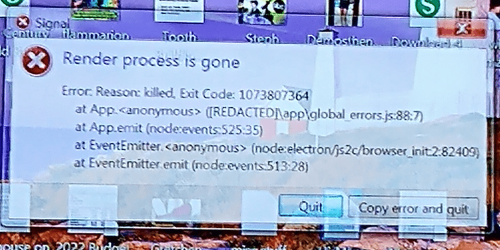
Solved Err msg on shutdown - "Render process is gone Error: Reason: killed."

ArlisT

New member
Local time
9:06 AM
Messages
33
Location
Indiana
Err msg on shutdown - "Render process is gone Error: Reason: killed."

Hello everybody.

My Dell Optiplex 7010 wouldn't start the other day - orange flashing power button. Took to shop for diagnosis and repair. Tech replaced power supply, and computer starts and runs fine again. However, after bringing it home, now every time I shut it down I get the attached error msg. It flashes too quickly to read or even hit the copy button before shutting down, so I took this pic with my phone. Anybody know what this is?

I tried searching it, and found a link to "process exit code: 1073807364, during windows machine shutdown/restart" on a developers forum in a post stating: "...I'm using Yajsw [Yet Another Java Service Wrapper] 12.14 to wrap my java application. We have deployed our application across different windows machines. Whenever the user shutdowns/restart the machine, the process exits with a non zero exit code : 1073807364"

I don't know what this all means. But did the tech slip something dodgy into my computer while he had it? and if so, how do I get rid of it? (see attached image)

Thanks
 

Attachments
  • error msg.PNG
    error msg.PNG
    1.2 MB · Views: 1

My Computer

Computer type
PC/Desktop
Computer Manufacturer/Model Number
Dell Optiplex 7010
OS
Windows 7 Pro x64
CPU
Intel i5 - 3470
Motherboard
Dell Inc. 0WR7PY
Memory
16 GB
Graphics Card(s)
Intel(R) HD Graphics
Sound Card
Realtek High Definition Audio
Monitor(s) Displays
Insignia 50" Flat Screen TV
Screen Resolution
1080p
Hard Drives
1863 GB HITACHI HUA723020ALA640 ATA Device (SATA)
Keyboard
Logitech K800
Mouse
Logitech M325
Internet Speed
25 Mbps down 5 Mbps up
Antivirus
MalwareBytes Premium
Browser
Firefox
Other Info
I am the rightful King of France
The new PS has nothing to do with the message. Intentionally or not, something has been installed.
I always take off my drives before I take the computer to a shop.

Don't you have a drive image backup?
Any restore point to a date before the shop?
Look at installed programs. Anything new?
Run MSConfig - Startup. Anything strange?
 
Last edited:

My Computers

System One System Two

  • Computer type
    PC/Desktop
    Computer Manufacturer/Model Number
    custom build
    OS
    Windows 7 HP 64
    CPU
    i5 6600K - 800MHz to 4200MHz
    Motherboard
    GA-Z170-HD3P
    Memory
    4+4G GSkill DDR4 3000
    Graphics Card(s)
    IG - Intel 530
    Monitor(s) Displays
    Samsung 226BW
    Screen Resolution
    1680x1050
    Hard Drives
    (1) -1 SM951 – 128GB M.2 AHCI PCIe SSD drive for Windows 7 and Lubuntu
    (2) -1 WD SATA 3 - 1T for Data
    (3) -1 WD SATA 3 - 1T for backup
    PSU
    Thermaltake 450W TR2 gold
    Keyboard
    Old and good Chicony mechanical keyboard
    Mouse
    Logitech mX performance - 9 buttons (had to disable some)
    Internet Speed
    500Mb/s
    Browser
    Firefox 64
    Other Info
    TinyWall firewall
  • Computer type
    Laptop
    System Manufacturer/Model Number
    Asus Q550LF
    OS
    Windows 7 Pro
    CPU
    i7-4500U 800MHz to 3.0GHz
    Motherboard
    Asus Q550LF
    Memory
    (4+4)G DDR3 1600
    Graphics Card(s)
    IG intel 4400 + NVIDIA GeForce GT 745M
    Sound Card
    Realtek
    Monitor(s) Displays
    LG Display LP156WF4-SPH1
    Screen Resolution
    1920 x 1080
    Hard Drives
    BX500 120G SSD for Windows and programs +
    1T HDD for data
    Internet Speed
    500 Mb/s
    Browser
    Firefox
    Other Info
    TinyWall firewall
Your error message-box says "Signal".

Try closing signal app properly, it's probably running as a tray icon. Right click it and close it before shut it down the computer. It is harmless though, you can safely ignore the message. It's just the program being forced to close.
 

My Computers

System One System Two

  • Computer type
    PC/Desktop
    OS
    Windows 7 Ultimate 64-bit SP1
    CPU
    Intel Core 2 Quad Q6700 @ 2.66GHz
    Motherboard
    ECS MCP73PVT-SM
    Memory
    4.00GB Single-Channel DDR2 @ 399MHz
    Graphics Card(s)
    2047MB NVIDIA GeForce GT 710 (ASUStek Computer Inc)
    Sound Card
    Realtek High Definition Audio
    Monitor(s) Displays
    HP 21kd
    Screen Resolution
    1920x1080@60Hz
    Hard Drives
    149GB Western Digital WDC WD1600AABS-61PRA0 ATA Device (SATA )
    4000GB Seagate ST4000DM004-2U9104 ATA Device (SATA )
    931GB TOSHIBA External USB 3.0 USB Device (USB (SATA) )
    Antivirus
    None. Don't Need it.
    Browser
    Librewolf Portable
    Other Info
    It's a very old system.
  • Computer type
    PC/Desktop
Your error message-box says "Signal".

Try closing signal app properly, it's probably running as a tray icon. Right click it and close it before shut it down the computer. It is harmless though, you can safely ignore the message. It's just the program being forced to close.

That did it. I've had Signal pinned to my task bar for months, but it never started throwing this error at shutdown until after it was repaired the other day, so I was suspicious. Turned off Signal and unpinned it from the taskbar, shutdown computer and presto, error msg gone. Thanks.
 

My Computer

Computer type
PC/Desktop
Computer Manufacturer/Model Number
Dell Optiplex 7010
OS
Windows 7 Pro x64
CPU
Intel i5 - 3470
Motherboard
Dell Inc. 0WR7PY
Memory
16 GB
Graphics Card(s)
Intel(R) HD Graphics
Sound Card
Realtek High Definition Audio
Monitor(s) Displays
Insignia 50" Flat Screen TV
Screen Resolution
1080p
Hard Drives
1863 GB HITACHI HUA723020ALA640 ATA Device (SATA)
Keyboard
Logitech K800
Mouse
Logitech M325
Internet Speed
25 Mbps down 5 Mbps up
Antivirus
MalwareBytes Premium
Browser
Firefox
Other Info
I am the rightful King of France
The other tall tale sign is that it mentions node:electron JS which is a web component part of the Electron programing code. So the Signal App must be coded in Electron.
 

My Computer

Computer type
PC/Desktop
OS
Windows 7 Ultimate x64
Back
Top