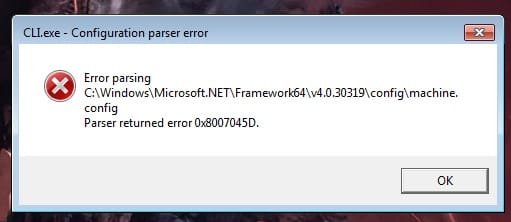
Error 0x8007045D

Sierra23

New member
Local time
7:42 AM
Messages
13
Hello there!

I'm going by memory because I'm not really sure what happened exactly. But...

A few weeks ago I've installed an update for framework, (4...something). I had to restart the computer for updates to apply. However... During the installment, there was a short power outrage. I would assume that the update didn't install itself fully, or properly.

Ever since then, whenever I turn my PC on, I get this error popping on my screen upon Windows start.
x.jpg

Is there any way to fix it? Appreciate the help..
 

My Computer

OS
Windows 7 Ultimate x64
CPU
Intel i3-2120
Motherboard
MSI H61M-P21
Memory
8GB DDR3
Graphics Card(s)
AMD Radeon HD6770
Hard Drives
HDS721050DLE630
Internet Speed
4mb/s

My Computer

Computer type
PC/Desktop
Computer Manufacturer/Model Number
medionl/Aspire 6930G/acer x55a
OS
W7 home premium 32bit/W7HP 64bit/w10 tp insider ring
CPU
E5300 dual core
Motherboard
medion MS7366
Memory
3gb
Graphics Card(s)
Nvidia Geforce 7100 Nforce 630i
Monitor(s) Displays
avixc
Internet Speed
n (isp resticted to 72)
Antivirus
mse/pands
Browser
palemoon
Other Info
Belkin Fd7050 n USB using Railink RT2870 drivers, more upto date
Hello Roy.

Thank you for your fast reply.

I ran the tool. Here's the screen of its diagnosis. I applied the changes by clicking "Next", then "Finish".

But the error was not removed.

xx.jpg
 

My Computer

OS
Windows 7 Ultimate x64
CPU
Intel i3-2120
Motherboard
MSI H61M-P21
Memory
8GB DDR3
Graphics Card(s)
AMD Radeon HD6770
Hard Drives
HDS721050DLE630
Internet Speed
4mb/s
Hi Sierra,
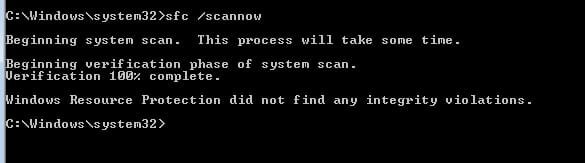
can you run sfc /scannow
Reboot

If that fails we could try copying the default file, into the main.

Roy
 

My Computer

Computer type
PC/Desktop
Computer Manufacturer/Model Number
medionl/Aspire 6930G/acer x55a
OS
W7 home premium 32bit/W7HP 64bit/w10 tp insider ring
CPU
E5300 dual core
Motherboard
medion MS7366
Memory
3gb
Graphics Card(s)
Nvidia Geforce 7100 Nforce 630i
Monitor(s) Displays
avixc
Internet Speed
n (isp resticted to 72)
Antivirus
mse/pands
Browser
palemoon
Other Info
Belkin Fd7050 n USB using Railink RT2870 drivers, more upto date
xx.jpg

Scanned. Restarted.

Error 0x8007045D still persists.
 

My Computer

OS
Windows 7 Ultimate x64
CPU
Intel i3-2120
Motherboard
MSI H61M-P21
Memory
8GB DDR3
Graphics Card(s)
AMD Radeon HD6770
Hard Drives
HDS721050DLE630
Internet Speed
4mb/s
Hi Sierra,

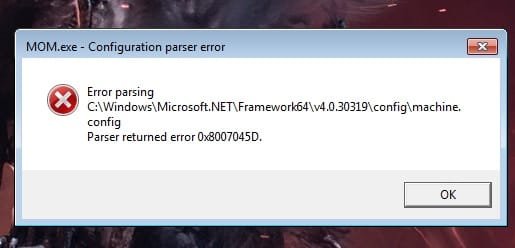
got sidetracked by the error message re NetF - NOT the source mom.exe

i take it your running the ATI Catalyst control centre, mom is one of its processes.
If you dont need it either uninstall it or in Start-up uncheck it.


ROy
 

My Computer

Computer type
PC/Desktop
Computer Manufacturer/Model Number
medionl/Aspire 6930G/acer x55a
OS
W7 home premium 32bit/W7HP 64bit/w10 tp insider ring
CPU
E5300 dual core
Motherboard
medion MS7366
Memory
3gb
Graphics Card(s)
Nvidia Geforce 7100 Nforce 630i
Monitor(s) Displays
avixc
Internet Speed
n (isp resticted to 72)
Antivirus
mse/pands
Browser
palemoon
Other Info
Belkin Fd7050 n USB using Railink RT2870 drivers, more upto date
Hello Roy.
Thank you for another reply.

I do indeed use ATI Catalyst Control Center and I have disabled it in Startup - as suggested by you.

x.jpg

It is still there.
 

My Computer

OS
Windows 7 Ultimate x64
CPU
Intel i3-2120
Motherboard
MSI H61M-P21
Memory
8GB DDR3
Graphics Card(s)
AMD Radeon HD6770
Hard Drives
HDS721050DLE630
Internet Speed
4mb/s
Try running chkdsk to scan for drive and file system errors.

Open an elevated command prompt, type chkdsk /r and hit Enter. Restart, let it run, and see if the problem remains.
 

My Computer

Computer type
PC/Desktop
OS
Windows
Back
Top