
Hello guys, I'm new to this forum so please don't go hard on me.
The problem that I have here is about my Music Library which is corrupted
I am annoyed that I can't open and see my music library on my libraries as it is corrupted. At first I tried seeing if it was hidden but it wasn't, then I tried copying it from C:\Users\(MY USER)\AppData\Roaming\Microsoft\Windows\Libraries to see if it will work but I got this:
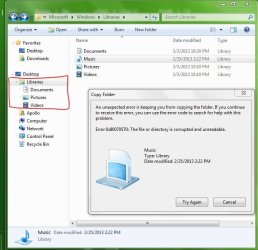
Even when I try to do the 'Right Click on Libraries--->Restore default libraries', It won't work.
Could anyone please help me? I'm really annoyed by this.
[EDIT]
P.S.
I tried deleting the library but it showed me this

The problem that I have here is about my Music Library which is corrupted
I am annoyed that I can't open and see my music library on my libraries as it is corrupted. At first I tried seeing if it was hidden but it wasn't, then I tried copying it from C:\Users\(MY USER)\AppData\Roaming\Microsoft\Windows\Libraries to see if it will work but I got this:
Even when I try to do the 'Right Click on Libraries--->Restore default libraries', It won't work.
Could anyone please help me? I'm really annoyed by this.
[EDIT]
P.S.
I tried deleting the library but it showed me this
My Computer
At a glance
Windows 7 Ultimate x64
- Computer type
- Laptop
- Computer Manufacturer/Model Number
- Samsung
- OS
- Windows 7 Ultimate x64
- Antivirus
- ESET NOD32 Antivirus
- Browser
- Google Chrome


