
error 1719 The windows installer service could not be accessed.......

error 1719

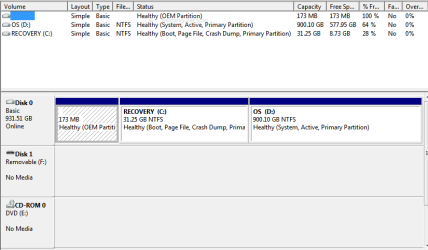
Disk copy 1.PNG Karl, had to totally reload windows 7 from installation disk. Got the BSOD with a message in the lower right that said "windows 7 / Build 7601 / This copy of windows is not genuine" This after I tried to boot up using the startup disk that I made. Oh well got a fresh start. Now at the beginning of the bootup process I get to choose 2 copies of windows 7 to choose from. I chose the default hightlighted one and there were no problems, maybe we can fix that too. I have to reboot now to update some drivers i've installed. Talk to you soon. Thank you for your time.
 

My Computer My Computer

At a glance

MS Windows 7 Home Premium 64-bit SP1Intel Core 2 Quad Q6600 @ 2.40GHz Kentsfield ...8.00 GB Dual-Channel DDR2 @ 399MHz (5-5-5-15)Acer S231HL (1920x1080@59Hz) 1024MB GeForce G...
Computer Manufacturer/Model Number
Dell XPS 720
OS
MS Windows 7 Home Premium 64-bit SP1
CPU
Intel Core 2 Quad Q6600 @ 2.40GHz Kentsfield 65nm Technology
Motherboard
Dell Inc. 0P611C (Microprocessor)
Memory
8.00 GB Dual-Channel DDR2 @ 399MHz (5-5-5-15)
Graphics Card(s)
Acer S231HL (1920x1080@59Hz) 1024MB GeForce GTS 450 (Gigabyt
Sound Card
Creative X-Fi Audio Processor (WDM)
Monitor(s) Displays
Acer S231HL
Screen Resolution
1920X1080
Hard Drives
WDC WD10 02FAEX-00Y9A SCSI Disk Device

ST332062 0AS SCSI Disk Device
PSU
I think its 750w
Case
stock Dell XPS 700 desk top
Cooling
not really sure
Keyboard
Eclipse
Mouse
Razer Death Adder
Internet Speed
3G sprint broadband air card
Mike,
This is Win 7 and not XP.

Normally, there is no need to install extra drivers.

Please do not!

Let Microsoft decide. They are smarter than both of us together.

Here is how to update your win 7.

Please use this procedure or i will severely beat you about the head and shoulders.:D


UPDATING YOUR WIN 7
1. ASSURE THAT YOU RECEIVE ALL UPDATES
WIN | type WINDOWS UPDATE | ENTER |
Change settings (left-hand column) |
checkmark all four of the boxes | OK
button

Approve any dialog boxes presented. Let Windows install any update features.

WIN is the key with the Microsoft flag on top.

2. INSTALL CRITICAL UPDATES
Check for Updates
(left-hand column)
Install ALL critical updates.
Restart your computer (even if not prompted)

Repeat this procedure until there are no more critical updates.

DO NOT TRUST the “Windows is up to date” in center of dialog. until you see that TWICE IN A ROW!

3. INSTALL IMPORTANT UPDATES
Use the “critical update” procedure until all important updates are installed.

4. INSTALL OPTIONAL UPDATES
Use the “critical update” procedure until all optional updates are installed.

Under Optional updates you will be presented with a list of about 34 language updates.
You can hide those updates so that aren't continually notified of those updates. When you click on 34 optional updates are available, then you
a) highlight all of the language updates,
b) right-click anywhere in the highlighted list.
c) click on Hide Updates,
d) OK button.


UPDATE GOLDEN RULES

Install ALL, yes, ALL updates.
This is Win 7 and not Vista or XP (eXPired).

UPDATE IS HUNG –TAKING FOREVER
Hung is very doubtful unless you interrupted updates.

CTRL + SHIFT + ESC key combo will pop-up the Task Manager.
Lo and behold, Windows Update is still running!

You hold down the CTRL and SHIFT keys.
While holding them down, tap the ESC key once.
 

My Computer My Computer

At a glance

MS Windows 7 Ultimate SP1 64-bitAMD A10-4600M6.00 GB Dual-Channel DDR3 @ 798MHz (11-11-12-28)AMD Radeon HD 7660G
Computer Manufacturer/Model Number
Toshiba Satellite S875D-S7239 laptop
OS
MS Windows 7 Ultimate SP1 64-bit
CPU
AMD A10-4600M
Motherboard
AMD Pumori (Socket FT1)
Memory
6.00 GB Dual-Channel DDR3 @ 798MHz (11-11-12-28)
Graphics Card(s)
AMD Radeon HD 7660G
Sound Card
High Definition Audio Device
Monitor(s) Displays
Generic PnP Monitor (1600x900@60Hz)
Screen Resolution
1600x900@60Hz
Hard Drives
SSD 119GB Corsair CSSD-V128GB2 ATA Device
Keyboard
Standard PS/2 Keyboard
Mouse
HP Wireless Optical Mobile Mouse Model FHA-3410
Internet Speed
What the local pub, local coffee shop offers.
Other Info
Optical Drive:MATSHITA BD-CMB UJ160B ATA Device


Also have an Asus ha1002xp netbook with Win 7 Ultimate installed.
ok Karl, I installed all critical updates as per your instructions. Now will I still be able to use my old C: HD? the one we disconnected to get this one to boot up. If so, is there anything special that I need to do with this one? Do I just connect the other smaller one and reboot? There is lots of information and programs on that other smaller HD that I would like to access, is that possable? I know I'm asking alot of questions but I want to get an idea of what to tell my wife so she dosen't have a cow and severely beat me about the head and shoulders...lol. Really thanks for your help. Laters.
 

My Computer My Computer

At a glance

MS Windows 7 Home Premium 64-bit SP1Intel Core 2 Quad Q6600 @ 2.40GHz Kentsfield ...8.00 GB Dual-Channel DDR2 @ 399MHz (5-5-5-15)Acer S231HL (1920x1080@59Hz) 1024MB GeForce G...
Computer Manufacturer/Model Number
Dell XPS 720
OS
MS Windows 7 Home Premium 64-bit SP1
CPU
Intel Core 2 Quad Q6600 @ 2.40GHz Kentsfield 65nm Technology
Motherboard
Dell Inc. 0P611C (Microprocessor)
Memory
8.00 GB Dual-Channel DDR2 @ 399MHz (5-5-5-15)
Graphics Card(s)
Acer S231HL (1920x1080@59Hz) 1024MB GeForce GTS 450 (Gigabyt
Sound Card
Creative X-Fi Audio Processor (WDM)
Monitor(s) Displays
Acer S231HL
Screen Resolution
1920X1080
Hard Drives
WDC WD10 02FAEX-00Y9A SCSI Disk Device

ST332062 0AS SCSI Disk Device
PSU
I think its 750w
Case
stock Dell XPS 700 desk top
Cooling
not really sure
Keyboard
Eclipse
Mouse
Razer Death Adder
Internet Speed
3G sprint broadband air card
Yes. You will be able to access the data on the other drive.

BUT -Complete that update procedure

In case your wondering, there are many important updates that are critical.
there are optional updates that are very important.

Microsoft has a wierd classification scheme.

After all of the updates are installed, I'll be giving you a script to run that lists all of the installed updates.
 

My Computer My Computer

At a glance

MS Windows 7 Ultimate SP1 64-bitAMD A10-4600M6.00 GB Dual-Channel DDR3 @ 798MHz (11-11-12-28)AMD Radeon HD 7660G
Computer Manufacturer/Model Number
Toshiba Satellite S875D-S7239 laptop
OS
MS Windows 7 Ultimate SP1 64-bit
CPU
AMD A10-4600M
Motherboard
AMD Pumori (Socket FT1)
Memory
6.00 GB Dual-Channel DDR3 @ 798MHz (11-11-12-28)
Graphics Card(s)
AMD Radeon HD 7660G
Sound Card
High Definition Audio Device
Monitor(s) Displays
Generic PnP Monitor (1600x900@60Hz)
Screen Resolution
1600x900@60Hz
Hard Drives
SSD 119GB Corsair CSSD-V128GB2 ATA Device
Keyboard
Standard PS/2 Keyboard
Mouse
HP Wireless Optical Mobile Mouse Model FHA-3410
Internet Speed
What the local pub, local coffee shop offers.
Other Info
Optical Drive:MATSHITA BD-CMB UJ160B ATA Device


Also have an Asus ha1002xp netbook with Win 7 Ultimate installed.
ok...you were right its still downloading updates....I checked it out w/ task mtg and its still going...after all is complete ill give u a buzz..
 

My Computer My Computer

At a glance

MS Windows 7 Home Premium 64-bit SP1Intel Core 2 Quad Q6600 @ 2.40GHz Kentsfield ...8.00 GB Dual-Channel DDR2 @ 399MHz (5-5-5-15)Acer S231HL (1920x1080@59Hz) 1024MB GeForce G...
Computer Manufacturer/Model Number
Dell XPS 720
OS
MS Windows 7 Home Premium 64-bit SP1
CPU
Intel Core 2 Quad Q6600 @ 2.40GHz Kentsfield 65nm Technology
Motherboard
Dell Inc. 0P611C (Microprocessor)
Memory
8.00 GB Dual-Channel DDR2 @ 399MHz (5-5-5-15)
Graphics Card(s)
Acer S231HL (1920x1080@59Hz) 1024MB GeForce GTS 450 (Gigabyt
Sound Card
Creative X-Fi Audio Processor (WDM)
Monitor(s) Displays
Acer S231HL
Screen Resolution
1920X1080
Hard Drives
WDC WD10 02FAEX-00Y9A SCSI Disk Device

ST332062 0AS SCSI Disk Device
PSU
I think its 750w
Case
stock Dell XPS 700 desk top
Cooling
not really sure
Keyboard
Eclipse
Mouse
Razer Death Adder
Internet Speed
3G sprint broadband air card
Back
Top