Solved Windows Installer Service could not be accessed

Ivan8ias

New member
Local time
7:53 PM
Messages
23
Location
East Coast US
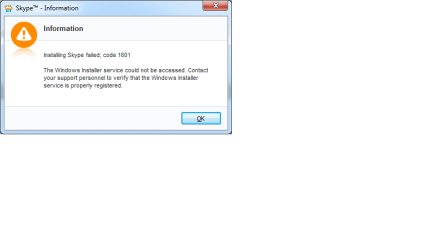
Now I see "Failed to install" messages with installing the Skype update and Adobe update. I'm assuming that is the problem. Has anyone had any experience with this? Any help would be greatly appreciated.
smile.gif
 

Attachments

  • Adobe update fail.png
    Adobe update fail.png
    10.1 KB · Views: 1
  • Skype error message.png
    Skype error message.png
    7.8 KB · Views: 1

My Computer My Computer

Computer type
Laptop
Computer Manufacturer/Model Number
Gateway
OS
Windows 7 Home Premium 64-bit
Antivirus
Bitdefender
Browser
IE 11 and Firefox
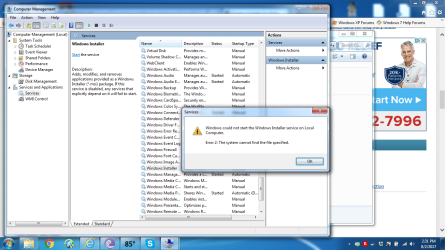
This is what I get when I go to Computer Management:
 

Attachments

  • Computer Management.png
    Computer Management.png
    105 KB · Views: 4

My Computer My Computer

Computer type
Laptop
Computer Manufacturer/Model Number
Gateway
OS
Windows 7 Home Premium 64-bit
Antivirus
Bitdefender
Browser
IE 11 and Firefox
Hi Ivan,

please run sfc /scannow

Reboot

try 1 of them.

Roy
 

My Computer My Computer

Computer type
PC/Desktop
Computer Manufacturer/Model Number
medionl/Aspire 6930G/acer x55a
OS
W7 home premium 32bit/W7HP 64bit/w10 tp insider ring
CPU
E5300 dual core
Motherboard
medion MS7366
Memory
3gb
Graphics Card(s)
Nvidia Geforce 7100 Nforce 630i
Monitor(s) Displays
avixc
Internet Speed
n (isp resticted to 72)
Antivirus
mse/pands
Browser
palemoon
Other Info
Belkin Fd7050 n USB using Railink RT2870 drivers, more upto date
Hi Roy,

Thank you for your prompt reply, but I already ran that last night with no errors. Should I look for the installer program online? Microsoft specified Microsoft Installer 5.0 for Windows 7 64 bit Service pack 1. I can't find it anywhere. Or am I looking for trouble? :)

Ivan
 

My Computer My Computer

Computer type
Laptop
Computer Manufacturer/Model Number
Gateway
OS
Windows 7 Home Premium 64-bit
Antivirus
Bitdefender
Browser
IE 11 and Firefox

My Computer My Computer

Computer type
PC/Desktop
Computer Manufacturer/Model Number
medionl/Aspire 6930G/acer x55a
OS
W7 home premium 32bit/W7HP 64bit/w10 tp insider ring
CPU
E5300 dual core
Motherboard
medion MS7366
Memory
3gb
Graphics Card(s)
Nvidia Geforce 7100 Nforce 630i
Monitor(s) Displays
avixc
Internet Speed
n (isp resticted to 72)
Antivirus
mse/pands
Browser
palemoon
Other Info
Belkin Fd7050 n USB using Railink RT2870 drivers, more upto date
Hi Roy,

Thank you. I backed up my Registry (as an extra precaution) and I created a Restore Point before trying the MS fix. It didn't help. It did say, however, that it repaired corrupted files in the Registry, though. I see that fix is for program install/uninstall, whereas I need help specifically with the Windows Installer Service program. It's the program that runs the updates for installed programs that ask for an update.

Ivan
 

My Computer My Computer

Computer type
Laptop
Computer Manufacturer/Model Number
Gateway
OS
Windows 7 Home Premium 64-bit
Antivirus
Bitdefender
Browser
IE 11 and Firefox

My Computer My Computer

Computer type
PC/Desktop
Computer Manufacturer/Model Number
medionl/Aspire 6930G/acer x55a
OS
W7 home premium 32bit/W7HP 64bit/w10 tp insider ring
CPU
E5300 dual core
Motherboard
medion MS7366
Memory
3gb
Graphics Card(s)
Nvidia Geforce 7100 Nforce 630i
Monitor(s) Displays
avixc
Internet Speed
n (isp resticted to 72)
Antivirus
mse/pands
Browser
palemoon
Other Info
Belkin Fd7050 n USB using Railink RT2870 drivers, more upto date
Hi Roy, the laptop came with Windows 7 Home Premium installed, with no disks. Four years ago the hard drive crashed and I had to send away for the replacement disks. My son did the repair and install, and that included 3 setup disks, one system disk and one language disk. He had to do endless Windows updates. The problem I also have, which I posted, (but oddly can't find anymore, I don't know why, I tried every kind of search?) is that I get the error message: "Microsoft Setup Bootstrapper has stopped working." when I tried loading my MS Office disk for icon repairs a month ago. (I still can't get the individual program icons to appear anywhere, so I am living with it.) I managed to do without the original Office disk, but it wouldn't let me eject it unless I shut down my laptop and rebooted! So I'm assuming that I will get the same error loading the iso for the system disk. I have yet to find out how to fix that.

Do you think I should try and find the download for the Microsoft Installer Service v5.0? The Microsoft website recommended 5.0 for Windows 7, however I couldn't find the download for it there.
https://msdn.microsoft.com/en-us/library/windows/desktop/aa371185(v=vs.85).aspx

https://support.microsoft.com/en-us...rvice-could-not-be-accessed-error-when-you-tr

Thank you,
Ivan
 
Last edited:

My Computer My Computer

Computer type
Laptop
Computer Manufacturer/Model Number
Gateway
OS
Windows 7 Home Premium 64-bit
Antivirus
Bitdefender
Browser
IE 11 and Firefox
Hi Ivan,

No such animal as 5.0:mad: download.

Still got a few more things to try
please run KB947821, SURT
post the log, its in C >> Windows >> logs >> CBS . SURT.

please make sure Netframework is up to date (4.6.1 min)
and a current version of Visual C++.

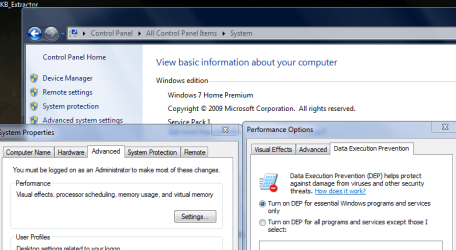
Would also like you to check your DEP setting. see screenshot

Roy
 

Attachments

  • depset.PNG
    depset.PNG
    35.4 KB · Views: 0

My Computer My Computer

Computer type
PC/Desktop
Computer Manufacturer/Model Number
medionl/Aspire 6930G/acer x55a
OS
W7 home premium 32bit/W7HP 64bit/w10 tp insider ring
CPU
E5300 dual core
Motherboard
medion MS7366
Memory
3gb
Graphics Card(s)
Nvidia Geforce 7100 Nforce 630i
Monitor(s) Displays
avixc
Internet Speed
n (isp resticted to 72)
Antivirus
mse/pands
Browser
palemoon
Other Info
Belkin Fd7050 n USB using Railink RT2870 drivers, more upto date
Hi Roy, I purchased a Windows Repair program a few months ago to see if it would help restore missing icons in MS Office after many attempts on my own, however it didn't. The program is called PC Scan & Repair by Reimage and I decided to run it for this problem. It took over 3 hours, but it did the trick! Thank you for your continuing effort to help me. :)

Ivan
 

My Computer My Computer

Computer type
Laptop
Computer Manufacturer/Model Number
Gateway
OS
Windows 7 Home Premium 64-bit
Antivirus
Bitdefender
Browser
IE 11 and Firefox
Back
Top