
Hi guys. Not sure what to do here. I'll start from the start. PC has been occasionally just randomly crashing and restarting (not for a long time, maybe a couple of weeks? every few days). Last night, Windows failed to start, prompted a chkdsk so I let it run, it did some stuff (can't remember what) then recovered some orphaned files, restarted fine.
I did get a couple of errors that are there upon each start-up (something relating to LCore.exe and cx_freeze), figured I'd come back to those later.
I tried to open the Battle.net client and got an error, googled around, tried to install the update with the .dll in question, it's already installed. So... I uninstall the update, then go to reinstall it... and it fails. Alright, no worries, I'll just go to Windows Update... and it fails. It doesn't even try. It just fails.
I've tried a number of things, including sfc /scannow, aggressive Fixit, clearing the \SoftwareDistribution\DataStore and \SoftwareDistribution\Download folders, Windows Update diagnostic tool? I think it was called? Can't remember anything else off the top of my head.
View attachment 396425
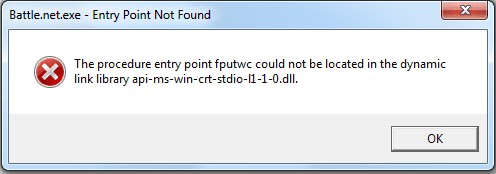
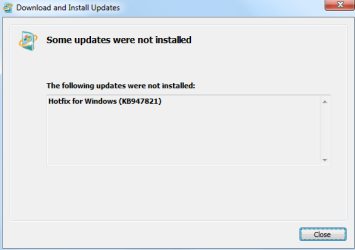
SURT also gave me an error as it tries to apply an update, which I can't do. Here is the Battle.net error and SURT error.
Hope the post came out okay.
I did get a couple of errors that are there upon each start-up (something relating to LCore.exe and cx_freeze), figured I'd come back to those later.
I tried to open the Battle.net client and got an error, googled around, tried to install the update with the .dll in question, it's already installed. So... I uninstall the update, then go to reinstall it... and it fails. Alright, no worries, I'll just go to Windows Update... and it fails. It doesn't even try. It just fails.
I've tried a number of things, including sfc /scannow, aggressive Fixit, clearing the \SoftwareDistribution\DataStore and \SoftwareDistribution\Download folders, Windows Update diagnostic tool? I think it was called? Can't remember anything else off the top of my head.
View attachment 396425
SURT also gave me an error as it tries to apply an update, which I can't do. Here is the Battle.net error and SURT error.
Hope the post came out okay.
My Computer
At a glance
Windows 7
- Computer type
- PC/Desktop
- OS
- Windows 7


